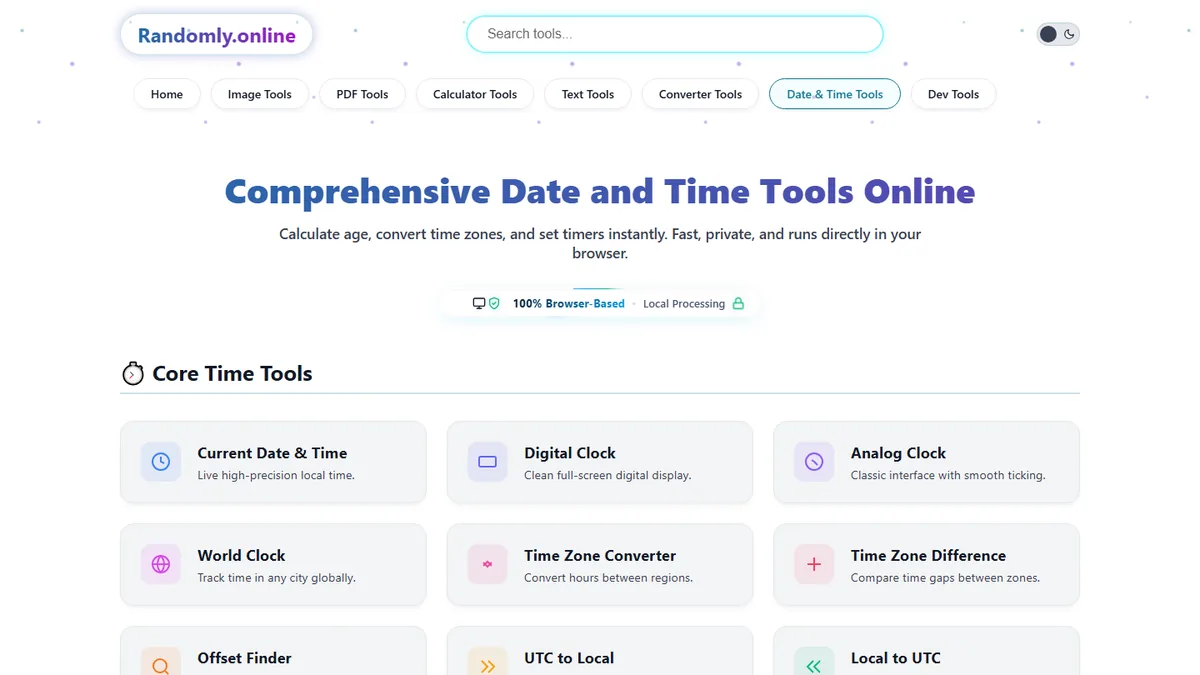
Comprehensive Date and Time Tools Online
Calculate age, convert time zones, and set timers instantly. Fast, private, and runs directly in your browser.
Core Time Tools
Current Date & Time
Check the current local date and time in your browser with live seconds, timezone context, and a simple display for quick reference.
Digital Clock
Open a full-screen digital clock for desks, classrooms, meetings, livestreams, projectors, and focus sessions with readable time at a glance.
Analog Clock
Use an online analog clock with a classic face, seconds hand, fullscreen mode, and ambient display options for teaching or room screens.
World Clock
View world clock online cards for multiple cities and compare local times across countries, teams, travel plans, and international schedules.
Time Zone Converter
Convert meeting times between time zones instantly using browser-based calculations designed for remote teams, calls, travel, and global planning.
Time Zone Difference
Find the time difference between two places, compare UTC offsets, and understand how many hours separate offices or cities.
Offset Finder
Look up UTC offsets for cities and time zones so you can verify scheduling, logs, calendars, and region-specific time settings.
UTC to Local
Convert UTC time to your local time for logs, deadlines, deployments, event listings, and international communication without manual math.
Local to UTC
Convert a local date and time into UTC for APIs, databases, schedules, server logs, and timezone-safe project records.
Meeting Time Planner
Find a meeting hour that works across several time zones, with each participant’s local time side by side.
DST Checker
Check whether a place is on daylight saving time right now, and when its next clock change falls.
Daylight Saving Calculator
Work out clock changes for any year and see how a DST shift moves a time you care about.
Sunrise & Sunset Time
Sunrise, sunset, golden hour and day length for any place and date, calculated in the browser.
Flight Time Calculator
Enter departure and arrival times per leg to get layover duration, total journey time and arrival in local time.
Date Calculators
Date Difference
Calculate days between dates, including date ranges for projects, events, deadlines, subscriptions, travel plans, and personal milestones.
Age Calculator
Use a how old am I calculator to find exact age in years, months, weeks, days, hours, and minutes from any birth date.
Birthday Calculator
Check birthday facts, upcoming birthday timing, day-of-week details, and useful date information from your birth date.
Anniversary Calculator
Find the exact years, months and days since a wedding, a first date or any milestone, with totals and the 1, 5 and 10 year dates.
Pregnancy Due Date
Estimate a due date from a last period, conception, an IVF transfer or a scan, with gestational age, trimester and milestone dates.
Next Birthday
Count down to the next birthday with days remaining, timing details, and a simple browser-based display for planning celebrations.
Day of Week
Find what day of the week any date falls on for history checks, birthdays, anniversaries, schedules, and calendar planning.
Leap Year Checker
Check whether a year is a leap year and confirm February date logic for calendars, forms, schedules, and date calculations.
Period Calculator
Track cycle dates, predict the next period and see fertile-window estimates from your own recent cycles.
Relationship Duration
Count the exact years, months and days since a first date, with the milestone dates still ahead.
Week Number Calculator
Find the ISO week number for any date, and the dates a given week number covers.
Timers & Counters
Countdown Timer
Run a countdown timer online for tasks, workouts, classes, events, presentations, and productivity sessions directly in your browser.
Online Stopwatch
Use an online stopwatch to track elapsed time, laps, split timing, experiments, workouts, study sessions, and timed activities.
Online Timer
Set a simple online timer for reminders, cooking, study blocks, classroom activities, meetings, and short timed workflows.
Pomodoro Timer
Manage focused work and break intervals with a Pomodoro timer built for study sessions, writing, coding, and deep work routines.
New Year Countdown
Count down to midnight on 1 January in any time zone, with a year-elapsed bar and five cities crossing New Year across 25 hours.
Holiday Countdown
Count down to Christmas, Easter, Thanksgiving, a bank holiday or a date of your own, in days, hours and minutes, in any time zone.
Exam Countdown
Track the days, hours and minutes to every paper you are sitting, with revision pace per topic and up to eight exams at once.
Alarm Clock
Create browser-based alarm reminders for meetings, breaks, tasks, study periods, and time-sensitive work without installing an app.
Event Countdown Timer
Count down to any event you name, with days, hours, minutes and seconds on a full-screen display.
Reverse Countdown Timer
Count up from a moment that has already passed, for streaks, sober dates and anniversaries.
Deadline Calculator
Set a due date and see exactly how long is left, in working days as well as calendar days.
Date Arithmetic
Time Duration
Calculate time duration between start and end times for shifts, projects, study sessions, event schedules, and elapsed-time tracking.
Add Days
Add days to a date to calculate due dates, delivery windows, project milestones, follow-up reminders, and future calendar targets.
Subtract Days
Subtract days from a date to find past deadlines, historical dates, previous billing periods, lookback windows, and earlier milestones.
Add Months
Add months to a date for subscription renewals, quarterly planning, contract dates, billing cycles, and longer schedule calculations.
Add Years
Add years to a date for anniversaries, warranties, long-term planning, eligibility dates, contract terms, and future milestones.
Business & Work
Working Days
Calculate working days between dates by excluding weekends, useful for operations, staffing, project timelines, and delivery estimates.
Business Days
Use a business day counter to calculate deadlines, service windows, project schedules, and workday ranges without spreadsheet formulas.
Work Hours
Calculate work hours across shifts, breaks, start times, and end times for timesheets, payroll checks, and schedule planning.
Overtime Calc
Estimate overtime hours from work schedules and compare regular hours with extra time for simple payroll and shift planning.
Time Card
Build weekly time card totals from clock-in and clock-out entries for work logs, payroll prep, and shift records.
Pay Period Calculator
Map out pay periods for weekly, fortnightly, semi-monthly or monthly cycles across a year.
Salary Days Calculator
Count paid days in a month or period, allowing for weekends, holidays and unpaid leave.
Shift Schedule Calculator
Build a rotating shift pattern and see who is on which day across the weeks ahead.
Time Slot Generator
Split a working window into even appointment slots, with the breaks and slot length you choose.
Fiscal Year Calculator
Find which fiscal year and quarter a date falls in, for any financial year start month.
Developer Time Tools
Unix Timestamp
Convert Unix epoch timestamps into human-readable dates, or generate timestamps from standard date formats for logs, APIs, and databases.
Timestamp to Date
Convert timestamp to date values in a readable format so developers can inspect epoch data, logs, exports, and backend records.
Date to Timestamp
Convert a date to timestamp output for application data, scheduled jobs, database fields, APIs, and Unix epoch workflows.
Format Converter
Convert date formats across ISO, RFC, SQL-style strings, and common readable formats for development, reporting, and data cleanup.
Custom Formatter
Create custom date formatter output for dashboards, spreadsheets, reports, databases, documentation, and locale-specific display needs.
Epoch Time Converter
Convert Unix epoch seconds or milliseconds to a readable date, and back again.
ISO Week Date Converter
Convert between calendar dates and ISO 8601 week dates, including week-numbering years.
Military Time Converter
Convert between military time and the 12-hour clock, with the zone letter spelled out.
12-Hour to 24-Hour
Turn AM and PM times into 24-hour clock values, one at a time or a whole list at once.
24-Hour to 12-Hour
Turn 24-hour clock values into AM and PM times, one at a time or a whole list at once.
Date Validator
Check whether a date string is real, in any common format, and see why an invalid one fails.
Time Validator
Check a time string against the 24-hour clock, with your own earliest and latest bounds.
Julian Date Converter
Convert between calendar dates and Julian day numbers or ordinal day-of-year values.
Calendar Tools
Calendar Generator
Generate calendar layouts for planning months, years, events, school schedules, team deadlines, and printable reference pages.
Monthly Generator
Create a monthly calendar view for one month at a time, useful for schedules, content plans, events, and printable planning.
Yearly Generator
Generate a yearly calendar overview for annual planning, holidays, project phases, school years, and long-range schedules.
Printable Calendar
Generate a clean month or year calendar sized for A4 or Letter and print it straight from the page.
Public Holidays Finder
Look up public holidays for a country and year, computed from the rules rather than a typed-in table.
Misc Useful Tools
Random Date
Generate random dates for testing forms, sample datasets, mock schedules, QA workflows, randomized examples, and development projects.
Moon Phase
Check moon phase information for dates, lunar calendars, astronomy references, planning, and curiosity about the current lunar cycle.
Date to Roman Numerals
Write a date in Roman numerals for a tattoo, ring or inscription, in the format you choose.
Random Time Generator
Draw random times from a range you set, for rotas, testing and drawing lots.
Time Randomizer
Shuffle a list of times or slots into a random order, with results you can copy out.
Privacy Focused
Local Processing. Your data never leaves your device.
Instant Results
Fully Client-Side. Runs instantly in your browser.
No Signup
No accounts. No hassle. Just open and use.
Browser Based
Works right in your browser. No installs, no downloads.
All-in-One Utility
Everything you need in one centralized, intuitive platform.
Developer Ready
Advanced formatting, epoch conversions, and API logic.
Boost Productivity
Streamline your workflow with zero delays and instant outputs.
Always Free
No hidden paywalls, subscriptions, or intrusive pop-ups.
Master Your Time Management
Date and time tools are browser utilities for checking current time, comparing time zones, calculating dates, converting Unix timestamps, generating calendars, and running timers. This hub groups those workflows into one free, private, no-signup directory.
Date and time calculations are part of everyday work. Whether you need to check the current time in another country, calculate your exact age, convert Unix timestamps, count business days, or plan a project deadline, these browser-based tools provide fast and accurate results without requiring an account.
Use the Age Calculator for "how old am I" searches, the Date Difference Calculator to calculate days between dates, the Unix Timestamp Converter as a Unix epoch converter, and the Business Days Calculator as a business day counter for deadlines. Every calculation runs locally in your browser, so birth dates, schedules, and work details stay on your device.
Technical reference points: browser date/time formatting is documented by MDN Web Docs; civil time zone rules are maintained by the Internet Assigned Numbers Authority through the IANA Time Zone Database; and timeanddate.com tracks current worldwide UTC offset usage.
Complete Date & Time Tool List
This hub is organized around the exact jobs people search for: world clock online checks, calculate days between dates, convert timestamp to date, add days to date, subtract days from date, countdown timer online, online stopwatch, and business day counter workflows.
Clock Tools
Date Calculators
Time Calculators
Popular Date & Time Tools by Use Case
Popular Date & Time Tools
- Age Calculator for exact age and "how old am I" calculations.
- Date Difference Calculator to calculate days between dates.
- World Clock for current time in another country.
- Time Zone Converter for meeting planning.
- Business Days Calculator for deadlines.
- Unix Timestamp Converter for epoch values.
Tools for Developers
- Unix Timestamp Converter for Unix epoch converter tasks.
- ISO Date Formatter for standard date strings.
- Date to Timestamp for generated epoch values.
- Timestamp to Date for readable log checks.
Tools for Business & Scheduling
- Working Days Calculator for team schedules.
- Business Days Calculator for service windows.
- Meeting Time Planner for remote teams.
- Time Zone Converter for international calls.
Why Use Online Date & Time Tools Instead of Spreadsheets?
Spreadsheets are useful for stored records, but quick time calculations often need formulas, date parsing, timezone assumptions, and extra checking. A browser tool is faster when you only need the result.
| Task | Browser Tool | Spreadsheet |
|---|---|---|
| Time Zone Conversion | Instant conversion with timezone context. | Manual formulas and timezone lookup. |
| Unix Timestamp Conversion | One-click Unix epoch converter and readable date output. | Custom functions or manual formula setup. |
| Age Calculation | Instant exact age from any birth date. | Complex formulas for years, months, and days. |
| Business Day Calculation | Automatic workday counting for deadlines. | Error-prone weekend and holiday logic. |
Date & Time Questions People Search For
Most date and time searches are task-based. People want one clear answer: how many days are between two dates, how old someone is, what time it is in another country, how to convert a Unix timestamp, or which workday a deadline lands on.
How many days are between two dates?
Use the Date Difference Calculator to calculate days between dates for deadlines, birthdays, travel plans, school projects, and event countdowns.
How old am I?
Use the Age Calculator to calculate exact age from a birth date in years, months, and days without building spreadsheet formulas.
What time is it in another country?
Use the World Clock for live city clocks, then use the Time Zone Converter when planning a specific meeting time.
How do I convert a Unix timestamp?
Use the Unix Timestamp Converter to convert Unix epoch values into readable dates or generate timestamps for APIs, logs, and databases.
How many business days are left?
Use the Business Days Calculator or Working Days Calculator for work deadlines that should exclude weekends.
What date is 30 days from today?
Use Add Days to Date or Subtract Days from Date to move forward or backward from any date.
How to Use the Date & Time Toolkit
Navigating and Utilizing Tools
Using the Randomly.online toolkit is designed to be frictionless. Start by locating the specific utility you need from the categorized grid above, or use the fuzzy search bar at the top of the page if you know exactly what you are looking for. Once you open a tool, such as the Business Days Calculator, you will immediately see intuitive input fields for your start and end parameters.
Enter your relevant dates or times. Because the logic runs locally via JavaScript, results typically generate instantly as you type or adjust dropdowns, removing the need for page reloads. For advanced users coordinating global events, tools like the Time Zone Converter allow you to stack multiple regions side-by-side to visually identify overlapping business hours. Always ensure your device's internal system clock is accurate, as tools relying on "current time" pull data directly from your local hardware.
Frequently Asked Questions
Are these date and time tools completely free to use?
Yes. Every tool in our date and time suite is 100% free without hidden fees. You don't need to sign up, subscribe, or create an account to access advanced features like the age calculator or time zone converters.
Is my timezone data and birthdate stored on your servers?
No. All calculations are performed entirely locally within your browser using JavaScript. We do not track, upload, or store your inputs, ensuring total privacy for sensitive scheduling or personal birthdate data.
How do you handle daylight saving time (DST)?
Our time zone converters utilize the standard IANA Time Zone Database, which is the same robust system used by modern operating systems. This automatically accounts for complex daylight saving shifts globally based on the exact date selected.
Can I format dates into custom developer formats?
Yes. We offer specialized developer utilities like the Custom Date Formatter and Unix Timestamp Converter. These tools allow you to easily switch between ISO 8601, RFC standards, and specific database string formats instantly.
Do these tools work accurately on mobile devices?
Absolutely. The entire toolkit is built with a responsive, mobile-first approach. Whether you are using the online stopwatch on a smartphone or the business days calculator on a tablet, the interface adapts perfectly without losing functionality.
Which tool should I use for international meetings?
Use the World Clock to monitor several cities, the Time Zone Converter to convert one exact meeting time, and the Business Days Calculator when follow-up deadlines need to exclude weekends.
What developer date tools are included?
Developer tools include Unix Timestamp Converter, Timestamp to Date Converter, Date to Timestamp, Date Format Converter, and Custom Date Formatter for ISO, RFC, SQL, and app-ready date values.
What types of date calculators are available?
The hub includes date difference, age, birthday, day-of-week, leap-year, time duration, add-days, subtract-days, add-months, add-years, working-days, and business-days calculators.
Can I use these tools for classrooms, offices, or shared displays?
Yes. The analog clock, digital clock, current date and time, world clock, timers, stopwatch, and calendar tools are suitable for phones, tablets, laptops, projectors, and shared room displays.
Why choose browser-based date and time tools?
Browser-based tools are fast, private, and easy to reopen. They avoid account steps, reduce unnecessary uploads, and keep common time calculations available from any modern device.
Why use online date and time tools instead of spreadsheets?
Online date and time tools are faster for one-off calculations such as time zone conversion, Unix timestamp conversion, age calculation, date difference checks, and business day counting. Spreadsheets are better for stored datasets, but they usually need formulas and extra checking.
How can I calculate days between two dates online?
Use the Date Difference Calculator. Enter a start date and end date to get the total days between them for deadlines, birthdays, event planning, travel schedules, or project timelines.
Which tool answers how old am I?
Use the Age Calculator. It is designed for "how old am I" searches and calculates exact age from a birth date in years, months, and days.
How do I convert a Unix timestamp to a date?
Use the Unix Timestamp Converter or Timestamp to Date Converter. Paste a Unix epoch value to convert it into a readable date, or enter a date to generate a timestamp.
Can I count business days excluding weekends?
Yes. Use the Business Days Calculator or Working Days Calculator to count workdays between dates while excluding weekends.
Which tool should I use to add or subtract days from a date?
Use Add Days to Date when you need a future date and Subtract Days from Date when you need a past date.
How can I check the current time in another country?
Use the World Clock to view current local times across cities and countries, or use the Time Zone Converter for a specific meeting time.
Still have questions?
If you can't find the answer you're looking for, feel free to contact our support team.