100% Browser-BasedLocal Processing

Month Shift Studio

Move a date by calendar months

Pick a start date, choose add or subtract, then select how month-end dates should be handled.

Calculated Date

Result date--Choose a start date and month amount.

Timeline updates after calculation.

Weekday--
ISO date--
Day difference--
Adjustment--
Quarter--
PrivacyLocal browser
No month shift yet.

Privacy Focused

🔒 Local Processing. Your data never leaves your device.

Instant Results

🌐 Fully Client-Side. Runs instantly in your browser.

No Signup

⚡ No accounts. No hassle. Just open and use.

Browser Based

🚀 Works right in your browser. No installs, no downloads.

Add or Subtract Months Without Month-End Mistakes

Adding months to a date sounds simple until the start date is near the end of a month. A contract that starts on January 31, a subscription that renews monthly, or a follow-up appointment scheduled six months later can land on a month with fewer days. This calculator makes that rule visible instead of hiding the adjustment.

Direct answer: Use this add months to date calculator to move a date forward or backward by calendar months. Choose whether invalid target days should clamp to the last valid day, preserve end-of-month behavior, or roll forward.

Use it for billing cycles, warranty dates, rental terms, project milestones, medical follow-ups, school semesters, subscription renewals, and deadline planning. For day-based offsets use Add Days to Date; for a gap between two dates use the Date Difference Calculator.
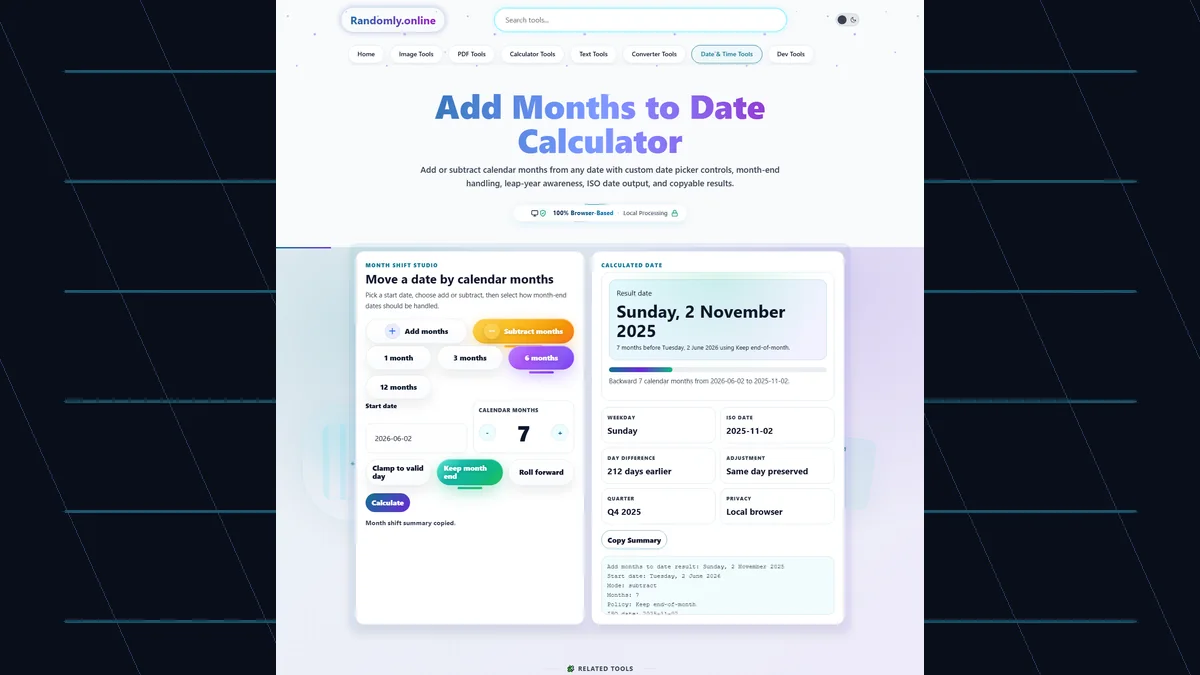
Add Months to Date Calculator with custom date picker, add and subtract mode chips, month amount stepper, month-end policy controls, resulting date, ISO date, day difference, and copy summary button
The Add Months to Date Calculator explains calendar-month shifts with custom controls, month-end policy choices, ISO date output, day difference, and copyable results.

Month Calculator Features Built for Real Calendar Rules

Custom date pickerSelect the start date from a branded calendar overlay instead of a native browser picker.
Add or subtract monthsUse mode chips to move forward or backward by calendar months.
Month-end policiesChoose clamp, keep end-of-month, or roll-forward behavior for dates like January 31.
Preset month amountsJump quickly to 1, 3, 6, or 12 months for common planning periods.
Readable result factsSee weekday, ISO date, day difference, quarter, and adjustment explanation.
Copyable summaryCopy the month-shift result for contracts, tickets, calendars, invoices, and notes.

Add Months Keywords Covered by Practical Examples

These content blocks cover common searches while explaining the exact page-specific behavior users care about.

add months to dateMove any start date forward by a selected number of calendar months.
subtract months from dateSwitch to subtract mode to find the date a month term began or a reminder should start.
add 6 months to dateUse the 6 months preset for warranties, follow-ups, school terms, renewals, and half-year planning.
add 3 months to dateUse the 3 months preset for quarterly reports, trials, subscriptions, and review cycles.
month-end date calculatorChoose a month-end policy to control January 31, March 31, August 31, and leap-year edge cases.
date calculator add monthsThe result includes a full date, ISO date, weekday, day difference, and adjustment explanation.

Why Use a Month Calculator Instead of Counting on a Calendar?

Manual month arithmetic is error-prone because calendar months do not all have the same number of days.

TaskRandomly.onlineManual method
Add monthsShifts by calendar months and explains the final date.Manual counting can confuse month length and day count.
Month-end datesShows whether the day was clamped, preserved, or rolled.January 31 style cases are easy to misread.
Subtract monthsUses the same visible rules in reverse.Counting backward across short months is slow.
Copy resultCopies a readable summary for work notes.Manual results need rewriting and checking.

How to Use Add Months to Date Calculator

Choose a start date, amount, direction, and month-end rule.

Pick the start date

Use the custom calendar or type a date in YYYY-MM-DD format.

Choose add or subtract

Use the mode chips to move the date forward or backward by calendar months.

Set the month amount

Use presets or the plus/minus month stepper for any whole number of months.

Choose a month-end policy

Clamp to the last valid day, preserve end-of-month behavior, or roll forward when the target month is shorter.

Copy the result

Review the result date, ISO date, day difference, adjustment explanation, and copy the summary.

Frequently Asked Questions

How do I add months to a date?

Choose a start date, keep Add months selected, enter the number of calendar months, and read the calculated result date.

How do I subtract months from a date?

Switch to Subtract months, enter the number of months, and the calculator moves the selected date backward by that many calendar months.

What happens when I add one month to January 31?

With Clamp to valid day, January 31 becomes the last valid day of February. In a leap year that can be February 29; otherwise it is February 28.

What does Keep month end mean?

If the start date is the last day of its month, Keep month end makes the result the last day of the target month too.

What does Roll forward mean?

Roll forward allows an invalid target day to overflow into the following month. This is useful when you want strict day-number rollover behavior.

Can I add 3 months or 6 months quickly?

Yes. Use the 3 months or 6 months preset, then adjust the value with the month stepper if needed.

Does this handle leap years?

Yes. The result accounts for leap years, including February 29 when the target year supports it.

Is adding one month the same as adding 30 days?

No. Calendar months vary from 28 to 31 days. Use Add Days to Date when you want a fixed number of days instead.

Can I use this for billing or subscription renewal dates?

Yes. The month-end policy controls are useful for subscriptions, billing cycles, contracts, rentals, and warranty terms.

Is my date stored online?

No. The selected date, month amount, month-end policy, and copied summary are calculated locally in your browser.

Does this show the weekday of the result?

Yes. The result cards show the weekday, ISO date, day difference, quarter, and adjustment status.

Can I copy the calculated month result?

Yes. Use Copy Summary to copy the start date, month amount, policy, result date, ISO date, and adjustment explanation.

Still have questions?

If you cannot find the answer you are looking for, contact our support team.

Contact Us