Unix Timestamp Converter
Convert epoch seconds, 13 digit milliseconds, ISO dates, UTC strings, local time, and batch server logs.
Unix timestamp conversion tool
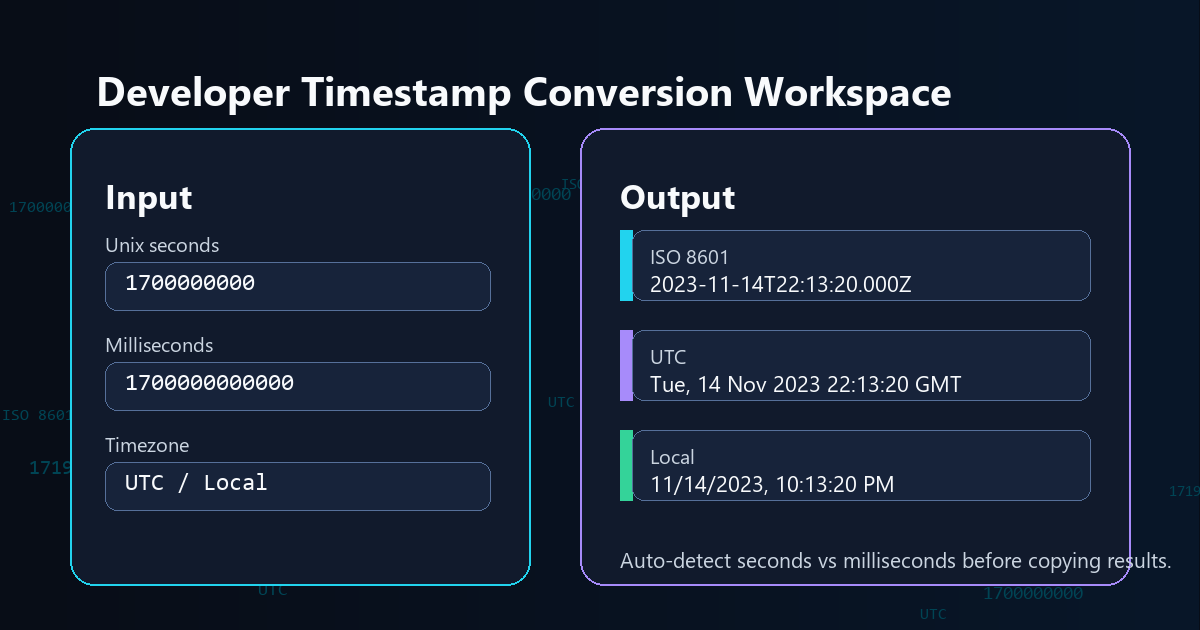
Paste Epoch Time
Use auto-detect for common 10 digit Unix seconds and 13 digit JavaScript milliseconds.
Choose a Calendar Moment
Convert a local or UTC date into Unix seconds and milliseconds for APIs, logs, and databases.
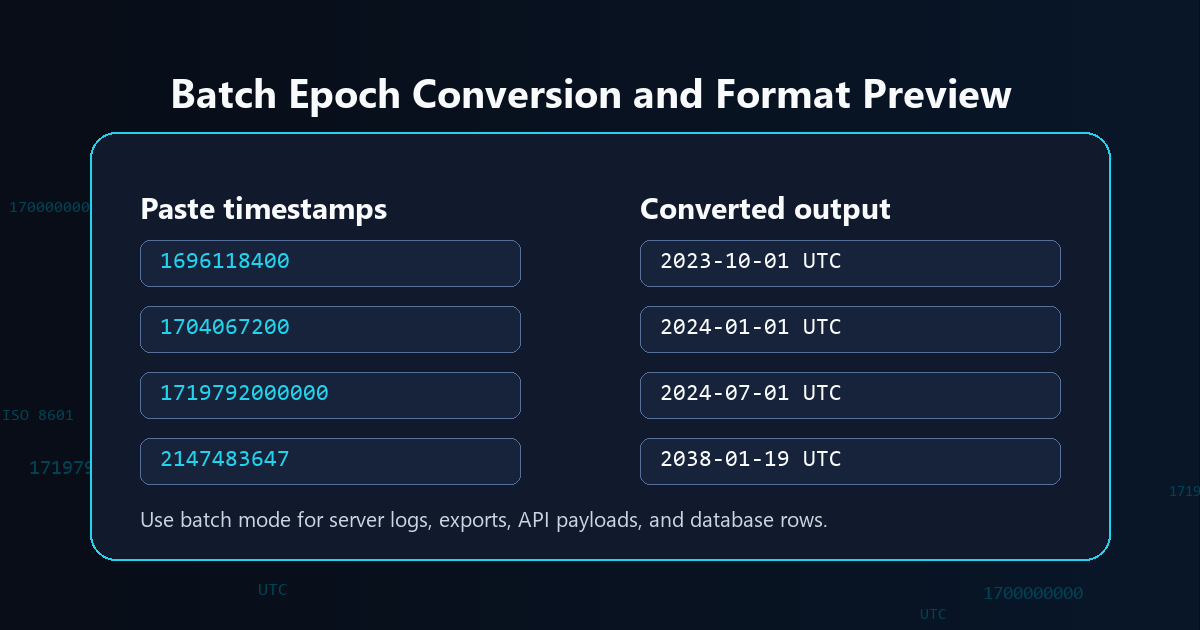
Batch Timestamp Conversion
Paste one timestamp per line. Auto-detect supports seconds and milliseconds for mixed server log exports.
Converted Output
Detected unit: seconds. Copy the format you need for a log, API payload, SQL row, or debugging note.
🧩 RELATED TOOLS
Privacy Focused
🔒 Local Processing. Your data never leaves your device.
Instant Results
🌐 Fully Client-Side. Runs instantly in your browser.
No Signup
⚡ No accounts. No hassle. Just open and use.
Browser Based
🚀 Works right in your browser. No installs, no downloads.
Convert Epoch Time Without Guesswork
A Unix timestamp converter turns a numeric epoch value into a readable date, or turns a calendar date back into Unix seconds or milliseconds. This tool keeps the common developer outputs in one compact panel: ISO 8601, UTC, local time, RFC 2822, SQL UTC, seconds, and milliseconds.
Developers often search for an epoch converter while debugging API payloads, database rows, server logs, analytics exports, webhooks, and JavaScript timestamps. The main mistake is unit confusion: classic Unix time is usually seconds, while JavaScript `Date.now()` returns milliseconds. The converter detects that difference and shows both outputs together so you can copy the correct value quickly.
For reference, MDN Web Docs explains Date.now() as milliseconds since the epoch, while POSIX-style Unix time is commonly discussed as seconds since 1970-01-01 00:00:00 UTC. The page uses your browser's date engine for local display, then keeps UTC and ISO values visible to reduce timezone mistakes.
Where Timestamp Conversion Helps
| Task | Use This Converter For | Common Mistake It Prevents |
|---|---|---|
| API debugging | Convert JSON timestamp fields into ISO 8601 UTC and local date output. | Reading a 13 digit millisecond timestamp as seconds. |
| Database checks | Copy SQL UTC datetime, Unix seconds, or Unix milliseconds from one result panel. | Mixing local wall time with UTC storage time. |
| Server logs | Paste many epoch values into batch mode and scan converted UTC dates. | Converting each timestamp one by one in a spreadsheet. |
| JavaScript work | Compare `Date.now()` style milliseconds with classic Unix seconds. | Forgetting to multiply or divide by 1000. |
How to Use the Unix Timestamp Converter
Convert timestamp to date
Paste a timestamp such as `1700000000` or `1700000000000`. Leave the unit on auto-detect unless you already know whether the value is seconds or milliseconds. The output panel will show ISO 8601, UTC, local date, RFC 2822, SQL UTC, seconds, and milliseconds.
Convert date to Unix time
Choose Date to Timestamp, enter a calendar date, and decide whether to interpret that picker value as local time or UTC. Use local time when you are starting from your computer's clock. Use UTC when your source date already has a UTC meaning.
Batch convert log timestamps
Choose Batch Convert and paste one value per line. The converter labels invalid rows, keeps the original value visible, and returns the readable UTC output, making it useful for quick server log reviews and exported data cleanup.
Unix Timestamp Converter FAQs
What is a Unix timestamp?
A Unix timestamp is a numeric time value counted from 1970-01-01 00:00:00 UTC. Most classic Unix timestamps are seconds, while JavaScript and many APIs often use milliseconds.
What is the Unix epoch?
The Unix epoch is the zero point used by Unix time: January 1, 1970 at 00:00:00 UTC. A timestamp is the elapsed time after that point.
Is Unix timestamp in seconds or milliseconds?
Traditional Unix time uses seconds. JavaScript `Date.now()` and many JSON APIs use milliseconds, which usually creates a 13 digit timestamp. The tool shows both seconds and milliseconds so you can copy the right unit.
Why is my timestamp 13 digits long?
A 13 digit timestamp is usually milliseconds since the Unix epoch. Divide it by 1000 to get Unix seconds, or choose milliseconds mode when converting it into a readable date.
Is Unix timestamp UTC or local time?
A Unix timestamp represents one UTC-based instant. Local time only changes how that instant is displayed for a specific timezone, so the same timestamp can show different clock times in different places.
How do I convert epoch time to ISO 8601?
Paste the epoch value, choose seconds or milliseconds if needed, and copy the ISO 8601 UTC output. The `Z` at the end means the value is expressed in UTC.
Can I convert many timestamps at once?
Yes. Batch mode accepts one timestamp per line and returns readable UTC output for each valid row. This is useful for server logs, exports, API payloads, and database rows.
What is the Year 2038 problem?
The Year 2038 problem affects older systems that store Unix seconds in signed 32-bit integers. The maximum classic 32-bit signed Unix seconds value is 2147483647, which maps to 2038-01-19 03:14:07 UTC. Modern 64-bit systems and JavaScript dates are generally not limited in the same way.
Is my timestamp data uploaded?
No. This converter runs in your browser after the page loads, so pasted timestamps and generated dates are not sent to a server by the tool.
Still have questions?
If you cannot find the answer you are looking for, contact the Randomly.online support team.