100% Browser-BasedLocal Processing

Global Time Bridge

Convert a city time without mental math

Search by city, small town, IANA zone, or UTC. Results use browser timezone rules and the shared city map.

Converted Result

Target timeReadySelect a city or timezone to convert.
Source offset--
Target offset--
Date shift--
DST note--

Business-hour overlap preview

Overlap appears after conversion.

No conversion yet.

Privacy Focused

🔒 Local Processing. Your data never leaves your device.

Instant Results

🌐 Fully Client-Side. Runs instantly in your browser.

No Signup

⚡ No accounts. No hassle. Just open and use.

Browser Based

🚀 Works right in your browser. No installs, no downloads.

Convert Time Zones by City, UTC Offset, or IANA Zone

Coordinating across countries is easiest when the original city, the destination city, and the converted result stay on the same screen. This converter is built for remote meetings, webinars, calls, releases, travel planning, server logs, and quick questions like EST to IST, PST to EST, UTC to local time, or London to Tokyo.

Direct answer: A time zone converter changes a source date and time into the equivalent local time in another city or IANA timezone. This tool searches mapped cities, handles date changes, shows UTC offsets, notes daylight saving behavior, and previews business-hour overlap.

Use this page when you know a meeting time in one place and need the exact local time somewhere else. If you only need the current time in many places, use the World Clock. If you need the offset only, use the Time Zone Offset Finder.
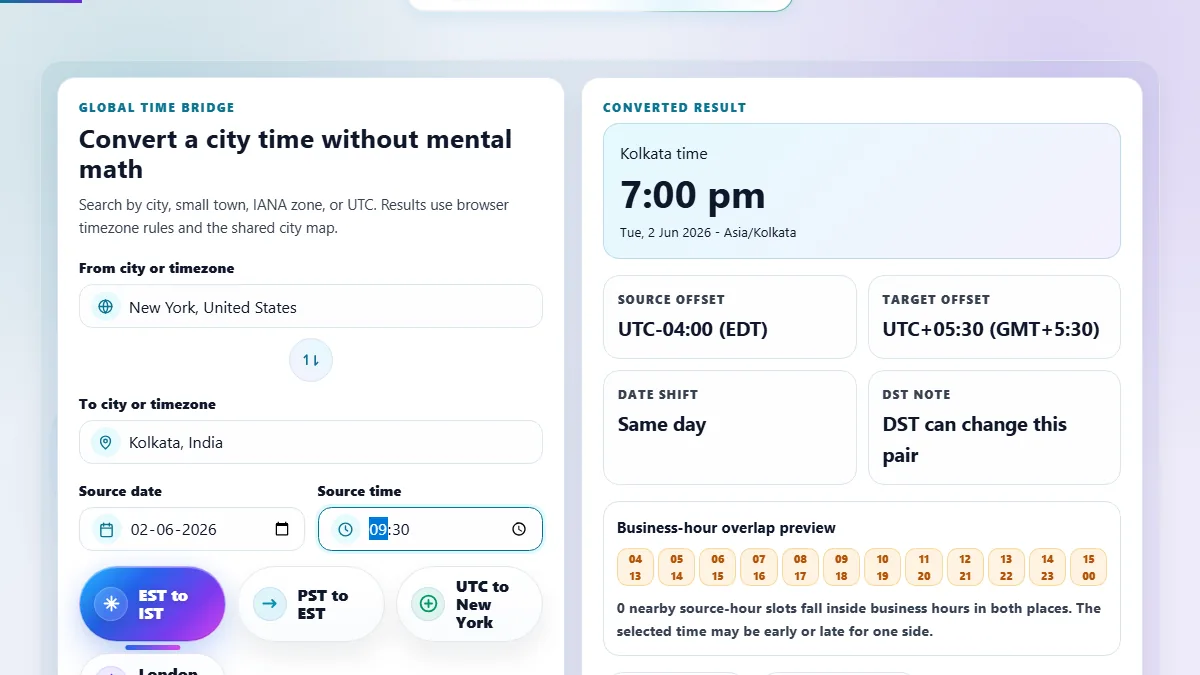
Time zone converter with searchable source and target city dropdowns, custom date and time controls, converted result, UTC offsets, and business-hour overlap timeline
The time zone converter keeps city search, date and time selection, converted output, offsets, and meeting overlap visible in one compact workspace.

Time Conversion Features Built for Real Scheduling

Search small citiesThe city search can map smaller city names to their IANA timezone using shared static data shards.
DST-aware datesConversions are based on the selected date, so daylight saving changes can affect the final offset.
Meeting overlap previewSee whether a converted time falls inside normal business hours for both locations.
Copyable summaryCopy the source time, converted time, offsets, and date shift for meeting notes or messages.

Time Zone Converter Searches Covered on This Page

These visible examples target common searches without hiding all keyword coverage in meta tags.

Time zone converterConvert a selected date and time from one city or timezone into another with the result shown immediately beside the controls.
City time converterSearch by city name instead of memorizing IANA identifiers such as America/New_York, Europe/London, or Asia/Kolkata.
EST to IST converterUse the EST to IST preset for New York or Eastern Time to India/Kolkata conversions, including daylight saving date changes.
PST to EST converterConvert West Coast times to Eastern Time for US meetings, webinars, releases, support shifts, and travel planning.
UTC to local time converterChoose UTC as the source and a city as the target to convert logs, API timestamps, release times, or server maintenance windows.
Meeting time plannerUse the overlap preview to see if a converted time is comfortable during normal business hours in both places.
Daylight saving time converterSelect the actual meeting date to account for seasonal offset changes in regions that observe daylight saving time.
International time converterConvert times across countries for global teams, freelancers, students, creators, travelers, and remote interviews.

Why Use a Time Zone Converter Instead of Manual Math?

Manual offset math breaks down around daylight saving time, half-hour offsets, and date changes. A converter keeps the selected date and timezone rules together.

TaskRandomly.onlineManual method
EST to IST or PST to ESTUses the selected date and timezone rules.Manual math can miss DST changes.
City-based searchSearch by city and map to the right IANA timezone.Requires knowing the timezone identifier.
Date shift detectionShows same day, next day, or previous day.Easy to miss when crossing midnight.
Meeting planningShows business-hour overlap hints.Requires checking both local schedules separately.

How to Use Time Zone Converter

Pick the source city, date, and time, then choose the destination city or timezone.

Search the source city or timezone

Type a city, country, UTC, GMT, or IANA timezone. The dropdown uses a small common list first and lazy-loads matching city shards as you type.

Choose the target city or timezone

Search the destination city the same way. Small cities map to their timezone, so you can find places even when the exact IANA name is different.

Set the date and time

Use the custom date and time controls to enter the source local time. The selected date matters because daylight saving rules can change offsets.

Read and copy the result

The result shows the converted local time, UTC offsets, date shift, DST note, business-hour overlap, and a copyable summary.

Frequently Asked Questions

How do I convert time zones online?

Choose the source city or timezone, enter the source date and time, then choose the target city or timezone. The converter returns the equivalent local time, UTC offsets, date shift, and a copyable summary.

Can I convert EST to IST?

Yes. Use the EST to IST preset or search New York and Kolkata/India manually. The selected date is important because Eastern Time can switch between EST and EDT while India stays UTC+05:30.

Can I convert PST to EST?

Yes. Use the PST to EST preset or select Los Angeles and New York. The result updates the target date when the conversion crosses midnight and shows the source and target UTC offsets.

Does daylight saving time affect the result?

Yes. Daylight saving time can change a region by one hour on specific dates. This page uses the selected date and browser timezone rules, so the same city pair can have different offsets in summer and winter.

Can I search by small city name?

Yes. The converter uses the shared city timezone dataset and lazy-loaded search shards. A small city maps to the correct IANA timezone even when the official timezone label uses a larger nearby city.

What is an IANA timezone?

An IANA timezone is a standard identifier such as America/New_York or Asia/Kolkata. It is more precise than an abbreviation because it includes regional daylight saving rules and historical offset changes.

Why did the converted date become tomorrow or yesterday?

That happens when the target timezone is far enough ahead or behind the source timezone to cross midnight. The date shift card tells you whether the converted time is the same day, next day, or previous day.

Can I convert UTC to local time?

Yes. Choose UTC as the source and search your target city. This is useful for server logs, API timestamps, release schedules, database records, and maintenance windows.

Is this a meeting time planner?

It works as a lightweight meeting time planner by showing the converted time and a business-hour overlap preview. For larger multi-city planning, pair it with World Clock or Time Slot Generator.

Are timezone searches private?

Yes. The tool runs in your browser. It fetches only small static city-search shards from this same website and does not upload your selected cities, date, time, or copied summary.

What is the difference between a time zone converter and a world clock?

A world clock shows the current time in many places. A time zone converter answers a specific question: what does this selected date and time become in another city or timezone?

Can this handle half-hour or 45-minute offsets?

Yes. IANA timezones include offsets such as India UTC+05:30, Nepal UTC+05:45, and other non-whole-hour regions. The converter uses timezone rules instead of assuming every offset is a full hour.

Still have questions?

If you cannot find the answer you are looking for, contact our support team.

Contact Us