100% Browser-BasedLocal Processing

Duration Matrix

Calculate elapsed time without spreadsheet formulas

Use custom date and time pickers, mode chips, duration steppers, and weekday work-window logic while the result stays beside the setup.

Duration Result

Primary answer--Choose dates and times to calculate duration.

Timeline updates after calculation.

Decimal hours--
Total minutes--
Total seconds--
Calendar days--
ISO duration--
Work window--
No time duration yet.

Privacy Focused

🔒 Local Processing. Your data never leaves your device.

Instant Results

🌐 Fully Client-Side. Runs instantly in your browser.

No Signup

⚡ No accounts. No hassle. Just open and use.

Browser Based

🚀 Works right in your browser. No installs, no downloads.

Calculate Time Duration Without Manual Clock Math

Time duration calculations are common in work logs, study sessions, payroll prep, meeting agendas, travel plans, production schedules, service windows, and event timing. This calculator gives a clear answer for elapsed time, hours and minutes, decimal hours, total minutes, total seconds, and ISO-style duration without requiring a spreadsheet.

Direct answer: A time duration calculator measures the elapsed time between a start date/time and an end date/time. It can also add or subtract a chosen duration from a start time and calculate weekday work-window hours.

Use this page for searches such as calculate hours between two times, hours and minutes calculator, elapsed time calculator, add time calculator, subtract time calculator, and decimal hours calculator. For lap timing, use the Stopwatch. For a countdown, use the Countdown Timer.
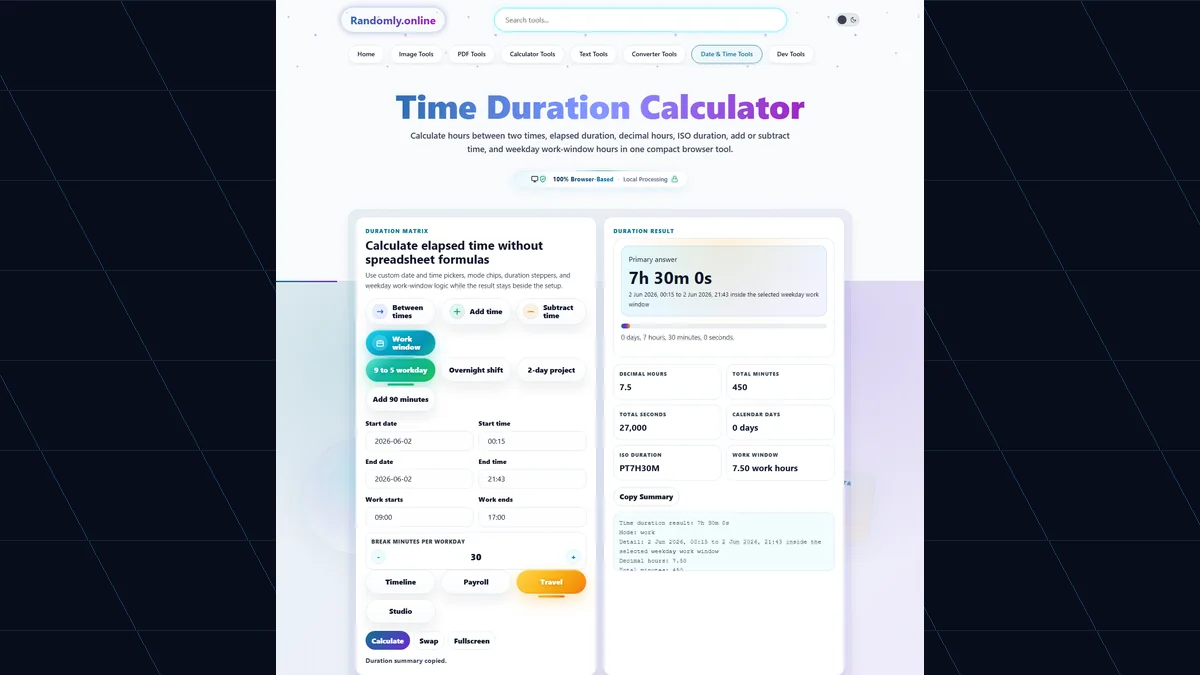
Time Duration Calculator with custom date and time pickers, mode chips, duration steppers, decimal hours, ISO duration, work-window hours, and copy summary button
The Time Duration Calculator keeps custom date and time pickers, add/subtract duration steppers, elapsed-time outputs, decimal hours, work-window hours, and copyable summaries together in one responsive workspace.

Time Duration Features for Work, Travel, Study, and Scheduling

Custom date and time pickersUse branded calendar and time overlays instead of default browser controls.
Between, add, subtract, and work modesSwitch workflows with custom mode chips while results remain beside the inputs.
Decimal hours outputConvert elapsed time into payroll-friendly decimal hours for invoices and timesheets.
Total minutes and secondsGet precise total minutes and seconds for scripts, workouts, tests, and process timing.
Weekday work windowCalculate duration inside selected work hours and optional break minutes.
Copyable summaryCopy a plain-language result for timesheets, notes, emails, project tickets, or reports.

Time Duration Searches Covered by Real Use Cases

These examples target common customer searches with visible, useful answers in the page body and FAQ.

time duration calculatorCalculate elapsed duration between two exact date and time values.
time difference calculatorCompare start and end times without doing clock math by hand.
calculate hours between two timesUse Between times mode to get total hours, decimal hours, minutes, and seconds.
hours and minutes calculatorRead the result as days, hours, minutes, seconds, decimal hours, and total minutes.
elapsed time calculatorMeasure how long a shift, meeting, event, test, trip, repair, or task lasted.
add time calculatorUse Add time mode to add days, hours, minutes, and seconds to a start time.
subtract time calculatorUse Subtract time mode to find the earlier time before a chosen duration.
decimal hours calculatorUse decimal hours for payroll, invoicing, timesheets, and work-hour summaries.

Why Use a Browser Time Duration Calculator Instead of a Spreadsheet?

Spreadsheet formulas can calculate time, but overnight spans, date boundaries, decimal hours, and work windows are easy to misconfigure.

TaskRandomly.onlineManual method
Hours between two timesShows elapsed time, decimal hours, minutes, and seconds together.Requires date-aware formulas and careful formatting.
Add or subtract timeMode chips and steppers handle the duration directly.Manual cell formulas are easy to reverse or misread.
Overnight durationDates and times are combined so crossing midnight works clearly.Often breaks if only times are subtracted.
Work-window hoursCounts weekday overlap and optional break minutes locally.Needs custom formulas or separate timesheet logic.

How to Use Time Duration Calculator

Choose the workflow, enter times with custom pickers, and copy the result.

Choose a mode

Use Between times for elapsed duration, Add time for a future target, Subtract time for a previous target, or Work window for weekday work-hour duration.

Pick start and end values

Use the custom date calendars and custom time lists. You can also type values in YYYY-MM-DD and HH:MM format.

Use duration steppers when adding or subtracting

Adjust days, hours, minutes, and seconds with branded plus and minus controls instead of native number spinners.

Set work-window rules when needed

Choose work start, work end, and break minutes to estimate weekday working duration.

Read and copy the result

Review elapsed time, decimal hours, total minutes, total seconds, ISO duration, and the copyable summary.

Frequently Asked Questions

How do I calculate hours between two times?

Choose Between times, enter the start date/time and end date/time, and the result shows elapsed duration, decimal hours, total minutes, and total seconds.

Can this calculate time across midnight?

Yes. Because the calculator uses both date and time, overnight spans such as 10:30 PM to 6:15 AM the next day calculate correctly.

Can I add hours and minutes to a start time?

Yes. Choose Add time, set the start date/time, then use the duration steppers for days, hours, minutes, and seconds.

Can I subtract hours and minutes from a time?

Yes. Choose Subtract time, enter the starting point, and the calculator returns the earlier target after subtracting the selected duration.

What are decimal hours?

Decimal hours convert time into a number. For example, 7 hours 30 minutes is 7.5 hours, which is useful for payroll, invoices, and timesheets.

Does this work as an elapsed time calculator?

Yes. It measures elapsed time between two exact date/time values and summarizes the result in several formats.

Can this calculate work hours inside a workday?

Yes. Work window mode counts overlap inside the selected weekday work start and end times, with optional break minutes per workday.

Does it exclude weekends in work-window mode?

Yes. Work-window mode counts Monday through Friday and skips Saturday and Sunday for the work-window result.

Does daylight saving time affect the result?

Browser date logic uses the local time zone rules. If a selected range crosses a daylight saving transition, the elapsed timestamp difference reflects the real local offset change.

Is this better than using Excel for time difference?

For quick online use, it is easier because it avoids time-format formulas, midnight mistakes, decimal-hour conversions, and separate total-minute calculations.

Is my time data uploaded?

No. Start times, end times, work windows, and copied summaries are calculated locally in your browser and are not uploaded.

What is ISO duration format?

ISO duration is a compact standard-style duration string such as PT2H30M or P1DT4H. It is useful for documentation, APIs, and technical notes.

Still have questions?

If you cannot find the answer you are looking for, contact our support team.

Contact Us