100% Browser-BasedLocal Processing

Precision Lap Timer

Measure elapsed time with laps and splits

Start, pause, lap, reset, copy, export, or go fullscreen. Keyboard shortcuts: Space start/pause, L lap, R reset, F fullscreen.

00:00:00.00

Ready for start, lap, reset, copy, or fullscreen.

Laps and Splits

Laps0
Best lap--
Slowest lap--
Average lap--
    Stopwatch summary appears here.

    Privacy Focused

    🔒 Local Processing. Your data never leaves your device.

    Instant Results

    🌐 Fully Client-Side. Runs instantly in your browser.

    No Signup

    ⚡ No accounts. No hassle. Just open and use.

    Browser Based

    🚀 Works right in your browser. No installs, no downloads.

    Use a Browser Stopwatch with Laps, Splits, and Export

    A stopwatch measures elapsed time upward from zero. For real use, the useful part is not only the big time display but also clean lap capture, split timing, keyboard shortcuts, fullscreen visibility, and exportable records.

    Direct answer: Press Start to begin the online stopwatch, Lap to record a split while the timer keeps running, Pause to stop the count temporarily, Reset to clear everything, and Download CSV or Copy Laps to save the lap table locally.

    Use this stopwatch for workouts, running drills, classrooms, lab experiments, presentations, user research tasks, cooking stages, music practice, speed runs, and process timing. If you need to count down from a duration instead, use the Countdown Timer.
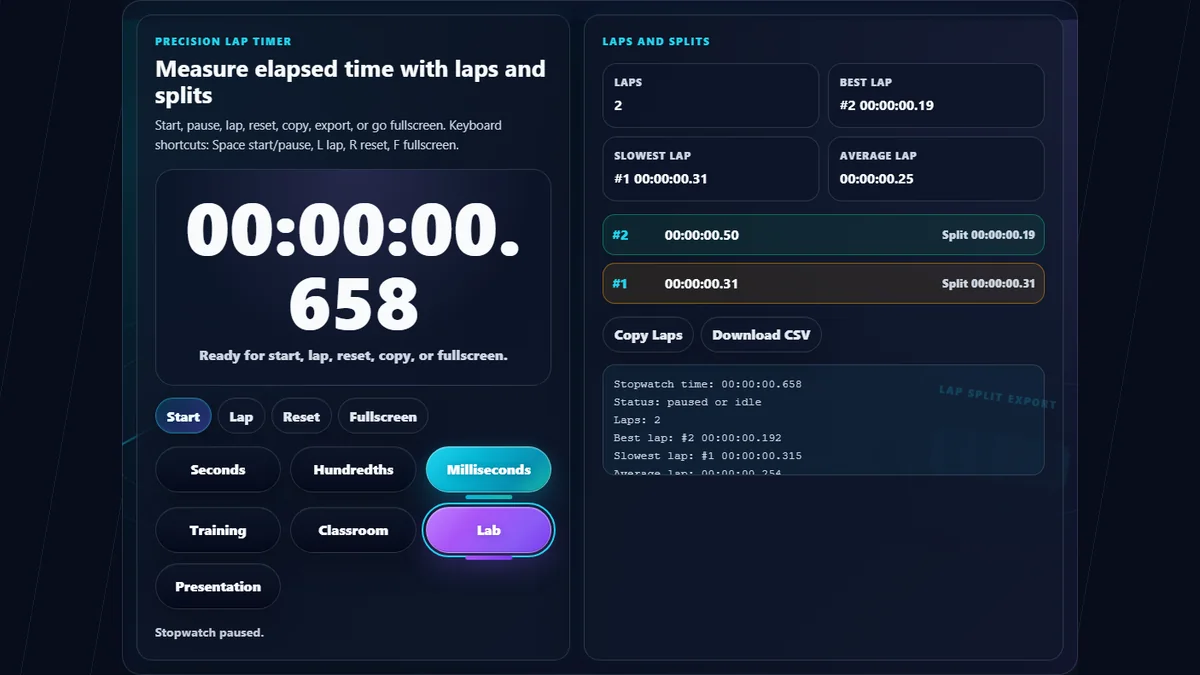
    Online Stopwatch with large elapsed time display, custom precision controls, themed stopwatch face, lap split list, best lap, slowest lap, average lap, copy and CSV export buttons
    The Online Stopwatch keeps high-resolution timing, lap capture, split analysis, precision controls, fullscreen display, and CSV export in one compact browser workspace.

    Stopwatch Features Built for Laps and Focused Timing

    High-resolution timingUses the browser high-resolution clock for smooth elapsed time measurement.
    Lap and split tableRecord cumulative total time and split duration for each lap while the stopwatch keeps running.
    Best, slowest, averageQuickly compare lap performance without exporting the table first.
    Keyboard shortcutsUse Space for start/pause, L for lap, R for reset, and F for fullscreen.
    Copy and CSV exportCopy the lap table or download a CSV for coaching notes, lab logs, or records.
    Fullscreen themesSwitch between training, classroom, lab, and presentation themes for the timing context.

    Stopwatch Searches Covered on This Page

    These examples reflect common stopwatch searches and explain which feature answers each intent.

    Online stopwatchStart a browser stopwatch instantly without installing an app or creating an account.
    Stopwatch with lapsRecord lap rows while the stopwatch continues running and review each split.
    Lap timerUse the lap table for running, cycling, workouts, presentations, and lab stages.
    Split timerEach lap shows both total elapsed time and split duration since the previous lap.
    Millisecond stopwatchSwitch the precision chip to milliseconds when you need finer display granularity.
    Fullscreen stopwatchUse fullscreen for classrooms, presentations, wall displays, coaching, or screen sharing.
    Stopwatch CSV exportDownload the lap table as CSV for spreadsheets, reports, or analysis.
    Browser stopwatchAll timing and lap data stay local to the browser and do not upload to a server.

    Why Use This Online Stopwatch Instead of a Phone Stopwatch?

    Phone stopwatches are useful, but browser stopwatches are better for shared screens, keyboard control, and exporting results.

    TaskRandomly.onlineManual method
    Lap exportCopy or download lap data as CSV.Often requires manual copying or app-specific sharing.
    Fullscreen timingLarge browser display for projectors and shared screens.Small personal screen.
    Keyboard controlSpace, L, R, and F shortcuts keep hands on the keyboard.Usually touch-only.
    PrivacyLap data stays in the browser unless you copy/export it.Device app may sync depending on settings.

    How to Use Online Stopwatch

    Start the stopwatch, capture laps, then copy or export the results if needed.

    Start or pause the stopwatch

    Press Start or Space to begin. Press the same control again to pause.

    Record lap times

    Press Lap or L while the stopwatch is running. Each lap stores total elapsed time and split duration.

    Switch precision

    Use Seconds, Hundredths, or Milliseconds to match the level of detail needed.

    Review lap stats

    Use best, slowest, and average lap cards to compare performance without leaving the page.

    Copy, export, or fullscreen

    Copy laps, download CSV, or use fullscreen for large displays and presentations.

    Frequently Asked Questions

    How do I use the online stopwatch?

    Press Start to begin timing, Lap to capture a split, Pause to stop temporarily, and Reset to clear the stopwatch and laps.

    Can this stopwatch record lap times?

    Yes. Press Lap or the L key while the stopwatch is running to record a lap with total elapsed time and split duration.

    What is the difference between lap time and split time?

    Lap or split duration is the time since the previous lap. Total elapsed time is the cumulative time from when the stopwatch started.

    Does this stopwatch show milliseconds?

    Yes. Use the Milliseconds precision chip to show three-digit millisecond display. Hundredths and seconds views are also available.

    Can I export stopwatch laps?

    Yes. Use Download CSV to save lap number, total time, and split time. You can also copy the lap table to the clipboard.

    Can I use keyboard shortcuts?

    Yes. Space starts or pauses, L records a lap, R resets, and F requests fullscreen.

    Does the stopwatch keep accurate time if I switch tabs?

    The stopwatch calculates elapsed time from the browser high-resolution clock, so the display catches up when the page updates again.

    Can I use the stopwatch fullscreen?

    Yes. Press Fullscreen to enlarge the stopwatch workspace for classrooms, coaching, labs, meetings, or presentations.

    Is this good for workout lap timing?

    Yes. Use Training theme, lap recording, best/slowest lap stats, and CSV export for workout intervals and drills.

    Is this good for classrooms or labs?

    Yes. Use Classroom or Lab theme, fullscreen display, and lap recording for experiments, activities, transitions, or presentations.

    Does this upload my lap data?

    No. Stopwatch timing and lap records run locally in your browser and are not uploaded.

    What is the difference between stopwatch and countdown timer?

    A stopwatch counts upward to measure elapsed time. A countdown timer counts down from a chosen duration or toward a future event.

    Still have questions?

    If you cannot find the answer you are looking for, contact our support team.

    Contact Us