Randomly.online

Professional Overtime Calculator

💼 Earnings Definitions

⏱️ Payroll Summary

40.00
Regular Hours
5.00
OT Hours
$1,000.00
Regular Pay
$187.50
OT Pay
$1,187.50
Total Gross Earnings
Blended Hourly Rate: $26.39

The Importance of Precise Overtime Calculation

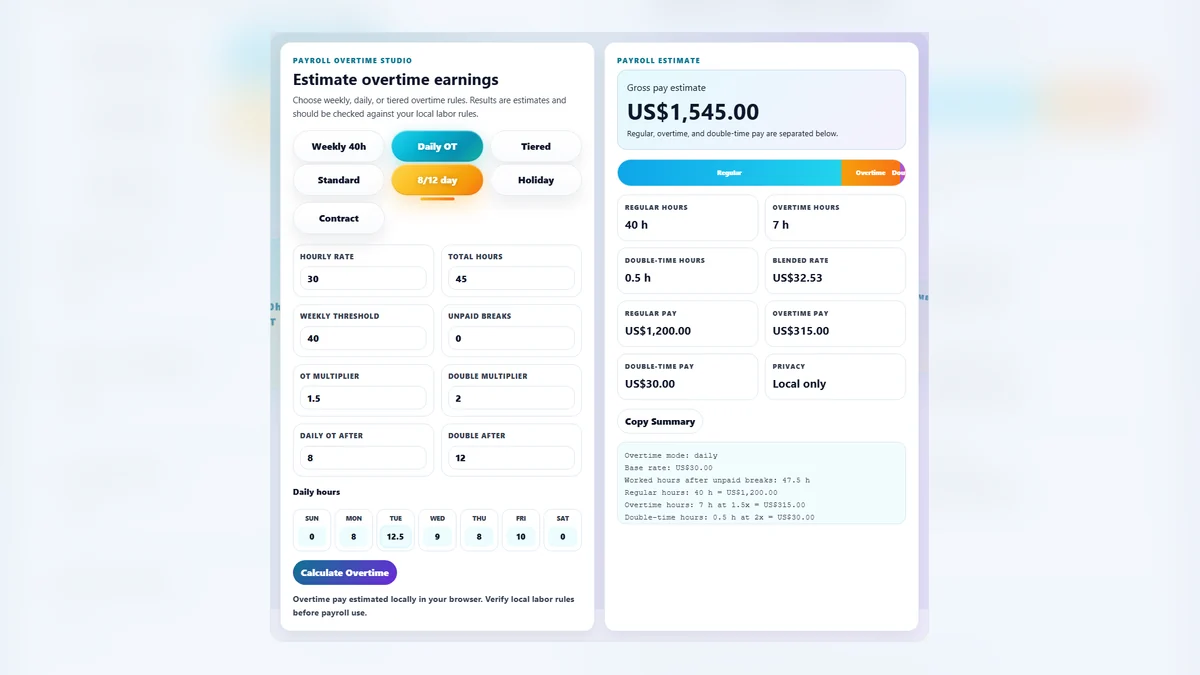
In the modern workspace, ensuring financial clarity and payroll compliance is paramount for both employers and employees. Our Overtime Calculator is meticulously engineered to provide absolute transparency into gross earnings, bridging the gap between raw hours worked and final paycheck figures. By utilizing deterministic arithmetic logic, this tool eliminates the ambiguity often associated with manual spreadsheet calculations. Whether you are a freelancer tracking billable hours or a payroll professional verifying weekly disbursements, understanding how multipliers like 1.5x (time and a half) or 2.0x (double time) impact your bottom line is essential.

Our interface allows users to define a baseline threshold—commonly 40 hours per week—and see in real-time how every additional minute contributes to their overtime bucket. This immediate feedback loop is critical for budgeting and financial planning. Furthermore, the tool supports advanced payroll features such as unpaid break deductions and double overtime thresholds, ensuring it meets the rigorous standards of diverse labor laws and company policies. For those working in regions with specific daily overtime mandates, this calculator provides the flexibility to adjust logic based on regional requirements, ensuring you stay compliant while maximizing your earnings accuracy.

By leveraging work hours calculators and integrated time duration tools, users can build a comprehensive view of their productivity and compensation. The professional-grade layout is optimized for high-contrast visibility, ensuring that numeric values are legible across all devices, from desktop monitors to mobile screens.

How to Use the Overtime Calculator

Using the Overtime Calculator is straightforward, yet it offers deep configuration for complex payroll scenarios. Follow these steps to ensure a precise calculation:

  1. Enter Your Base Rate: Start by inputting your standard hourly wage in the 'Hourly Base Rate' field. Ensure this reflects your pre-tax regular pay.
  2. Define Total Hours: Input the total number of hours worked during the pay period. You can use decimals for partial hours (e.g., 40.5 for 40 hours and 30 minutes).
  3. Set the OT Threshold: The default is typically 40 hours for a standard week. Adjust this if your contract or local law specifies a different regular-hour limit.
  4. Choose Multipliers: Select the overtime rate applicable to your situation. Most standard overtime is calculated at 1.5x, but holiday or weekend work might trigger a 2.0x rate.
  5. Review the Summary: As you type, the Summary Panel updates instantly. Observe the 'Blended Hourly Rate' to see your true average earnings per hour across the entire period.
  6. Export Your Data: Use the 'Download Payroll Report' button to generate a clean, text-based breakdown of your calculations, perfect for record-keeping or attachment to an invoice.

For more complex tracking, consider using our time card calculator to aggregate daily logs before performing your final overtime analysis here.

Frequently Asked Questions

A blended hourly rate, often referred to as the "weighted average," is the total amount earned divided by the total number of hours worked. While your base rate might be $25.00, if you work several hours of overtime at $37.50, your blended rate will naturally be higher than $25.00. This figure is vital for understanding your actual earning power during busy periods. It is also a key metric for employers to calculate project costs and for employees to evaluate the true value of their time when working beyond standard hours. Our calculator computes this automatically to ensure you have a bird's-eye view of your compensation dynamics without needing manual long-division.

In many jurisdictions, labor laws specify that unpaid breaks do not count toward the total hours worked for the purpose of overtime eligibility. For example, if you were at the workplace for 45 hours but had 5 hours of unpaid lunch breaks, your total "worked" hours for payroll purposes is 40. In our advanced settings, you can enter the 'Unpaid Breaks' value. The system will automatically subtract these hours from your total before comparing the result against the overtime threshold. This ensures you aren't accidentally over-calculating overtime pay and that your results align perfectly with standard corporate payroll software like SAP or Workday.

Yes, our professional calculator supports a secondary "Double OT" threshold. In certain regions, such as California, work performed beyond 12 hours in a single day or beyond a specific weekly limit (often 60 or 72 hours) must be paid at a double-time rate (2.0x). By enabling the Double OT setting in the advanced panel, you can define this second tipping point. The calculator will then segment your hours into three distinct categories: Regular, Overtime (1.5x), and Double Overtime (2.0x). This granular breakdown provides the ultimate level of payroll compliance and ensures that high-intensity work weeks are compensated accurately according to the most stringent labor regulations.