Timeline Visualization
Choose two dates to see the progress bar
Date Difference Calculator: Precision Time Tracking
Understanding the exact duration between two moments in time is a fundamental requirement in modern project management, historical research, and personal planning. The Date Difference Calculator at Randomly.online is designed to provide a comprehensive breakdown of time, bridging the gap between simple calendar math and professional-grade precision. Whether you are calculating the exact age of a person down to the second, determining the number of business days remaining in a high-stakes quarterly goal, or simply planning a countdown to a major life event, our tool processes complex astronomical and calendar logic instantly on your device.
In the digital age, manual calculations are prone to human error, especially when accounting for leap years, varying month lengths, and weekend exclusions. Our platform eliminates these variables by utilizing high-performance client-side JavaScript. This means your data never leaves your browser, ensuring absolute privacy. The interface is optimized for both desktop clarity and mobile accessibility, featuring tap-friendly inputs and high-contrast typography that adheres to WCAG accessibility standards. We believe that utility should be beautiful; hence the application of a dual-theme system that adapts to your environment, reducing eye strain during late-night planning sessions.
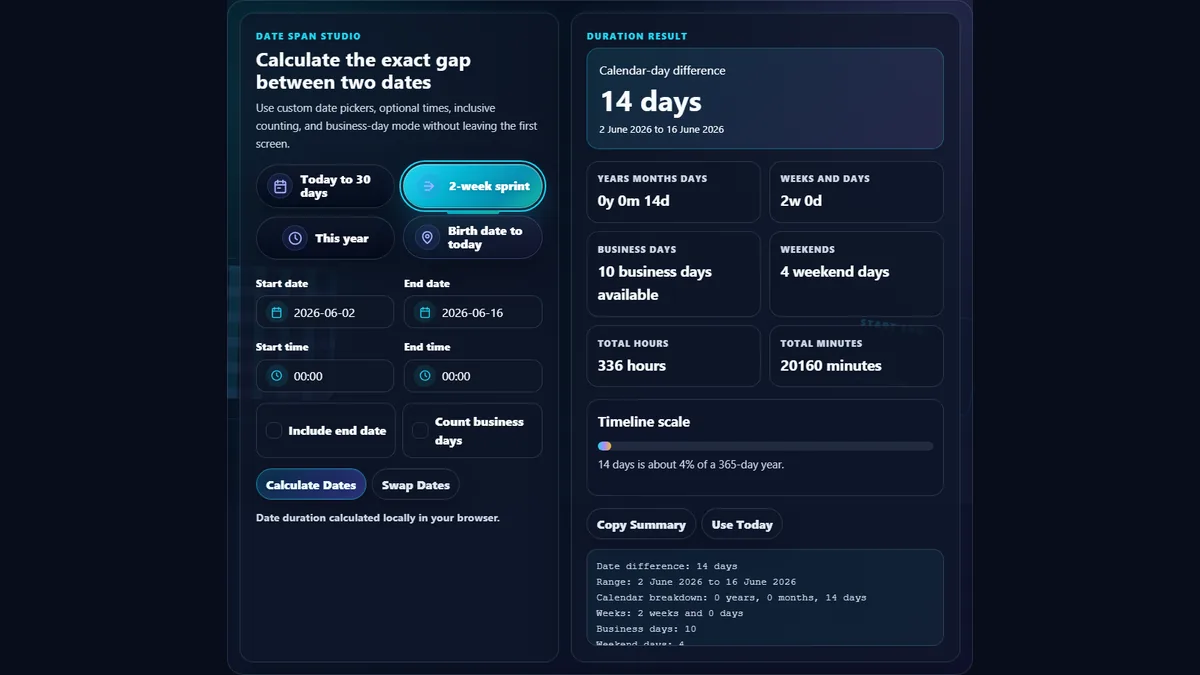
Using our Date Difference Calculator is designed to be as intuitive as possible. To begin, navigate to the "Start Date & Time" input. You can either type the date directly using your keyboard for maximum speed or click the calendar icon to use our optimized date picker. Once the start point is established, proceed to the "End Date" field. The calculator works dynamically; as soon as a valid date range is detected, the results panel below will populate with data in real-time. There is no need to refresh or click a "calculate" buttonāour engine reacts to every input change to provide instant feedback.
For more specific scenarios, explore the options panel located just below the date inputs. The "Include end date" checkbox is vital for calculations where the final day counts as a full day of activity, such as rental agreements or hotel stays. The "Business days only" feature is a powerful tool for professionals, automatically stripping away Saturdays and Sundays to reveal the actual work time available for a project. Each result categoryāfrom total days to precise minutesāfeatures a "Copy" button. This allows you to effortlessly transfer data into your emails, spreadsheets, or project management software like Jira or Trello without the risk of transcription errors.
Frequently Asked Questions
Yes, our Date Difference Calculator utilizes the standard ISO-8601 calendar logic, which natively accounts for leap years. A leap year occurs almost every four years to keep our calendar in alignment with the Earth's revolutions around the Sun. Specifically, a year is a leap year if it is divisible by 4, except for years that are divisible by 100 but not by 400. Our algorithm calculates the exact number of days in February for every year within your selected range, ensuring that your "Total Days" result is 100% accurate regardless of whether the period spans across a February 29th. This level of precision is critical for legal contracts, financial interest calculations, and scientific research where a single day discrepancy can have significant consequences.
When you enable the "Business Days Only" option, the calculator iterates through every single day within the selected timeframe and checks the day of the week. It explicitly excludes Saturdays and Sundays from the total count. This is standard practice for the majority of global markets and corporate environments. While we currently focus on weekend exclusion, we are continuously updating our logic to eventually allow for custom holiday inputs, as public holidays vary significantly by country and region. Currently, for project management purposes, this tool provides a robust "baseline" of working days. If your specific industry operates on a 6-day work week or different weekend structures, you can use our "Total Days" output and manually adjust, though for most office-based applications, our automated 5-day week filter is perfectly calibrated for immediate use.
Privacy and security are core pillars of the Randomly.online philosophy. Unlike many other online utilities that process data on a remote server, our Date Difference Calculator runs entirely client-side. This means that the moment you enter a date, the calculation is performed by your own computer's or smartphone's processor within your browser's environment. No date, time, or preference information is transmitted to our servers or stored in any database. This architecture not only provides superior privacyāensuring your personal milestones or confidential project timelines remain yours aloneābut also results in near-zero latency. Since there is no "round-trip" to a server, the results are displayed as fast as your hardware can render them. You can even use this tool offline once the page has loaded, making it a reliable resource in any environment.