100% Browser-BasedLocal Processing

Year Shift Studio

Move a date by calendar years

Pick a start date, choose add or subtract, then set the February 29 rule for leap-day edge cases.

Calculated Date

Result date--Choose a start date and year amount.

Timeline updates after calculation.

Weekday--
ISO date--
Day difference--
Leap handling--
Century--
PrivacyLocal browser
No year shift yet.

Privacy Focused

🔒 Local Processing. Your data never leaves your device.

Instant Results

🌐 Fully Client-Side. Runs instantly in your browser.

No Signup

⚡ No accounts. No hassle. Just open and use.

Browser Based

🚀 Works right in your browser. No installs, no downloads.

Add or Subtract Years Without Leap-Day Confusion

Adding years to a date is common for contracts, warranties, anniversaries, legal deadlines, insurance policies, school programs, long-term reminders, and retirement planning. The hard case is February 29, because not every target year has a leap day.

Direct answer: Use this add years to date calculator to move a start date forward or backward by calendar years. Choose how February 29 should behave when the target year is not a leap year: February 28, March 1, or preserve leap day when available.

Use the page for searches like add years to date, subtract years from date, add 5 years to date, add 10 years to date, future date calculator, and leap day add years. For month-based deadlines, use Add Months to Date; for fixed day counts, use Add Days to Date.
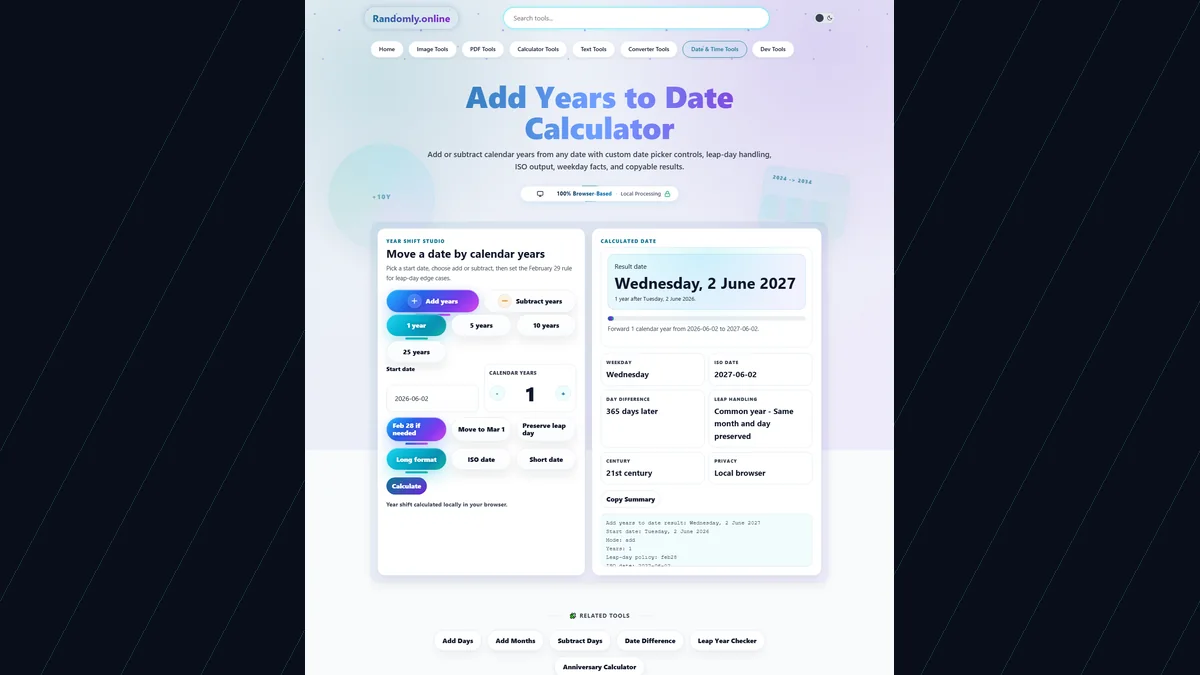
Add Years to Date Calculator with custom date picker, add and subtract year chips, year amount stepper, leap-day policy controls, resulting date, ISO date, day difference, and copy summary button
The Add Years to Date Calculator explains calendar-year shifts with custom controls, February 29 policy choices, ISO date output, weekday facts, and copyable results.

Year Calculator Features for Long-Term Planning

Custom date pickerSelect the start date from a branded calendar overlay instead of using a default browser calendar.
Add or subtract yearsMove forward or backward with custom mode chips while the result stays in the same compact workspace.
Leap-day policy choicesControl February 29 results with Feb 28, Mar 1, or preserve-when-available rules.
Preset year amountsJump quickly to 1, 5, 10, or 25 years for common contract, warranty, and anniversary periods.
Readable result factsSee weekday, ISO date, day difference, leap-year status, and century in one result panel.
Copyable summaryCopy the year-shift result for contracts, project notes, messages, spreadsheets, or documentation.

Add Years Keywords Covered by Practical Examples

These content blocks cover high-intent date arithmetic searches while explaining the page-specific leap-day behavior.

add years to dateMove any start date forward by selected calendar years with clear output.
subtract years from dateSwitch to subtract mode to find when a multi-year term began.
add 5 years to dateUse the 5 years preset for warranties, license renewals, policy terms, and future reminders.
add 10 years to dateUse the 10 years preset for passports, long-term planning, and anniversary calculations.
date calculator add yearsThe result includes a full date, ISO date, weekday, day difference, and leap-day explanation.
leap day add yearsChoose what happens when February 29 is shifted into a non-leap target year.

Why Use a Year Calculator Instead of Counting on a Calendar?

Manual calendar counting works for simple dates, but multi-year terms and leap-day dates deserve explicit rules.

TaskRandomly.onlineManual method
Add yearsShifts by calendar years and explains the final date.Manual counting can miss leap-year changes.
February 29Lets you choose Feb 28, Mar 1, or preserve leap-day behavior.Manual calendars often hide the policy decision.
Subtract yearsUses the same visible rules in reverse.Counting backward across leap years is easy to misread.
Copy resultCopies a clear summary for work notes.Manual results need rewriting and checking.

How to Use Add Years to Date Calculator

Choose a start date, direction, year amount, and leap-day rule.

Pick the start date

Use the custom calendar picker or type a date in YYYY-MM-DD format.

Choose add or subtract

Use the custom mode chips to move the date forward or backward by calendar years.

Set the year amount

Use presets or the plus/minus year stepper for any whole number of years.

Choose a February 29 rule

If the start date is February 29 and the target year is not leap, choose February 28 or March 1 behavior.

Read and copy the result

Review result date, weekday, ISO date, day difference, leap handling, and copy the summary.

Frequently Asked Questions

How do I add years to a date?

Choose a start date, keep Add years selected, enter the number of calendar years, and read the calculated result date.

How do I subtract years from a date?

Switch to Subtract years, enter the number of years, and the calculator moves the selected date backward by that many calendar years.

What happens when I add years to February 29?

If the target year is a leap year, February 29 is preserved. If not, choose whether the result should become February 28 or March 1.

Is adding one year the same as adding 365 days?

Not always. Calendar years can include 365 or 366 days depending on leap years. Use Add Days to Date when you need a fixed day count.

Can I add 5 years or 10 years quickly?

Yes. Use the 5 years or 10 years preset, then adjust the value with the custom year stepper if needed.

Does this handle leap years?

Yes. The result explains whether the target year is a leap year or common year and shows any leap-day adjustment.

Can this calculate contract or warranty expiration dates?

Yes. The tool is useful for contracts, warranties, policies, licenses, renewals, reminders, and long-term deadlines.

Does this show the weekday of the result?

Yes. The result cards show the weekday, ISO date, day difference, leap handling, and century.

Can I copy the calculated year result?

Yes. Use Copy Summary to copy the start date, year amount, policy, result date, ISO date, and day difference.

Is my date stored online?

No. The selected date, year amount, leap-day policy, and copied summary are calculated locally in your browser.

What date format can I use?

Type dates as YYYY-MM-DD or choose them from the custom calendar. The result can display as a long date, ISO date, or short date.

What is the difference between add years and add months?

Add years changes the calendar year while keeping the month and day when possible. Add months changes by calendar months and needs separate month-end rules.

Still have questions?

If you cannot find the answer you are looking for, contact our support team.

Contact Us