Randomly.online
×

Time Card Calculator

Track daily work hours, calculate break deductions, handle overnight shifts, and generate payroll-ready totals instantly.

Regular Hours
0.00
Overtime Hours
0.00
Total Hours
0.00
Estimated Gross Pay
$0.00

Related Tools

About the Time Card Calculator

Welcome to the ultimate professional-grade Time Card Calculator. Whether you are an employee validating your weekly timesheet, an employer running payroll, or a freelancer tracking billable hours, this tool provides a robust, zero-friction environment to compute precise work hours. Managing time correctly is the foundation of fair compensation, and our utility removes the stress of manual arithmetic entirely.

Traditional time calculation can be notoriously tricky, especially when factoring in unpaid lunch breaks, varied shift structures, or complicated schedules that cross over midnight. With our intelligent, fully client-side system, you can enter your clock-in and clock-out times using smooth native selectors. As you type, the engine recalculates instantly without page reloads. Need to know the current date and time to log your final shift? You can cross-reference it quickly.

What sets this Time Card Calculator apart is its deterministic handling of overnight shifts. If you clock in at 10:00 PM and clock out at 6:00 AM, the system inherently understands the date boundary transition, correctly summing your shift as 8 hours instead of resulting in a negative error. Additionally, calculating compensation is seamless. By inputting an optional hourly rate, the calculator dynamically projects your gross earnings. If your job involves global client coordination, pairing this with a world clock ensures your hours align with expected regional deliverables.

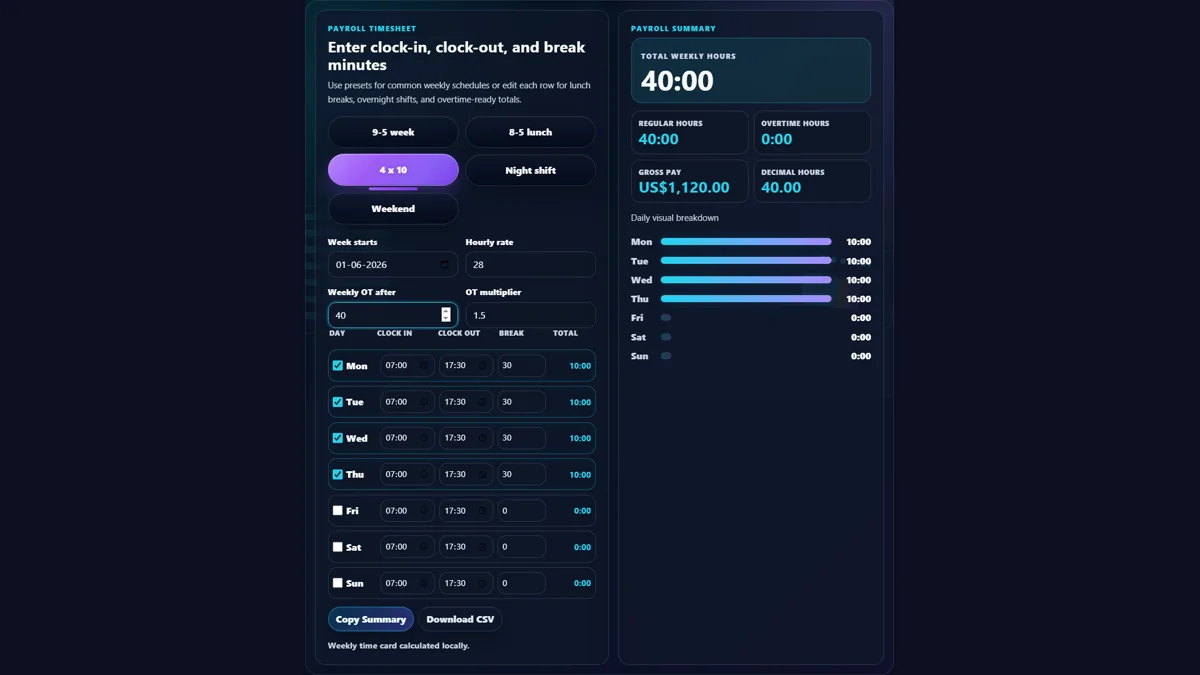
Using the Time Card Calculator is designed to be highly intuitive and thumb-friendly for mobile users while remaining spacious and professional on desktop displays. Start by looking at the time entry grid representing your work week. For each day you worked, click or tap into the "Time In" field and select the exact hour and minute your shift began.

Next, move to the "Time Out" field and enter when your shift ended. If you took an unpaid break—such as a 30-minute lunch or a 15-minute rest—enter that duration in minutes into the "Break (mins)" column. The system will immediately deduct this from your gross time, updating the daily net hours clearly on the right side of that day's row. You'll also notice a visual timeline bar updating dynamically, giving you a quick visual audit of your active work blocks. Need to time an ongoing task? Use a stopwatch to ensure accurate break inputs.

For more advanced payroll preparation, navigate to the settings panel above the grid. Here, you can enforce rounding rules common in corporate HR policies, such as rounding to the nearest quarter-hour (15 minutes). You can also toggle overtime thresholds—either setting it to calculate time-and-a-half for hours exceeding 8 in a single day, or exceeding 40 across the whole week. Finally, entering your hourly wage in the Pay Rate box will actively project your gross income in the summary panel at the bottom. Once you're done, the entire breakdown is ready to be transferred to your official payroll system. To plan future payroll dates, our add months to date tool is an excellent companion.

How does the calculator handle shifts that go past midnight?

One of the most common issues with standard time calculation is the "overnight shift" scenario—for example, a shift starting at 8:00 PM and ending at 4:00 AM the next day. A basic subtraction of these hours results in negative numbers. Our Time Card Calculator employs a smart deterministic algorithm that automatically detects when a "Time Out" entry is chronologically earlier than the "Time In" entry. When this occurs, the calculator understands that the shift crossed the midnight threshold into the next calendar day. It seamlessly adds 24 hours to the checkout time behind the scenes, ensuring the total duration (8 hours, in this example) is calculated perfectly without requiring you to manually check an "overnight" box. This makes it ideal for night-shift workers, healthcare professionals, and logistics drivers.

How are overtime and gross pay calculated?

The calculator offers dynamic overtime processing based on standard labor regulations. By selecting an overtime rule from the top dropdown, the system alters how it aggregates the weekly total. If you select "Weekly (> 40 hrs)", the system sums up all net daily hours; the first 40 hours are logged as "Regular Hours," and any duration beyond that is segmented as "Overtime Hours." If "Daily (> 8 hrs)" is chosen, overtime is evaluated on a per-row basis, assigning anything over 8 hours on a single day to the overtime pool. When an hourly pay rate is entered, the tool calculates standard gross pay by multiplying the regular hours by your base rate, and multiplies the overtime hours by 1.5x your base rate. These two figures are combined instantly in the "Estimated Gross Pay" field, providing excellent financial foresight. For estimating long-term work schedules, check out our working days calculator.

Is my data saved or sent to a server?

Privacy and speed are core principles of our platform. Everything you enter into the Time Card Calculator operates 100% client-side. This means that all mathematical calculations, time conversions, and payroll estimates happen locally within your internet browser's memory using JavaScript. Zero data regarding your work hours, schedule, or financial pay rate is transmitted over the internet, stored in external databases, or saved on our servers. Because there is no server-side communication required, the calculator functions with instant recalculation—there are no loading wheels or page refreshes. When you close the tab, the data is gone. This ensures your professional and financial information remains strictly confidential. If you need to plan time off around holidays, use the public holidays finder in tandem with this timesheet tool.