All Development Tools

33 free developer tools — formatters, minifiers, converters, inspectors, generators, hashes and a SQL playground. Every one of them runs in your browser.

100% Browser-Based • Local Processing

33 of 33 tools

Every developer tool 33 tools

Thirty-three developer tools, none of which upload your work

Randomly.online's developer tools are 33 free, single-purpose web utilities — formatters, minifiers, converters, inspectors, generators, hash tools and a SQL playground. Each one is its own page, each does one job, and every one of them processes what you paste entirely on your own device. Nothing is uploaded, nothing is logged, and there is no account to make.

Most tools like these are a tab you open once and never find again. This directory is built to be the page you keep: the filter above matches on a tool's name, the format it reads and the group it belongs to, so typing json narrows 33 cards to the six that touch JSON, and minify narrows them to the four that make a file smaller. The count beside the heading follows the filter, so what the page says and what the page shows never disagree.

The All Development Tools directory in dark mode: a filter field reading 33 of 33 tools, a heading "Every developer tool" with a 33 tools pill, and the Format group of six cards beneath it — CSS, HTML, JavaScript, JSON, SQL and XML formatters, each with its own indent-bar glyph in an indigo plate and a badge naming the format it reads
Every card carries the glyph for what the tool does and the colour for what it does to your input, both from one registry

The groups are the category's own vocabulary, not a taxonomy invented for this page. A tool either re-indents a document, shrinks it, turns it into another format, inspects it, produces something new, reduces it to a digest, or runs it. That verb decides the group a card sits in, the colour of its icon plate, and the colour of the same tool's pill everywhere else on the site — all three from a single lookup, so a card cannot be filed under Minify while drawing a formatter's glyph.

Everything here is client-side by construction rather than by promise. The formatters and minifiers parse your document in the page; the hash tools use the browser's own WebCrypto; the JavaScript minifier runs a Terser build served from this site rather than off a CDN; and the Markdown preview renders inside a sandboxed frame so a document you paste can never run in our origin. You can watch the network tab while you use any of them and see that nothing leaves the tab.


How to find the tool you need

There are three ways into the directory and they suit different starting points.

If you know the format, type it into the filter. css brings back the formatter and the minifier; xlsx brings back the one tool that reads a spreadsheet. Each card carries a badge naming what it reads, so a scan down a column tells you which tools take JSON, which take HTML and which take a file rather than text.

The directory filtered to the word json: the tally reads 6 of 33 tools match, the section pill reads 6 of 33, and only the JSON Formatter, JSON Minifier, JSON Validator, JSON to CSV, CSV to JSON and Fill JSON cards remain, each still under its own group heading
The filter matches the name, the format and the group, and every count on the page follows it

If you know what you want done but not by what, read the group headings. Format and Minify are the same document in two directions. Convert is the eight tools that read one format and write another. Inspect is the five that tell you what something is or what is wrong with it. Generate makes something that did not exist; Hash reduces something to a digest; Run executes it.

If you are already on a tool page, the related-tools strip at the bottom of it links the tools closest to the one you are using, with the same glyphs and the same colours you see here. Nothing in this system asks you to learn two vocabularies.

Every tool opens as an ordinary page with no interstitial, no sign-in wall and no cookie prompt before you can use it. Paste, read the result, copy or download it, close the tab.

What each group means

Format — six tools

Re-indents a document so its structure is visible. Formatting is cosmetic by definition: it changes whitespace, never what the browser, the parser or the database does with the file afterwards. The HTML formatter returns the contents of pre, textarea, script and style byte for byte, because re-indenting inside those changes what renders. The SQL formatter's output still runs, which sounds like a low bar until you meet one whose output does not.

The directory scrolled to the group headings: FORMAT with a 6 pill, MINIFY with a 4 pill and CONVERT with an 8 pill, each followed by a one-line description, and the cards under each group carrying icon plates in that group’s own colour — indigo for format, orange for minify, cyan for convert
Seven groups, seven colours, and the count beside each heading is the number of cards under it

Minify — four tools

The same document in the other direction: the bytes a machine needs and none of the ones a person needs. The hard part is knowing what is structure and what is content — a URL inside a script, a string inside a stylesheet, a space between two inline tags that is a word space. Each of these reads the document with a real tokenizer rather than a pattern, which is the difference between a smaller file and a broken one.

Convert — eight tools

Read one format, write another: CSV and JSON in both directions, HTML and Markdown in both directions, text to binary, Base64, URL encoding, and a spreadsheet to a folder of XML files. Conversion between formats of different expressive power is lossy in one direction by definition, and the tools say so rather than pretending otherwise — the HTML to Markdown converter reports every element Markdown has no syntax for instead of quietly dropping it.

Inspect — five tools

Look at something and say what it is, or what is wrong with it. A diff between two versions, a JSON document that will not parse, a regular expression against your own text, the header and payload of a JWT, and a crontab line explained in English. None of these change your input; they only tell you about it.

Generate — four tools

Produce something that was not there: UUIDs, passwords and passphrases, placeholder prose, and sample values poured into a JSON skeleton. Where randomness has to be real it comes from crypto.getRandomValues rather than Math.random, which is not a detail when the output is a password.

Hash — three tools

Reduce text, a keyed message or a whole file to a digest. The file hasher reads your file with the FileReader API and hashes it in the page; the file itself never moves. The HMAC tool uses the browser's own WebCrypto rather than a library pulled from a CDN, which matters here more than elsewhere: a compromised CDN script on a page where you paste a signing key is the whole threat model.

Run — three tools

Execute or evaluate and show the result: real SQL against your own data, an epoch timestamp resolved to a date, a colour resolved into every notation at once.

What to expect

  • Nothing is uploaded. Every tool here processes your input in your browser. There is no server that receives your code, no logging of it, and nothing to delete afterwards.
  • They work offline. Once a tool page has loaded it keeps working with no connection, which you can test by turning the network off and using it.
  • No account, no cap, no watermark. There is nothing to sign up for and nothing metered, because there is no server-side work to meter.
  • The limit is your own device. A very large file is bounded by your memory and CPU rather than by an upload cap. That is usually the better trade, but it is a real one.
  • They work on a phone. Every tool is built and measured at 390 pixels wide as well as on a desktop, with the two panes becoming a tab strip rather than a column you scroll past.
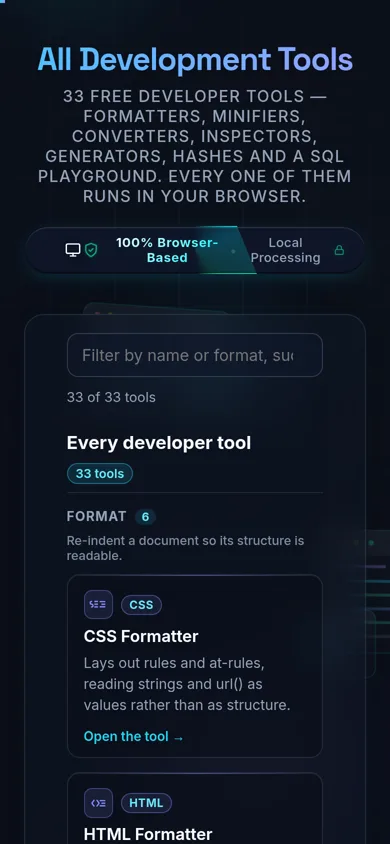
The All Development Tools directory on a 390-pixel phone: the title, the browser-based privacy badge, the filter field with its 33 of 33 tools tally, and the Format group cards stacked one per row
The directory stacks to one card per row on a phone rather than becoming a sideways-scrolling strip

Frequently Asked Questions

What are Randomly.online's developer tools?

A collection of 33 free, browser-based utilities for developers — formatters, minifiers, converters, encoders/decoders, generators, validators/testers, security/hashing tools, and a SQL playground. Each one is a standalone page that does one job well, and every one of them processes your input entirely on your own device.

Are these online developer tools safe for sensitive data?

Yes, structurally. Every tool runs in your browser with no server-side processing, no save feature, and no logging of what you paste — there's no server-side store to leak. That matters because online formatters and beautifiers with a save/share feature have historically been the ones where saved documents were later found exposed; a tool with nothing stored server-side has nothing there to breach.

Do these tools upload my code or files anywhere?

No. Every tool processes input with JavaScript running on your own device — nothing is transmitted to a server. You don't have to take that on faith: open your browser's DevTools, switch to the Network tab, use any tool here, and you'll see the page and its assets load, then nothing else.

Are the developer tools free, and do I need an account?

Yes and no — free, and no account. No signup, no email, no trial period, no watermark, and no paid tier on any of the 33 tools. Because everything runs client-side, there's no usage metering to gate behind a subscription.

Do the tools work offline?

Yes, after the page has loaded. Once a tool's page and its assets are in your browser, it keeps working with your network disconnected — useful on a locked-down machine or a flaky connection. A cold visit with no network at all won't load the page in the first place, since there's no offline-first service worker on the site yet.

Which tool do I need for my task?

It depends on what you're doing to the data. Formatters make dense code readable; minifiers do the opposite for production; converters move data between formats (CSV↔JSON, Markdown↔HTML, and more); encoders/decoders handle wire formats like Base64 and JWTs; generators produce UUIDs, passwords, and placeholder data; validators/testers check correctness before you ship; security/hashing tools compute digests locally. Browse the grouped list below, or use the search box.

What's the difference between a formatter, a minifier, and a validator?

A formatter re-indents and beautifies code so a human can read it. A minifier does the reverse — strips whitespace and comments to shrink file size for production. A validator checks that the syntax is actually correct and points you to the exact error, without changing the content at all. All three are represented here as separate, purpose-built tools rather than one tool trying to do everything.

Do I need to install anything or run Docker?

No. Every tool is a normal web page — no desktop app install, no container, no local server to stand up. That's the practical middle ground between ad-heavy hosted formatter sites and the privacy-respecting desktop or self-hosted tools that require more setup than opening a browser tab.

Is there a file-size or usage limit?

Not a server-imposed one — there's no server. Practical limits come from your own device: very large inputs are bounded by your browser's memory and CPU rather than by an upload cap or a daily quota. A few individual tools do enforce their own client-side size checks (for example, an upload cap on the SQL Playground) — check that tool's own page for specifics.

Do these work on a phone or tablet?

Yes — they're standard responsive web pages, so any tool here works in a mobile browser the same way it does on desktop, without an app to install. Complex tools with a lot of on-screen controls (like the SQL Playground) are more comfortable on a larger screen, but none require one.

How are hashes, HMACs, and UUIDs generated — is the randomness real?

Yes. The security/hashing and generator tools use your browser's built-in Web Crypto API (SubtleCrypto for hashing/HMAC, crypto.randomUUID() for UUIDs) — the same cryptographically secure primitives built into the browser itself, not a custom or simulated implementation. Check each tool's own page for its specific algorithm coverage.

How can I verify that nothing is being uploaded?

Open your browser's Developer Tools (F12 or right-click → Inspect), switch to the Network tab, and use any tool on this site — paste your data, run the action, and watch the tab. You'll see the initial page load and its assets, and then no further requests as you work. That's the actual test, not just a marketing claim, and it takes about ten seconds.

Still have questions?

If you can't find the answer you're looking for, feel free to contact our support team.

Contact Us

Privacy Focused

🔒 Local Processing. Your code never leaves your device.

Instant Results

🌐 Fully Client-Side. Runs instantly in your browser.

No Signup

⚡ No accounts. No API keys. Just open and use.

Browser Based

🚀 No installs, no CLI, no build step.