CSV to JSON Converter

Convert CSV to JSON in your browser — header row becomes keys, each row an object.

100% Browser-Based Local Processing
Delimiter
Also
CSV
JSON objects

Waiting for CSV Rows 0 Columns 0 Delimiter , Size 0 B

Rows to check1 problem

    Privacy Focused

    🔒 Local Processing. Your code never leaves your device.

    Instant Results

    🌐 Fully Client-Side. Runs instantly in your browser.

    No Signup

    ⚡ No accounts. No API keys. Just open and use.

    Browser Based

    🚀 No installs, no CLI, no build step.

    Convert CSV to JSON — privately

    CSV to JSON converts tabular CSV data into JSON. The header row becomes the keys, and each following row becomes a JSON object — so the output is an array of objects. This one runs entirely in your browser, so your CSV is never uploaded, and it handles quoted fields correctly.

    CSV is how spreadsheets and databases export tabular data, but most code and APIs want JSON. This converter bridges the two: it reads your CSV and turns the header row into keys and each data row into an object, producing a clean array of objects ready to drop into your app.

    Paste your CSV or load a local file, set the delimiter (comma, semicolon, tab, or a custom character), choose whether the first row is a header, and optionally enable type inference to convert numbers and booleans (otherwise everything stays a string). The parser follows RFC 4180, so it correctly handles quoted fields that contain commas, quotes (escaped as ""), or even embedded newlines. Output can be pretty-printed or minified, and you can copy or download it, along with a row/column count.
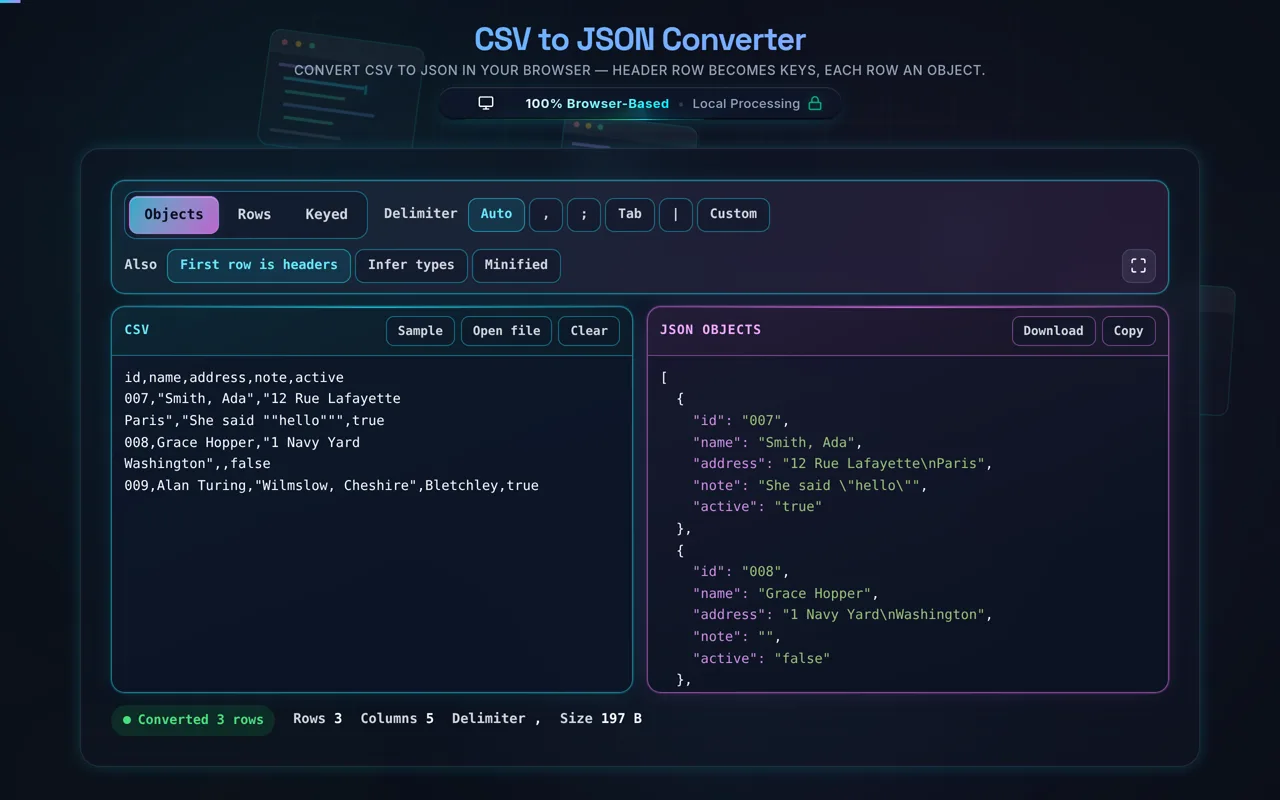
    The CSV to JSON converter in dark mode: a CSV in the cyan pane whose second row holds a quoted address split over two lines and a quoted name containing a comma, and the magenta pane beside it showing the JSON where that address is one value with an escaped newline and the id 007 is still a string
    The three things that break a naive parser, in one sample: a quoted comma, a quoted newline, and a doubled quote

    Privacy is the point. Everything runs in your browserno server, no upload, no logging, no tracking. CSVs frequently hold real data: customer exports, financial records, spreadsheets. Here, none of it leaves your device, and the tool works offline once loaded.

    Two honest notes worth knowing. First, CSV is only loosely standardised — delimiters, quoting, encodings, and line endings vary between tools — so while this converter follows RFC 4180 and lets you pick the delimiter, unusually formatted CSV may need a tweak. Second, type inference is a heuristic: turning it on can silently misread values like ZIP codes, phone numbers, or IDs with leading zeros (01234 becoming 1234) as numbers. When identifiers matter, keep values as strings.

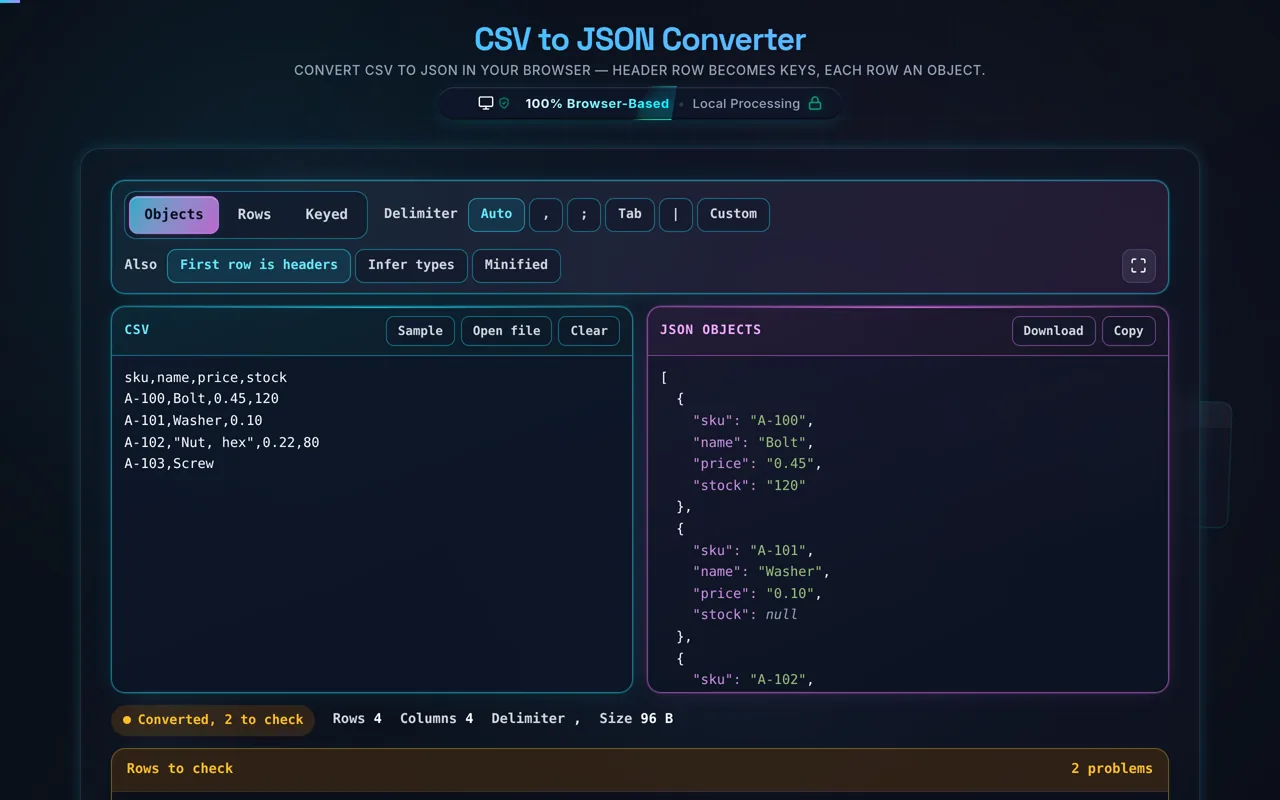
    Rows that do not fit are named, not counted. A CSV whose rows have different numbers of fields is the normal case with hand-edited data, and the converter still produces JSON — missing fields become null, extra ones become column6 and onward — while the panel underneath lists each row by its number in the file and what it found there. In Keyed output, where each row is filed under its first column, two rows sharing a key means one silently replaces the other; that is reported the same way, naming both rows.

    Two more details that decide whether the output is right. Auto picks the delimiter by consistency across lines rather than by whether a character appears somewhere — one semicolon inside one quoted sentence should not re-read the whole file. And Infer types converts a value only when JSON would write it back identically, so 007, +44 20 and 0x10 stay strings even with inference on, and a 19-digit account number is not quietly rounded into a float.
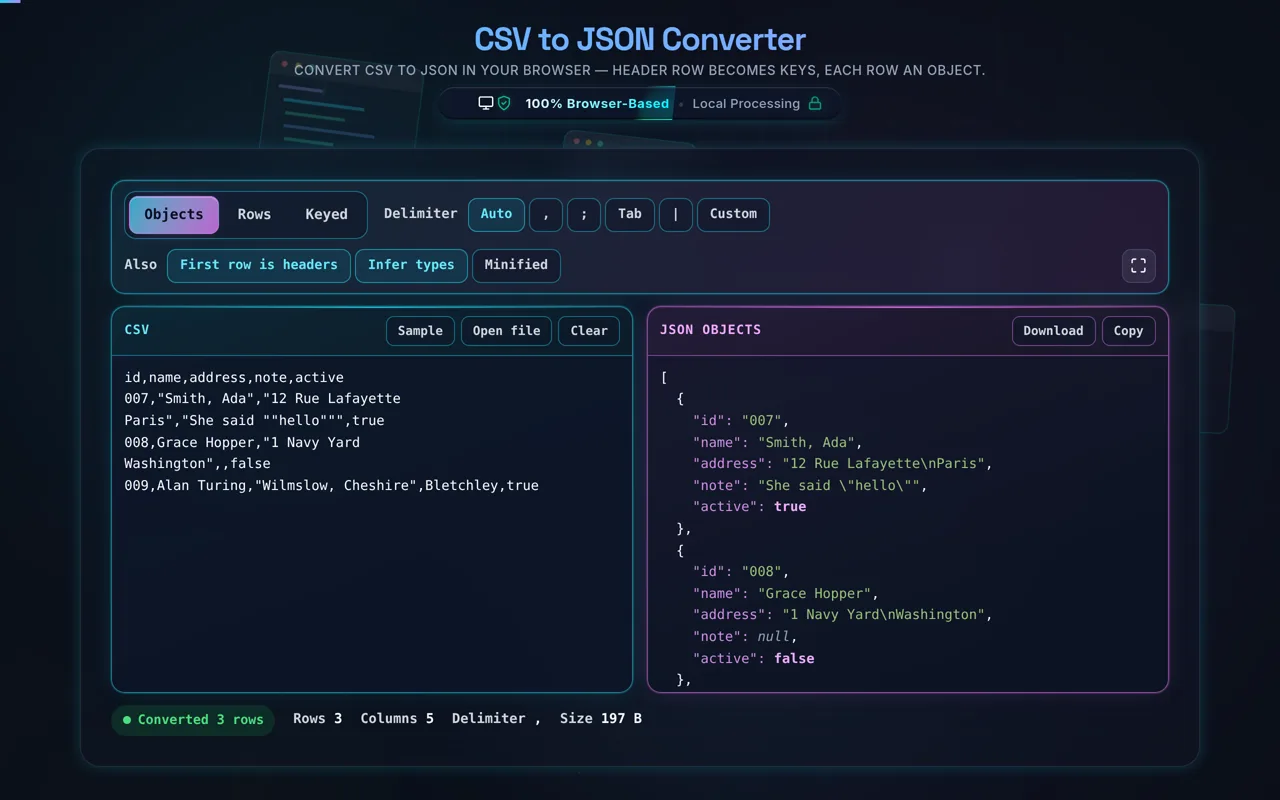
    The same conversion with Infer types turned on: in the JSON pane the ages and counts are unquoted numbers, true and false are booleans in a different colour, an empty cell has become null, and the id 007 is still quoted as a string
    With Infer types on, numbers and booleans lose their quotes. 007 keeps them, because 7 is not what the file said

    For the reverse, see JSON to CSV; to tidy the output, the JSON Formatter.

    When CSV to JSON helps

    • Feeding APIs. Turn a spreadsheet export into JSON for a request or import.
    • Seeding data. Convert sample CSV into JSON fixtures.
    • Config from spreadsheets. Let non-devs edit CSV, ship JSON.
    • Quick inspection. See tabular data as structured objects.
    • Sensitive exports. Convert real data files without uploading them.

    How to convert CSV to JSON

    Paste or load your CSV

    Type it, paste it, or open a local file (read in-browser, not uploaded).

    Set the delimiter and header

    Auto reads the first few rows and picks the separator that splits them consistently; the buttons beside it force comma, semicolon, tab or pipe, and Custom takes any single character. First row is headers decides whether row 1 supplies the keys or becomes data with generic keys column1, column2 and so on.

    Choose type handling

    Off by default, and off is the safe setting: every value stays a string, which is what you want for IDs, ZIP codes and phone numbers. Turn Infer types on and values that are unambiguously numbers or booleans become JSON numbers and booleans, and an empty cell becomes null. A value is only converted when writing it back would produce the same characters, so a leading zero or a plus sign keeps its quotes either way.

    Convert

    There is no Convert button: the JSON is rebuilt on every keystroke. The segment at the top chooses the shape — Objects for an array of objects keyed by the header, Rows for an array of arrays with no keys at all, Keyed for one object filed under each row's first column — and Minified drops the indentation.

    Copy or download

    Grab the JSON. Nothing is sent anywhere.

    Realistic example

    name,age\nAda,36\nGrace,45 becomes [{"name":"Ada","age":"36"},{"name":"Grace","age":"45"}] — or with type inference, the ages become numbers.

    Advanced tip

    If your data has IDs or codes with leading zeros, leave type inference off so 007 stays "007" instead of 7.

    Common mistake to avoid

    If the output looks like one giant column, the delimiter is wrong: press the one your file actually uses instead of Auto. The other silent one is Keyed output on a column that is not unique — each repeat replaces the row before it, so the JSON has fewer entries than the CSV had rows. The panel under the tool names those rows.

    Related

    To go back, use JSON to CSV.

    What to keep in mind

    • Zero-knowledge and private. Parsing runs in your browser — nothing uploaded, logged, or tracked, and it works offline.
    • CSV is loosely standardised. Delimiters, quoting, encodings, and line endings vary; set the delimiter to match your file.
    • Type inference is heuristic. It can turn 01234 into 1234 — keep values as strings when leading zeros or IDs matter.
    • RFC 4180 quoting supported. Quoted fields with commas, escaped quotes, and newlines are handled.
    • Large files run locally. Very big CSVs are limited by your device, since there's no server.

    Frequently Asked Questions

    A CSV where one row has fewer fields than the header: the status pill reads Converted, 2 to check in amber, and the panel underneath lists row 3 and row 5 by number with what each one held
    Rows that do not fit are named by their number in the file, and the JSON is still produced
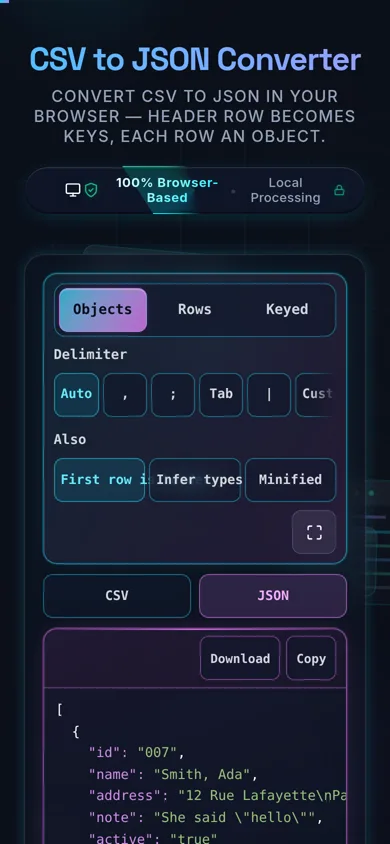
    The converter on a 390-pixel phone: the shape segment and the delimiter buttons stacked across the top, a tab strip switching between the CSV and JSON panes, and the JSON output filling the width
    On a phone the two panes become a tab strip and the control rows stack
    How do I convert CSV to JSON?

    Paste your CSV (or load a local file), set the delimiter and whether the first row is a header, and the tool turns the header row into keys and each data row into a JSON object — producing an array of objects. Optionally infer numbers and booleans. Then copy or download the JSON. Everything happens in your browser; nothing is uploaded.

    Does this upload my CSV, and does it work offline?

    No upload, and yes it works offline. All parsing happens in your browser using JavaScript — there's no server receiving your data, no logging, and no tracking. That matters because CSVs often hold real data like customer exports or financial records. Once the page has loaded it keeps working with no internet connection, which you can confirm in your browser's network tab.

    What does the JSON output look like?

    By default it's an array of objects: the header row supplies the keys, and each data row becomes one object with those keys mapped to its values. For example, columns name,age produce [{"name":"Ada","age":"36"}, ...]. You can also choose an array of arrays if you'd rather keep the raw row structure without keys. Output can be pretty-printed or minified.

    My CSV uses semicolons or tabs — can it handle that?

    Yes. Set the delimiter to semicolon, tab, or a custom character to match your file. Many European spreadsheets export semicolon-separated values (because the comma is a decimal separator), and tab-separated (TSV) is common too. If your converted output looks like a single column, the delimiter is almost certainly wrong — switch it to the one your file actually uses.

    Does it handle quoted fields with commas or newlines?

    Yes. The parser follows RFC 4180, so fields wrapped in double quotes can safely contain commas, line breaks, and escaped quotes (written as two double quotes, ""). This means a value like "Smith, Ada" is treated as one field, not split at the comma. Proper quote handling is what separates a real CSV parser from a naive split-on-comma.

    How do I keep leading zeros (ZIP codes, IDs)?

    Nothing to do: a leading zero survives either way. Type inference only converts a value when JSON would write it back identically, and 01234 written back is 1234 — different characters, so it stays the string it was. The same rule protects +44 numbers, 0x10, 1e5 and any integer long enough to lose digits as a float. Leaving type inference off keeps every value a string, which is still the simplest answer when identifiers matter. That's usually not what you want for identifiers. Keeping values as strings preserves them exactly; only enable inference when you genuinely want numeric/boolean types.

    Can I convert numbers and booleans instead of strings?

    Yes. Enable type inference and the tool converts values that are unambiguously numbers (3636) and booleans (true and false) into their JSON types, and maps an empty cell to null. This is handy when the JSON feeds code that expects real numbers. Just be careful with identifiers and leading zeros, where you'll want inference off to keep them as strings.

    What if my CSV has no header row?

    Turn the "first row is header" option off. Then the tool won't treat row one as keys — instead it can output an array of arrays (each row as a list of values), or generate generic keys like column1, column2. Use this when your data is purely positional or when the header is missing, and add your own keys afterward if needed.

    Can I get an array of arrays instead of objects?

    Yes. Choose the array-of-arrays output shape and each CSV row becomes a JSON array of its cell values, preserving the raw tabular structure without keys. This is useful when column order matters more than names, when there's no header, or when you're feeding something that expects rows-and-columns rather than named fields. The default, though, is the more common array of objects.

    Can I load a CSV file instead of pasting?

    Yes. You can open a local .csv file and the tool reads it directly in your browser with the FileReader API — the contents load into the editor without being uploaded anywhere. This is ideal for larger exports or ones you'd rather not copy and paste, and it's exactly as private as pasting the data by hand.

    Can it handle large CSV files?

    Usually yes. Because it runs locally, the limit is your device's memory and CPU rather than a server cap, and modern browsers handle files with tens of thousands of rows well. Very large files (hundreds of MB) can be slow or hit memory limits, since everything is processed in-browser — but nothing is uploaded, and there's no server-imposed size cap.

    Is it free, and are there limits?

    Yes, completely free — no payment, no signup, no account, and no usage caps or watermarks. Since everything runs in your browser, there's nothing for us to meter; the only practical limit is your device's performance on very large files. Use it as much as you like, including offline once the page has loaded.

    Still have questions?

    If you can't find the answer you're looking for, feel free to contact our support team.

    Contact Us