UUID Generator

Generate UUID v4, v7, v1, v3 and v5 in your browser, or paste one in to read what it is.

100% Browser-Based • Local Processing
Version
Settings
Format
Generated None

Press Generate

Privacy Focused

🔒 Local Processing. Your code never leaves your device.

Instant Results

🌐 Fully Client-Side. Runs instantly in your browser.

No Signup

⚡ No accounts. No API keys. Just open and use.

Browser Based

🚀 No installs, no CLI, no build step.

About The UUID Generator

Generate UUIDs in your browser — v4 random, v7 time-ordered, v1 time-based, or v3 and v5 derived from a namespace and a name. Copy or download the batch, or paste an existing UUID into the inspector to read its version, variant and timestamp. Nothing is uploaded.

A UUID is 128 bits written as 32 hex characters, unique enough to hand out without asking anyone's permission first. That property is why they end up as primary keys, as request ids in a log, and as the name of a file nobody wants to collide. Every version here follows RFC 9562, the 2024 specification that replaced RFC 4122.

v7 is the one most people have not tried yet. Its first six bytes are the Unix millisecond it was created in, so a table keyed on v7 stays in insertion order and the index behaves; v4 scatters writes across the whole key space. Postgres, MySQL and SQLite all feel the difference on a large table. The v3 and v5 paths are checked against the published vectors — v5 of the DNS namespace and www.example.com is 2ed6657d-e927-568b-95e1-2665a8aea6a2 here, as it is everywhere else.

The inspector is the other half. Paste a UUID in any spelling — canonical, compact, braced, urn:uuid: — and it decodes rather than pattern-matches: version and what that version means, variant, and for v1 and v7 the moment it was created. Bulk generation runs to 10,000 at a time, all of it in the page, which is why an internal id is safe to paste into it.

Need whole test records, not just IDs? The test data generator on QA Playground builds up to 100,000 rows of fake users or orders, UUID column included, as CSV, JSON or SQL.
How to generate a UUID

Choose the UUID version

Five buttons, left to right by how often you want them. v4 is 122 random bits and the right answer for most identifiers. v7 is new in RFC 9562: 48 bits of Unix milliseconds followed by random, so a column of them sorts by creation time — which is what a database index wants and what v4 cannot give it. v1 is the older time-based form, with a node identifier in the last six bytes. v3 and v5 are name-based: the same namespace and name always produce the same UUID.

The page generates as soon as you switch, so you can see the shape of each one before deciding.

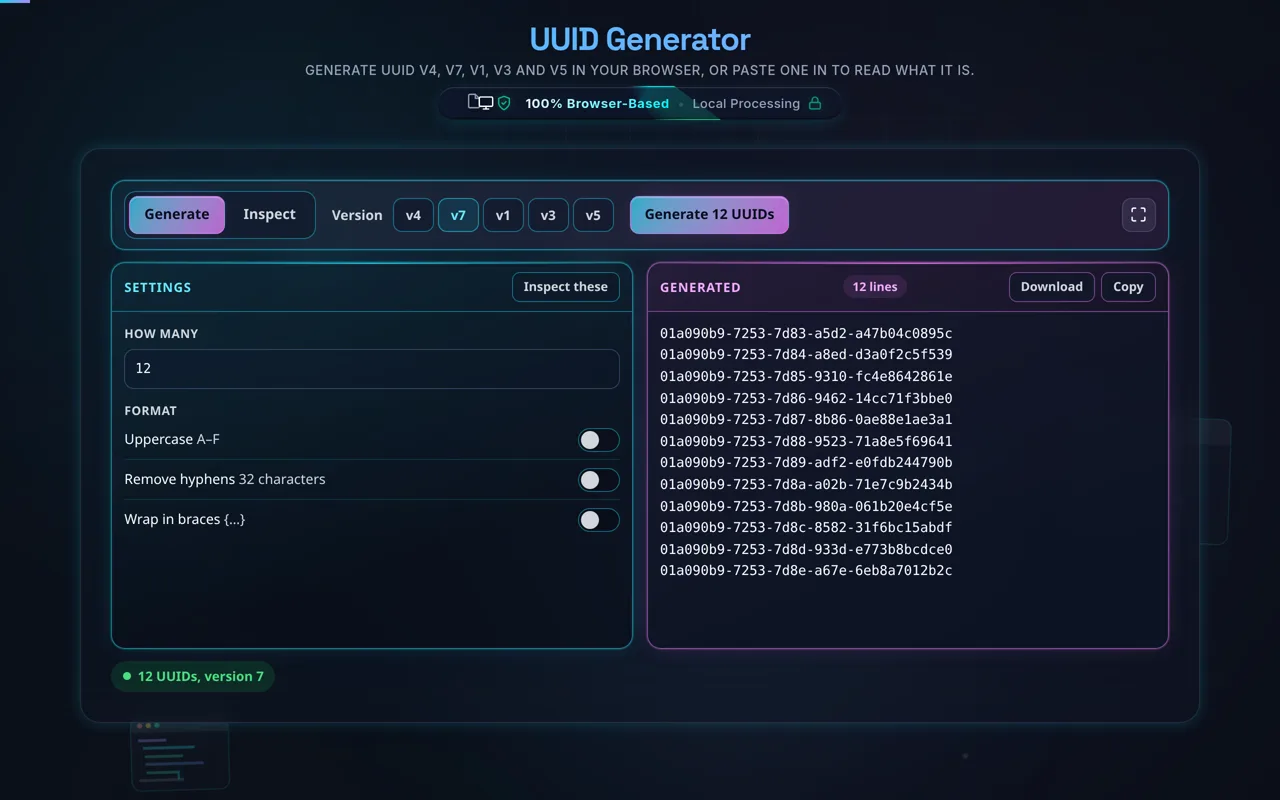
The tool with v7 selected and twelve UUIDs in the right pane, all beginning 01a090b9-7253-7d8 with the last character stepping from 3 to e, above a status line reading 12 UUIDs, version 7.
Twelve v7 UUIDs made in the same second. The first six bytes are a Unix millisecond timestamp, so the list is already in creation order.
Add a namespace and a name

Only v3 and v5 ask for these, and the fields appear when you pick one. The namespace is itself a UUID: DNS, URL, OID and X.500 are the four RFC 9562 defines, and you can paste one of your own. The name is any string.

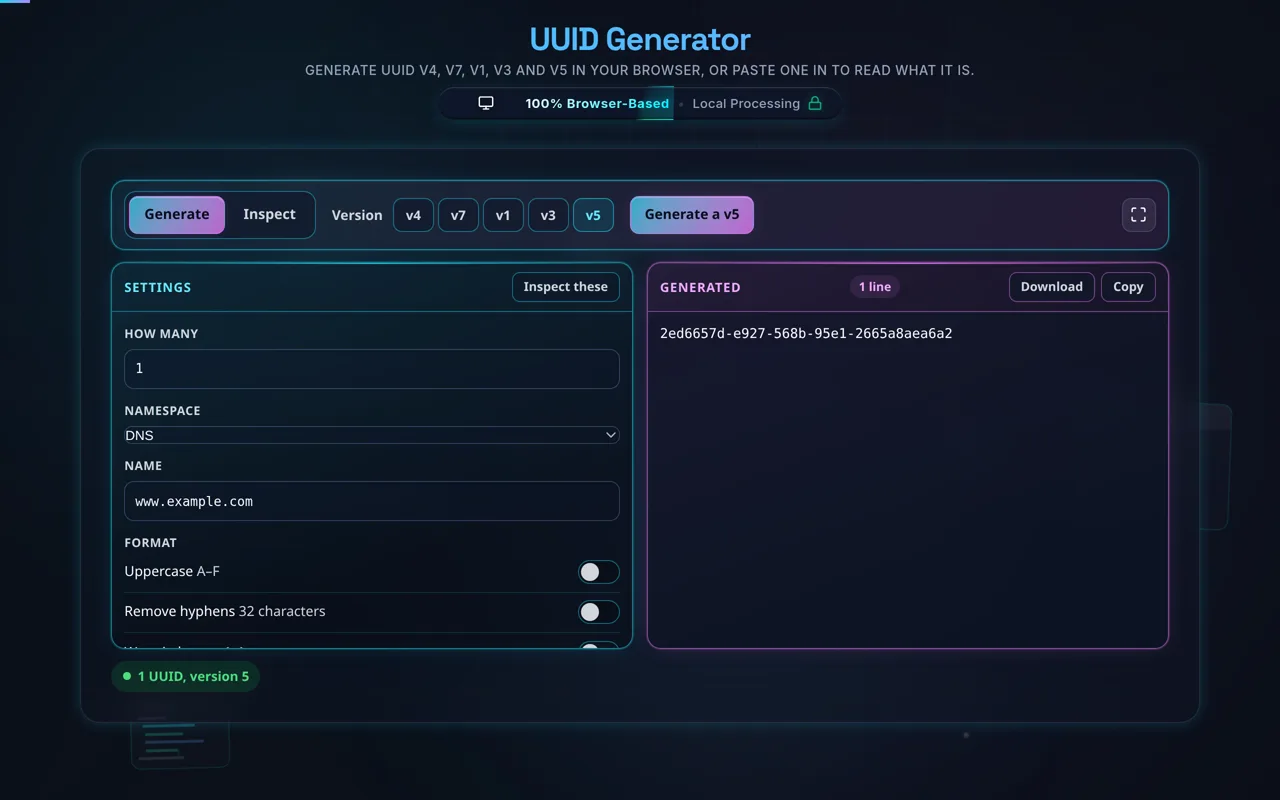
The result is a hash of the two, so it is reproducible anywhere: v5 of the DNS namespace and www.example.com is 2ed6657d-e927-568b-95e1-2665a8aea6a2 in this page, in Python's uuid5, and in every other correct implementation.

The tool with v5 selected, the DNS namespace chosen and www.example.com in the Name field. The right pane reads 2ed6657d-e927-568b-95e1-2665a8aea6a2 and the status line reads 1 UUID, version 5.
A name-based UUID is a hash, so the answer is fixed. This is the published value for the DNS namespace and www.example.com.
Set the formatting

Three switches: uppercase, hyphens off for the 32-character compact form, and braces for the {…} spelling Windows and .NET use. They apply to every line in the batch, and the inspector accepts all of them back — including urn:uuid: — so a UUID this tool wrote is a UUID this tool can read.

Set How many to anything up to 10,000.

Generate

The button says what it is about to do, batch size included. Generation is local and synchronous: 10,000 v4 UUIDs take a few milliseconds, and nothing is sent anywhere at any point.

One thing worth knowing about a batch of v3 or v5: they are deterministic, so the same namespace and name give the same UUID every time. Ask for 500 and you get the same line 500 times, and the status line says so rather than leaving you to spot it.

Copy all or download .txt

Copy puts the whole list on the clipboard. Download writes it to a .txt file named for the version and the count — uuid-v4-100.txt — one UUID a line, ready for a seed script or a fixture file.

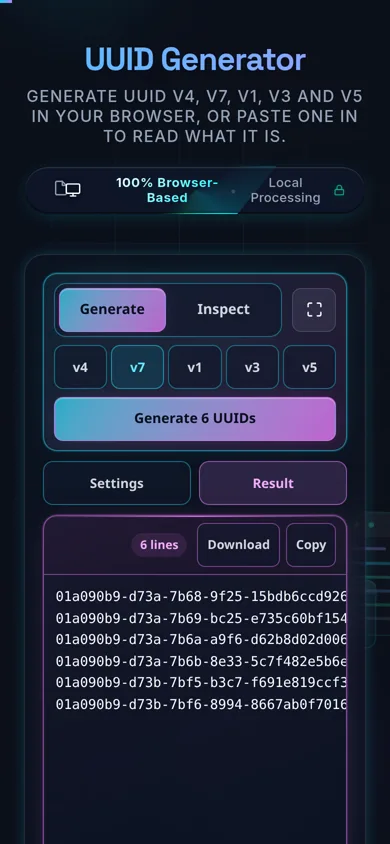
On a phone the two panes become tabs, and both buttons stay in the pane header.

The tool on a phone with the Result tab open, showing six v7 UUIDs all beginning 01a090 above a status line reading 6 UUIDs, version 7. Download and Copy sit in the pane header.
On a phone the settings and the result become tabs. The version buttons stay on the bar.
Inspect a UUID you already have

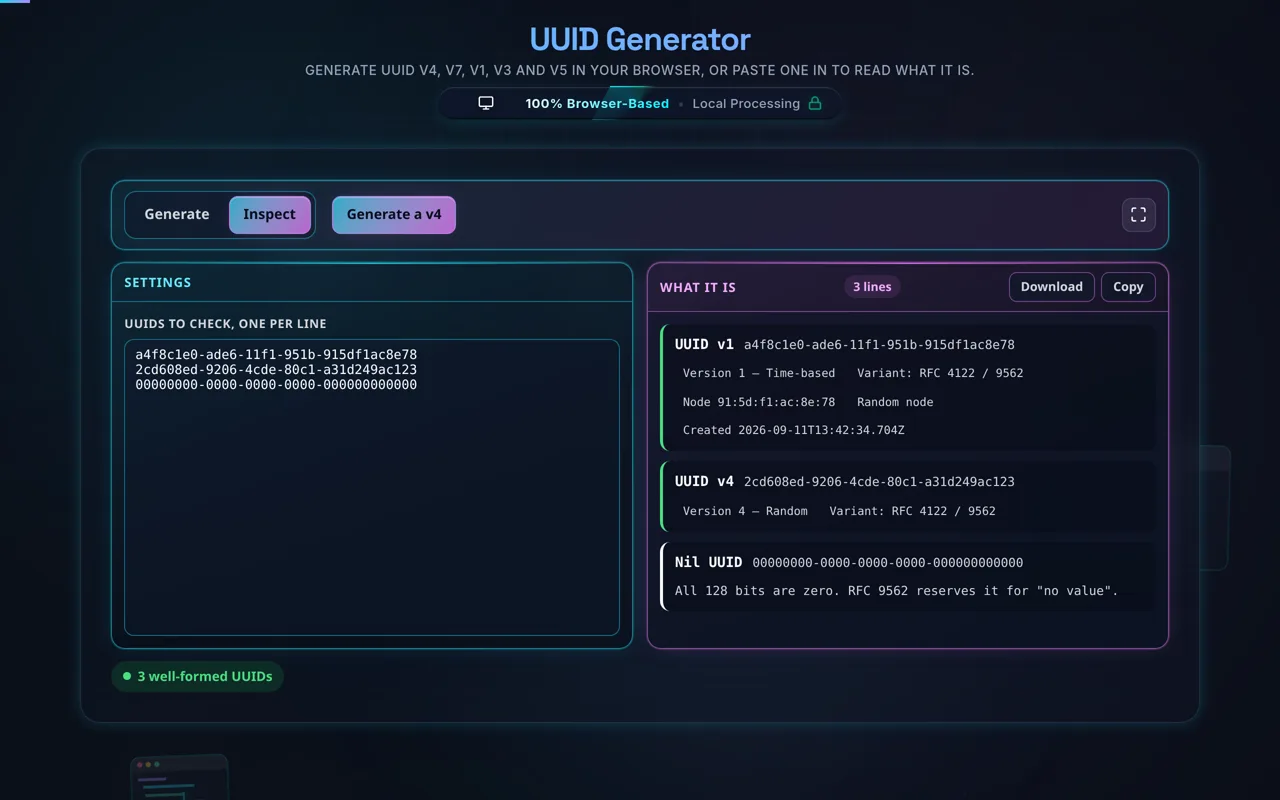
Switch to Inspect and paste one UUID a line. Each gets a card: the version and what that version means, the variant, and for v1 and v7 the timestamp it carries, decoded. A v1 also shows its node identifier and whether that node is random or MAC-derived.

Two special values are named rather than described: the all-zero Nil UUID and the all-ones Max UUID, both reserved by RFC 9562. Anything that is not 32 hex characters is rejected with the count it actually had.

The Inspect pane with three UUIDs pasted. The first card reads UUID v1 with tags for Version 1 Time-based, Variant RFC 4122 slash 9562, Node 91 colon 5d colon f1 colon ac colon 8e colon 78, Random node and Created 2026-09-11. The second reads UUID v4, and the third Nil UUID with a note that all 128 bits are zero.
The inspector decodes rather than pattern-matching: a v1 carries the time it was made and the node that made it.

Frequently Asked Questions

How do I generate a UUID?

Choose a version — v4 (random) is the usual pick, v7 if the id is going into a database index — and it generates immediately. For v3 or v5, add a namespace and a name. For many at once, set How many.

Adjust the formatting if you need it: uppercase, hyphens off, or braces. Then copy the list or download it as a .txt. Everything happens in your browser; nothing is uploaded.

Does this run in my browser and work offline?

Yes to both. UUIDs are generated entirely in your browser with JavaScript — there's no server involved, no logging, and no tracking. Once the page has loaded it keeps working with no internet connection, so you can generate IDs on a plane or an air-gapped machine. Nothing you generate is ever sent anywhere.

What's the difference between UUID versions 1, 3, 4, 5 and 7?

Version 4 is random: 122 unpredictable bits and no meaning. Version 7 is also mostly random, but its first 48 bits are the Unix millisecond it was created in, so v7 ids sort by creation time. Version 1 is the older time-based form — a 60-bit timestamp counted in 100-nanosecond intervals since 1582, plus a node identifier. Versions 3 and 5 are name-based: they hash a namespace and a name, v3 with MD5 and v5 with SHA-1, so the same inputs always produce the same UUID.

Put another way: v4 is unpredictable, v7 and v1 are ordered, v3 and v5 are reproducible. Most applications want v4, and anything going into a database index is worth generating as v7.

Which version should I use?

Use v4 for general-purpose ids — random, unpredictable, no inputs needed. Use v7 when the ids become a primary key or an index: the timestamp prefix keeps inserts at the end of the B-tree instead of scattering them, which is the difference people notice on a large table. Use v5 when you need the same name to map to the same id every time, and prefer it over v3.

Use v1 only if you specifically need its shape and do not mind the embedded timestamp and node. When in doubt: v4, or v7 if it is going in a database.

Is a UUID guaranteed to be unique?

Not literally guaranteed, but the odds of a collision are astronomically small. A v4 UUID has 122 random bits — about 5.3 × 10³⁶ possibilities — so you'd have to generate billions per second for many years before a duplicate became likely. In practice, treat v4 UUIDs as unique. v3/v5 are unique per distinct name within a namespace, and v1 relies on time plus node to avoid collisions.

Is a v4 UUID random and secure?

The randomness is strong. Every path here calls crypto.getRandomValues, the browser's cryptographically secure generator — there is no Math.random fallback anywhere in the page, which is worth saying because that fallback is the usual way this claim stops being true.

That said, unpredictable is not the same as secret. A v4 UUID has 122 bits of entropy, which is plenty, but for passwords, tokens and API keys use a purpose-built secret generator rather than repurposing an identifier.

What are namespace UUIDs (v3 and v5)?

They're deterministic UUIDs derived by hashing a namespace (itself a UUID — DNS, URL, OID, X500, or a custom one) together with a name string. The same namespace and name always produce the same UUID, which is perfect for reproducible IDs — for example, always mapping a given URL to the same identifier. v5 uses SHA-1 and is preferred; v3 uses MD5 and exists mainly for compatibility.

Can I generate many UUIDs at once?

Yes — set How many, up to 10,000, and the whole batch is generated in one go with your formatting applied to each line. Copy All takes the list to the clipboard; Download writes a .txt named for the version and the count, one UUID a line.

One exception is worth knowing: v3 and v5 are deterministic, so a batch of them is the same UUID repeated. The status line says so rather than leaving you to spot it.

Can I validate or check a UUID?

Yes — switch to Inspect and paste one per line. Each line gets read rather than pattern-matched: the version and what that version means, the variant, and for v1 and v7 the timestamp it carries, decoded to a date. A v1 also shows its node identifier and whether that node is random or MAC-derived.

Every spelling parses — canonical, compact with no hyphens, braced, and urn:uuid: — so a UUID this tool formatted is one it can read back. The all-zero Nil UUID and the all-ones Max UUID are named rather than called invalid, and anything that is not 32 hex characters is rejected with the count it actually had. It checks the string, not whether the id exists in your system.

Should I use a UUID as a secret or token?

Generally, no. A UUID is an identifier, designed to be unique, not unguessable. v1, v3, and v5 are partly or fully predictable, so they're unsafe as secrets. A v4 UUID is unpredictable (122 random bits), so it's better than the others, but a dedicated secret from a secret generator — with your chosen length and character set — is the right tool for passwords, API keys, and tokens.

Does UUID v1 leak information?

It can. A v1 UUID embeds the timestamp of when it was created and a node identifier (historically derived from a network MAC address). That means someone reading a v1 UUID may infer roughly when it was generated, and in older implementations, something about the machine. If that metadata shouldn't be exposed, avoid v1 and use v4, which contains no such information.

Is it free, and are there limits?

Yes, completely free — no payment, no signup, no account, and no usage caps or watermarks. Since everything runs in your browser, there's nothing for us to meter; the only practical limit is your device's performance on very large batches. Use it as much as you like, including offline once the page has loaded.

Still have questions?

If you can't find the answer you're looking for, feel free to contact our support team.

Contact Us