All Excel Tools

Seven tools for spreadsheets, none of which upload your file.

100% Browser-Based Local Processing

Every tool here runs in the browser tab you have open and none of them uploads your workbook. The five that read a file convert one sheet at a time, and each one prints a summary of what your data lost on the way through.

Privacy Focused

Local Processing. The values you enter never leave your device.

Instant Results

Fully Client-Side. Runs instantly in your browser.

No Signup

No accounts. No API keys. Just open and use.

Browser Based

No installs, no sign-ups, no conversion limits.

Seven Excel tools, and what each one can and cannot keep

This is the index for seven Excel tools that run in your browser and never upload the file you give them. Two work on typed input: the serial date converter and the column letter converter. Five read a workbook and produce something else, whether that is a Markdown table, SQL INSERT statements, JSON, an HTML table or a chart. What separates them is what the target can hold. HTML keeps merged cells and the other three formats cannot. JSON refuses NaN and Infinity because they are not valid JSON. Every tool tells you which of your data survived.

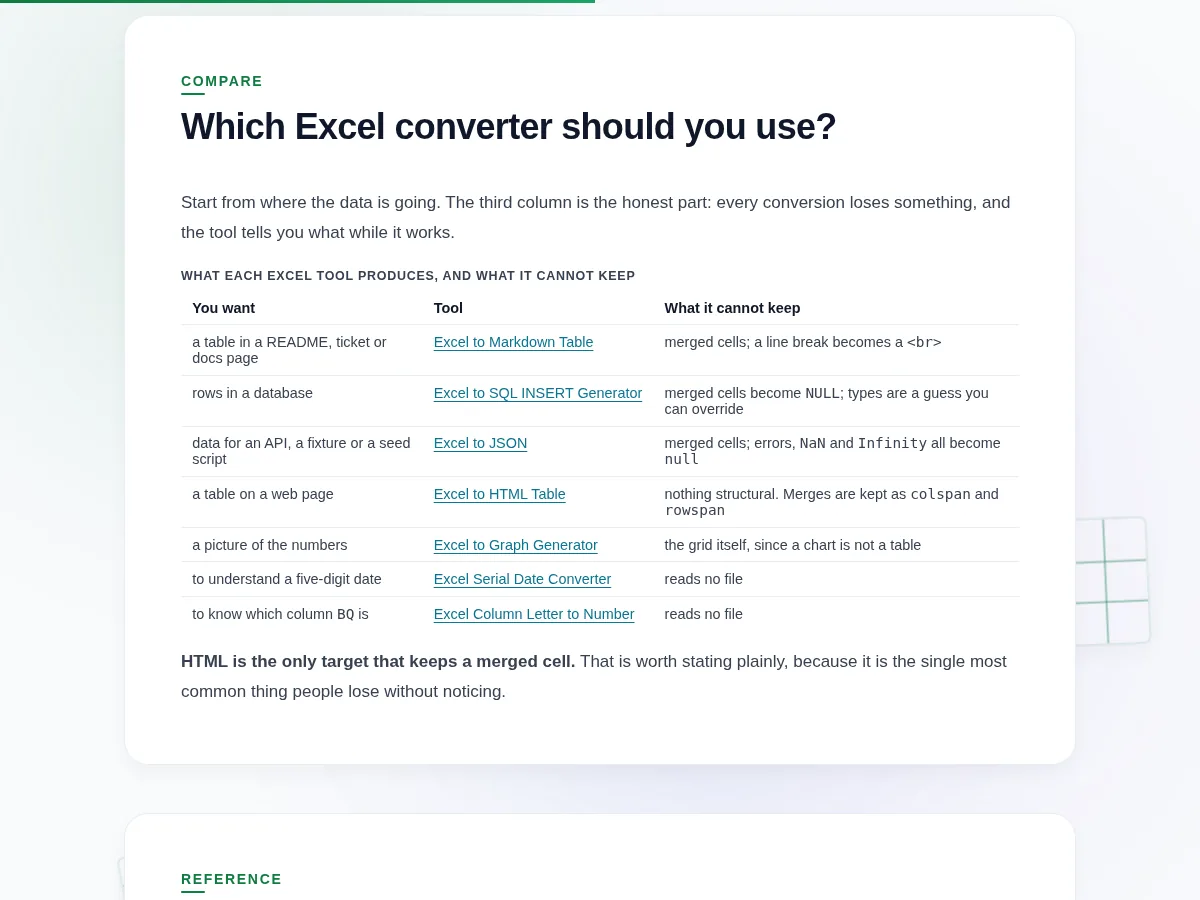
Which Excel converter should you use?

Start from where the data is going. The third column is the honest part: every conversion loses something, and the tool tells you what while it works.

What each Excel tool produces, and what it cannot keep
You want Tool What it cannot keep
a table in a README, ticket or docs page Excel to Markdown Table merged cells; a line break becomes a <br>
rows in a database Excel to SQL INSERT Generator merged cells become NULL; types are a guess you can override
data for an API, a fixture or a seed script Excel to JSON merged cells; errors, NaN and Infinity all become null
a table on a web page Excel to HTML Table nothing structural. Merges are kept as colspan and rowspan
a picture of the numbers Excel to Graph Generator the grid itself, since a chart is not a table
to understand a five-digit date Excel Serial Date Converter reads no file
to know which column BQ is Excel Column Letter to Number reads no file

HTML is the only target that keeps a merged cell. That is worth stating plainly, because it is the single most common thing people lose without noticing.

Five things a spreadsheet holds that most formats do not

Defined once here so each tool can be short about it. All five appear in the quirk summary the converters print above their output.

Serial dates. A date cell is the number 45292, not 2024-01-01. Every converter formats these by default and offers the raw serial. The serial date converter explains the numbering and why serial 60 has no valid date.

Formulas. The file holds both the formula and the last value Excel saved for it. Converters emit the cached value and count how many cells were formulas, because a cached value can be stale if the workbook was edited outside Excel.

Merged cells. The value lives in the top-left cell of the merge. Only the HTML converter can represent that; the others put the value top-left and leave the rest empty or null, and count what they flattened.

Float precision. Excel stores 15 significant digits and the converters emit exactly what is stored. Nothing is re-rounded on the way through, including by us.

Leading-zero text. 007 is text, not the number seven. It stays text everywhere, and the SQL generator is where this matters most, because a type scanner will call that column an integer and drop the zeros for good.

The Excel tools, at a glance

The Excel tools hub showing seven cards grouped into the five that read a workbook and the two that decode what Excel shows you.
Seven tools in two groups: five read a file, two answer a question about one
Comparison table showing what each Excel conversion loses, with HTML the only target that keeps a merged cell as colspan and rowspan.
What each target cannot keep. HTML is the only one that holds a merged cell

Frequently Asked Questions

Which Excel tool should I use?

Start from where the data is going. A README or a ticket wants the Markdown table converter. A database wants the SQL generator. An API or a fixture file wants JSON. A web page wants the HTML table converter, which is also the only one that keeps merged cells. If you only need to understand a number Excel showed you, the two typed converters need no file at all.

Do any of these upload my spreadsheet?

None of them. Every tool here parses your workbook in the browser tab you have open, using a library served from this domain, and makes no network request while it converts. You can check that in your browser's network tab on any of the seven. They also keep working with the connection switched off, which is the simplest way to confirm it.

Which formats keep merged cells?

Only HTML. It has colspan and rowspan, so a merged region comes out as one cell spanning the right number of rows and columns. Markdown, JSON and SQL have no equivalent, so in those three the value lands in the top-left cell and the rest come out empty or null. Each tool counts how many merges it flattened rather than losing them quietly.

Why do my dates show as numbers in every converter?

Because Excel stores a date as a number and only displays a date because the cell is formatted as one. Serial 45292 is 2024-01-01. Every file-reading tool here formats those by default and offers the raw serial as an option. The serial date converter explains the numbering, including serial 60, which maps to a date that never existed. That refusal is deliberate.

What file types do these read?

The five file-reading tools take .xlsx and .xls, and the graph generator also takes .csv. A workbook with several sheets lets you pick the sheet first, because every one of these converts one grid at a time. A file the parser does not recognise is refused by name, with the extension it actually saw. The two typed converters read no file at all.

Is there a row limit?

The four format converters cap output at 5,000 rows by default and let you lift it once from the page. The cap exists because rendering hundreds of thousands of rows into an output pane freezes the tab, and a frozen page is worse than a truncated one. Either way the true row count is stated, so you always know what was left out.

Do these work offline?

Yes, once a page has loaded. Everything runs in the browser, so there is no request to fail when the connection drops. Load the tool while you have a network, disconnect, and keep working. That is also the easiest way to test the privacy claim on any of the seven, because a tool that had to upload your file would stop.