JSON Validator

Every problem, with the line it is on — and a repaired copy.

100% Browser-Based • Local Processing
Rules
Your JSON
Report
Paste or type JSON and the report appears here.

Waiting for JSON Depth 0 Keys 0 Values 0 Size 0 B

Privacy Focused

🔒 Local Processing. Your code never leaves your device.

Instant Results

🌐 Fully Client-Side. Runs instantly in your browser.

No Signup

⚡ No accounts. No API keys. Just open and use.

Browser Based

🚀 No installs, no CLI, no build step.

Validate JSON, and see what is wrong with it

A JSON validator checks whether a document follows the syntax rules of RFC 8259 — the quoting, the commas, the brackets — and tells you where it does not. This one parses in your browser as you type, names the line and column of every problem it finds, and can hand you a repaired copy. Your JSON is never uploaded.

Most JSON you have to debug arrives broken from somewhere else: an API response cut off halfway, a config file someone hand-edited, an object copied out of JavaScript where the rules are looser. JSON.parse will tell you that it failed and give you one position; it will not tell you that there are seven other things wrong, or that the same key is set twice.
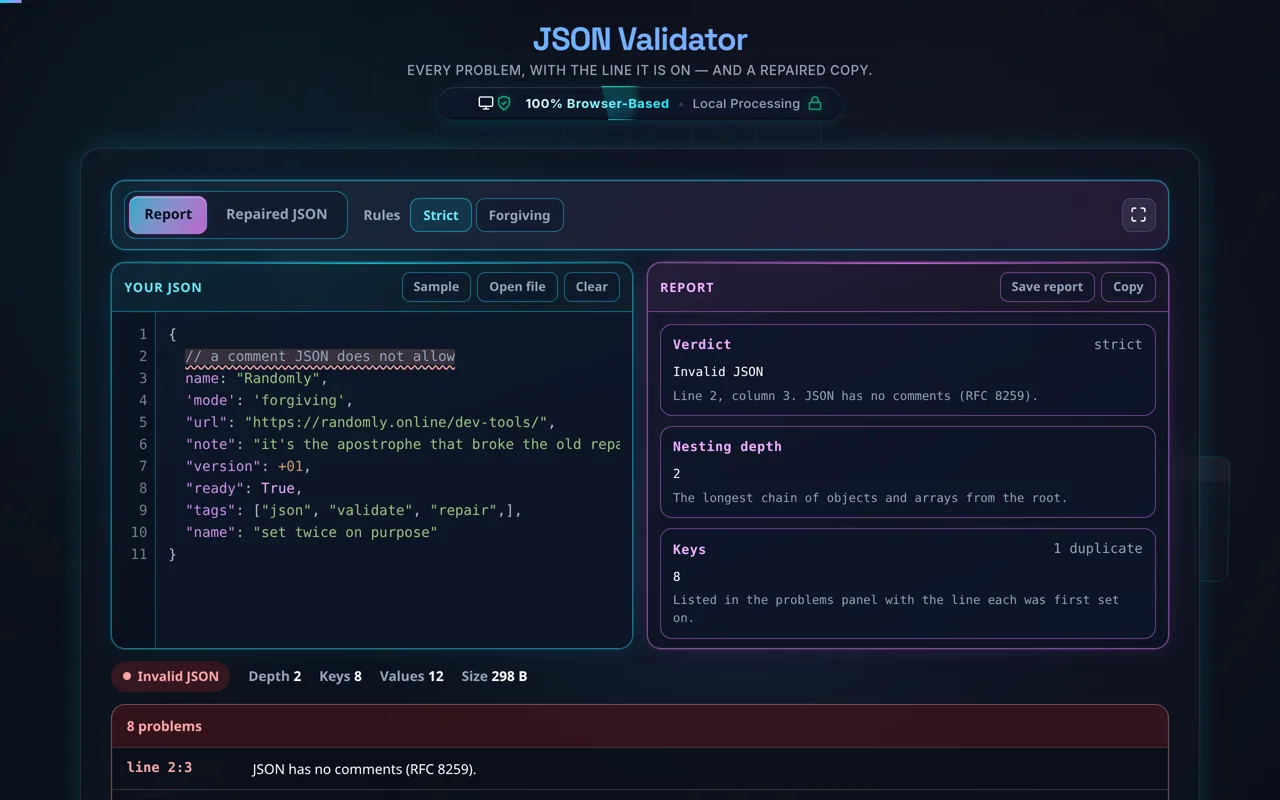
The JSON validator in dark mode: an eleven-line document in the cyan editor pane on the left with the illegal comment on line 2 underlined in red, and the magenta pane on the right showing the report — a Verdict card reading "Invalid JSON" and naming line 2, column 3, then Nesting depth 2 and Keys 8 with one duplicate
The report names the verdict, the depth, the key count and the value breakdown. The problem list under the panes names every problem, and clicking one selects that line in the editor

Paste your JSON, or open a local file. The report gives you the verdict, the nesting depth, how many keys there are and how many are set twice, a breakdown of the values by type, and the size. Under the panes, a problem list names every issue with the line and column it is on — click one and the editor selects that line.

Well-formed is not the same as correct. A document can pass every check here and still carry the wrong price, a misspelled key your code never reads, or a missing field that matters. This checks the syntax; the meaning is yours and your schema's.

As with every tool here, privacy is the point. Parsing, repair and highlighting all happen in your browser — there is no server, no upload, no logging. That matters more here than on most pages, because the JSON people need to validate is usually a real request or response body: API keys, tokens, customer records. Once the page has loaded it keeps working offline.

For pretty-printing valid JSON see the JSON Formatter, and for shrinking it the JSON Minifier. To go between formats there is CSV to JSON and JSON to CSV; to read a token's payload, the JWT Decoder.
When a JSON validator helps

  • A broken API response. Find the character that made the parse fail, and the ones after it.
  • A hand-edited config. Catch the trailing comma or missing brace before the deploy does.
  • JSON copied out of JavaScript. Unquoted keys, single quotes and comments are legal there and not here.
  • A payload with a duplicated key. Every parser accepts it and they do not all keep the same value.
  • Sensitive data. Check a real response body without sending it anywhere.
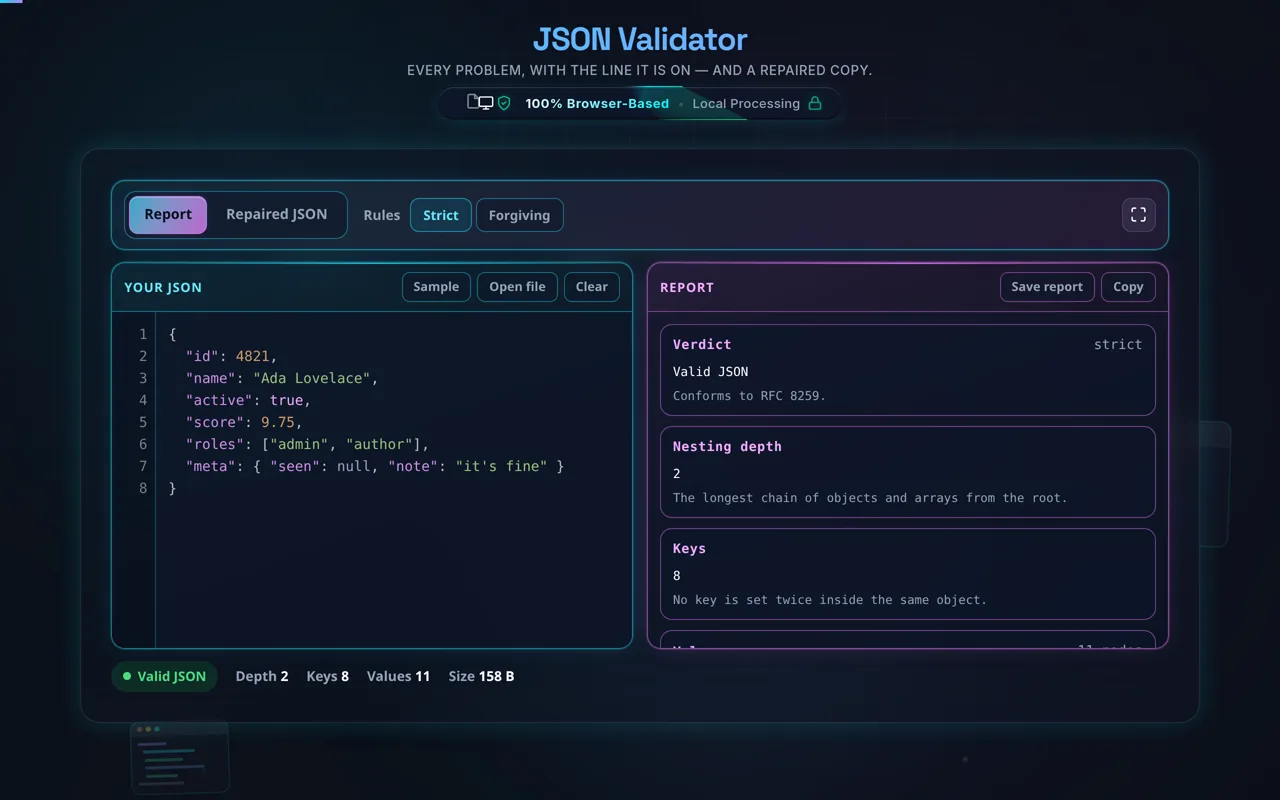
The validator in dark mode with an eight-line user record in the editor: the status pill reads "Valid JSON", there is no problem panel at all, and the report reads Valid JSON, conforms to RFC 8259, with a nesting depth of 2 and 8 keys none of which is set twice
A document with nothing wrong with it: the problem list disappears and the report is a description rather than a complaint

How to validate JSON

Step 1: Paste or type your JSON

Drop it into the left pane, or use Open file to load a .json from your machine. Nothing is sent anywhere — the file is read by your own browser. Checking runs as you type, so there is no Validate button to press. Sample loads a document built out of the mistakes this tool is for.

Step 2: Read the verdict and the problem list

The pill under the panes says Valid JSON, Invalid JSON or Duplicate keys. The report beside the editor gives the depth, the key count and the value breakdown. Under both, the problem list names every issue with its line and column; click one and the editor selects that line.

Step 3: Switch between Strict and Forgiving

Strict is RFC 8259: a comment, a trailing comma, a single quote or an unquoted key makes the document invalid. Forgiving accepts those six things and marks them instead. The mode changes the verdict, not how much you are told — both list the same problems.

Step 4: Open Repaired JSON

The Repaired JSON view shows a conforming version: quotes straightened, keys quoted, comments and trailing commas dropped, True and None rewritten, unclosed brackets closed. It comes from the same parse as the verdict, so the two cannot disagree. Read it before you use it — where the document was ambiguous, the repair had to choose.

Step 5: Copy or download the result

Copy and Download hand over whichever pane you are looking at: the repaired document as repaired.json, or the report as a text file you can paste into an issue. Nothing is uploaded either way.

What the repair does, and what it will not do

The repair is not a set of find-and-replace rules. It is the same walk over the same tokens that produced the verdict, so it knows when it is inside a string — which is why {"url":"https://x.com"} keeps its // instead of losing the rest of the line to an imagined comment, and why the apostrophe in "it's" survives having the quotes straightened.

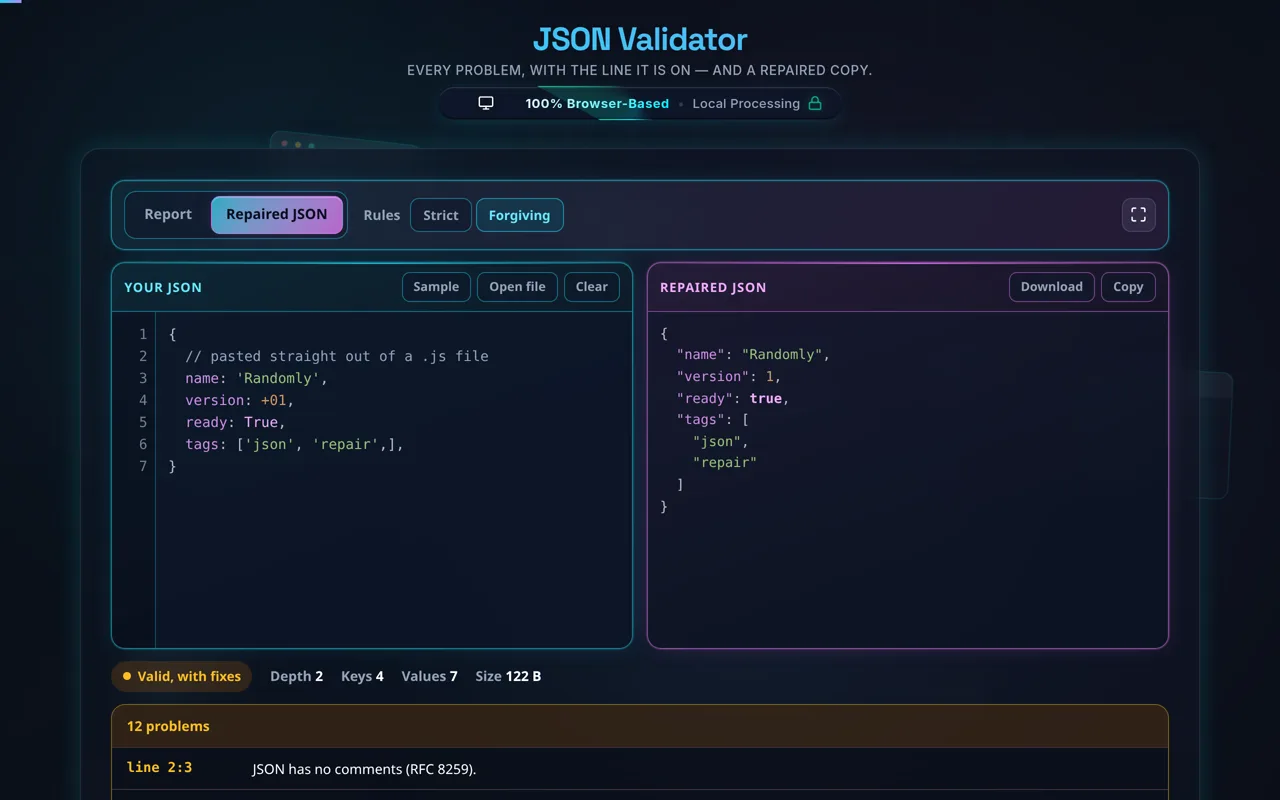
The validator in Forgiving mode: the left pane holds an object copied out of JavaScript with a comment, unquoted keys, single quotes, +01 and True, and the right pane shows the same document rewritten as conforming JSON with double-quoted keys, 1, and true
The repaired document comes out of the same parse as the verdict beside it, so the two cannot disagree

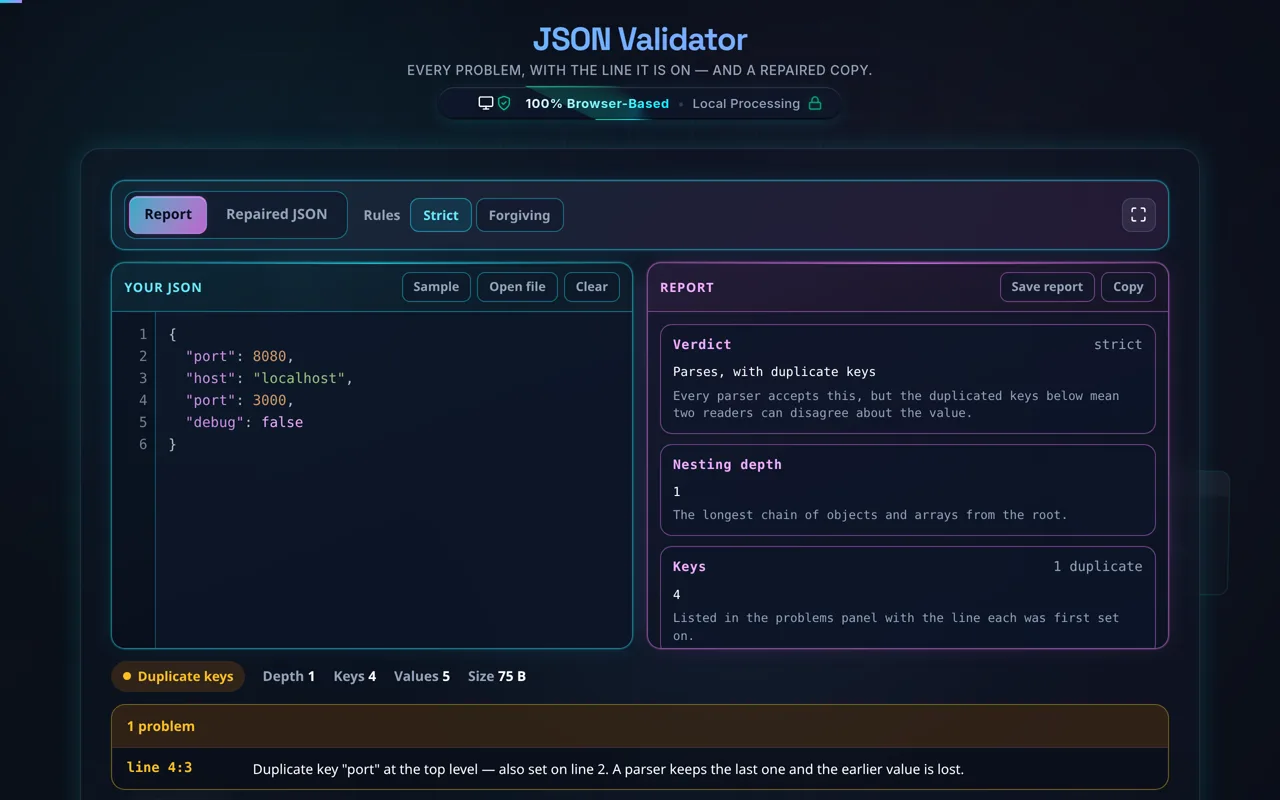
Duplicate keys are legal and still a bug. {"port":8080,"port":3000} parses everywhere; what each parser keeps is not guaranteed to be the same, and the value you meant may be the one thrown away. The report counts them and the problem list names each one with the line it was first set on.

A six-line configuration object in the editor with the key "port" set twice, on lines 2 and 4, and the report showing the status pill reading "Duplicate keys" and the Keys card reporting 4 keys with 1 duplicate
Valid JSON, and still worth knowing about: the second "port" wins, and the first value is gone

Two honest limits. This is not schema validation — it checks the syntax, not whether your fields are the ones your application expects; that is what JSON Schema is for. And syntax colouring stops above about 400 KB: the parse stays fast at any size, but drawing a coloured span around every token in a multi-megabyte document is what locks a tab, so past that point the text is shown plain and the report is unchanged.

If you need the data somewhere else afterwards: JSON to CSV for a spreadsheet, JSON to PDF for a document, Base64 Encoder / Decoder for an encoded payload, Epoch Time Converter for the timestamps inside it, and the JavaScript Formatter for the code that produced it.

Frequently Asked Questions

How do I validate JSON?

Paste or type your JSON and the tool checks it in real time, reporting whether it's well-formed. If it isn't, you get the error's location — line and column — and the reason, so you can jump straight to the problem. Open Repaired JSON for a conforming copy, then copy it. Everything happens in your browser; nothing is uploaded.

Does this upload my JSON, and does it work offline?

No upload, and yes it works offline. All validation and repair happen in your browser using JavaScript — there's no server receiving your data, no logging, and no tracking. That matters because JSON often carries real request and response payloads. Once the page has loaded it keeps working with no internet connection, which you can confirm in your browser's network tab.

What errors does it catch?

Any syntax error that makes the JSON not well-formed: missing or extra commas, trailing commas, single quotes instead of double, unquoted keys, unterminated strings, mismatched or missing brackets and braces, invalid escapes, and numbers JSON does not accept such as +1, .5 or 0x1f. It also reports duplicate keys, which are legal JSON and still usually a bug. Every problem is listed with its line and column, not just the first one.

How does the repair work, and can I trust it?

The repair is the same walk over the same tokens that produced the verdict, so the two cannot disagree — it writes out what it actually parsed rather than running find-and-replace over the text. It straightens quotes, quotes bare keys, drops comments and trailing commas, rewrites True/None/NaN, fixes number spellings like +01 and .5, and closes anything left open. Because it knows when it is inside a string, a URL keeps its // and an apostrophe survives. Where the document was genuinely ambiguous the repair still had to choose, so read it before you use it.

What's the difference between validating and formatting JSON?

Validating checks whether the JSON is well-formed — a pass/fail on the syntax rules. Formatting (pretty-printing) re-indents already-valid JSON to make it readable, and minifying strips whitespace to make it small. This tool validates and can repair; for pure formatting or minifying, use the dedicated JSON Formatter and JSON Minifier. You generally validate first, then format the clean result.

Does it check against a JSON Schema?

Core validation checks that your JSON is syntactically well-formed, which is different from schema validation — confirming your data matches a defined structure (required fields, types, allowed values) via JSON Schema. Where schema testing is offered, it goes beyond syntax to check shape. But even a perfect schema match doesn't guarantee the values are meaningful for your app, only that they fit the declared structure.

Does valid JSON mean my data is correct?

No — and it's an important distinction. Validation confirms the JSON is well-formed: quotes, commas, and brackets are all correct. It says nothing about whether the values are right for your application — a valid document can still have a wrong price, a misspelled key your code doesn't expect, or a missing field that matters. Use the validator for syntax, and your own logic or a schema for correctness.

What are the most common JSON errors?

Trailing commas (a comma after the last item), single quotes instead of double quotes (JSON requires double), unquoted object keys, missing commas between items, and unescaped characters inside strings. Copy-pasting from JavaScript or a config file is a frequent source, since those often allow things JSON doesn't. The repair handles exactly these, and every one is listed with the line and column it is on.

Does it show where the error is?

Yes. When JSON is invalid, the tool reports the line and column of the first error along with a description — for example "Trailing comma before }" or "Missing colon after the property name". Every problem is listed, not only the first, and clicking one selects that line in the editor. Because a JSON error often comes from something just before the character that was flagged — a missing comma on the line above — the position is a starting point rather than always the culprit.

Can JSON have comments or trailing commas?

Not in standard JSON. The JSON spec has no comments and no trailing commas, so // like this or a comma after the last array item makes the document invalid — even though editors and JavaScript often allow them. Formats like JSON5 and JSONC add those features, but they aren't JSON. Strict mode follows the spec; Forgiving mode accepts both and marks them, and Repaired JSON removes them.

Can it handle large JSON?

Usually yes. Because it runs locally the limit is your device's memory and CPU rather than a server cap, and the parser reads the document once, in a single pass, so size costs time and not much else. One honest detail: above about 400 KB the syntax colouring is turned off and the text is shown plain, because drawing a coloured span around every token in a multi-megabyte document is what locks a tab. The verdict, the report and the problem list are unchanged.

Is it free, and are there limits?

Yes, completely free — no payment, no signup, no account, and no usage caps or watermarks. Since everything runs in your browser, there's nothing for us to meter; the only practical limit is your device's performance on very large JSON. Use it as much as you like, including offline once the page has loaded.

Still have questions?

If you can't find the answer you're looking for, feel free to contact our support team.

Contact Us