Convert & Encode Text

Strip HTML, remove accents, build URL slugs, translate Morse and NATO, turn numbers into words or Roman numerals.

100% Browser-Based Local Processing

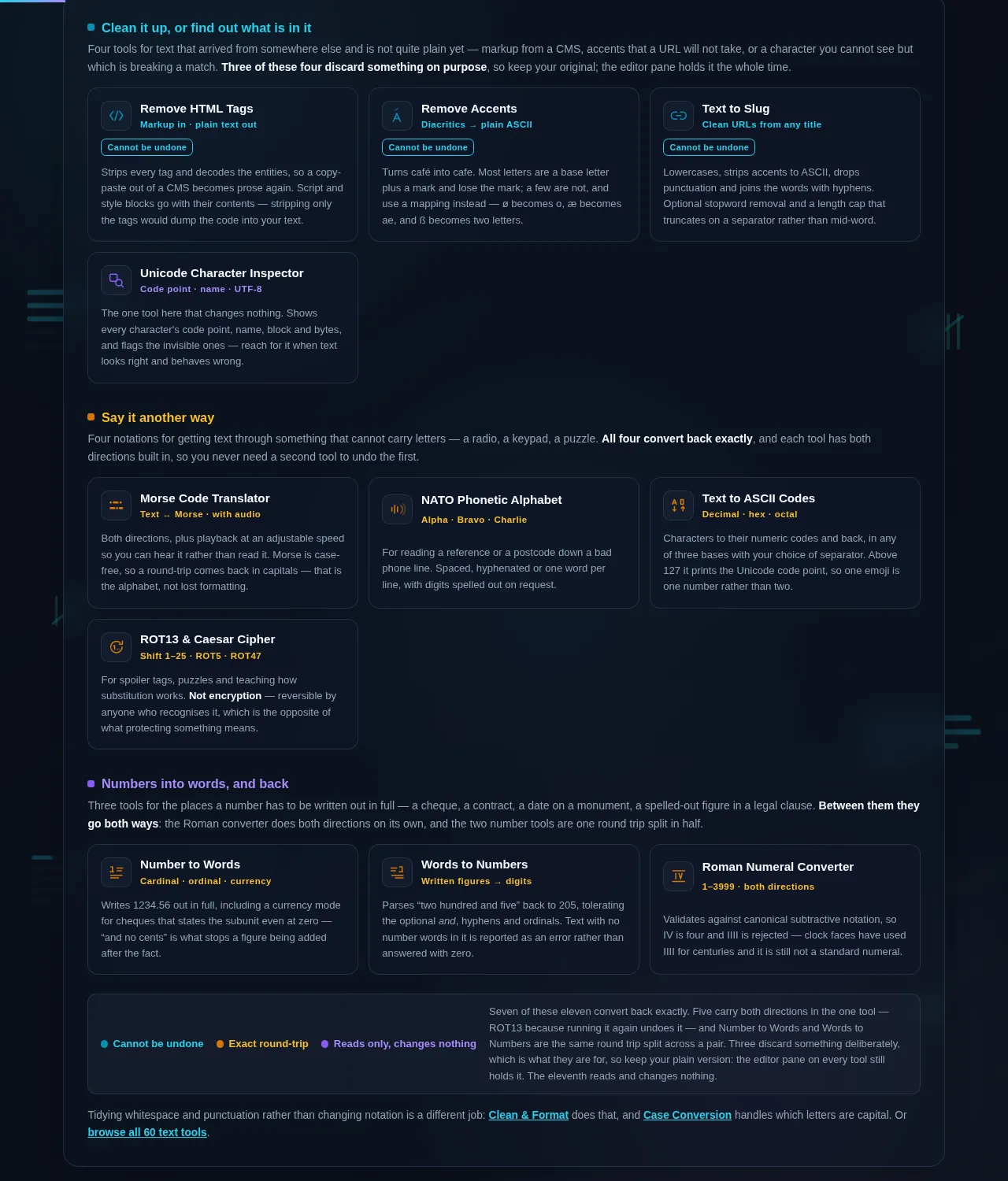
Clean it up, or find out what is in it

Four tools for text that arrived from somewhere else and is not quite plain yet — markup from a CMS, accents that a URL will not take, or a character you cannot see but which is breaking a match. Three of these four discard something on purpose, so keep your original; the editor pane holds it the whole time.

Say it another way

Four notations for getting text through something that cannot carry letters — a radio, a keypad, a puzzle. All four convert back exactly, and each tool has both directions built in, so you never need a second tool to undo the first.

Numbers into words, and back

Three tools for the places a number has to be written out in full — a cheque, a contract, a date on a monument, a spelled-out figure in a legal clause. Between them they go both ways: the Roman converter does both directions on its own, and the two number tools are one round trip split in half.

Cannot be undone Exact round-trip Reads only, changes nothing Seven of these eleven convert back exactly. Five carry both directions in the one tool — ROT13 because running it again undoes it — and Number to Words and Words to Numbers are the same round trip split across a pair. Three discard something deliberately, which is what they are for, so keep your plain version: the editor pane on every tool still holds it. The eleventh reads and changes nothing.

Tidying whitespace and punctuation rather than changing notation is a different job: Clean & Format does that, and Case Conversion handles which letters are capital. Or browse all 60 text tools.

Privacy Focused

🔒 Local Processing. Your text never leaves your device.

Instant Results

🌐 Fully Client-Side. Runs instantly in your browser.

No Signup

⚡ No accounts. No API keys. Just open and use.

Browser Based

🚀 No installs, no sign-ups, no character limits.

Which of these conversions can you undo?

These eleven tools rewrite text in a different notation without changing what it says — HTML to plain text, letters to Morse or NATO words, numbers to words or Roman numerals, characters to their codes. Eight of the conversions reverse exactly. Three discard information and cannot be undone.

Every tool on this page answers the same shape of question: *I have this text, and something else needs it written differently.* A URL needs a slug. A radio operator needs NATO words. A cheque needs the amount in words. A database needs plain text where a CMS gave you markup. The content does not change; the notation does.

That sounds trivial until you need it back. Eight of these eleven conversions are exact round-trips — Morse, NATO, character codes, Roman numerals, numbers to words and back, and the two ciphers. Convert, convert again, and you have precisely what you started with. Those are safe to use on text you have no other copy of.

Three of them throw something away, permanently. Removing accents turns *café* into *cafe* and there is nothing in the output that says which *e* used to carry an acute. Stripping HTML deletes the tags and keeps the words, so the structure is simply gone. Building a slug lowercases, drops punctuation and may cut the string short. Each of these is doing exactly what it was asked to do — that is the point of the tool — but none of them is undoable, and each one's page says so above the result.

The distinction matters most in the place people least expect it. ROT13 and the Caesar cipher are perfectly reversible and still not security. They are reversible *by anybody*, which is the opposite of the property you want from encryption. They are on this page because they are genuinely useful for puzzles, spoiler tags and teaching, and the tool says plainly what it is not.

Everything runs as a lookup table or a few lines of arithmetic in your own browser. Nothing is uploaded, and your original stays on screen beside the result the whole time.
How to convert text

Step 1: Pick the tool for the notation you need

If you are not sure which, the groups below sort them by what they do rather than what they are called.

Step 2: Paste or type your text into the left pane

The converted version appears on the right as you type, and your original is never touched.

Step 3: Set the options if the tool has any — a separator for slugs and character codes, a shift for the Caesar cipher, a speed for Morse audio, currency mode for numbers to words

Set the options if the tool has any — a separator for slugs and character codes, a shift for the Caesar cipher, a speed for Morse audio, currency mode for numbers to words.

Step 4: Read the note above the result

On the three lossy tools it says what was discarded; on the reversible ones it tells you how to get back.

Step 5: Copy the result, or use Send to to carry it straight into another text tool without it ever touching the clipboard or the address bar

Copy the result, or use Send to to carry it straight into another text tool without it ever touching the clipboard or the address bar.

Convert & Encode Text in action

The Convert & Encode cluster grid, eleven tools grouped by whether they clean text up, rewrite it in another notation, or convert numbers, dark mode
The eleven-tool cluster grid
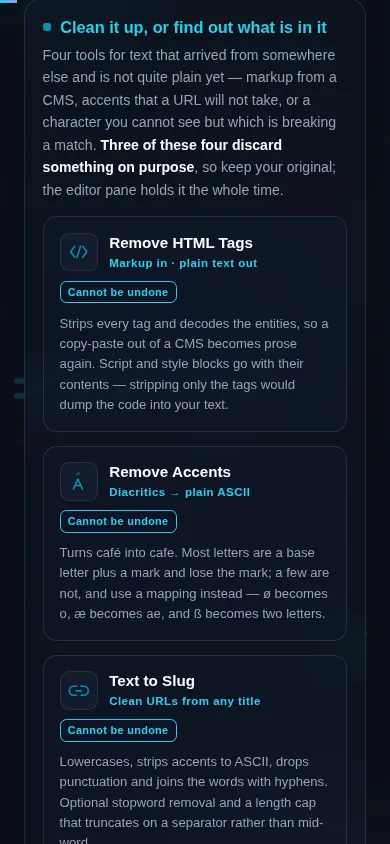
The Convert & Encode cluster on a phone, the eleven tool cards stacked in a single column
Mobile (grid stacked to one column)

Reversible, lossy, and the one that only looks secure

The reversible eight. Morse, NATO phonetic, character codes, Roman numerals, numbers to words, words to numbers, ROT13 and the Caesar cipher all convert back exactly. Each of those tools has both directions built in, so you never need a second tool to undo the first. Two notes worth knowing: Morse and NATO are case-free alphabets, so a round-trip comes back in capitals — that is the alphabet, not a bug. And Roman numerals only cover 1 to 3999 in standard form, so anything outside that range is rejected rather than approximated.

The lossy three. Remove Accents, Remove HTML Tags and Text to Slug each discard something on purpose. Keep your original if you might need it — the editor pane still holds it, and every one of these three pages says so where you will see it rather than in a footnote.

The one that only looks secure. ROT13 shifts each letter thirteen places; the Caesar cipher shifts it by however many you choose. Both are trivially reversible by anyone who notices what they are, which is why they were broken as serious ciphers roughly two thousand years ago. Use them to hide a spoiler, set a puzzle or teach how substitution works. Do not use them to protect anything, and do not let the word "cipher" suggest otherwise — the tool's own page carries that warning directly under the result.

And one that is not a conversion at all. The Unicode Character Inspector does not rewrite your text; it shows you what is already in it — every character's code point, name, block, category and UTF-8 bytes, plus a flag on any invisible or zero-width character hiding in the string. It is the tool to reach for when text looks right and behaves wrong: a name that will not match, a password field that rejects a correct password, a CSV column that sorts oddly. Nine times out of ten there is a character in there that nobody can see.

Frequently Asked Questions

Which of these conversions can I undo?

Eight of the eleven reverse exactly: Morse, NATO phonetic, character codes, Roman numerals, numbers to words, words to numbers, ROT13 and the Caesar cipher. Each of those tools converts in both directions, so you never need a second tool to get back. The three that cannot be undone are Remove Accents, Remove HTML Tags and Text to Slug — each discards something deliberately, and each says so above its result.

Is ROT13 or the Caesar cipher secure?

No. Both are reversible by anyone who recognises them, which is the opposite of what encryption means, and both were broken as serious ciphers around two thousand years ago. They are genuinely useful for hiding a spoiler, setting a puzzle or teaching how substitution works. They are not protection. If something actually needs to stay private, these tools are not the answer and the page says so directly under the result.

Why does my Morse or NATO text come back in capitals?

Because both alphabets are case-free. Morse has one code for the letter S and no concept of upper or lower case; NATO has one word, "Sierra". A round-trip therefore returns capitals no matter what you typed. That is the alphabet behaving correctly rather than the tool losing your formatting — there was never any case information in the encoded form to preserve.

Does anything I paste get uploaded?

No. Every conversion here is a lookup table or a few lines of arithmetic running in your own browser, and there is no request that carries your text anywhere. That includes the Send to button, which moves your work between tools through session storage rather than the address bar, specifically so that nothing you typed can end up in a URL, a browser history entry or an analytics record.

Why do my accented letters come back as plain ones?

Because that is what Remove Accents does, and it is one-way. It normalises each letter to its base form and drops the mark, so *café* becomes *cafe*, and nothing in the output records which *e* used to carry an acute. A few letters are not simply a letter plus a mark and use an explicit mapping instead — ø becomes o, æ becomes ae, and ß becomes ss, which is one character turning into two.

What is the difference between Text to Slug and a case converter?

A slug is built for a URL, so it does several things at once: lowercases, strips accents to plain ASCII, removes punctuation, replaces spaces with hyphens and collapses repeats. A case converter only changes case. If you want my-blog-post-title from "My Blog Post Title!", use the slug tool. If you want myBlogPostTitle or MY BLOG POST TITLE, that is a case conversion and lives in a different cluster.

Why does the Roman numeral tool reject IIII?

Because IIII is not canonical, even though clock faces have used it for centuries. Standard Roman numerals use subtractive notation, so four is IV and nine is IX, and the tool validates against that rule rather than merely trying to add the letters up. It also covers 1 to 3999 only — there is no zero in the system and no standard way to write larger numbers without an overline the tool does not attempt.

What does the Unicode Character Inspector actually tell me?

It shows what is really in your text: every character's code point, its official name, the block it belongs to, its category and its UTF-8 bytes, plus a flag on any invisible or zero-width character. Reach for it when text looks correct and behaves wrong — a name that will not match, a password a field keeps rejecting, a column that sorts strangely. There is usually a character in there nobody can see.

Do the character codes work above ASCII?

Yes, and it is worth knowing what you get. Above code point 127 the tool prints the Unicode code point rather than a byte, so é is 233 and an emoji is a single large number rather than two. That is deliberate: splitting a character into UTF-16 units would print one emoji as two meaningless values. If you need the actual bytes, the Unicode Character Inspector shows the UTF-8 sequence for each character.

Can I chain these tools together?

Yes. Every tool in the category has a Send to button that carries the current result straight into another text tool, so you can strip HTML, then remove accents, then build a slug without copying anything by hand. The handoff travels in session storage rather than a query string, so a long document does not get truncated and nothing you typed ends up in a shareable link.

Still have questions?

If you can't find the answer you're looking for, feel free to contact our support team.

Contact Us