Roman Numeral Converter

Convert numbers to Roman numerals and Roman numerals back to numbers, with validation.

100% Browser-Based Local Processing
15px

Ln 1, Col 1 No selection

One value per line, each converted on its own, so a list comes back as a list. Standard numerals cover 1 to 3,999: no zero, nothing negative, and the overline convention for larger numbers is left out rather than faked.

Roman numerals Nothing to convert yet
Lines converted
0
Outside 1–3,999
0
Not recognised
0

A clock face writes four as IIII and this tool will not: accepting both would give one number two spellings while the validator said nothing. IIII, VV and IC are rejected for that reason, not by oversight. Case is not fussed over — mcmlxxxvii reads as 1987.

Privacy Focused

🔒 Local Processing. Your text never leaves your device.

Instant Results

🌐 Fully Client-Side. Runs instantly in your browser.

No Signup

⚡ No accounts. No API keys. Just open and use.

Browser Based

🚀 No installs, no sign-ups, no character limits.

What is a Roman Numeral Converter?

Roman Numeral Converter turns numbers into Roman numerals (2024 → MMXXIV) and Roman numerals back into numbers, with validation of the input. It uses standard subtractive notation like IV and IX. Enter a number or a numeral and convert. It runs entirely in your browser, so your input stays private, and you can copy the result.

Roman numerals turn up on clocks, in dates and copyright years, on book chapters, in names like 'Henry VIII', and in movie credits — and decoding or writing them correctly trips most people up.

This converter goes both ways with proper validation, all in your browser. Nothing is uploaded. Enter a number or numeral and convert.
How to convert Roman numerals

Step 1: Enter a number to convert to Roman numerals, or a Roman numeral to convert to a number

Enter a number to convert to Roman numerals, or a Roman numeral to convert to a number.

Step 2: Convert — the tool validates the input and shows the result

Convert — the tool validates the input and shows the result.

Step 3: Copy the Roman numeral or the number

Copy the Roman numeral or the number.

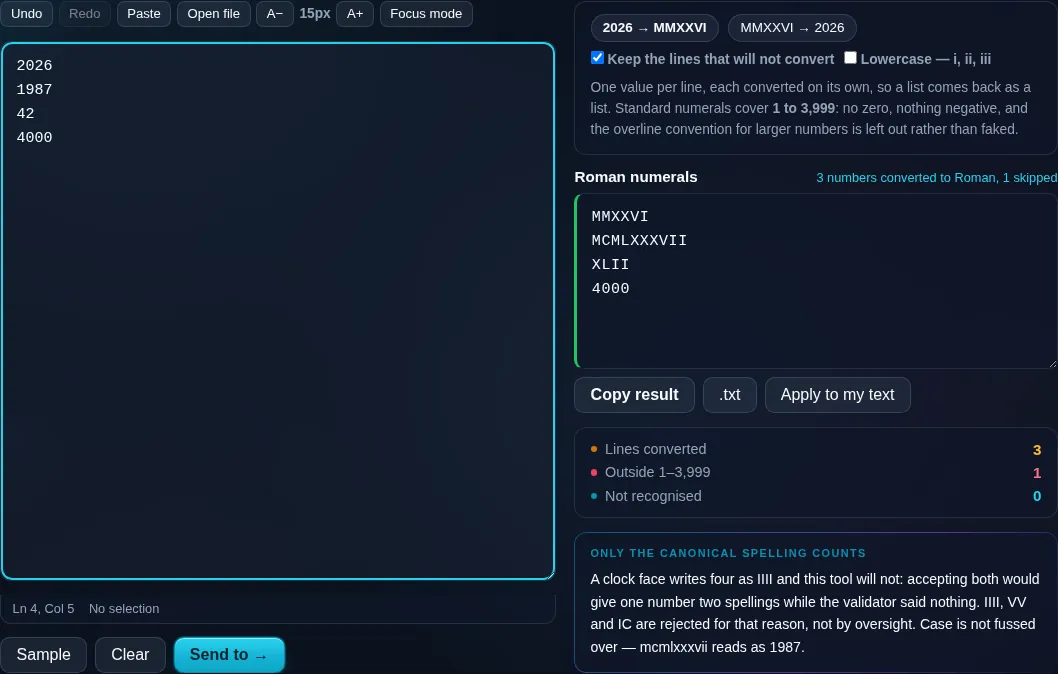
Roman Numeral Converter in action

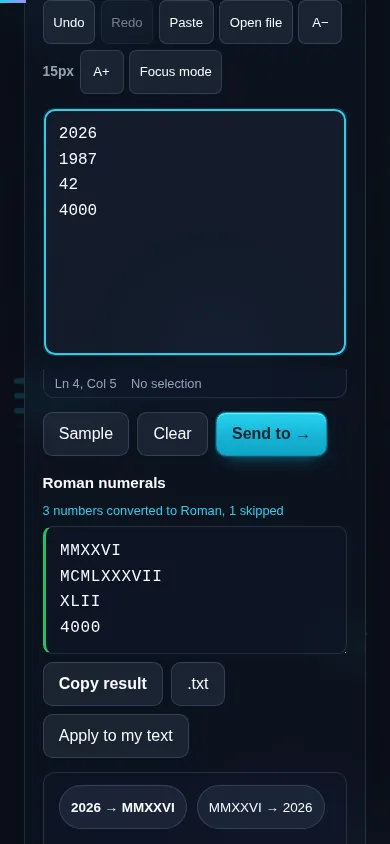
Roman Numeral Converter turning a number into Roman numerals in the browser.
Roman result
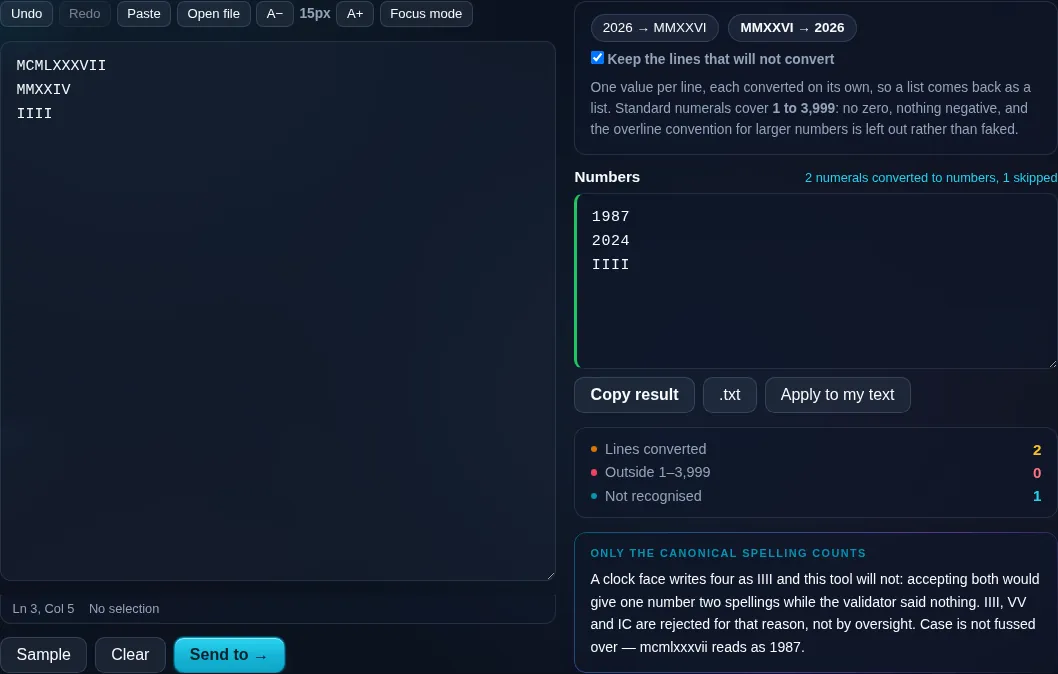
Roman numerals read back as numbers, with a clock-face IIII rejected.
Roman to number
Converting Roman numerals on a phone, no app installed.
Mobile (stacked)

How Roman numerals work

Roman numerals use seven letters — I (1), V (5), X (10), L (50), C (100), D (500), M (1000) — combined by addition, with a subtractive rule for the awkward values: IV is 4 (one before five), IX is 9, XL is 40, XC is 90, CD is 400, CM is 900. The converter builds numbers using these rules going one way, and parses and validates numerals going the other, flagging invalid forms like 'IIII' or 'VX'. Standard Roman numerals represent 1 to 3999; there's no symbol for zero and no way to write negative numbers, which is a genuine limitation of the system, so those inputs are rejected. Numbers above 3999 traditionally use an overline (a bar over a letter multiplies it by 1000), which the tool can indicate. It's handy for dates, copyright years, clock faces, outlines, and learning the system. Everything runs locally in your browser, so nothing is uploaded.

Frequently Asked Questions

How do I convert a number to Roman numerals?

Enter the number and convert — for example 2024 becomes MMXXIV. The tool builds the numeral using the standard letters and subtractive notation (like IV for 4), then lets you copy it. It works for numbers from 1 up to 3999.

Can it convert Roman numerals back to numbers?

Yes. Enter a Roman numeral like 'XLII' and it returns 42. It validates the input as it parses, so a malformed numeral is flagged rather than silently giving a wrong answer. It's a two-way converter, so you can go in either direction.

What is subtractive notation (like IV and IX)?

It's the rule that a smaller letter before a larger one means subtraction: IV is 5−1=4, IX is 10−1=9, XL is 40, CM is 900. It avoids long repeats like 'IIII', and the converter applies it correctly both when building and when reading numerals.

Why is there no Roman numeral for zero?

The Roman system has no symbol for zero — it was designed for counting, not for place-value arithmetic, so a 'nothing' value wasn't represented. Negative numbers can't be written either. The converter therefore only handles positive whole numbers, rejecting zero and negatives.

What's the largest number it can convert?

Standard Roman numerals go up to 3999 (MMMCMXCIX). Beyond that, the traditional approach adds an overline over a letter to multiply it by a thousand, which the tool can indicate. Within the everyday 1–3999 range, conversion is straightforward and exact.

What are Roman numerals used for today?

Clock faces, dates and copyright years (often in film and TV credits), book chapters and outlines, monarch and sequel names (Louis XIV, Rocky III), and Super Bowl numbering. The converter is handy for reading those and for writing a year or number correctly.

Is my text private — is anything uploaded?

No. Everything runs in your browser, so whatever you type or paste is processed on your own device and never uploaded to a server. Nothing is stored once you close the tab. That keeps your text — notes, code, documents, lists — completely private.

Is it free, and do I need to sign up?

Yes, it's completely free with no account, no trial, and no limit on how many times you use it. Because it runs entirely in your browser, there are no server costs, no usage caps, and no watermark or branding added to your text.

Does it work on a phone?

Yes. It runs in your phone's browser with nothing to install, so you can use it on Android or iOS. The layout adapts to small screens, so you can paste text, get the result, and copy it on the go just as easily as on a computer.

Does it work offline?

Once the page has loaded, it runs entirely on your device, so it keeps working without a connection — which is also why nothing is uploaded. You only need to be online to open the page the first time; after that the tool works locally.

Can I copy or download the result?

Yes. You can copy the result to your clipboard with one click, and longer output can be downloaded as a text file. Everything is processed locally, so copying and downloading are instant with no upload step and no waiting.

Is there a limit on how much text I can process?

There's no artificial cap, because the work happens on your device rather than a server. The practical limit is your device's memory, so very large inputs are smoother on a computer than an older phone. For most everyday text, processing is effectively instant.

Still have questions?

If you can't find the answer you're looking for, feel free to contact our support team.

Contact Us