Text to Slug Generator

Convert a title into a clean, URL-friendly slug — lowercase, hyphenated, with accents and punctuation stripped.

100% Browser-Based Local Processing
15px

Ln 1, Col 1 No selection

A length of 0 means no limit; when there is one, the slug is cut at a separator rather than mid-word. Dropping the small words never returns an empty slug, so a title made entirely of them is left alone.

URL slug Nothing to convert yet
Slug length
0
Words kept
0
Words dropped
0

Lowercase letters, digits and one separator. Accents fold to their plain letters first, so café becomes cafe rather than a run of percent signs, and anything with no Latin form is dropped rather than transliterated by guesswork. Naming a variable instead of a page? That is snake_case and kebab-case.

Privacy Focused

🔒 Local Processing. Your text never leaves your device.

Instant Results

🌐 Fully Client-Side. Runs instantly in your browser.

No Signup

⚡ No accounts. No API keys. Just open and use.

Browser Based

🚀 No installs, no sign-ups, no character limits.

What is a Text to Slug Generator?

Text to Slug turns a title or phrase into a clean, URL-friendly slug: lowercase, words joined by hyphens, with accents converted to plain letters and punctuation removed. Paste a title like 'Café & Bar Review!' and get 'cafe-bar-review'. It runs entirely in your browser, so your text stays private.

A slug is the readable part of a URL — the 'my-blog-post' in /blog/my-blog-post. A good slug is lowercase, hyphenated, free of accents and punctuation, and concise, which is fiddly to produce by hand.

This tool slugifies any title in one click, with the SEO-friendly options that matter, all in your browser. Nothing is uploaded. Paste, slugify, and copy.
How to generate a URL slug

Step 1: Paste or type your title or phrase

Paste or type your title or phrase.

Step 2: Set options — separator, stopword removal, max length — if needed

Set options — separator, stopword removal, max length — if needed.

Step 3: Generate the slug, then copy it into your URL or CMS

Generate the slug, then copy it into your URL or CMS.

Text to Slug Generator in action

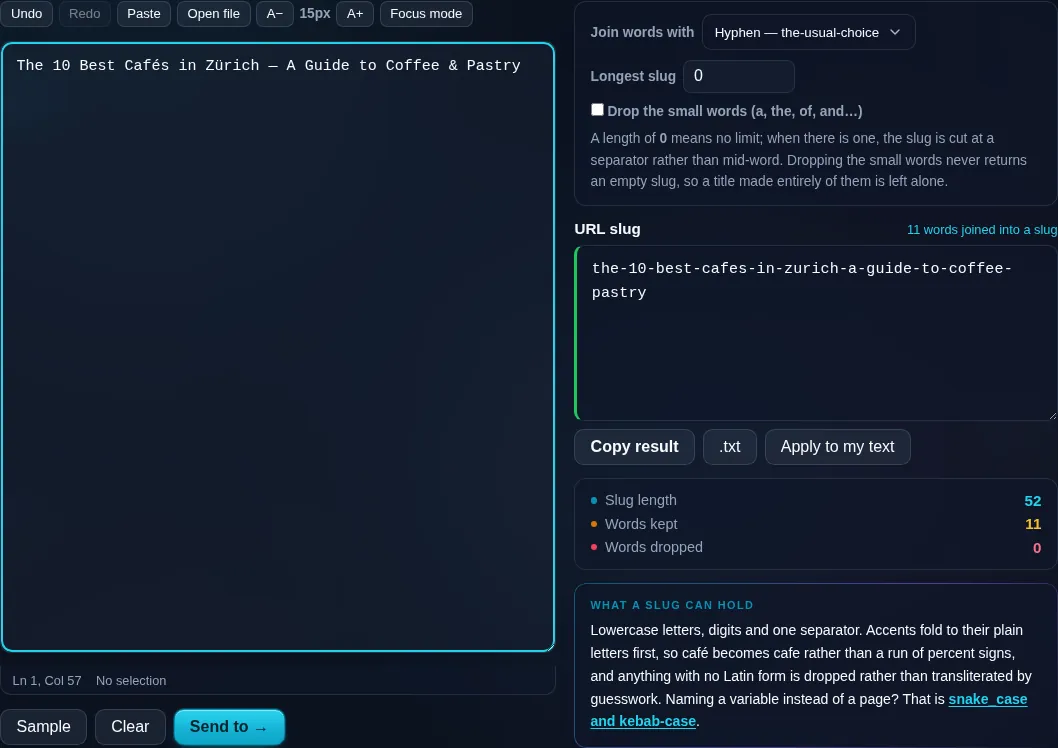
Text to Slug generating a URL slug in the browser.
Slug result
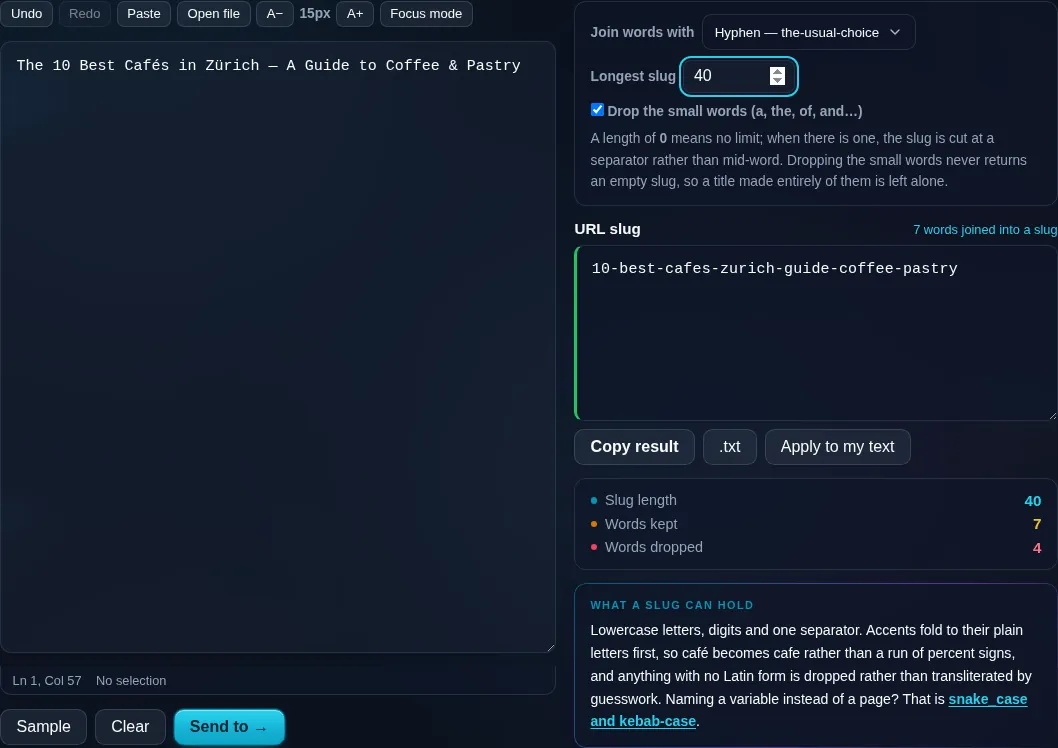
The same title with its small words dropped and a length cap applied.
Options
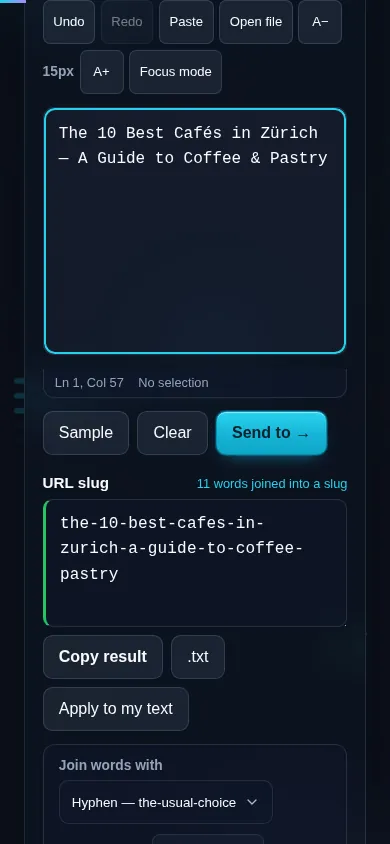
Generating a URL slug on a phone, no app installed.
Mobile (stacked)

What makes a good slug

A clean slug is lowercase (URLs are case-sensitive on some servers, so lowercase avoids duplicates), uses hyphens between words (search engines treat hyphens as word separators, unlike underscores), and contains only safe characters — letters, numbers, and hyphens. This tool lowercases the text, replaces spaces and punctuation with hyphens, collapses repeated hyphens, and trims them from the ends. Crucially, it transliterates accented characters to their plain ASCII equivalents (é → e, ñ → n) so the slug works in any URL. Optional extras help SEO: removing common stopwords ('the', 'a', 'of') makes slugs shorter and more keyword-focused, and a maximum-length setting keeps them tidy. Non-Latin scripts may need transliteration or will be dropped. Everything runs locally in your browser. For code identifiers rather than URLs, see the kebab-case and snake_case converter.

Frequently Asked Questions

What is a URL slug?

A slug is the human-readable part of a URL that identifies a page — for example 'how-to-bake-bread' in a blog URL. It's lowercase, uses hyphens between words, and avoids spaces, accents, and punctuation so it's clean, shareable, and good for SEO.

How do I turn a title into a slug?

Paste your title and the tool lowercases it, replaces spaces and punctuation with hyphens, strips accents, and removes anything unsafe for a URL — producing a ready-to-use slug. So 'My First Post!' becomes 'my-first-post', which you can copy into your CMS or link.

Why does it use hyphens instead of underscores?

Search engines treat hyphens as word separators but underscores as joiners, so 'red-shoes' is read as two words while 'red_shoes' can be read as one. Hyphens are the SEO-recommended choice for slugs, which is why this tool uses them by default.

Does it remove accents and special characters?

Yes. Accented letters are transliterated to plain ASCII (é → e, ü → u, ñ → n) and punctuation and symbols are stripped, so the slug contains only safe URL characters. This prevents broken or encoded URLs that accents and symbols would otherwise cause.

Can it remove common words to shorten the slug?

Yes, optionally. Removing stopwords like 'the', 'a', 'and', and 'of' makes slugs shorter and more focused on your keywords, which many SEO guidelines recommend. There's also a maximum-length option to keep long titles from producing unwieldy slugs.

How is this different from the kebab-case converter?

Text to Slug is tuned for URLs — it strips accents, removes stopwords, limits length, and handles punctuation for the web. The kebab-case converter produces hyphenated identifiers for code. They overlap, but use this for URLs and the kebab/snake converter for variable and class names.

Is my text private — is anything uploaded?

No. Everything runs in your browser, so whatever you type or paste is processed on your own device and never uploaded to a server. Nothing is stored once you close the tab. That keeps your text — notes, code, documents, lists — completely private.

Is it free, and do I need to sign up?

Yes, it's completely free with no account, no trial, and no limit on how many times you use it. Because it runs entirely in your browser, there are no server costs, no usage caps, and no watermark or branding added to your text.

Does it work on a phone?

Yes. It runs in your phone's browser with nothing to install, so you can use it on Android or iOS. The layout adapts to small screens, so you can paste text, get the result, and copy it on the go just as easily as on a computer.

Does it work offline?

Once the page has loaded, it runs entirely on your device, so it keeps working without a connection — which is also why nothing is uploaded. You only need to be online to open the page the first time; after that the tool works locally.

Can I copy or download the result?

Yes. You can copy the result to your clipboard with one click, and longer output can be downloaded as a text file. Everything is processed locally, so copying and downloading are instant with no upload step and no waiting.

Is there a limit on how much text I can process?

There's no artificial cap, because the work happens on your device rather than a server. The practical limit is your device's memory, so very large inputs are smoother on a computer than an older phone. For most everyday text, processing is effectively instant.

Still have questions?

If you can't find the answer you're looking for, feel free to contact our support team.

Contact Us