Remove Accents & Diacritics

Remove accents and diacritics from text, converting letters like é, ñ, and ü to plain ASCII.

100% Browser-Based Local Processing
15px

Ln 1, Col 1 No selection

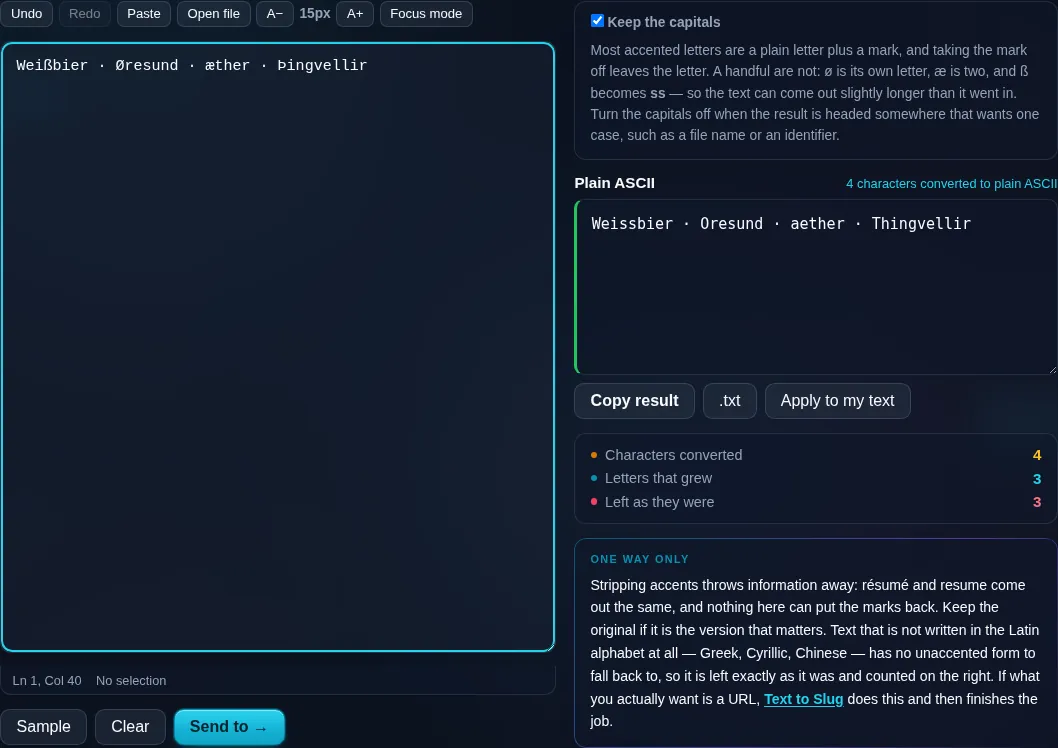
Most accented letters are a plain letter plus a mark, and taking the mark off leaves the letter. A handful are not: ø is its own letter, æ is two, and ß becomes ss — so the text can come out slightly longer than it went in. Turn the capitals off when the result is headed somewhere that wants one case, such as a file name or an identifier.

Plain ASCII Nothing to convert yet
Characters converted
0
Letters that grew
0
Left as they were
0

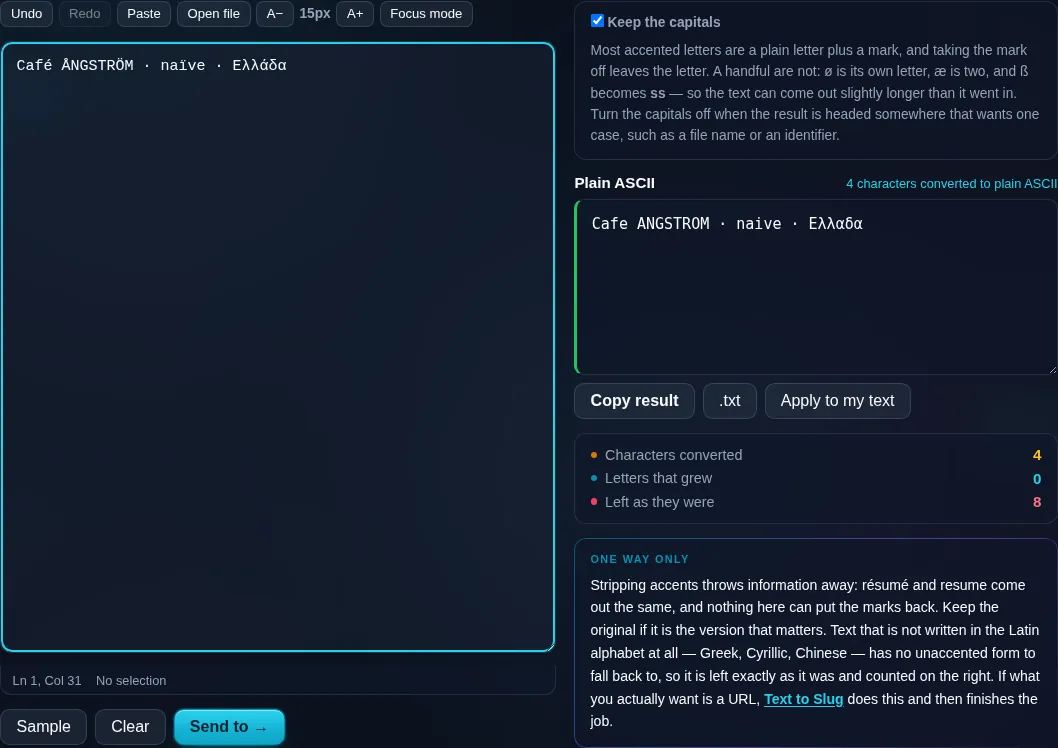
Stripping accents throws information away: résumé and resume come out the same, and nothing here can put the marks back. Keep the original if it is the version that matters. Text that is not written in the Latin alphabet at all — Greek, Cyrillic, Chinese — has no unaccented form to fall back to, so it is left exactly as it was and counted on the right. If what you actually want is a URL, Text to Slug does this and then finishes the job.

Privacy Focused

🔒 Local Processing. Your text never leaves your device.

Instant Results

🌐 Fully Client-Side. Runs instantly in your browser.

No Signup

⚡ No accounts. No API keys. Just open and use.

Browser Based

🚀 No installs, no sign-ups, no character limits.

What is a Remove Accents & Diacritics?

Remove Accents strips the accents and diacritics from your text, converting letters like é, ñ, ü, and ç to their plain ASCII equivalents (e, n, u, c). It's useful for slugs, filenames, usernames, and systems that only accept basic letters. It runs entirely in your browser, so your text stays private.

Accented characters cause trouble in places that expect plain ASCII — URLs, filenames, usernames, legacy systems, and some databases. Converting 'résumé' to 'resume' keeps the word recognizable while making it universally compatible.

This tool removes diacritics in one click, handling the tricky special letters too, all in your browser. Nothing is uploaded. Paste, convert, and copy.
How to remove accents

Step 1: Paste or type your accented text into the box

Paste or type your accented text into the box.

Step 2: Remove accents — each accented letter becomes its plain equivalent

Remove accents — each accented letter becomes its plain equivalent.

Step 3: Copy the plain-text result or download it

Copy the plain-text result or download it.

Remove Accents & Diacritics in action

Remove Accents converting accented letters in the browser.
Plain ASCII result
Letters with no accent to strip mapped instead: sharp s to ss, o-slash to o.
Special letters
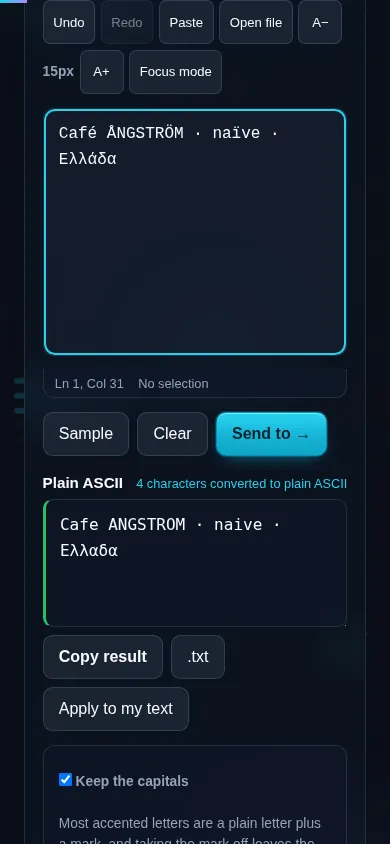
Removing accents on a phone, no app installed.
Mobile (stacked)

How accents are removed

Most accented letters are technically a base letter plus a combining mark, so the tool normalizes the text (Unicode NFD) to separate the mark, then removes the marks — turning é into e, ü into u, and so on, while keeping the underlying letter and its case. A handful of letters aren't simple base-plus-accent combinations — the German ß, the Scandinavian ø and å, the ligature æ — so those are converted using a lookup map (ß → ss, ø → o, æ → ae) to give sensible plain-text results. Letters from non-Latin scripts (Cyrillic, Greek, Arabic, CJK) don't have ASCII equivalents and are left as-is rather than guessed at. Everything runs locally in your browser, so nothing is uploaded. This pairs naturally with the Text to Slug tool, which strips accents as part of building a URL, and with the lowercase and punctuation tools.

Frequently Asked Questions

How do I remove accents from text?

Paste your text and click to remove accents — each accented letter is replaced by its plain ASCII version, so 'café' becomes 'cafe' and 'piñata' becomes 'pinata'. The words stay readable and you can copy or download the converted text.

Which characters does it handle?

All the common accented Latin letters — à, é, î, õ, ü, ç, ñ and the rest — convert to their base letters. Special letters that aren't simple base-plus-accent, like ß, ø, and æ, are handled with a sensible mapping (ss, o, ae) so nothing is left as a stray symbol.

Does it keep uppercase and lowercase?

Yes. Removing the accent doesn't change the letter's case, so 'É' becomes 'E' and 'é' becomes 'e'. Your text's capitalization is preserved; only the diacritical marks are stripped.

What about non-Latin scripts like Cyrillic or Chinese?

Those don't have plain ASCII equivalents, so the tool leaves them unchanged rather than guessing at a transliteration. It focuses on Latin-script accents and diacritics, which is what 'remove accents' usually means; full transliteration of other scripts is a different task.

Why would I need to remove accents?

For compatibility: URLs, filenames, usernames, email local parts, and some older systems only accept basic ASCII letters. Converting accented text keeps it recognizable while avoiding broken links, encoding errors, or rejected input. It's also a step in creating clean slugs.

Does it change any other characters?

No. It only removes diacritical marks from letters. Numbers, spaces, punctuation, and unaccented letters are left exactly as they are. If you also want to strip punctuation or build a full URL slug, use the Remove Punctuation or Text to Slug tools alongside it.

Is my text private — is anything uploaded?

No. Everything runs in your browser, so whatever you type or paste is processed on your own device and never uploaded to a server. Nothing is stored once you close the tab. That keeps your text — notes, code, documents, lists — completely private.

Is it free, and do I need to sign up?

Yes, it's completely free with no account, no trial, and no limit on how many times you use it. Because it runs entirely in your browser, there are no server costs, no usage caps, and no watermark or branding added to your text.

Does it work on a phone?

Yes. It runs in your phone's browser with nothing to install, so you can use it on Android or iOS. The layout adapts to small screens, so you can paste text, get the result, and copy it on the go just as easily as on a computer.

Does it work offline?

Once the page has loaded, it runs entirely on your device, so it keeps working without a connection — which is also why nothing is uploaded. You only need to be online to open the page the first time; after that the tool works locally.

Can I copy or download the result?

Yes. You can copy the result to your clipboard with one click, and longer output can be downloaded as a text file. Everything is processed locally, so copying and downloading are instant with no upload step and no waiting.

Is there a limit on how much text I can process?

There's no artificial cap, because the work happens on your device rather than a server. The practical limit is your device's memory, so very large inputs are smoother on a computer than an older phone. For most everyday text, processing is effectively instant.

Still have questions?

If you can't find the answer you're looking for, feel free to contact our support team.

Contact Us