Morse Code Translator

Translate text to Morse code and Morse back to text, with optional audio playback at adjustable speed.

100% Browser-Based Local Processing
15px

Ln 1, Col 1 No selection

Speed changes the sound, never the text. Timing is the PARIS standard: a dash is three dots, the gap inside a letter one, between letters three, between words seven.

In Morse Nothing to convert yet
wpm
Characters in the alphabet
0
Not in it
0
Takes about

A message that goes out and comes back arrives in capitals — the alphabet, not formatting you lost. Anything with no code is marked ? rather than dropped.

Privacy Focused

🔒 Local Processing. Your text never leaves your device.

Instant Results

🌐 Fully Client-Side. Runs instantly in your browser.

No Signup

⚡ No accounts. No API keys. Just open and use.

Browser Based

🚀 No installs, no sign-ups, no character limits.

What is a Morse Code Translator?

Morse Code Translator converts text into Morse code and decodes Morse back into text, using the International Morse standard. It can play the Morse as audio beeps at a speed you set, so you can hear and learn it. Paste text or Morse and translate in one click. It runs entirely in your browser, so your text stays private.

Morse code turns letters into dots and dashes — a system that's been used for over a century and is still fun to learn, useful for signaling, and popular in puzzles and games.

This translator goes both ways and can even play the code as sound, all in your browser. Nothing is uploaded. Paste text or Morse, translate, and listen.
How to translate Morse code

Step 1: Paste text to encode, or paste Morse (dots and dashes) to decode

Paste text to encode, or paste Morse (dots and dashes) to decode.

Step 2: Translate; adjust the dot/dash and word separators if needed

Translate; adjust the dot/dash and word separators if needed.

Step 3: Play the audio at your chosen speed, then copy or download the result

Play the audio at your chosen speed, then copy or download the result.

Morse Code Translator in action

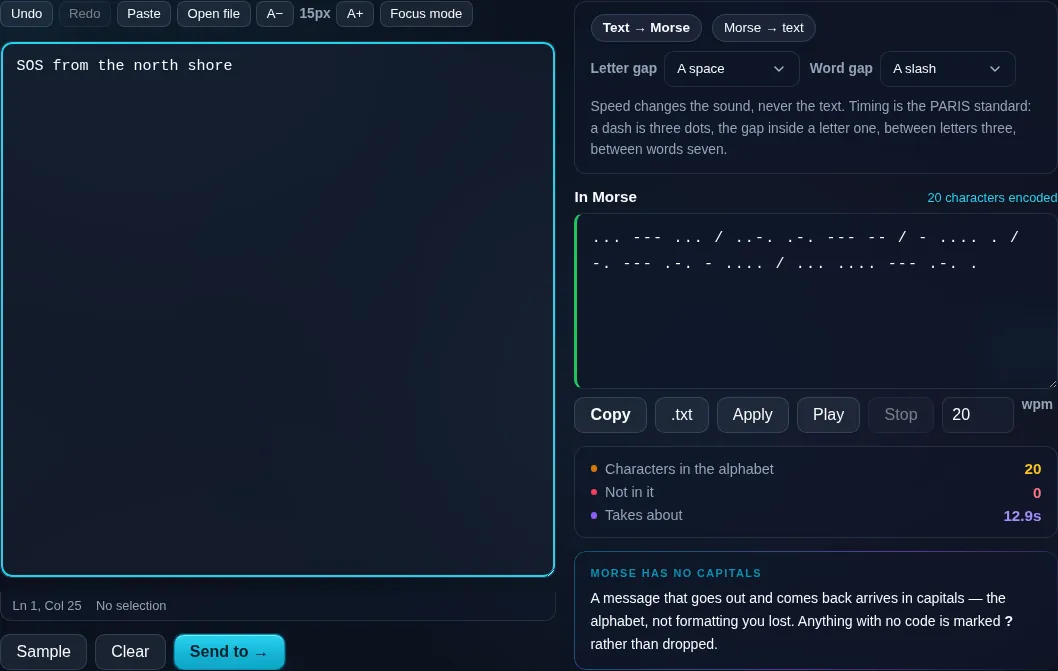
Morse Code Translator converting text to Morse in the browser.
Morse result
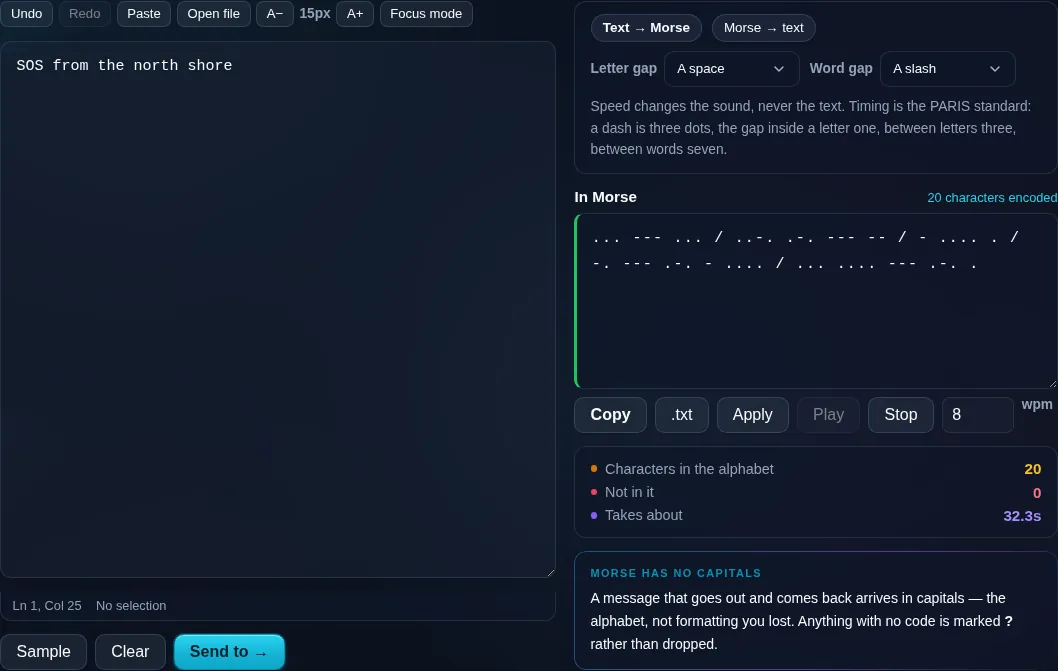
Morse playing back at eight words per minute, with the message duration on screen.
Audio + speed
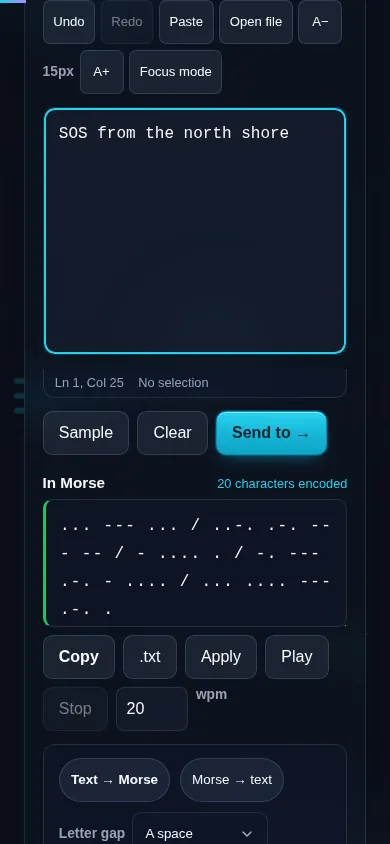
Translating Morse code on a phone, no app installed.
Mobile (stacked)

International Morse, spacing, and audio

The tool uses International Morse Code, which maps each letter, digit, and common punctuation mark to a sequence of dots (short) and dashes (long). Correct spacing is what makes Morse readable: a small gap separates the symbols within a letter, a larger gap separates letters, and a still larger gap (often shown as '/') separates words — and you can configure how those gaps are written. Translating to text is case-insensitive, and characters that have no standard Morse representation are skipped or flagged rather than guessed. The optional audio uses the Web Audio API to play the dots and dashes as beeps at an adjustable speed (words per minute), which is the best way to learn Morse by ear. Everything, including the audio, runs locally in your browser, so nothing is uploaded. It's a great companion to the NATO Phonetic Alphabet converter for spelling and signaling.

Frequently Asked Questions

How do I convert text to Morse code?

Paste your text and translate — each letter, number, and supported punctuation mark becomes its dot-and-dash Morse sequence, with spaces separating letters and words. You can then copy or download the Morse, or play it as audio to hear how it sounds.

Can it decode Morse back into text?

Yes. Paste Morse code — dots and dashes with spaces between letters and a separator (like '/') between words — and the tool decodes it into readable text. It's a two-way translator, so you can encode and decode freely.

Can I hear the Morse code as sound?

Yes. The tool can play your Morse as audio beeps using your browser's sound, with an adjustable speed in words per minute. Hearing the rhythm of dots and dashes is the most effective way to learn Morse, and it all plays locally with nothing uploaded.

Which characters are supported?

International Morse covers the 26 letters, the digits 0–9, and common punctuation such as period, comma, question mark, and slash. Characters without a standard Morse equivalent are skipped or flagged so the output stays accurate rather than inventing codes.

How is letter and word spacing handled?

Morse relies on gaps: a short gap between the dots and dashes of one letter, a longer gap between letters, and a longer one still between words (commonly written as '/'). The translator applies correct spacing automatically and lets you configure how the separators appear.

What can I use a Morse translator for?

Learning Morse code by sight and sound, decoding messages in puzzles and games, amateur radio practice, signaling, and educational projects. Because it translates both ways and plays audio, it works equally well for studying and for quick one-off conversions.

Is my text private — is anything uploaded?

No. Everything runs in your browser, so whatever you type or paste is processed on your own device and never uploaded to a server. Nothing is stored once you close the tab. That keeps your text — notes, code, documents, lists — completely private.

Is it free, and do I need to sign up?

Yes, it's completely free with no account, no trial, and no limit on how many times you use it. Because it runs entirely in your browser, there are no server costs, no usage caps, and no watermark or branding added to your text.

Does it work on a phone?

Yes. It runs in your phone's browser with nothing to install, so you can use it on Android or iOS. The layout adapts to small screens, so you can paste text, get the result, and copy it on the go just as easily as on a computer.

Does it work offline?

Once the page has loaded, it runs entirely on your device, so it keeps working without a connection — which is also why nothing is uploaded. You only need to be online to open the page the first time; after that the tool works locally.

Can I copy or download the result?

Yes. You can copy the result to your clipboard with one click, and longer output can be downloaded as a text file. Everything is processed locally, so copying and downloading are instant with no upload step and no waiting.

Is there a limit on how much text I can process?

There's no artificial cap, because the work happens on your device rather than a server. The practical limit is your device's memory, so very large inputs are smoother on a computer than an older phone. For most everyday text, processing is effectively instant.

Still have questions?

If you can't find the answer you're looking for, feel free to contact our support team.

Contact Us