Number to Words Converter

Convert numbers into written words, including a currency mode for cheques (dollars and cents).

100% Browser-Based Local Processing
15px

Ln 1, Col 1 No selection

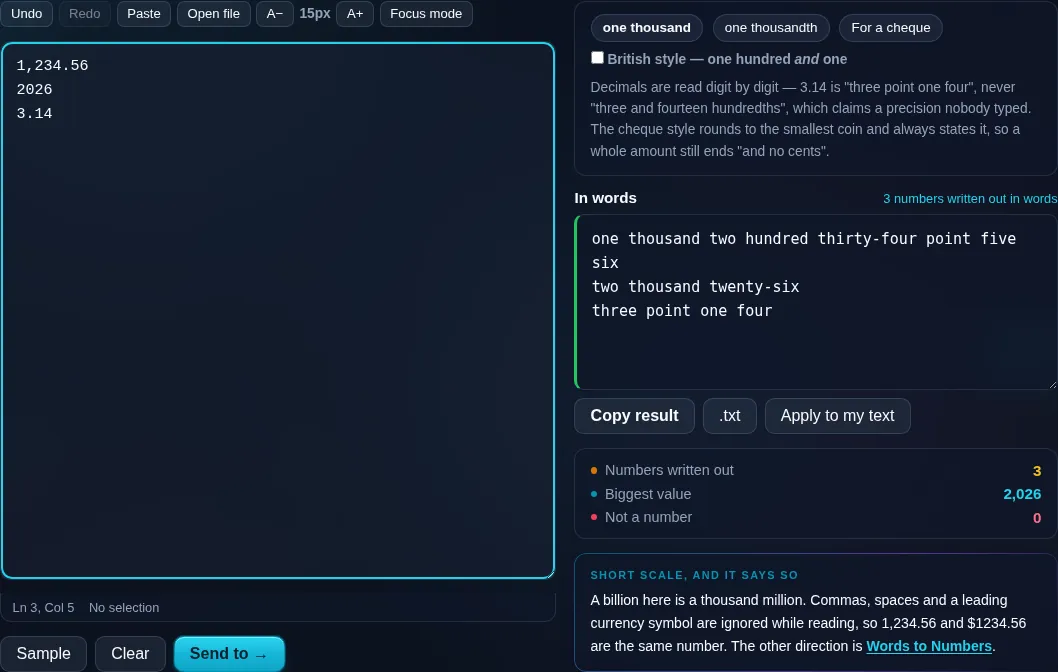
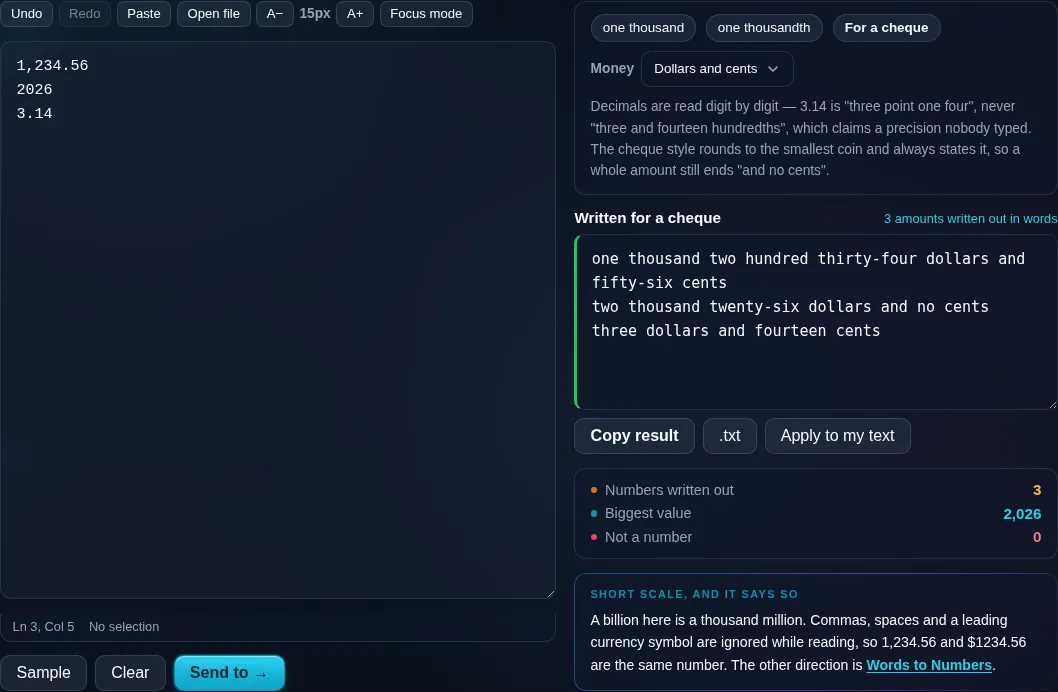
Decimals are read digit by digit — 3.14 is "three point one four", never "three and fourteen hundredths", which claims a precision nobody typed. The cheque style rounds to the smallest coin and always states it, so a whole amount still ends "and no cents".

In words Nothing to convert yet
Numbers written out
0
Biggest value
Not a number
0

A billion here is a thousand million. Commas, spaces and a leading currency symbol are ignored while reading, so 1,234.56 and $1234.56 are the same number. The other direction is Words to Numbers.

Privacy Focused

🔒 Local Processing. Your text never leaves your device.

Instant Results

🌐 Fully Client-Side. Runs instantly in your browser.

No Signup

⚡ No accounts. No API keys. Just open and use.

Browser Based

🚀 No installs, no sign-ups, no character limits.

What is a Number to Words Converter?

Number to Words Converter spells out numbers in plain English — 1,234 becomes 'one thousand two hundred thirty-four'. A currency mode writes amounts the way cheques do ('one thousand two hundred thirty-four dollars and fifty cents'), and it handles decimals, negatives, and ordinals. It runs entirely in your browser, so your data stays private.

Writing a number out in words comes up for cheques, contracts, invoices, legal documents, and teaching kids — and it's surprisingly easy to get wrong with large numbers.

This tool spells out any number instantly, with a currency mode for cheques, all in your browser. Nothing is uploaded. Enter a number and copy the words.
How to convert a number to words

Step 1: Type or paste the number

Type or paste the number.

Step 2: Choose a mode — plain words, currency (for cheques), or ordinal — and any options like decimals

Choose a mode — plain words, currency (for cheques), or ordinal — and any options like decimals.

Step 3: Read the words and copy them

Read the words and copy them.

Number to Words Converter in action

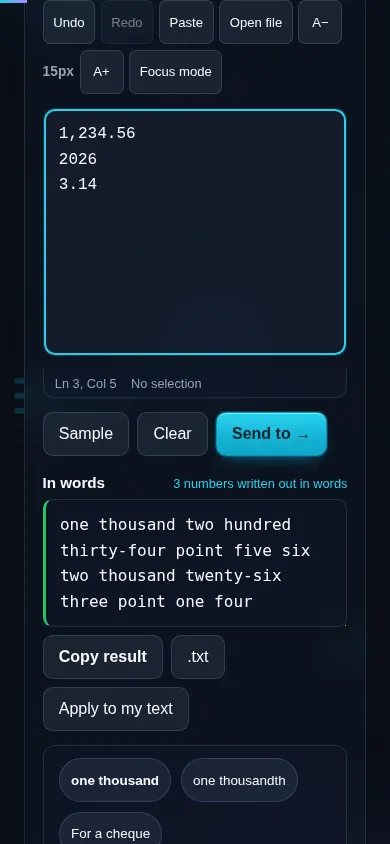
Number to Words Converter spelling out a number in the browser.
Words result
A number written out in words with a currency mode.
Currency mode
Converting a number to words on a phone, no app installed.
Mobile (stacked)

Cardinal, ordinal, and currency modes

In plain (cardinal) mode the tool spells the number as you'd say it — 'two thousand five hundred'. Currency mode formats it as a monetary amount for cheques and invoices: the whole part as the main unit and the fraction as cents/pence, with a configurable currency name ('… dollars and fifty cents'). Ordinal mode gives position words ('twenty-first'). It handles decimals (read out digit by digit or as a fraction), negative numbers, and zero, and offers a locale option for British-style 'one hundred and one' versus American 'one hundred one'. Very large numbers use short-scale naming (million, billion, trillion), which is the common English convention. Everything runs locally in your browser, so nothing is uploaded. For the reverse — turning written words back into a number — use the Words to Numbers Converter, and for Roman numerals, the Roman Numeral Converter.

Frequently Asked Questions

How do I convert a number into words?

Type the number and the tool spells it out — for example 1,234 becomes 'one thousand two hundred thirty-four'. Choose plain, currency, or ordinal mode, then copy the words. It handles numbers from zero up to very large values instantly.

Can it write amounts for cheques?

Yes — that's the currency mode. It formats the amount the way cheques and invoices require, with the whole part as the currency unit and the decimal as cents (for example 'two hundred fifty dollars and seventy-five cents'). You can set the currency name to match your country.

Does it handle decimals and negative numbers?

Yes. Decimals can be read out digit by digit or as a fraction of the currency unit, and negative numbers are prefixed with 'minus' (or 'negative'). Zero is handled too, so the converter works across the full range of everyday numbers.

Can it produce ordinal numbers like 'twenty-first'?

Yes. Ordinal mode gives the position form of a number — 1st as 'first', 21 as 'twenty-first', 100 as 'one hundredth'. That's useful for dates, rankings, and any context where you need the ordinal rather than the counting word.

Does it use 'and', like 'one hundred and one'?

You can choose. British English typically inserts 'and' ('one hundred and one'), while American English often omits it ('one hundred one'). A locale option lets you match the convention you need, since both are correct in their respective styles.

How are very large numbers named?

The converter uses short-scale naming — thousand, million, billion, trillion — which is the standard in modern English. So a number in the billions is spelled with 'billion'. This keeps the output consistent with how large numbers are normally written and spoken.

Is my text private — is anything uploaded?

No. Everything runs in your browser, so whatever you type or paste is processed on your own device and never uploaded to a server. Nothing is stored once you close the tab. That keeps your text — notes, code, documents, lists — completely private.

Is it free, and do I need to sign up?

Yes, it's completely free with no account, no trial, and no limit on how many times you use it. Because it runs entirely in your browser, there are no server costs, no usage caps, and no watermark or branding added to your text.

Does it work on a phone?

Yes. It runs in your phone's browser with nothing to install, so you can use it on Android or iOS. The layout adapts to small screens, so you can paste text, get the result, and copy it on the go just as easily as on a computer.

Does it work offline?

Once the page has loaded, it runs entirely on your device, so it keeps working without a connection — which is also why nothing is uploaded. You only need to be online to open the page the first time; after that the tool works locally.

Can I copy or download the result?

Yes. You can copy the result to your clipboard with one click, and longer output can be downloaded as a text file. Everything is processed locally, so copying and downloading are instant with no upload step and no waiting.

Is there a limit on how much text I can process?

There's no artificial cap, because the work happens on your device rather than a server. The practical limit is your device's memory, so very large inputs are smoother on a computer than an older phone. For most everyday text, processing is effectively instant.

Still have questions?

If you can't find the answer you're looking for, feel free to contact our support team.

Contact Us