Transform & Reorder

Sort, shuffle, reverse, number, wrap, find and replace or repeat your text.

100% Browser-Based Local Processing

A new order — every word survives

These five put the same text in a different sequence. Nothing is added, nothing is deleted, and the result contains exactly the characters you started with — which is why their result pane counts what MOVED rather than what changed.

Something added to every line

These two leave your text alone and put something in front of it or behind it, once per line. The result is longer than what you pasted, and the readout says by how much.

The text itself rewritten

These two change what your text says, or how much of it there is. They are the two worth reading the result over before you copy it.

New order Added to each line Rewritten Only the last two groups change what your text says. The five order tools give back exactly the characters you pasted, in a different sequence — so if the result is missing something, it was an option, not the tool.

Reordering it is one job; cleaning it is another. Clean & Format removes the stray spaces, blank lines and duplicates these tools carry through untouched, and Count & Analyze Text measures what you are left with. Or browse all 60 text tools.

Privacy Focused

🔒 Local Processing. Your text never leaves your device.

Instant Results

🌐 Fully Client-Side. Runs instantly in your browser.

No Signup

⚡ No accounts. No API keys. Just open and use.

Browser Based

🚀 No installs, no sign-ups, no character limits.

What does rearranging text actually mean?

Rearranging text means changing where the words sit rather than what they say. These nine tools sort, shuffle or reverse the order of lines and words, number or wrap each line, replace one string with another, and repeat text — each one doing a single, visible thing.

A list is rarely in the order you need it. Names arrive unsorted, a log arrives oldest-first when you want newest-first, a column of values needs quotes and commas before it will paste into code, and a hundred rows need numbering before anyone can refer to row 47 in an email. None of that is writing. It is moving text around, and doing it by hand is where the mistakes come from.

The nine tools here split that work by what they actually do to your text, because the difference matters more than it looks. Five of them reorder: the result contains exactly the characters you pasted, in a different sequence, so nothing can go missing. Two of them add something to every line — a number, a prefix, a suffix — so the result is longer than what you started with. Two of them rewrite: a replacement changes what the text says, and a repeat changes how much of it there is. The card colours on this page follow that split, and so does each tool's own readout.

That readout is worth knowing about. A cleaner can honestly say "12 characters removed", but a reorder removes nothing, so counting characters would report either "nothing happened" — on a tool that just reversed your whole document — or a meaningless score. These tools count the movement instead: "7 of 9 lines reordered", "Reversed", "24 characters added", "3 matches replaced". If the wording does not match what you expected the tool to do, that is the fastest signal that a switch is set wrong.

And nothing is uploaded. A client list, a set of customer names, an export you are not supposed to email anywhere — all of it is rearranged by JavaScript running on your own machine, with the original still on screen beside the result.
How to rearrange text

Step 1: Pick the tool named after the change you want

The groups below sort them by what they do to your text — a new order, something added to each line, or the text itself rewritten.

Step 2: Paste your text into the left pane

The result appears on the right as you type, and your original is never touched.

Step 3: Set the options

Most of them exist because there is no single right answer: sorting a list of file names wants natural order, sorting invoice rows wants numeric order, and reversing a sentence for a puzzle wants something different from reversing it to inspect its code points.

Step 4: Read the result pane

It tells you what moved, what was added or how many matches were replaced, which is the quickest way to notice that an option did more than you meant.

Step 5: Copy the result, download it as a .txt, or press Apply to my text to move it into the editor as a single undo step

Copy the result, download it as a .txt, or press Apply to my text to move it into the editor as a single undo step.

Step 6: Use Send to to chain tools without retyping — sort a list, then send the sorted result straight to Add Line Numbers

Use Send to to chain tools without retyping — sort a list, then send the sorted result straight to Add Line Numbers.

Transform & Reorder in action

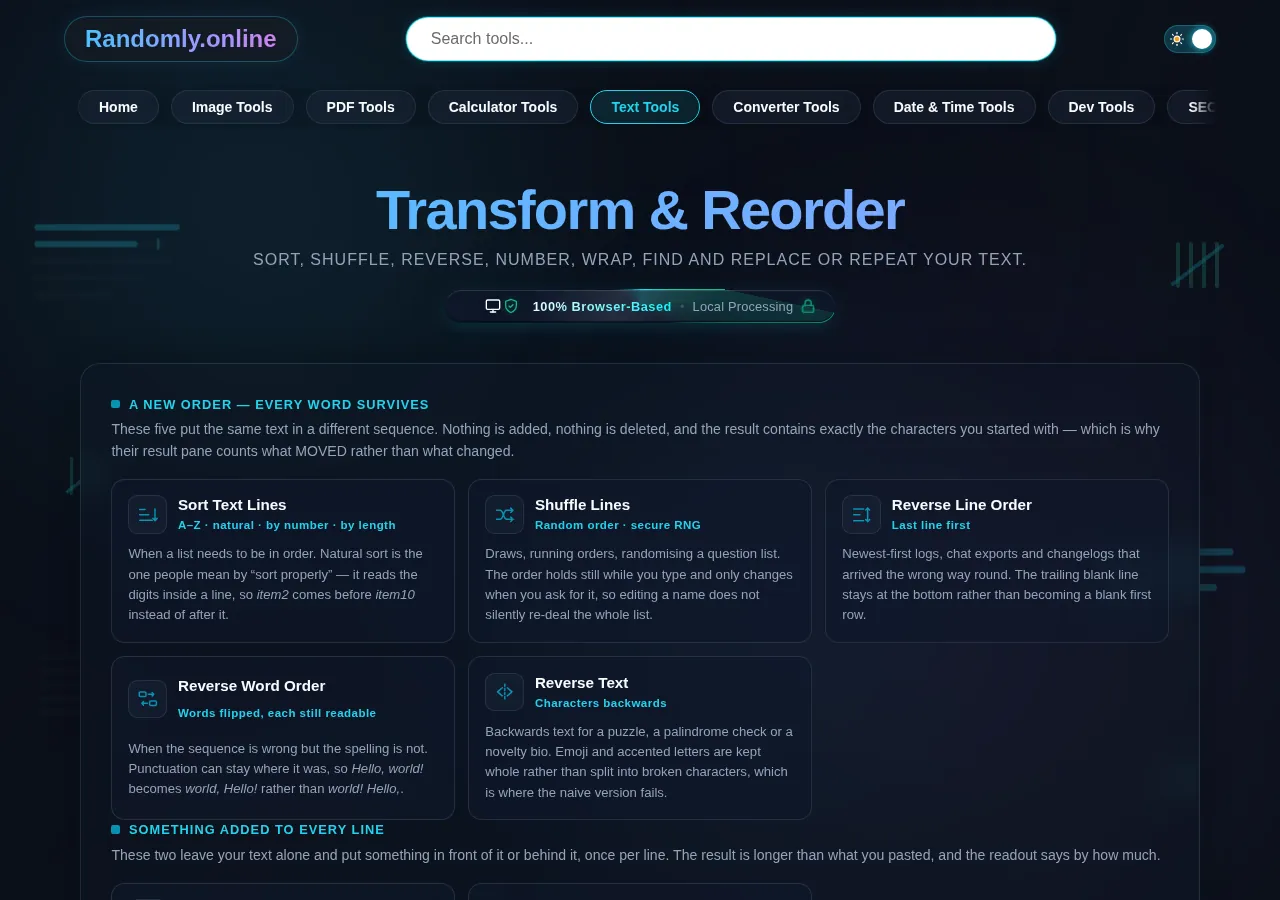
The Transform & Reorder cluster grid, nine text tools grouped by whether they reorder, add to each line or rewrite the text, dark mode
The nine-tool cluster grid
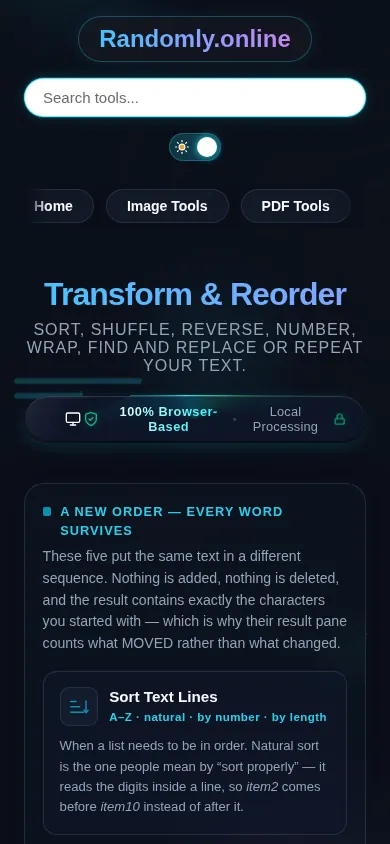
The Transform & Reorder cluster on a phone, the nine tool cards stacked in a single column
Mobile (grid stacked to one column)

Which tool you need, and the order to run them in

Start from what you want the result to contain. If every character you pasted must still be there afterwards, you want one of the five order tools, and the only question is what you are reordering: whole lines (sort, shuffle, reverse line order), the words inside a line (reverse word order), or the individual characters (reverse text). If the result should carry something your text does not, you want Add Line Numbers or Add Prefix & Suffix. If the words themselves have to change, that is Find and Replace, and if you need more of the text than you have, that is Text Repeater.

Order matters when you chain them, because these tools feed each other. Sort before you number, never after — numbering first bakes the old positions into the text, and the sort then arranges rows by a number that no longer means anything. Wrap after you sort, too, for the same reason: a prefix and suffix change what every line starts and ends with, and an A–Z sort reads the first character it finds. Deduplicate before you shuffle, if you are drawing names, or a duplicate simply gets two chances. And if the text arrived messy, clean it before you reorder it: a list where half the rows have trailing spaces will not sort or deduplicate the way you expect, because a line ending in a space is not the same line as one without.

Two habits are worth building. Check what a sort did to the rows that had no number in them. Sorting numerically only works on lines that contain a number, and every tool has to decide what to do with the ones that do not — this one keeps them, together, at the bottom, in the order you had them, because dropping them loses data and floating them to the top buries the answer. And be careful with a replacement that looks like it did nothing. Replacing a word with itself still counts as a match, and the count is the only place that shows up; if the readout says three matches and the text looks unchanged, the tool found them and your replacement was identical.

Frequently Asked Questions

Why does my list sort with item10 before item2?

Because a plain A–Z sort compares text, and in text 1 comes before 2, so item10 lands next to item1. Switch the order to Natural, which reads the digits inside each line as a number and puts item2 first. It is the setting people mean by "sort properly", and it is why file names and version numbers so often look wrong in a sorted list.

What happens to lines that have no number in them when I sort by number?

They stay. They collect at the bottom of the result, in the order you had them, rather than being dropped or floated to the top. Dropping them would lose data silently, and putting them first would bury the rows you are actually sorting. If you want them gone entirely, remove the blank ones with the blank-line option and delete the rest before you sort.

Does reversing text break emoji and accented letters?

Not here. Reversing character by character is the naive version, and it splits an emoji into two broken symbols and lifts an accent off its letter. These tools reverse by grapheme — the unit a person sees as one character — so Café 🎉 comes back whole. You can switch to code-point reversal deliberately if you are inspecting an encoding, which is a different question with a different right answer.

What is the difference between reversing text, words and lines?

Reverse Text turns the characters backwards, so Hello becomes olleH. Reverse Word Order keeps every word spelled correctly and flips their sequence, so one two three becomes three two one. Reverse Line Order leaves each line untouched and flips the list top to bottom. They sound similar and produce entirely different results, so pick by what should still be readable afterwards.

Is the shuffle actually random?

Yes. It uses your browser's cryptographic random source for its seed and a Fisher–Yates shuffle, which is the only common method that makes every possible order equally likely. Sorting with a random comparator — the usual shortcut — is measurably biased. The order also holds still while you edit your text and changes only when you press Shuffle again, so typing a name does not silently re-deal the list.

Does my text get uploaded anywhere?

No. Every tool here runs entirely in your browser: nothing is sent to a server, nothing is stored on one, and there is no account, no upload and no queue. That matters most for exactly the lists people rearrange — customer names, email addresses, internal exports. You can disconnect from the network and every one of these tools still works.

Can I use a regular expression to find and replace?

Yes. Turn on expression mode and capture groups work as you would expect — (\w+) (\w+) with $2, $1 swaps two words. Whole-words-only switches off in that mode on purpose, because wrapping your own pattern in word boundaries would change what it means. A half-finished pattern shows a message and leaves your text exactly as it was, rather than blanking it while you type.

How do I turn a column of names into a quoted list for code?

Use Add Prefix & Suffix to Lines with " in front and ", behind, or press the quoted-list preset. Blank lines are left alone by default, which is what stops a stray empty pair landing in the middle. Nothing is escaped, so if your own text contains the quote character you are wrapping with, read the result before you paste it into code.

Why is there a limit on how many times I can repeat text?

Because there has to be one. Repeating a kilobyte of text ten thousand times is ten megabytes of string built in the page, on every keystroke, which locks up the tab. The repeat stops at two million characters and tells you it did, in words. A tool that quietly handed back a shorter result than you asked for would look like a bug rather than a limit.

Can I run one tool's result through another?

Yes, and it is often the fastest route. Every tool has a Send to button that carries the result to any other text tool without retyping or re-pasting. The text travels in your browser's session storage, never in the address bar — a URL would put your document into the page address, where analytics, browser history and anything you shared the link with would record it verbatim.

Still have questions?

If you can't find the answer you're looking for, feel free to contact our support team.

Contact Us