Find and Replace Text

Find and replace text in your browser, with case-sensitivity, whole-word matching, and optional regex.

100% Browser-Based Local Processing
15px

Ln 1, Col 1 No selection

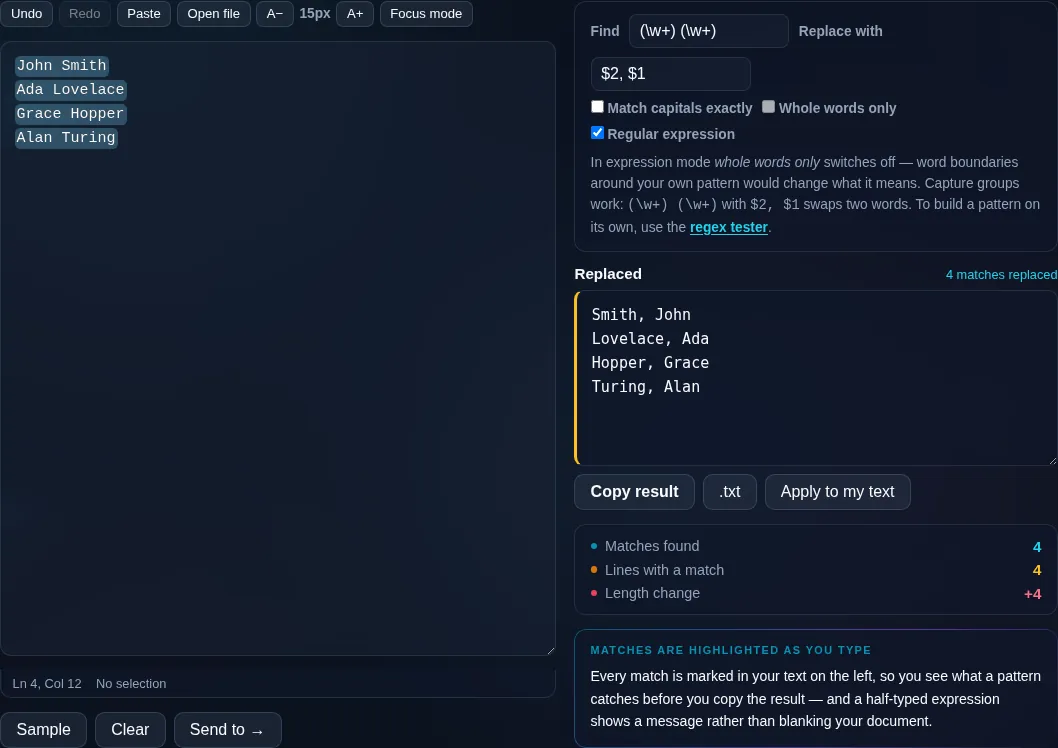
In expression mode whole words only switches off — word boundaries around your own pattern would change what it means. Capture groups work: (\w+) (\w+) with $2, $1 swaps two words. To build a pattern on its own, use the regex tester.

Replaced Nothing to replace yet
Matches found
0
Lines with a match
0
Length change
0

Every match is marked in your text on the left, so you see what a pattern catches before you copy the result — and a half-typed expression shows a message rather than blanking your document.

Privacy Focused

🔒 Local Processing. Your text never leaves your device.

Instant Results

🌐 Fully Client-Side. Runs instantly in your browser.

No Signup

⚡ No accounts. No API keys. Just open and use.

Browser Based

🚀 No installs, no sign-ups, no character limits.

What is a Find and Replace Text?

Find and Replace Text searches your text for a word or pattern and replaces every match. It supports case-sensitive and whole-word matching, shows a live match count, and has an optional regular-expression mode with capture groups. Paste your text and replace in one click. It runs entirely in your browser, so your text stays private.

Swapping one word for another throughout a document, fixing a repeated typo, or reformatting data all come down to find-and-replace. A good one handles case, whole words, and patterns.

This tool does plain and regex replacement with a live match count, all in your browser. Nothing is uploaded. Paste, set your find and replace, and go.
How to find and replace text

Step 1: Paste or type your text into the box

Paste or type your text into the box.

Step 2: Enter what to find and what to replace it with; set case-sensitive, whole-word, or regex options

Enter what to find and what to replace it with; set case-sensitive, whole-word, or regex options.

Step 3: Replace all, see the match count, then copy or download the result

Replace all, see the match count, then copy or download the result.

Find and Replace Text in action

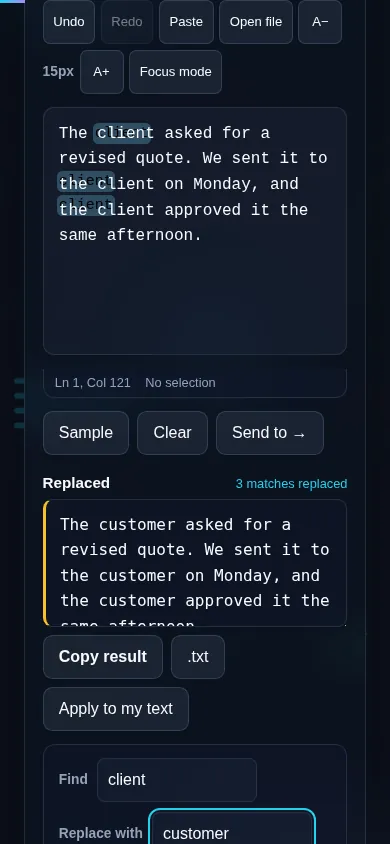
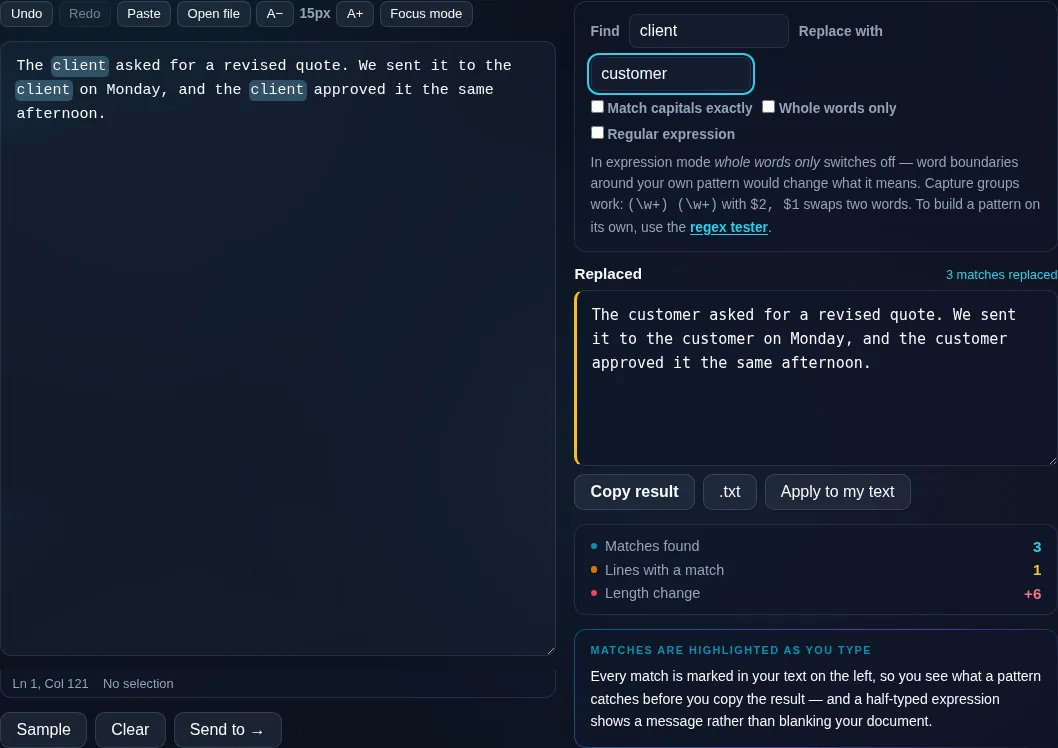
Find and Replace Text replacing words in the browser.
Replace + count
Find and replace with a match count and regex mode.
Regex mode
Find and replace on a phone, no app installed.
Mobile (stacked)

Plain text and regex replacement

In plain mode, the tool finds the exact text you type and replaces every occurrence, with toggles for case-sensitivity (so 'Cat' need not match 'cat') and whole-word matching (so 'cat' doesn't match inside 'category'). It shows how many matches it found so you know the scope before committing. Regex mode unlocks pattern matching — find all numbers, all email addresses, or text between markers — and supports capture groups in the replacement (like $1) for powerful reformatting. An invalid pattern is reported rather than silently failing. You can also run several find/replace rules in sequence. Everything runs locally in your browser, so even large documents process instantly and nothing is uploaded. This is the general-purpose replacer; to build and test a regular expression interactively, the developer Regex Tester is linked here.

Frequently Asked Questions

How do I replace all occurrences of a word?

Paste your text, type the word to find and the replacement, and click Replace All. Every occurrence is swapped at once and the tool shows how many it replaced. Use the case-sensitive and whole-word toggles to control exactly what counts as a match.

Can I make the search case-sensitive?

Yes. By default matching can ignore case, but turning on case-sensitivity means 'Cat' matches only 'Cat' and not 'cat' or 'CAT'. This matters when capitalization is meaningful — for example replacing a proper noun without touching the lowercase word.

What does whole-word matching do?

It ensures your search only matches complete words, not parts of longer words. With it on, replacing 'cat' won't change 'category' or 'concatenate'. Leave it off when you do want to match inside words, such as replacing a substring.

Does it support regular expressions?

Yes. Regex mode lets you match patterns instead of fixed text — all digits, email-like strings, anything between two markers — and use capture groups in the replacement (such as $1) to reformat matches. If your pattern has a syntax error, the tool tells you instead of failing silently.

Can I run several replacements at once?

Yes. You can apply multiple find/replace rules in sequence, which is handy for cleaning data or making a set of consistent edits in one pass. Each rule runs on the result of the previous one, so you can chain transformations.

How is this different from the developer Regex Tester?

This tool performs replacements on your text and is built for getting an edited result. The developer Regex Tester is for building and debugging a regular expression interactively, showing matches and groups as you type. Use this to replace; use the Regex Tester (linked here) to craft a pattern.

Is my text private — is anything uploaded?

No. Everything runs in your browser, so whatever you type or paste is processed on your own device and never uploaded to a server. Nothing is stored once you close the tab. That keeps your text — notes, code, documents, lists — completely private.

Is it free, and do I need to sign up?

Yes, it's completely free with no account, no trial, and no limit on how many times you use it. Because it runs entirely in your browser, there are no server costs, no usage caps, and no watermark or branding added to your text.

Does it work on a phone?

Yes. It runs in your phone's browser with nothing to install, so you can use it on Android or iOS. The layout adapts to small screens, so you can paste text, get the result, and copy it on the go just as easily as on a computer.

Does it work offline?

Once the page has loaded, it runs entirely on your device, so it keeps working without a connection — which is also why nothing is uploaded. You only need to be online to open the page the first time; after that the tool works locally.

Can I copy or download the result?

Yes. You can copy the result to your clipboard with one click, and longer output can be downloaded as a text file. Everything is processed locally, so copying and downloading are instant with no upload step and no waiting.

Is there a limit on how much text I can process?

There's no artificial cap, because the work happens on your device rather than a server. The practical limit is your device's memory, so very large inputs are smoother on a computer than an older phone. For most everyday text, processing is effectively instant.

Still have questions?

If you can't find the answer you're looking for, feel free to contact our support team.

Contact Us