Reverse Word Order

Reverse the order of words in your text while keeping each word readable.

100% Browser-Based Local Processing
15px

Ln 1, Col 1 No selection

Off, the words move with their marks and Hello, world! becomes world! Hello,. On, the marks stay put and it becomes world, Hello! — which is the one that still reads like a sentence.

Reversed word order Nothing to reorder yet
Words
0
Lines
0
Now the first word

This flips the order of the words and nothing else — every word keeps its own spelling, so the result can still be read aloud. To turn the letters backwards instead, that is Reverse Text; to flip a list top-to-bottom, Reverse Line Order. Double spaces and tabs are preserved exactly where they were.

Privacy Focused

🔒 Local Processing. Your text never leaves your device.

Instant Results

🌐 Fully Client-Side. Runs instantly in your browser.

No Signup

⚡ No accounts. No API keys. Just open and use.

Browser Based

🚀 No installs, no sign-ups, no character limits.

What is a Reverse Word Order?

Reverse Word Order flips the sequence of words in your text while keeping each word spelled normally — 'the quick brown fox' becomes 'fox brown quick the'. You can reverse the whole text or each line on its own. It runs entirely in your browser, so your text stays private, and you can copy or download the result.

Sometimes you want the words in the opposite order but still readable — for language exercises, puzzles, certain RTL formatting tricks, or just curiosity. That's different from reversing the letters.

This tool reverses word order in one click, leaving the words themselves intact, all in your browser. Nothing is uploaded. Paste, reverse, and copy.
How to reverse word order

Step 1: Paste or type your text into the box

Paste or type your text into the box.

Step 2: Choose to reverse the words across the whole text or within each line

Choose to reverse the words across the whole text or within each line.

Step 3: Reverse, then copy or download the result

Reverse, then copy or download the result.

Reverse Word Order in action

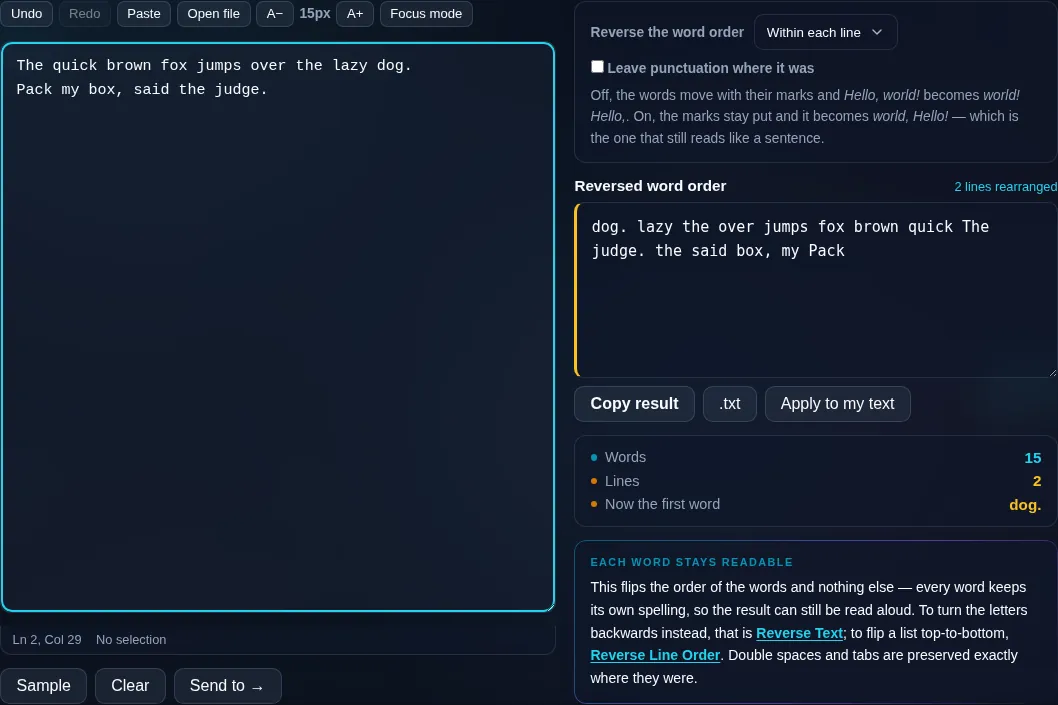
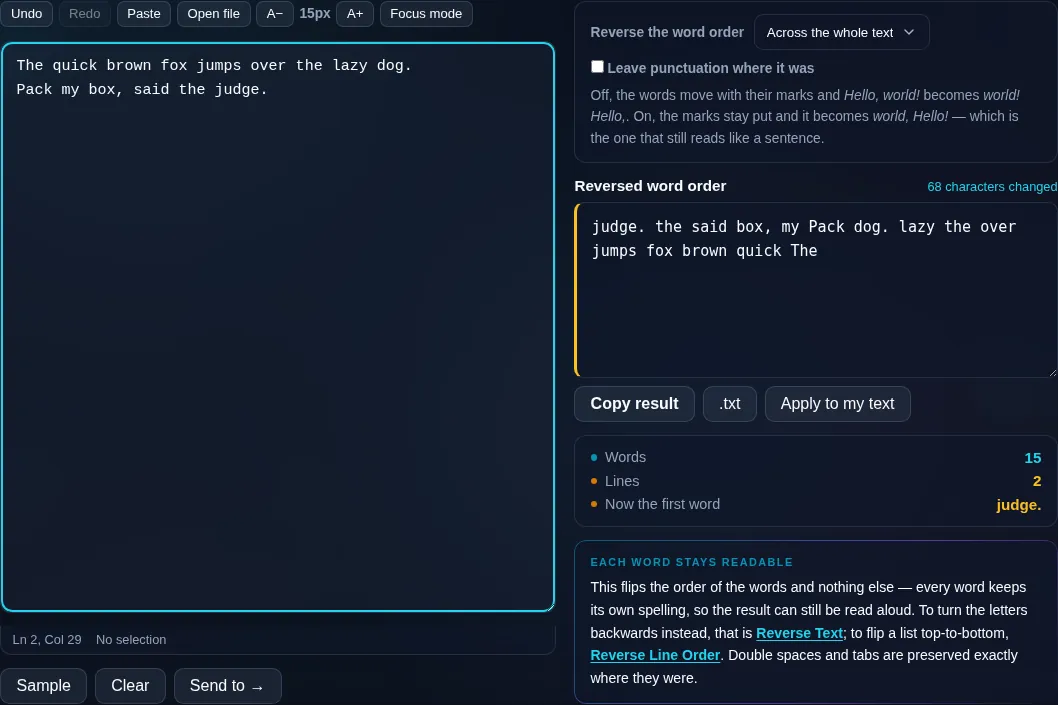
Reverse Word Order flipping word sequence in the browser.
Reversed words
Words reversed in order but still readable.
Per-line option
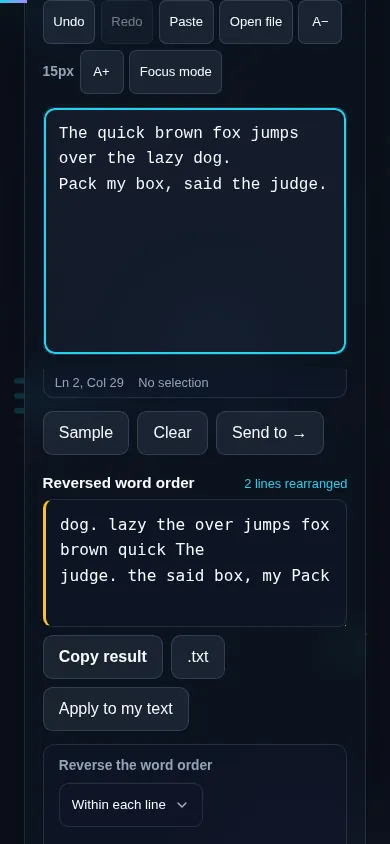
Reversing word order on a phone, no app installed.
Mobile (stacked)

Reversing words versus characters

Reversing word order changes the sequence of the words but not the words themselves, so each one remains readable — 'I love coding' becomes 'coding love I'. That's the key difference from reversing text, which flips individual characters and makes the words unreadable. You can apply it across the entire text (treating it as one stream of words) or per line, so each line's words are reversed while the lines stay in place — useful for lists and structured text. The tool keeps punctuation with its word and handles multiple spaces and line breaks cleanly. It's commonly used for language-learning drills, puzzles, and experimenting with sentence structure. Everything runs locally in your browser, so nothing is uploaded. For backwards letters use Reverse Text; to flip the order of whole lines, Reverse Line Order.

Frequently Asked Questions

What does reversing word order do?

It reverses the sequence of words while keeping each word spelled normally. So 'the quick brown fox' becomes 'fox brown quick the' — the words are readable, just in the opposite order. It's different from reversing the characters of the text.

How is this different from reversing the text?

Reversing word order keeps words intact and only changes their sequence. Reversing text flips individual characters, so words become unreadable ('fox' → 'xof'). Use this tool to reorder words; use Reverse Text when you want the characters themselves backwards.

Can I reverse words within each line?

Yes. A per-line option reverses the word order inside each line separately while keeping the lines in their original order. That's handy for lists or tables where you want each row's words reversed but the rows themselves to stay put.

Does it keep punctuation attached to words?

Yes. Punctuation stays with its word, so 'Hello, world!' reverses to 'world! Hello,' with the marks following their words. The result reads sensibly rather than leaving punctuation stranded in the wrong place.

What is reversing word order useful for?

Language-learning exercises, word and logic puzzles, experimenting with sentence rhythm, and certain text-formatting tricks. Because the words stay readable, the reversed version is still meaningful in a way that character-reversed text isn't.

Can I undo the reversal?

Yes — reversing the word order again restores the original sequence, since it's its own opposite. Your original text also stays in the box, so you can simply re-run it or revert without losing anything.

Is my text private — is anything uploaded?

No. Everything runs in your browser, so whatever you type or paste is processed on your own device and never uploaded to a server. Nothing is stored once you close the tab. That keeps your text — notes, code, documents, lists — completely private.

Is it free, and do I need to sign up?

Yes, it's completely free with no account, no trial, and no limit on how many times you use it. Because it runs entirely in your browser, there are no server costs, no usage caps, and no watermark or branding added to your text.

Does it work on a phone?

Yes. It runs in your phone's browser with nothing to install, so you can use it on Android or iOS. The layout adapts to small screens, so you can paste text, get the result, and copy it on the go just as easily as on a computer.

Does it work offline?

Once the page has loaded, it runs entirely on your device, so it keeps working without a connection — which is also why nothing is uploaded. You only need to be online to open the page the first time; after that the tool works locally.

Can I copy or download the result?

Yes. You can copy the result to your clipboard with one click, and longer output can be downloaded as a text file. Everything is processed locally, so copying and downloading are instant with no upload step and no waiting.

Is there a limit on how much text I can process?

There's no artificial cap, because the work happens on your device rather than a server. The practical limit is your device's memory, so very large inputs are smoother on a computer than an older phone. For most everyday text, processing is effectively instant.

Still have questions?

If you can't find the answer you're looking for, feel free to contact our support team.

Contact Us