Shuffle Lines

Randomly shuffle the order of lines in your text with a secure, unbiased shuffle.

100% Browser-Based Local Processing
15px

Ln 1, Col 1 No selection

The order holds still while you type, so editing your list does not silently re-deal it. Press Shuffle again for a new one, drawn from your browser’s cryptographic random source rather than the clock.

Shuffled Nothing to reorder yet
Lines shuffled
0
Blank lines dropped
0
Lines that moved
0

Sorting with a random comparator is the common shortcut, and it is biased: some orders come up far more often than others. This walks the list once instead, which makes every order equally likely. Duplicates are kept — shuffling is not deduplicating.

Privacy Focused

🔒 Local Processing. Your text never leaves your device.

Instant Results

🌐 Fully Client-Side. Runs instantly in your browser.

No Signup

⚡ No accounts. No API keys. Just open and use.

Browser Based

🚀 No installs, no sign-ups, no character limits.

What is a Shuffle Lines?

Shuffle Lines randomly reorders the lines of your text using a secure, unbiased shuffle. Paste a list and get it in a fresh random order, then shuffle again for another. It runs entirely in your browser with your device's secure random generator, so the order is genuinely random and your list stays private.

Putting a list in random order is useful for fair draws, randomized question banks, shuffling a playlist of names, or removing any bias from a sequence. A proper shuffle has to be unbiased.

This tool shuffles your lines with a secure random generator, so every order is equally likely, all in your browser. Nothing is uploaded. Paste, shuffle, and copy.
How to shuffle lines

Step 1: Paste your list, one item per line

Paste your list, one item per line.

Step 2: Click Shuffle to randomize the order; optionally remove blank lines first

Click Shuffle to randomize the order; optionally remove blank lines first.

Step 3: Copy or download the shuffled list, or shuffle again for a new order

Copy or download the shuffled list, or shuffle again for a new order.

Shuffle Lines in action

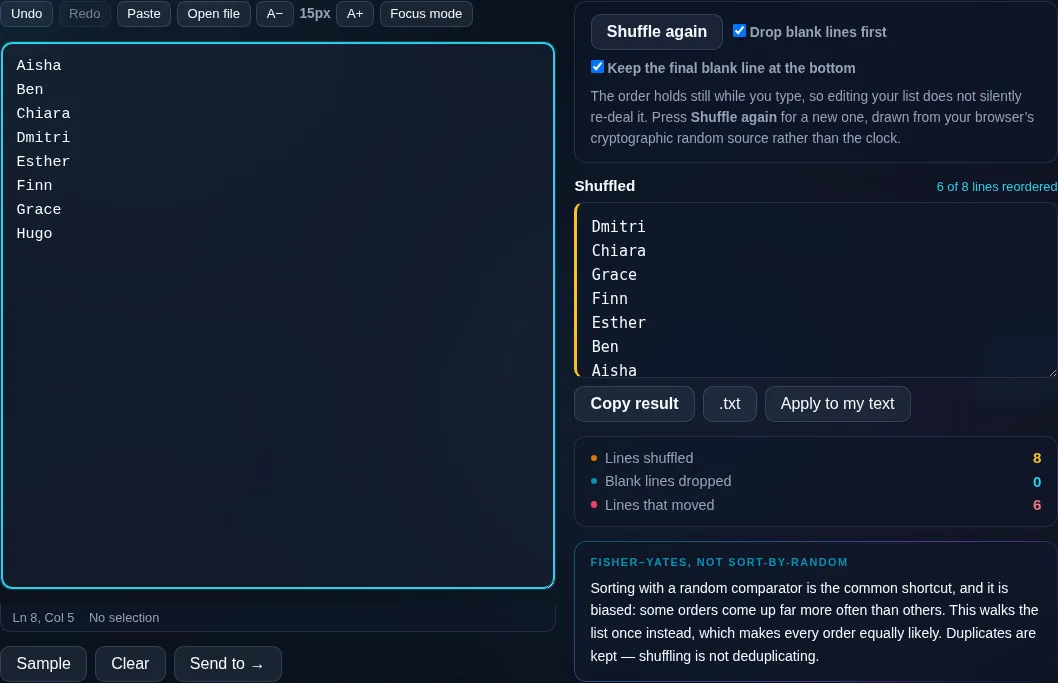
Shuffle Lines randomizing line order in the browser.
Shuffled list
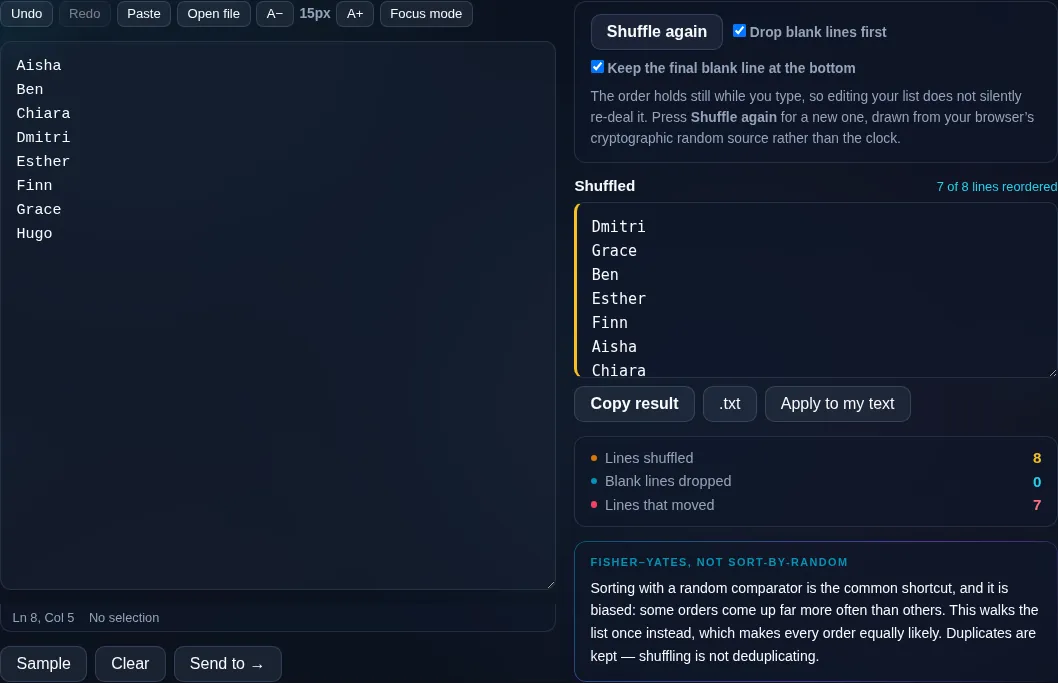
A list shuffled into a random order.
Shuffle again
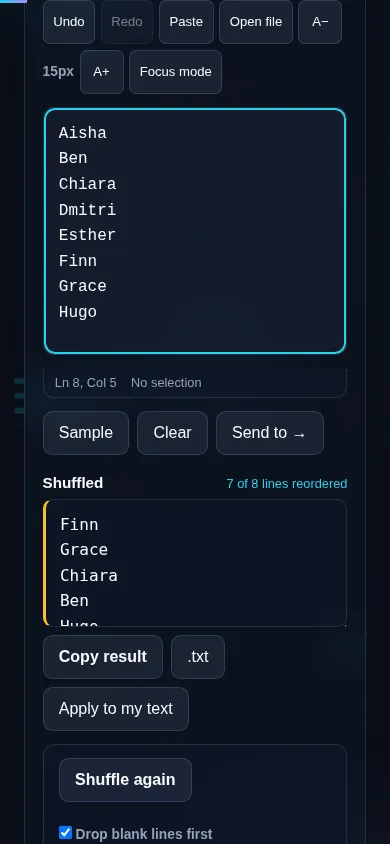
Shuffling lines on a phone, no app installed.
Mobile (stacked)

A fair, secure shuffle

The order is produced with the Fisher–Yates algorithm driven by your browser's cryptographically secure random generator (crypto.getRandomValues), which means every possible ordering is equally likely and there's no bias toward keeping items near their original positions — a problem that naive shuffles suffer from. This is the one text tool here that relies on randomness, so it's worth doing properly: it's suitable for fair draws and unbiased sampling, not just casual reordering. You can remove blank lines before shuffling so empties don't end up scattered through the result, and shuffle repeatedly to get a different order each time. Duplicate lines are kept (shuffling doesn't dedupe). Everything runs locally in your browser, so your list isn't uploaded. For shuffling that's tied to picking winners, see the List Randomizer in the random generator tools; to order rather than randomize, Sort Text Lines.

Frequently Asked Questions

How do I shuffle lines into a random order?

Paste your list with one item per line and click Shuffle. The lines are reordered randomly, and you can shuffle again for a different order or copy and download the result. Each shuffle is independent, so you get a fresh order every time.

Is the shuffle actually random and fair?

Yes. It uses the Fisher–Yates algorithm with your browser's cryptographically secure random generator, so every possible ordering is equally likely and there's no bias. That makes it suitable for fair draws and unbiased sampling, not just casual reordering.

Can I shuffle again to get a different order?

Yes. Each click of Shuffle produces a new independent random order, so you can keep shuffling until you're happy or simply to demonstrate that the order changes. Your original list stays available so you can always start over.

Does it remove blank lines or duplicates?

It optionally removes blank lines before shuffling so empties don't scatter through the result, but it keeps duplicate lines — shuffling only reorders, it doesn't dedupe. To remove duplicates, run Remove Duplicate Lines first, then shuffle the unique list.

Is this the same as sorting?

No — it's the opposite. Sorting puts lines in a defined order (alphabetical or numeric); shuffling puts them in a random order. Use Sort Text Lines when you want a specific order, and Shuffle Lines when you want to remove order and randomize the sequence.

Is my list private when I shuffle it?

Yes. The shuffle happens entirely in your browser using local randomness, so your list is never uploaded and nothing is stored. That matters when the lines are names or other data you'd rather keep on your own device.

Is my text private — is anything uploaded?

No. Everything runs in your browser, so whatever you type or paste is processed on your own device and never uploaded to a server. Nothing is stored once you close the tab. That keeps your text — notes, code, documents, lists — completely private.

Is it free, and do I need to sign up?

Yes, it's completely free with no account, no trial, and no limit on how many times you use it. Because it runs entirely in your browser, there are no server costs, no usage caps, and no watermark or branding added to your text.

Does it work on a phone?

Yes. It runs in your phone's browser with nothing to install, so you can use it on Android or iOS. The layout adapts to small screens, so you can paste text, get the result, and copy it on the go just as easily as on a computer.

Does it work offline?

Once the page has loaded, it runs entirely on your device, so it keeps working without a connection — which is also why nothing is uploaded. You only need to be online to open the page the first time; after that the tool works locally.

Can I copy or download the result?

Yes. You can copy the result to your clipboard with one click, and longer output can be downloaded as a text file. Everything is processed locally, so copying and downloading are instant with no upload step and no waiting.

Is there a limit on how much text I can process?

There's no artificial cap, because the work happens on your device rather than a server. The practical limit is your device's memory, so very large inputs are smoother on a computer than an older phone. For most everyday text, processing is effectively instant.

Still have questions?

If you can't find the answer you're looking for, feel free to contact our support team.

Contact Us