Excel to Markdown Table Converter

A GitHub-Flavored Markdown pipe table, with pipes escaped and the alignment row written for you.

100% Browser-Based Local Processing
Drop a spreadsheet, or click to choose one .xlsx, .xlsm, .xls and .csv. Read in this tab, never uploaded.
Spreadsheet
Markdown
Markdown


    One sheet at a time. The pipe is escaped, a line break becomes <br>, and asterisks, underscores, backticks and backslashes are left alone. Nothing is uploaded.

    Privacy Focused

    Local Processing. The values you enter never leave your device.

    Instant Results

    Fully Client-Side. Runs instantly in your browser.

    No Signup

    No accounts. No API keys. Just open and use.

    Browser Based

    No installs, no sign-ups, no conversion limits.

    Excel to Markdown, with the escaping done right

    This converter reads a sheet from an .xlsx or .xls workbook and writes it out as a GitHub-Flavored Markdown pipe table, alignment row included. A pipe character inside a cell is escaped to \| so it stops ending the cell early and shifting every column to its right. A line break inside a cell becomes <br>, and the tool counts that as a quirk rather than a clean conversion, because <br> is HTML sitting inside Markdown and not every renderer honours it. Asterisks, underscores, backticks and backslashes are left exactly as they are. The file never leaves your browser.

    The alignment row is the part people leave out when they write these by hand. |:---|---:| is required syntax, not styling. Drop it and no renderer treats the block as a table at all, which is why a hand-written table sometimes renders as a wall of pipes. This tool infers alignment from the data, numeric columns right and everything else left, and every column can be overridden before you copy.

    Escaping too much is the other way to get this wrong. *, _ and a backtick are all valid inside a table cell, and escaping them puts visible backslashes into the rendered page. Several converters in this space do it. This one does not, and the only two characters it treats specially are the pipe and the line break. If you are coming at the same problem from the other side, HTML to Markdown answers it for markup rather than for a spreadsheet.

    Spreadsheets store dates as numbers, so a cell that displays 2024-01-01 is really 45292 on disk. The converter formats those by default and offers the raw serial as a toggle. If that number is the thing you were actually trying to understand, the Excel serial date converter explains where it comes from and why serial 60 has no valid date at all.

    How to convert an Excel sheet to a Markdown table

    Five steps, and the two that matter are alignment and line breaks.

    Step 1: Choose your workbook. Drop it on the page or click to browse.

    Drop an .xlsx or .xls file onto the page, or click to browse for one. The file is parsed where it sits. Nothing is sent anywhere, and the drop zone collapses to a one-line file chip once the workbook loads so the output has room.

    Step 2: Pick the sheet. One grid per table, so one sheet at a time.

    A workbook with several sheets shows a picker. Only the selected sheet is converted, because a Markdown table holds one grid and there is no sensible way to stack three of them into one. An empty sheet is refused by name rather than producing an empty table.

    Step 3: Check the alignment row. Inference is a guess about intent.

    Alignment is inferred from the data: numeric columns get ---:, everything else gets :---. Inference is a guess about intent, so override any column that reads wrong. A column of postcodes or part numbers is text to a human and numeric to a scanner, and the human is right.

    Step 4: Decide what happens to line breaks. There is no lossless answer.

    If any cell contains a line break, the tool tells you and gives you two options. <br> keeps the break visible and works on GitHub. Replacing it with a space keeps the output pure Markdown and loses the break. Pick the one your renderer can handle, and there is no third answer that is better than both.

    Step 5: Copy the Markdown. Or download it as a .md file.

    Copy the whole table to the clipboard, or download it as a .md file. Output is padded so the columns line up in a plain text editor. Turn padding off with the compact toggle if the sheet is wide, since padding a 40-column table produces very long lines that are harder to read than unpadded ones.

    Excel to Markdown Table Converter in action

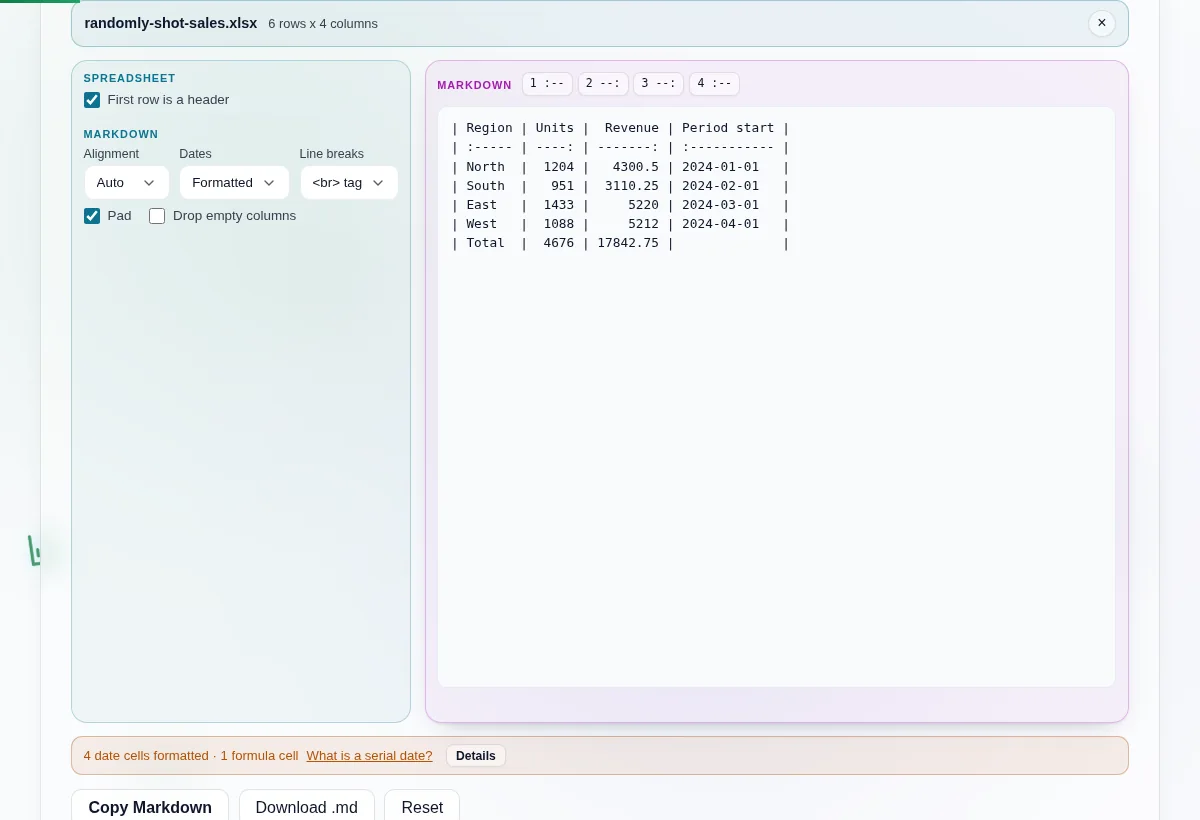
    A six-row sales workbook loaded on the left and the padded GFM pipe table it produced on the right, with the alignment row under the header.
    A loaded workbook and the padded pipe table it produced, alignment row and all
    A spreadsheet cell reading Sales pipe EMEA converted to a Markdown cell where the pipe is written as a backslash followed by a pipe.
    A pipe inside a cell comes out escaped, so the row does not split into extra columns
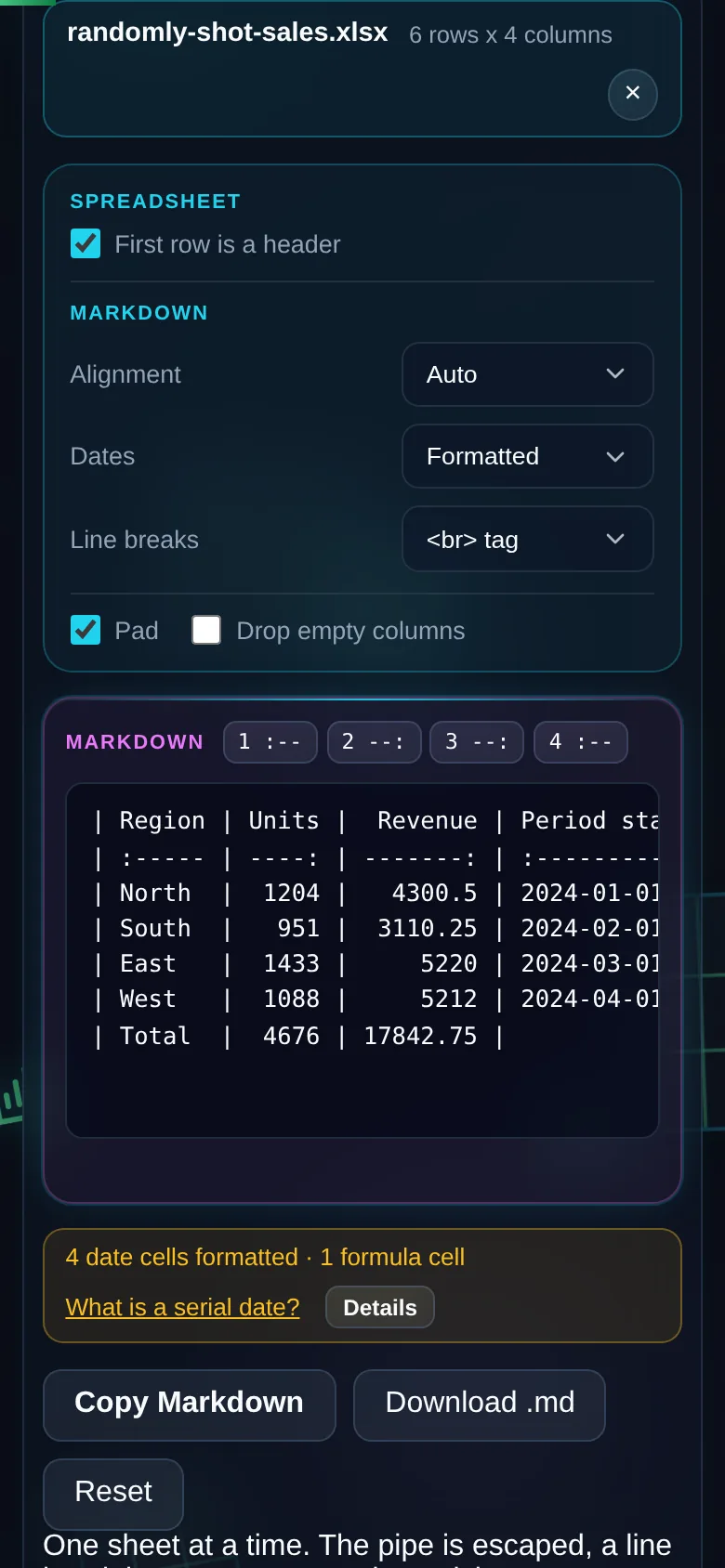
    The same converter on a 390 pixel phone screen, with the options and the Markdown output stacked in one column.
    The same tool on a phone

    Frequently Asked Questions

    Why does my Markdown table break when a cell contains a pipe?

    A raw | inside a cell ends that cell early. Every column to its right shifts by one, so the header row and the body stop lining up and the renderer gives up on the block. This converter escapes it to \| before the cell is written, which GitHub and most other renderers read as a literal pipe. You do not have to hunt for them yourself.

    What happens to a line break inside a cell?

    It becomes <br>. Markdown pipe tables have no multi-line cell, so there is no lossless answer, and the tool reports it as a quirk instead of pretending the conversion was clean. <br> works in GitHub-Flavored Markdown and fails in stricter renderers. If you need output that stays pure Markdown, switch the option to replace each break with a space.

    Does it escape asterisks and underscores?

    No, and that is deliberate. *, _ and backticks are valid inside a table cell, so escaping them adds backslashes that show up in the rendered page. Several converters do this and the output looks broken to whoever reads it. Backslashes are left alone as well. The pipe and the line break are the only two characters treated specially.

    Why is my date showing as 45292 instead of a date?

    Because that is what the spreadsheet stores. Excel keeps dates as serial numbers counted from its own epoch, and 45292 is 2024-01-01. This converter formats them by default, so you get the date rather than the number. Flip the dates toggle if you want the raw serial in the table instead. The Excel serial date converter explains the numbering, including serial 60, which has no valid date at all.

    What happens to merged cells?

    The value lands in the top-left cell of the merge and the rest come out empty, and the tool counts how many. Markdown has no colspan or rowspan, so this genuinely loses information and the summary line says how much. If the merge carries meaning you need to keep, HTML is the target format that can hold it, because HTML has both attributes.

    Do formulas convert?

    You get the cached value, which is the last result Excel wrote into the file. The formula itself is not carried over, because a Markdown table has nowhere to put it. The quirk summary names how many cells were formulas. A cached value can be stale if the workbook was edited outside Excel and never recalculated, so it is worth a glance.

    Is there a row limit?

    5,000 rows by default, liftable once from the page. The cap exists because rendering hundreds of thousands of padded rows into the output pane freezes the tab, and a frozen page is a worse outcome than a truncated one. Either way the tool states the true row count, so you always know exactly what was left out.

    Is my spreadsheet uploaded anywhere?

    No. The workbook is read in your browser by a parser served from this domain, and the page makes no network request while it converts. You can confirm that in your browser's network tab. It also means the tool keeps working with the connection off, which is the practical test: load the page, go offline, convert a file.