Excel to SQL INSERT Generator

CREATE TABLE and INSERT statements for MySQL, PostgreSQL, SQLite or SQL Server, with the escaping right in each one.

100% Browser-Based Local Processing
Drop a spreadsheet, or click to choose one .xlsx, .xlsm, .xls and .csv. Read in this tab, never uploaded.
Spreadsheet
Output options
SQL


    One sheet at a time. This writes SQL text and runs none of it: there is no connection and no query runner here, and nothing is uploaded. Output is not portable between dialects, because the quoting, the escaping and the date literals all differ.

    Privacy Focused

    Local Processing. The values you enter never leave your device.

    Instant Results

    Fully Client-Side. Runs instantly in your browser.

    No Signup

    No accounts. No API keys. Just open and use.

    Browser Based

    No installs, no sign-ups, no conversion limits.

    Excel to SQL, with the escaping right in all four dialects

    This generator reads a sheet from an .xlsx workbook and writes CREATE TABLE and INSERT statements for MySQL, PostgreSQL, SQLite or SQL Server. The four dialects quote identifiers differently: backticks for MySQL, double quotes for PostgreSQL and SQLite, square brackets for SQL Server. MySQL also treats a backslash as an escape character inside string literals and the other three do not, so a generator that only doubles single quotes produces output that is correct in three dialects and silently wrong in the most widely deployed one. Column types are inferred from every row and can be overridden. The workbook is never uploaded.

    That backslash rule is worth a second sentence, because it breaks on ordinary data rather than on anything exotic. A cell holding C:\Users\ana\report.xlsx inserts correctly on MySQL only if each backslash is doubled. Double it on PostgreSQL and you have added a character that was never in the spreadsheet. There is no single output that is right everywhere, which is why the dialect selector changes the escaping as well as the quote marks.

    Type inference scans the whole column instead of sampling the first row. Integers inside int32 give INT, wider ones give BIGINT, a fractional part gives DECIMAL sized to the widest value actually present, and everything else falls to VARCHAR. One text value on row 401 makes the whole column text. Inference is still a guess about intent, so every column can be changed before you generate: a column of 007, 012 and 045 reads as text to a person and as an integer to a scanner, and the person is right.

    Two problems stop the generator rather than being patched over quietly. Duplicate column names are refused and both positions are named, because auto-suffixing the second one to region_2 produces a script that runs and is wrong, and you find that out at query time. An empty header is refused the same way, named by its column letter.

    Nothing here touches a database. There is no connection string, no query runner and no network call, so what you get is text you take somewhere else. That makes escaping a correctness problem rather than a security boundary. A cell containing '); DROP TABLE users;-- has to round-trip into a string literal that inserts that exact text, because that is what the data says, and getting it wrong corrupts a table whether or not anybody meant harm.

    Dates come out as dialect-correct literals, so PostgreSQL gets DATE '2024-01-01' and the other three get the quoted string. Underneath, the spreadsheet stored that date as the number 45292. The Excel serial date converter explains where that number comes from.
    How to generate SQL from an Excel sheet

    Five steps. Pick the dialect before you check the types, because the dialect changes them.

    Step 1: Choose your workbook. Drop it on the page or click to browse.

    Drop an .xlsx or .xls file onto the page, or browse for one. It is parsed in the tab you are sitting in. If the file is not a workbook the tool says so and names the extension it saw, rather than producing an empty script.

    Step 2: Name the table. Required, and quoted for whichever dialect you pick.

    The table name is required and generation is blocked without it. It is quoted for the dialect you pick, so a name with a space or a reserved word still works. A name containing the dialect's own quote character is escaped by doubling it, which is the rule in all four.

    Step 3: Pick the dialect. It changes quoting, escaping and dates at once.

    MySQL, PostgreSQL, SQLite or SQL Server. This changes three things at once: how identifiers are quoted, how strings are escaped, and how dates are written. MySQL is the default and it is the one that differs on backslashes. Output is not portable between dialects, so pick the database you are actually loading into.

    Step 4: Check the inferred types. Inference is a guess about intent.

    Every column shows the type it was given and why. Change any that read wrong, and pay attention to columns holding leading zeros or long identifiers, because those are where inference does the most damage. An empty column has nothing to infer from and defaults to VARCHAR(255) with a note.

    Step 5: Copy or download the SQL. Batched at 100 rows per statement.

    Copy the script or download it as a .sql file. CREATE TABLE can be switched off if the table already exists. Rows are written in batches of 100 by default, which keeps a large insert from becoming one statement your client refuses to parse.

    Excel to SQL INSERT Generator in action

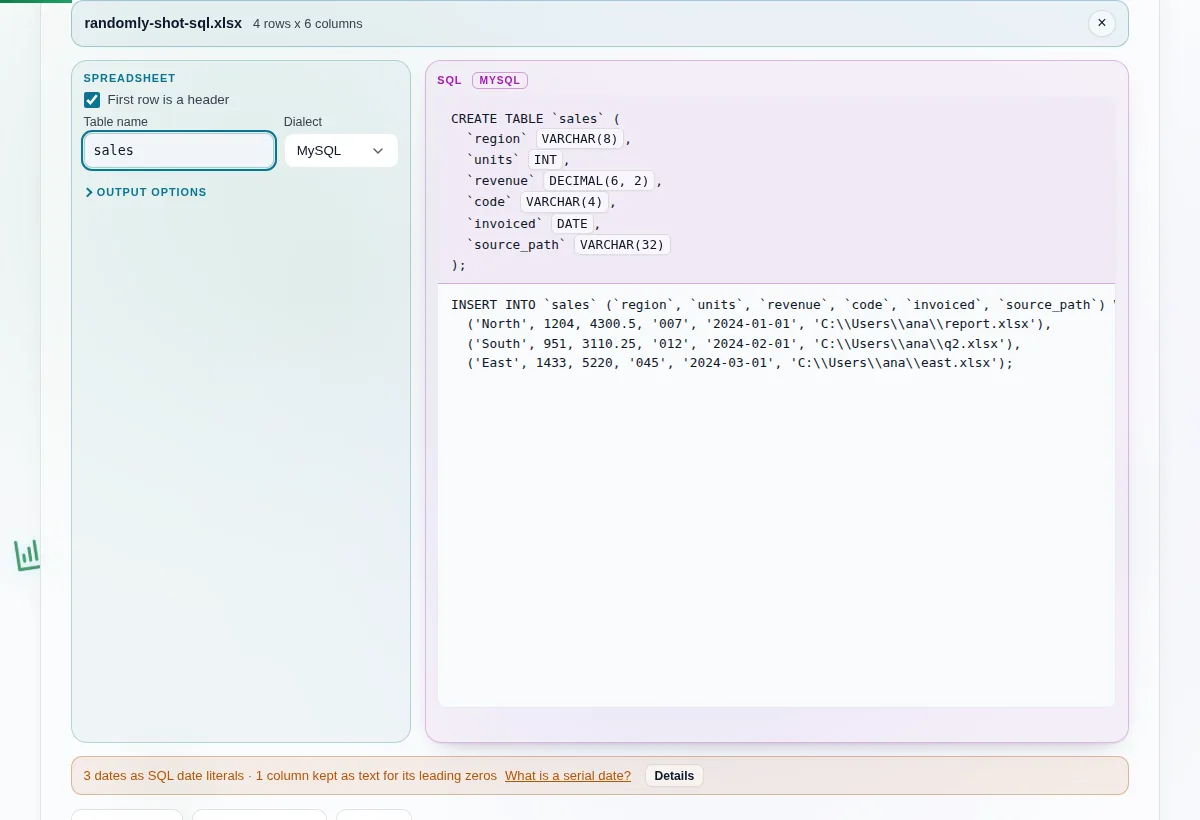
    A workbook loaded with the table name set to sales and the dialect set to MySQL, beside a generated CREATE TABLE and a batched INSERT statement.
    CREATE TABLE and a batched INSERT, with the guessed column type shown beside each name
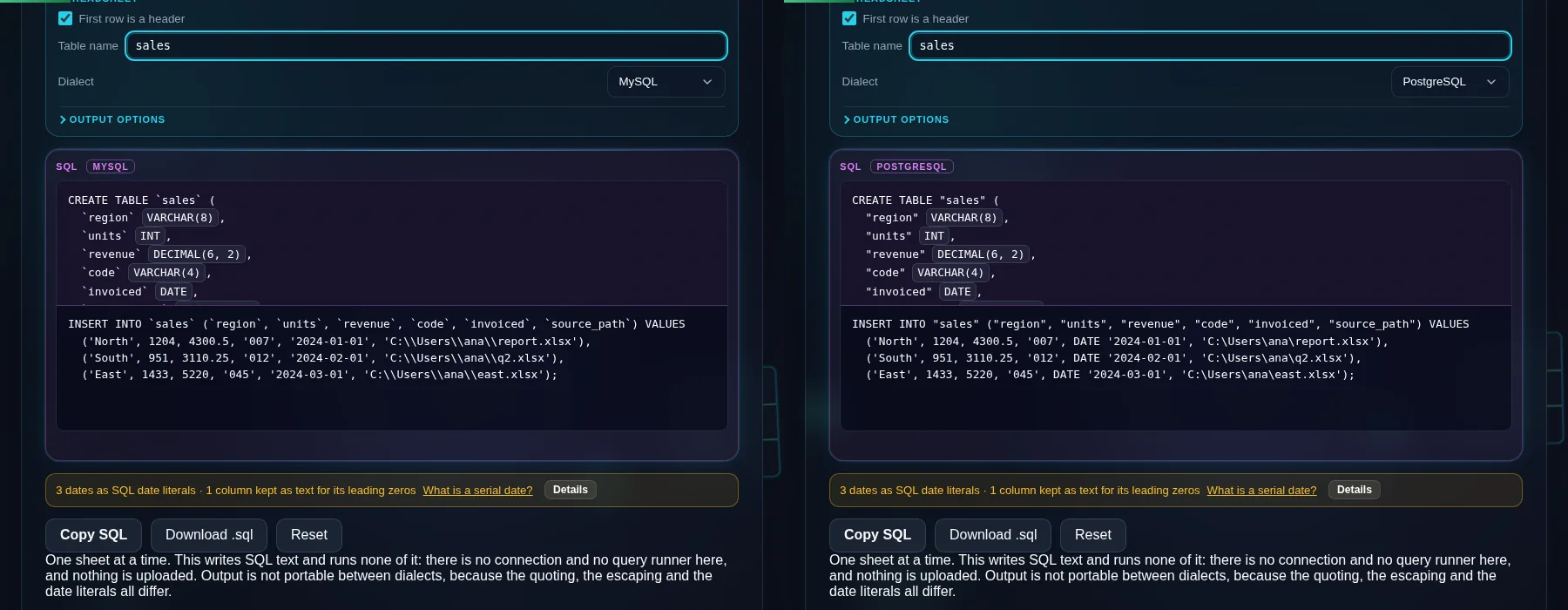
    The same Windows file path generated twice, with doubled backslashes under MySQL on the left and single backslashes under PostgreSQL on the right.
    One cell, two dialects: MySQL doubles the backslash and PostgreSQL leaves it alone
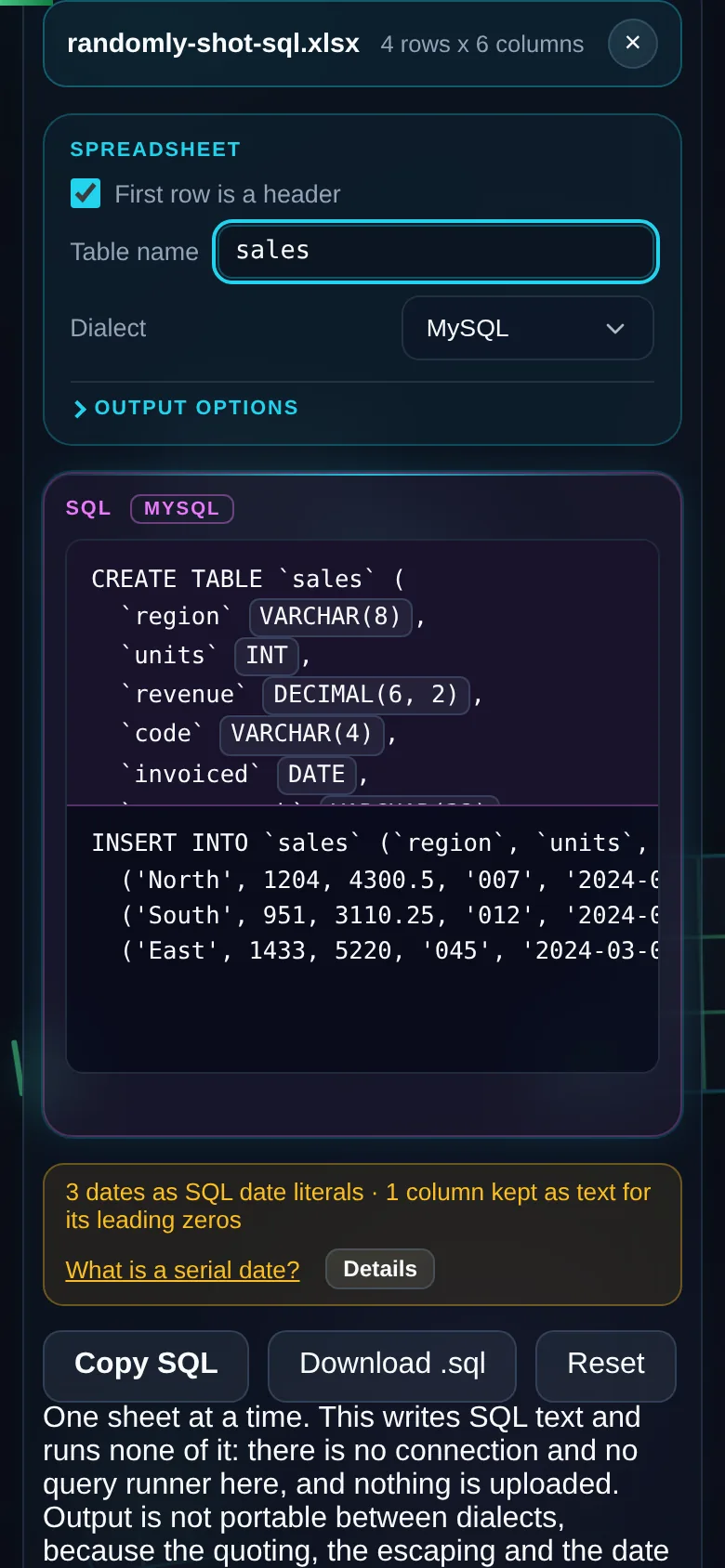
    The same generator on a 390 pixel phone screen, with the dialect selector above the generated SQL.
    The same tool on a phone

    Frequently Asked Questions

    Which SQL dialects does it support?

    Four: MySQL, PostgreSQL, SQLite and SQL Server. They differ in three places and the generator handles all three. Identifiers are quoted with backticks, double quotes, double quotes and square brackets. String escaping is the same in three of them and different in MySQL. Date literals are written as DATE '2024-01-01' on PostgreSQL and as plain quoted strings elsewhere. Pick the one your database actually runs, because the output is not portable between them.

    Why does the MySQL output have doubled backslashes?

    Because MySQL needs them. With NO_BACKSLASH_ESCAPES unset, which is the default, MySQL treats a backslash inside a string literal as an escape character. PostgreSQL, SQLite and SQL Server do not. So a Windows path like C:\Users\ana inserts correctly on MySQL only if each backslash is doubled, and doubling it on the other three would insert a backslash that was never in your data.

    What happens if two columns have the same name?

    The generator refuses and names both positions. SQL cannot have two columns with one name, and auto-suffixing the second to region_2 produces a script that runs and is wrong, which you discover at query time rather than load time. Fixing the header in the source takes about ten seconds and that is where the fix belongs. An empty header is refused the same way, named by its column letter.

    How are column types decided?

    By scanning the whole column rather than the first row. All integers inside int32 give INT, wider ones give BIGINT, anything with a fractional part gives DECIMAL sized to the widest value present, date-formatted cells give DATE or DATETIME, and everything else gives VARCHAR sized to the longest value. One text value in 400 rows makes the column text. Every type can be overridden.

    How do I stop 007 becoming 7?

    Set that column's type to text before generating. A column of 007, 012 and 045 looks like an integer to a scanner, and INT drops the zeros permanently. The generator flags the column as a quirk when it infers a numeric type on values with leading zeros, so you get a chance to catch it. Part numbers and postcodes are the usual victims.

    How are dates written?

    As dialect-correct literals. PostgreSQL gets DATE '2024-01-01', and MySQL, SQLite and SQL Server get the quoted string. A cell carrying a time fraction becomes DATETIME rather than DATE. If you would rather keep the raw Excel serial, the dates toggle emits it as an integer instead, and the serial date converter explains what that number means.

    Does it connect to my database or run the SQL?

    No. It writes SQL text and nothing else. There is no connection string, no query runner and no database anywhere in this page, so what you get is a script you take somewhere else. That is also why escaping is a correctness problem here rather than a security one: a cell containing SQL syntax has to insert as that exact text.

    Is my spreadsheet uploaded anywhere?

    No. The workbook is parsed in your browser by a library served from this domain, and the page makes no network request while it generates. Check it in your browser's network tab if you want to be sure. It keeps working offline too, which is the easy test: load the page, disconnect, generate a script. Nothing you convert is stored here.