Excel to HTML Table Converter

thead, tbody, th scope and a caption, with merged cells kept as colspan and rowspan.

100% Browser-Based Local Processing
Drop a spreadsheet, or click to choose one .xlsx, .xlsm, .xls and .csv. Read in this tab, never uploaded.
Table
Semantics


    One sheet at a time. This writes table markup and nothing around it: no page, no stylesheet beyond the one option, and nothing is uploaded. Cell content is escaped, so a cell holding a tag arrives as visible text rather than as markup.

    Privacy Focused

    Local Processing. The values you enter never leave your device.

    Instant Results

    Fully Client-Side. Runs instantly in your browser.

    No Signup

    No accounts. No API keys. Just open and use.

    Browser Based

    No installs, no sign-ups, no conversion limits.

    Excel to HTML, with markup that is actually accessible

    This converter reads a sheet from an .xlsx workbook and writes an HTML table with the structure a table is supposed to have: <thead> and <tbody>, <th scope="col"> on every header cell, and a <caption> prefilled from the sheet name. Most converters in this space emit <tr> and <td> and nothing else, which renders in a browser and is not accessible. Merged cells come through as colspan and rowspan, so they survive here and are lost in Markdown, JSON and SQL. Ampersands are escaped before angle brackets, which is the ordering that prevents double-escaped output. The file is never uploaded.

    One option is deliberately off. <th scope="row"> turns the first column into row headers, and whether that column really labels its rows is a question about what the data means rather than how it is shaped. The file cannot answer it. A column of names might be row headers and might be ordinary data, so offering the switch is right and assuming it is not. Turn it on when you know it is true.

    Five characters need care and two of them are conditional. &, < and > are escaped everywhere. Quotes are escaped inside attribute values and left alone in text content, because escaping them there puts visible entity codes on the rendered page. Order matters more than the list does. Escape the ampersand first, or escaping < to &lt; and then escaping ampersands turns your own output into &amp;lt;. That is the classic double-escape bug and the ordering is the entire fix.

    A cell containing a script tag is escaped and lands in the output as visible text. The preview on this page never injects cell content as live markup, so nothing in your file is ever executed. There are fewer warnings here than on the sibling converters, and that is correct rather than a gap: HTML constrains less than SQL or JSON, so duplicate headers are fine and need no message, and ragged rows are padded and counted. Dates are formatted from the serial numbers Excel stores, where 45292 is 2024-01-01. The Excel serial date converter explains that numbering.

    How to convert an Excel sheet to an HTML table

    Five steps, and step three is the one that decides whether the markup is honest.

    Step 1: Choose your workbook. Drop it on the page or click to browse.

    Drop an .xlsx or .xls file onto the page or browse for one. It is parsed in your browser. A file that is not a workbook is refused by name, with the extension it actually saw.

    Step 2: Pick the sheet and check the caption.

    Multi-sheet workbooks show a picker. The caption is prefilled from the sheet name and you should change it, because Sheet1 is not a useful accessible name for anybody hearing it read aloud. Write what the table shows.

    Step 3: Decide about row headers. Only switch them on if they are true.

    Column headers are on and are not optional. Row headers are off, and you switch them on only if your first column genuinely labels the rows beside it. Getting this wrong tells a screen reader something untrue about your data, which is worse than leaving the cells plain.

    Step 4: Choose how it is styled. None, classes or inline.

    No styling emits bare semantic markup, which is what you want if your own stylesheet will handle it. Class names add a single hook you can target. Inline styles are available for email templates and CMS fields that strip stylesheets, and they are the wrong choice everywhere else.

    Step 5: Copy the HTML. Built as a string, not through a DOM.

    Copy the markup or download it as an .html file. Indentation is two spaces. The output is built as a string rather than assembled in the DOM and read back, because a DOM round trip quietly normalises markup and you would get something other than what the options say.

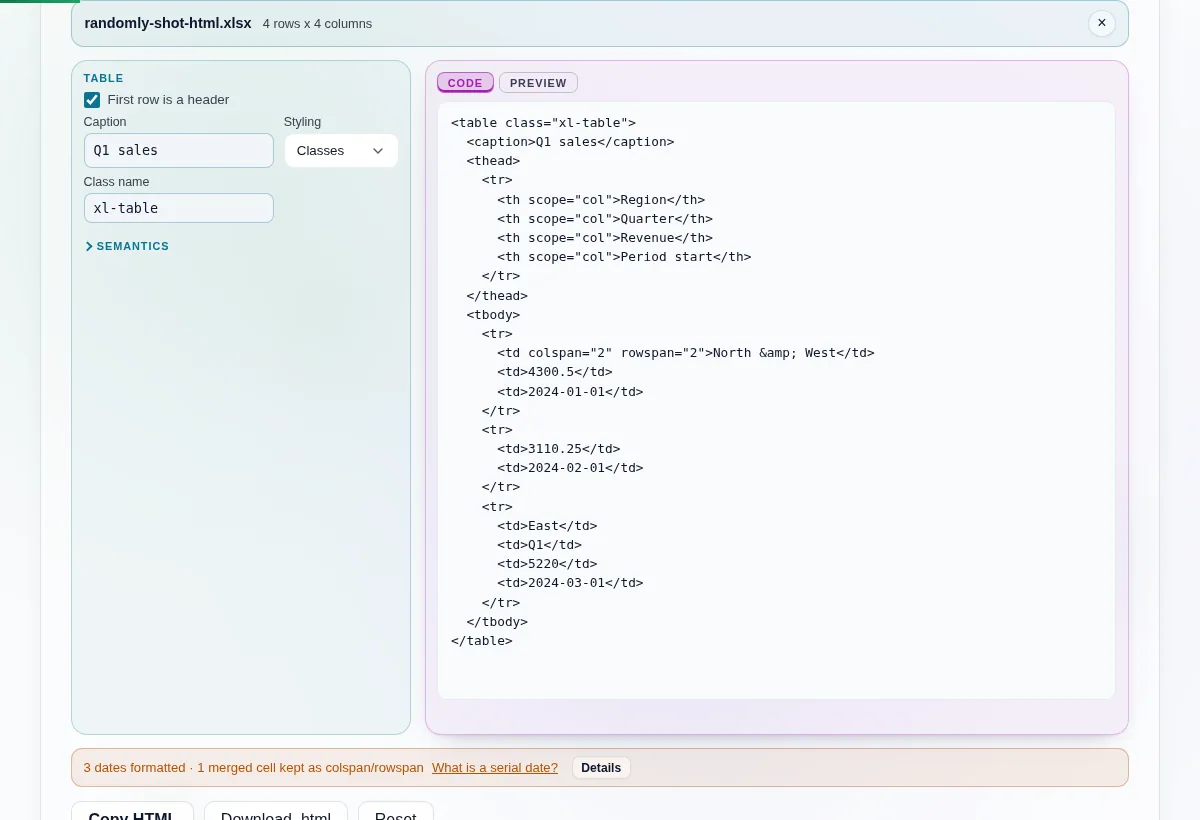
    Excel to HTML Table Converter in action

    A workbook loaded with a caption filled in, beside indented markup containing thead, tbody and a th carrying scope equals col.
    thead, tbody, a caption, and scope on every header cell
    A merged two by two spreadsheet region rendered in the preview tab as one cell spanning two columns and two rows.
    A merged 2x2 region survives as colspan and rowspan, which no other target here keeps
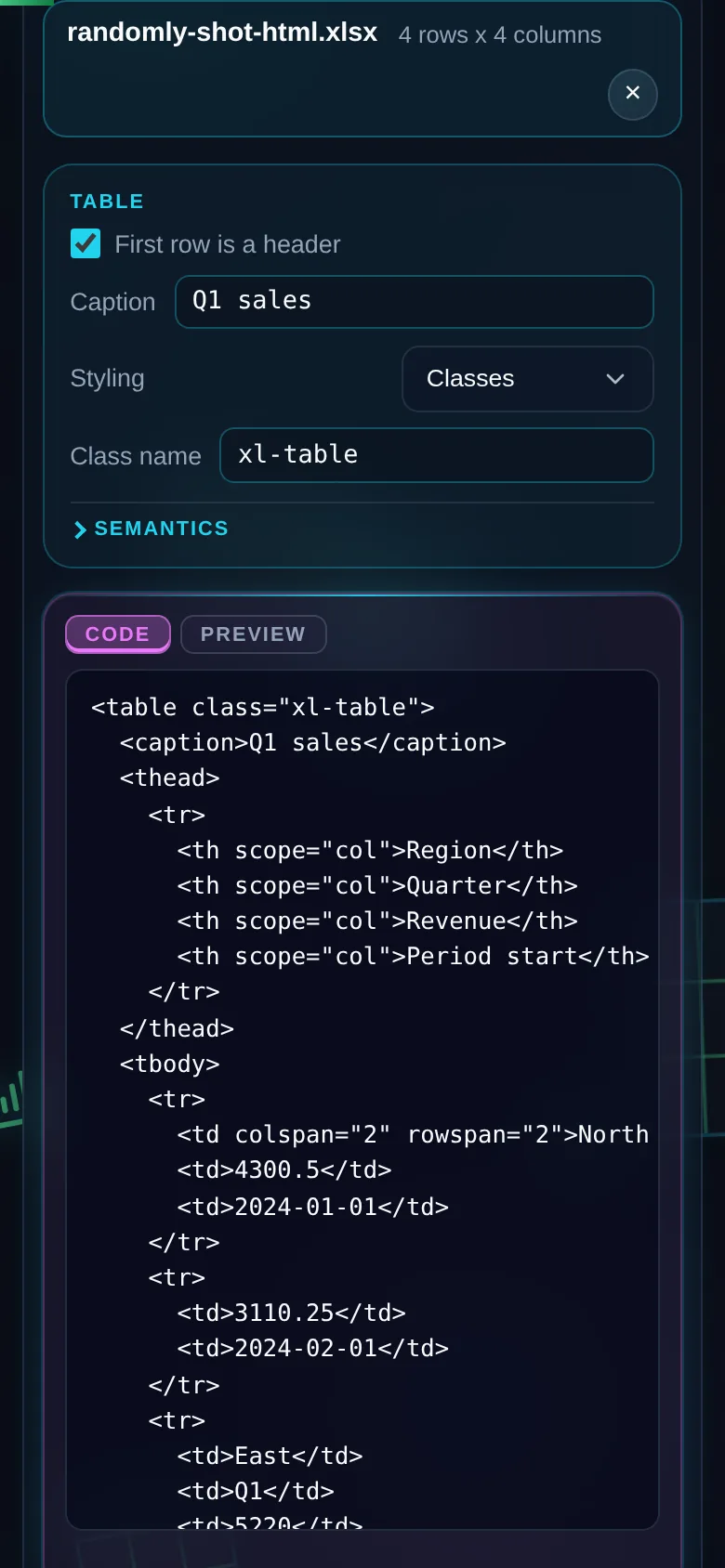
    The same converter on a 390 pixel phone screen, with the table options above the generated markup.
    The same tool on a phone

    Frequently Asked Questions

    What makes this markup accessible?

    It carries the elements a screen reader and a print stylesheet need. <thead> and <tbody> let assistive technology and print CSS repeat the header across pages. <th> with a scope attribute binds each header to its column, which matters because a bare <th> is ambiguous in any table that has both row and column headers. A <caption> gives the table an accessible name, prefilled from the sheet.

    Why is scope="row" off by default?

    Because whether your first column labels its rows is a question about meaning, and the file does not answer it. A column of names might be row headers and might just be data. Guessing wrong produces markup that tells a screen reader something untrue, which is worse than plain cells. Turn it on when you know it is true, and it applies to every row.

    What happens to merged cells?

    They survive. HTML has colspan and rowspan, so a merged two-by-two region comes out as one cell spanning both directions with the three neighbours removed. This is the only one of the four converters here where merges are exact rather than lossy. Markdown, JSON and SQL have no equivalent, so the same file loses that structure in all three of them.

    Why does my output show &amp;lt; instead of a tag?

    That is the double-escape bug and it comes from escaping in the wrong order. If you escape the angle bracket first and then escape ampersands, the ampersand you just created gets escaped too. The fix is ordering rather than a longer list: escape the ampersand first, then the angle brackets. This converter does, and the test suite asserts it on every build.

    Are quotes escaped?

    Only inside attribute values. A double quote in an attribute becomes an entity and so does an apostrophe, because either one would otherwise end the attribute early. In ordinary text content they are left exactly as typed. Escaping them there is the second most common bug in this space and it puts visible entity codes into the rendered page, which readers notice immediately.

    Is a cell containing script tags dangerous?

    No. A cell containing a script tag is escaped and lands in the output as visible text. The live preview on this page never injects cell content as HTML, so nothing from your file is executed as markup. That holds whatever the cell contains, and the test suite asserts that no script node is created and no error fires during the preview.

    What happens if rows have different lengths?

    Short rows are padded with empty cells and the tool reports how many it padded. A table with unequal row lengths is invalid HTML and browsers recover from it inconsistently, so padding is the only sane answer. Duplicate headers, by contrast, are fine here and get no warning. HTML has no key constraint, so inventing a warning would add noise rather than information.

    Is my spreadsheet uploaded anywhere?

    No. Your workbook is read by a parser served from this domain and the conversion happens in the page you are looking at. No request goes out while it runs, which you can confirm in the network tab. Turn the connection off and it still works. That is the difference between a claim about privacy and a property you can test.