Randomly.online
☀️ 🌙
×

ISO Week Date Converter

ISO 8601 Input

Week starts Monday
Year
2026
Week
03
Day
5
2026-W03-5

Gregorian Date

Friday, Jan 16
2026

Understanding ISO 8601 Week Dates

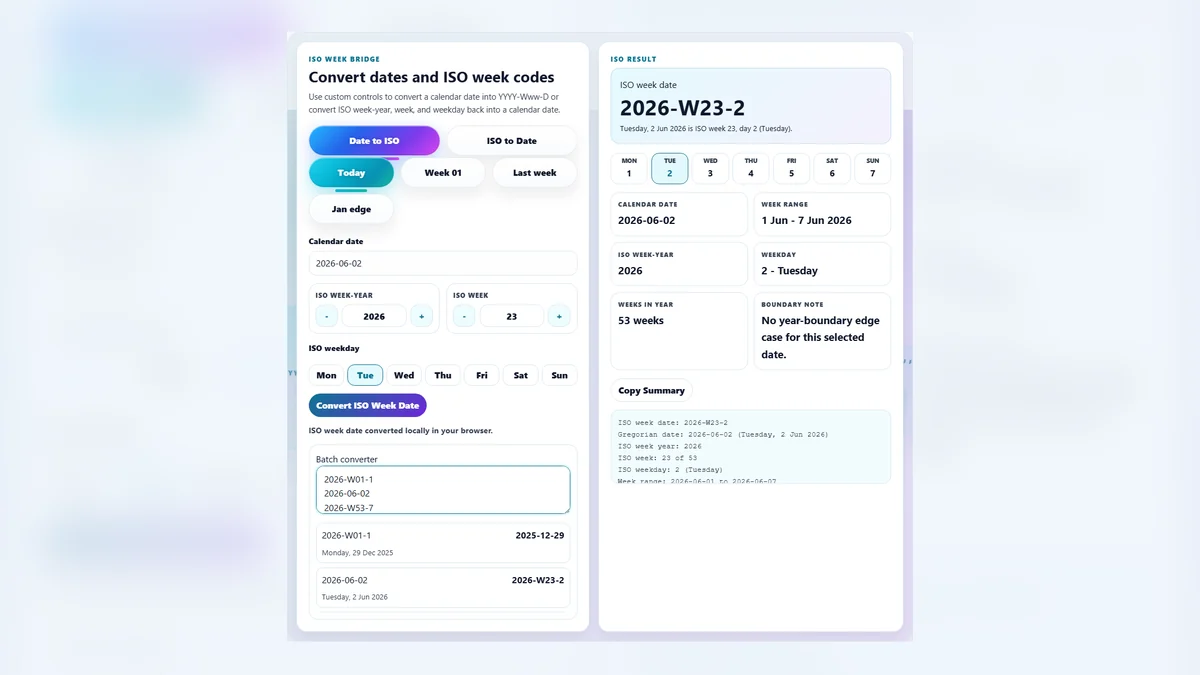
The ISO week date system is an international standard (ISO 8601) for representing dates using a year, a week number (01–53), and a weekday (1–7). Unlike standard calendars, ISO years consist of whole weeks. This means an ISO year can have 52 or 53 weeks. For those managing strict schedules, using a Week Number Calculator alongside this converter is essential for accuracy.

A critical rule in this system is that Week 01 of any year is the week that contains the first Thursday of the Gregorian year, or equivalently, the week that contains January 4th. This leads to interesting edge cases where dates in late December (like Dec 29-31) may belong to Week 01 of the next ISO year. When creating reports, a Calendar Generator can help visualize these transitions clearly.

Our ISO Week Date Converter handles these complexities automatically. Use it to coordinate manufacturing schedules, fiscal years, or development sprints that rely on strict weekly cycles. If you are preparing documentation, you might also find our PDF to JPG converter useful for extracting images from weekly reports.

Using the Converter

Direct ISO Input: Use the scroll controls or arrow buttons in the main workspace. Adjusting the Year, Week, or Day instantly calculates the corresponding calendar date. The visual week strip updates to show you the full Monday-Sunday context of your selected week. For individual day verification, our Day of Week Calculator is a perfect companion tool.

Reverse Conversion: If you have a standard calendar date, simply pick it in the "Reverse Convert" date picker. The system will immediately reverse-engineer the correct ISO Year, Week Number, and Weekday.

Batch Mode: Click the "Batch Mode" button to convert lists of dates. You can paste a mix of ISO strings (YYYY-Www-d) and standard dates (YYYY-MM-DD), and the tool will parse and convert them line-by-line.

Why does my date show a different year?

In the ISO system, the "ISO Year" differs from the calendar year near the start and end of the year. For example, January 1st might be part of Week 52 or 53 of the previous year. This is related to how the solar year is structured; you can verify specific year types with our Leap Year Checker.

Can I convert this for programming?

Absolutely. Developers often need to synchronize ISO weeks with system timestamps. Our Unix Timestamp Converter can assist in converting these exact calendar dates into machine-readable epoch values for database storage and API calls.

Is this tool compatible with Excel?

Yes. Excel uses the ISOWEEKNUM() function. Our converter produces results strictly compliant with ISO 8601, matching the output you would get in Excel, Google Sheets, or programming languages like Python. If your data is in an image format, consider using a text to image tool to label your exported charts.