Military Time Converter
Precision bidirectional 12/24 hour conversion.
Standard Time (12h)
Military Time (24h)
Related Date & Time Tools
Understanding the Precision of Military Time Conversion
The transition between standard 12-hour time and the 24-hour military clock is more than just a mathematical shift; it is a fundamental aspect of global synchronization in professional environments. Our Military Time Converter is engineered to eliminate the ambiguity often associated with "AM" and "PM" markers, which can lead to catastrophic errors in sectors like healthcare, logistics, and emergency response. In a standard clock, 2:00 can refer to either the middle of the night or the heat of the afternoon. However, in military format, 0200 and 1400 are distinct, unique identifiers that leave no room for interpretation. This level of clarity is why international agencies and time zone converters rely on the 24-hour system as a baseline.
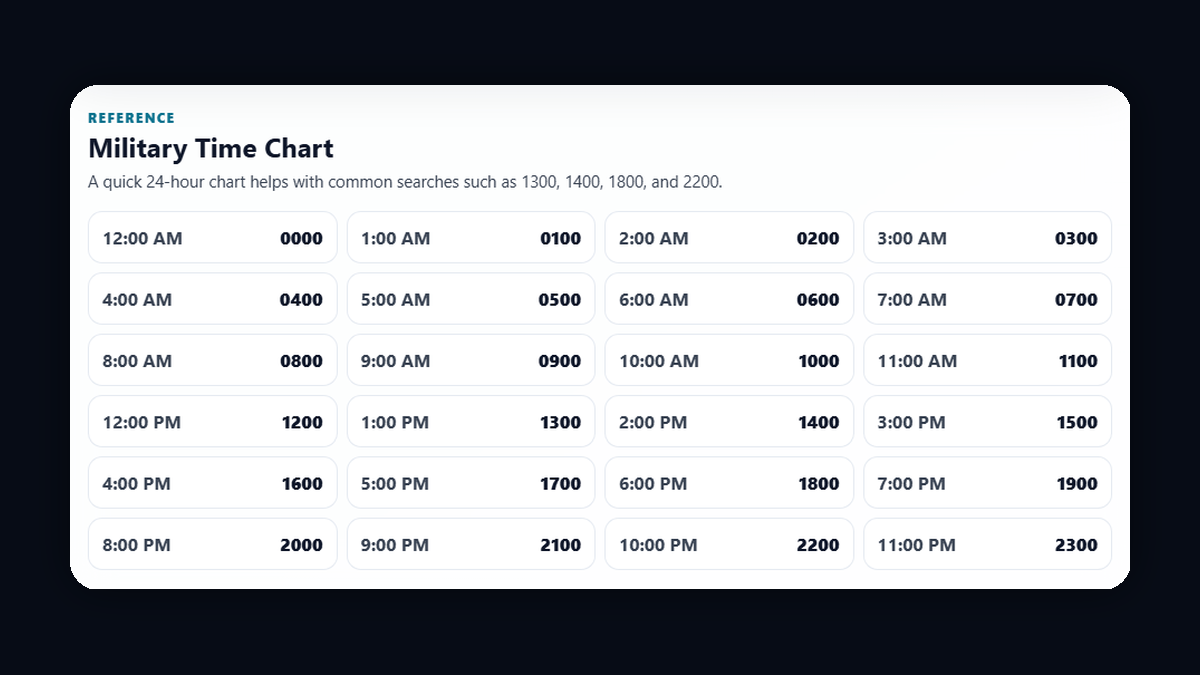
The logic behind military time is rooted in a continuous count of the 24 hours that comprise a full solar day. Starting at midnight (0000), the hours climb steadily until they reach the final minute of the day at 2359. When you use a world clock, you'll often notice that major aviation hubs and military bases display time in this format to maintain a unified "Zulu" or UTC reference point. By utilizing our tool, you can instantly bridge the gap between civilian life and professional military standards, ensuring that your scheduling, documentation, and reporting are always accurate to the minute.
How to Use the Military Time Converter Effectively
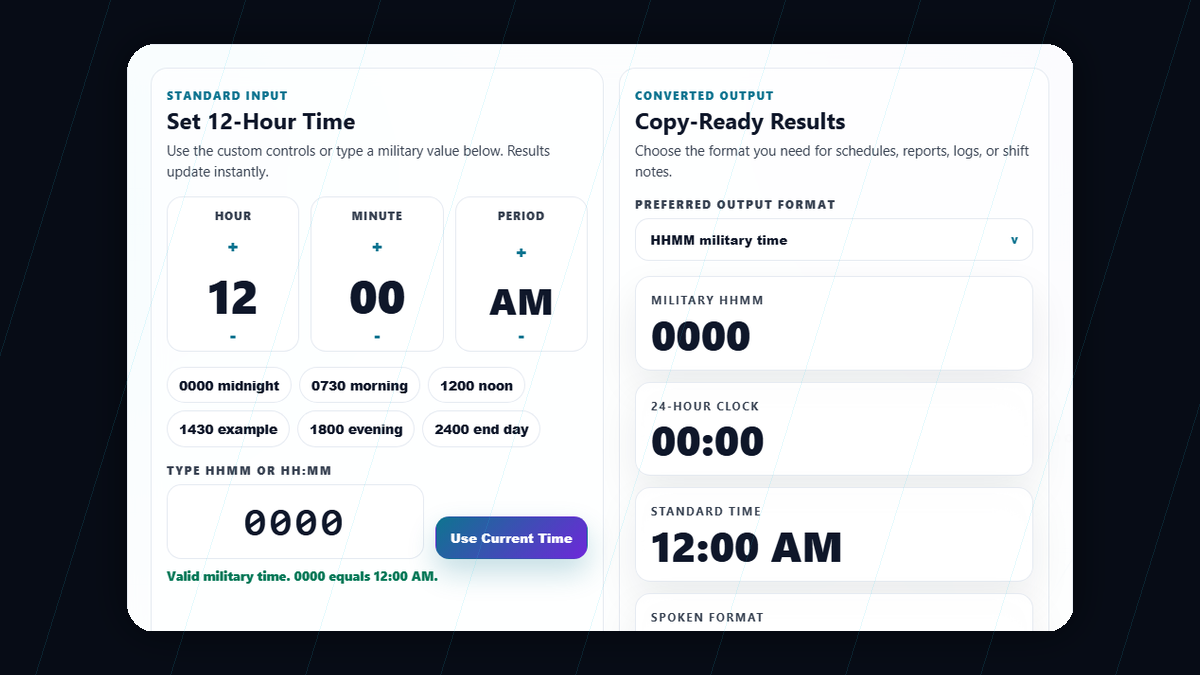
Using our interface is designed to be intuitive yet powerful. On the left panel, you will find the 12-hour standard time selector. Unlike traditional input fields that might be prone to typing errors on mobile devices, we have implemented a high-performance scroll-based selector. Simply click or tap on the desired hour (1 through 12), the minute (00 through 59), and the period (AM or PM). As you interact with these elements, the 24-hour panel on the right updates in real-time. This instantaneous feedback loop allows you to visualize exactly how a standard time translates into its military counterpart without ever needing to click a "convert" button or refresh the page.
For those who prefer direct entry, the Military Time panel accepts a strict four-digit HHMM format. We have built-in validation that monitors your keystrokes. For example, if you attempt to enter a value higher than 2359, the interface will immediately highlight the error and provide guidance. You can also toggle the colon separator depending on your required documentation style—whether you need the classic "14:30" or the strict military "1430" format. Advanced users can also take advantage of our bulk conversion tool. By pasting a list of times into the bulk area, you can transform an entire schedule in a single second. Once converted, simply use the "Copy Time" button to export your results directly to your clipboard for use in spreadsheets, emails, or time card calculators.
The distinction between midnight and noon is perhaps the most common point of confusion for those transitioning to a 24-hour clock. In the military system, noon is straightforward: it is 1200 hours. Because the clock starts at zero, the middle of the day is exactly 12 hours into the count. Midnight, however, represents the end of one day and the beginning of another. Technically, the military uses 0000 to represent the start of a day (12:00 AM). While some older systems or specific operational logs might use 2400 to signify the absolute end of a day, 0000 is the industry standard for digital systems and modern military operations. Using our converter, you can see that selecting 12:00 AM immediately results in 0000, while 12:00 PM yields 1200. Understanding this eliminates the "12:00 ambiguity" that frequently plagues civilian scheduling. For highly precise event planning, checking a countdown timer for an upcoming deadline often relies on this 0000 reference to ensure the date doesn't slip by a full 24 hours due to a simple AM/PM error.
Military time is the global language of precision. In high-stakes environments like surgical theaters, international flight decks, and combat zones, there is no room for the question "Did you mean 3 AM or 3 PM?" Standard 12-hour time relies on suffixes (AM/PM) that can be easily misheard over a radio, misread in a handwritten note, or stripped away in database migrations. By using a 24-hour cycle, every single minute of the day has a unique, non-repeating name. Furthermore, military time simplifies the calculation of time durations. If you start a task at 0900 and end at 1700, the subtraction (17 - 9) is simple math. In a 12-hour system, calculating the difference between 9:00 AM and 5:00 PM requires an extra logical step to account for the meridian crossover. Professionals across the globe—from pilots to paramedics—adopt this system because it reduces cognitive load during stressful situations, allowing them to focus on the task at hand rather than deciphering the clock.
Speaking military time follows a specific rhythmic pattern designed for clarity over voice communications. Generally, times are spoken as a series of digits or a single number followed by the word "hours." For example, 0800 is spoken as "Zero Eight Hundred Hours" or simply "Oh-Eight-Hundred." When minutes are involved, such as 1430, you would say "Fourteen Thirty Hours." One common rule is to always use "Zero" for leading digits; 0500 is "Zero Five Hundred," not just "Five Hundred." This ensures the listener knows a four-digit time is being transmitted. For the first hour of the day, such as 0015, you would say "Zero Zero Fifteen Hours." In aviation and specialized military branches, you might also hear the term "Zulu" appended to the time (e.g., "1430 Zulu") which indicates the time is referenced to Coordinated Universal Time (UTC) rather than a local time zone. This standardized verbalization is a key component of current date and time protocols used in global operations to ensure that every participant, regardless of their native language, understands the precise timing of an event.