100% Browser-BasedLocal Processing

Inscription Converter

Convert a special date into Roman numerals

Pick the date, choose the order, select the separator, and copy a clean Roman numeral date for tattoos, rings, cards, or designs.

Date order
Separator style

Roman Numeral Result

Converted date--
Day--
Month--
Year--

Inscription preview

--
I=1V=5X=10L=50C=100D=500M=1000

Privacy Focused

🔒 Local Processing. Your data never leaves your device.

Instant Results

🌐 Fully Client-Side. Runs instantly in your browser.

No Signup

⚡ No accounts. No hassle. Just open and use.

Browser Based

🚀 Works right in your browser. No installs, no downloads.

Convert Important Dates into Roman Numerals Carefully

This date to Roman numerals converter turns birthdays, wedding dates, anniversaries, memorial dates, and historical dates into Roman numeral formats such as DD.MM.YYYY, MM.DD.YYYY, YYYY.MM.DD, compact strings, and written-date style.

The most common searches are practical: Roman numeral tattoo date converter, wedding date in Roman numerals, birthday in Roman numerals, anniversary in Roman numerals, and Roman numerals for tattoo. The tool gives format and separator control because tattoo artists, jewelers, designers, and customers often need the same date written in different styles.

If you are checking the distance between two important dates, use the Date Difference Calculator. For milestone ideas around an anniversary date, use the Anniversary Calculator.
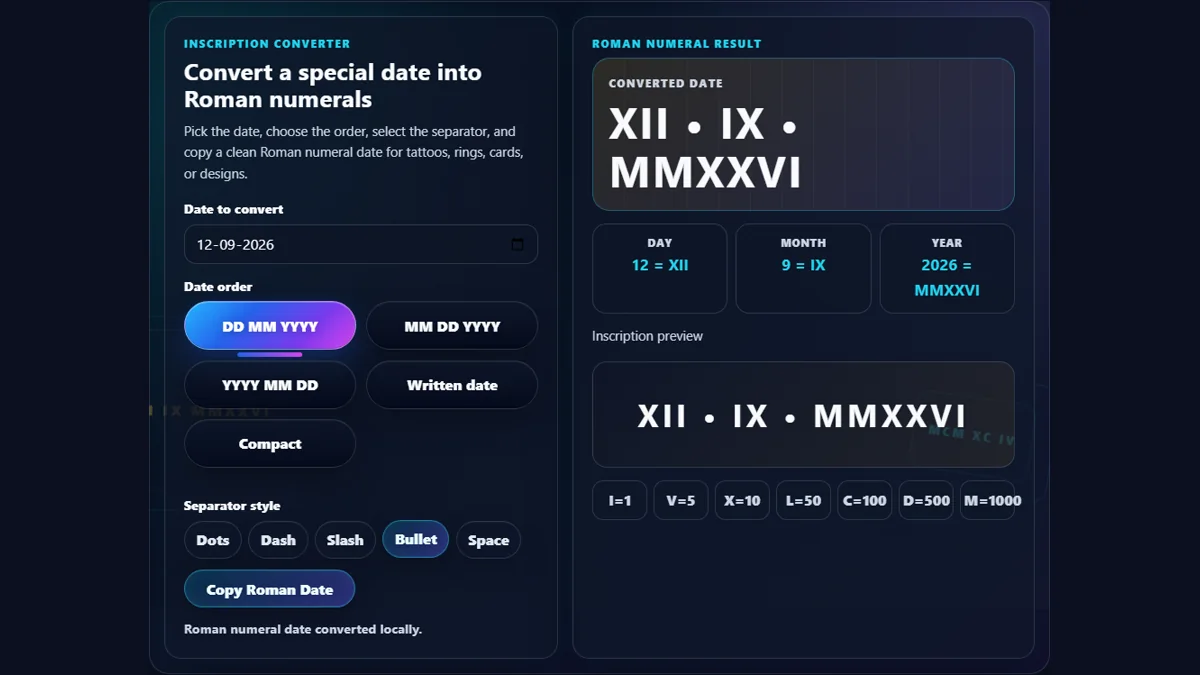
Date to Roman numerals converter showing date picker, DD MM YYYY and MM DD YYYY format chips, separator controls, Roman numeral output, and tattoo engraving preview
The Roman numeral date converter shows format order, separators, component breakdown, and a clean inscription preview for tattoos, jewelry, and anniversary designs.

Roman Date Controls for Tattoos, Jewelry, and Designs

Multiple date ordersSwitch between DD MM YYYY, MM DD YYYY, YYYY MM DD, written style, and compact output.
Separator choicesUse dots, dashes, slashes, bullets, or spaces depending on the design or inscription style.
Component breakdownSee the Roman numeral for the day, month, and year separately before copying the full date.
Tattoo previewReview a large inscription-style preview that is easier to inspect before saving or sharing.
Standard notationUses common subtractive notation such as IV, IX, XL, XC, CD, and CM.
Private conversionThe selected personal date stays in your browser and is not uploaded.

Roman Numeral Date Search Intents Covered

The page covers format questions and real design use cases instead of only converting one static string.

Roman numeral tattoo date converterChoose a date order and separator before copying the Roman date for tattoo planning or artist discussion.
Wedding date in Roman numeralsConvert wedding dates for rings, invitations, keepsakes, wall art, and anniversary gifts.
Birthday in Roman numeralsConvert a birth date into Roman numerals for jewelry, tattoos, cards, memorials, and family designs.
Anniversary in Roman numeralsUse DD MM YYYY or MM DD YYYY formats depending on the design convention you prefer.
Roman numeral date translatorThe breakdown shows how each date part becomes Roman numerals, making the conversion easier to verify.
Roman numerals for tattooDots, bullets, spaces, and compact mode help test common tattoo layout styles before committing to a design.
Roman numeral birthday converterBirthdays can be copied as separate day-month-year numerals or one compact inscription.
Date Roman numeral generatorThe converter generates a clean Roman date instantly and lets you copy it in one click.

Why Use This Instead of Manually Writing Roman Numerals?

Roman numerals are simple for small values, but full dates combine day, month, year, order, and separator choices.

TaskRandomly.onlineManual method
Tattoo date conversionShows full date, separators, and a large preview.Manual conversion may mix up day/month order.
Wedding or anniversary datesLets you compare DD/MM/YYYY and MM/DD/YYYY.A single handwritten format may be hard to judge.
Year conversionConverts modern years with subtractive notation.Long years like 1999 or 2026 are easy to mistype.
Copying the resultCopies the final Roman date in one click.Manual typing can introduce irreversible design mistakes.

How to Use Date to Roman Numerals Converter

Choose the date first, then compare the output style before copying.

Select the date

Choose the birthday, wedding date, anniversary, memorial date, historical date, or design date you want to convert.

Choose the date order

Pick DD MM YYYY for day-first, MM DD YYYY for US-style dates, YYYY MM DD for year-first, written date for educational use, or compact for tight designs.

Choose a separator

Try dots, dashes, slashes, bullets, or spaces. Tattoo and jewelry designs often look different depending on separator width.

Check the breakdown and preview

Review the day, month, and year conversion separately, then inspect the large preview before copying.

Copy the Roman numeral date

Use Copy Roman Date and paste it into notes, design briefs, messages, engraving forms, or tattoo reference files.

Frequently Asked Questions

How do I convert a date to Roman numerals?

Choose the date, pick a date order such as DD MM YYYY or MM DD YYYY, select a separator, and the converter changes the day, month, and year into Roman numerals.

What is the best Roman numeral date format for tattoos?

There is no single required tattoo format. Many people use DD.MM.YYYY, MM.DD.YYYY, or YYYY.MM.DD. The best choice depends on the meaning, location, and design preference, so compare formats before copying.

Can I convert a wedding date to Roman numerals?

Yes. Select the wedding date and choose the format you prefer. The converter is useful for wedding bands, anniversary gifts, invitations, keepsakes, and wall art.

Can I convert a birthday to Roman numerals?

Yes. Use the date picker to select the birthday, then copy the Roman numeral result. The breakdown shows the Roman day, month, and year separately.

Should Roman numeral dates use day-month-year or month-day-year?

Both are commonly used in modern designs. Day-month-year is common internationally, while month-day-year is common in the United States. For tattoos or jewelry, choose the format that you and the recipient understand clearly.

Does the converter use standard Roman numeral notation?

Yes. It uses common subtractive notation, including IV for 4, IX for 9, XL for 40, XC for 90, CD for 400, and CM for 900.

Can Roman numerals represent zero?

Classical Roman numerals do not use a standard zero symbol. This tool converts valid calendar date parts, so days and months are always positive and modern years from the date picker are supported.

Can I choose dots or bullets between Roman numerals?

Yes. Use the separator controls to choose dots, dashes, slashes, bullets, or spaces. This is useful for tattoos, jewelry engraving, and graphic design mockups.

Is the selected date uploaded?

No. The conversion runs locally in your browser. Randomly.online does not upload the selected birthday, anniversary, wedding date, or copied Roman numeral result.

Can I use this for historical dates?

Yes, for ordinary date-to-numeral conversion. The tool converts the calendar date parts into Roman numerals, but it does not convert into the ancient Roman calendar system of Kalends, Nones, and Ides.

Why does 2026 become MMXXVI?

2026 is written as 2000 plus 20 plus 6. In Roman numerals, 2000 is MM, 20 is XX, and 6 is VI, so the result is MMXXVI.

Can I copy the Roman numeral date?

Yes. Use Copy Roman Date to copy the formatted output into a message, tattoo brief, engraving form, design file, or notes.

What should I check before using Roman numerals in a permanent tattoo?

Verify the date, confirm the intended day-month order, compare separator styles, and ask the artist or designer to double-check the final string before it becomes permanent.

Can I use compact Roman numeral dates?

Yes. Compact mode removes separators and places day, month, and year together. It can work for small designs, but it may be harder to read than separated formats.

Still have questions?

If you cannot find the answer you are looking for, contact our support team.

Contact Us