Remove Duplicate Words

Remove duplicate words from your text — delete all repeats or just accidental consecutive ones like 'the the'.

100% Browser-Based Local Processing
15px

Ln 1, Col 1 No selection

Remove

Words are matched with their punctuation set aside, so stop. stop. collapses to stop. and the full stop survives.

Deduplicated words Nothing to clean yet
Words removed
0
Words kept
0
Distinct words
0

Side-by-side is the safe mode and the default: it catches the the and leaves everything else alone. Every duplicate deletes the second the in a paragraph and every one after it, which is right for a keyword list or a tag set and wrong for prose. Read the result before you apply it.

Privacy Focused

🔒 Local Processing. Your text never leaves your device.

Instant Results

🌐 Fully Client-Side. Runs instantly in your browser.

No Signup

⚡ No accounts. No API keys. Just open and use.

Browser Based

🚀 No installs, no sign-ups, no character limits.

What is a Remove Duplicate Words?

Remove Duplicate Words deletes repeated words from your text. Use the consecutive mode to fix accidental double words like 'the the', or the all-duplicates mode to keep only the first occurrence of each word — handy for tidying keyword and tag lists. It runs entirely in your browser, so your text stays private.

Two kinds of duplicate words are worth removing: the accidental double word that slips into writing ('the the cat'), and genuine repeats in a list of keywords or tags where you only want each once.

This tool handles both, with a mode for each, entirely in your browser. Nothing is uploaded. Paste, clean, and copy.
How to remove duplicate words

Step 1: Paste or type your text into the box

Paste or type your text into the box.

Step 2: Choose a mode — remove only consecutive repeats (safe for prose) or remove all duplicates (for lists)

Choose a mode — remove only consecutive repeats (safe for prose) or remove all duplicates (for lists).

Step 3: Clean, then copy or download the result

Clean, then copy or download the result.

Remove Duplicate Words in action

Remove Duplicate Words deleting repeated words in the browser.
Repeats removed
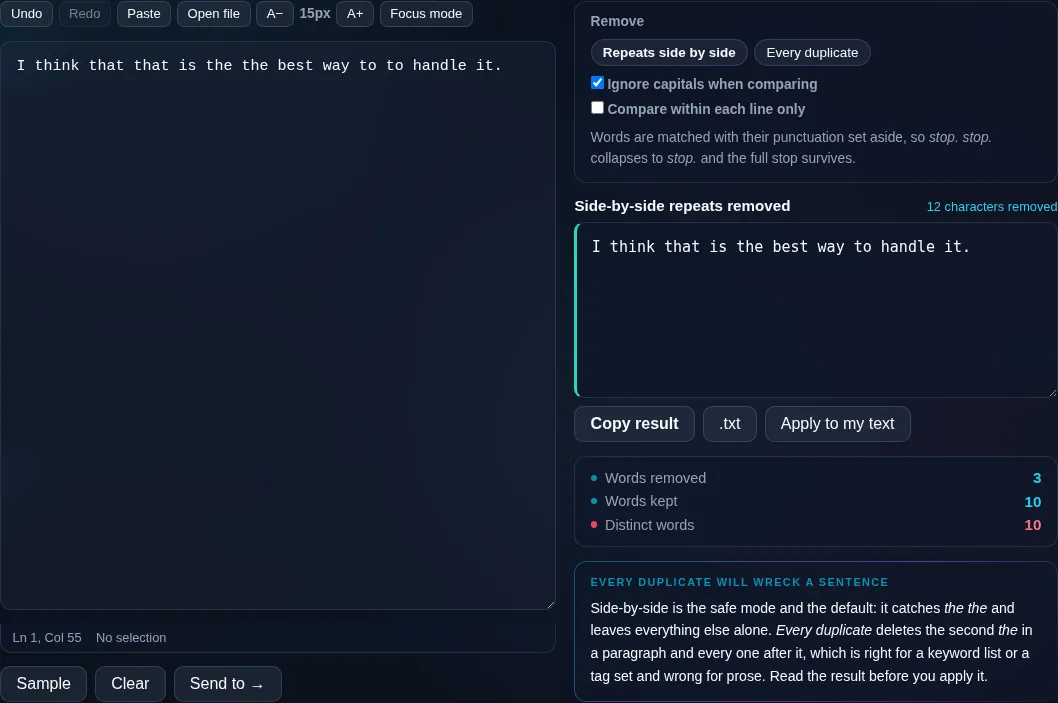
Accidental double words removed from a sentence.
Mode toggle
Removing duplicate words on a phone, no app installed.
Mobile (stacked)

Consecutive repeats versus all duplicates

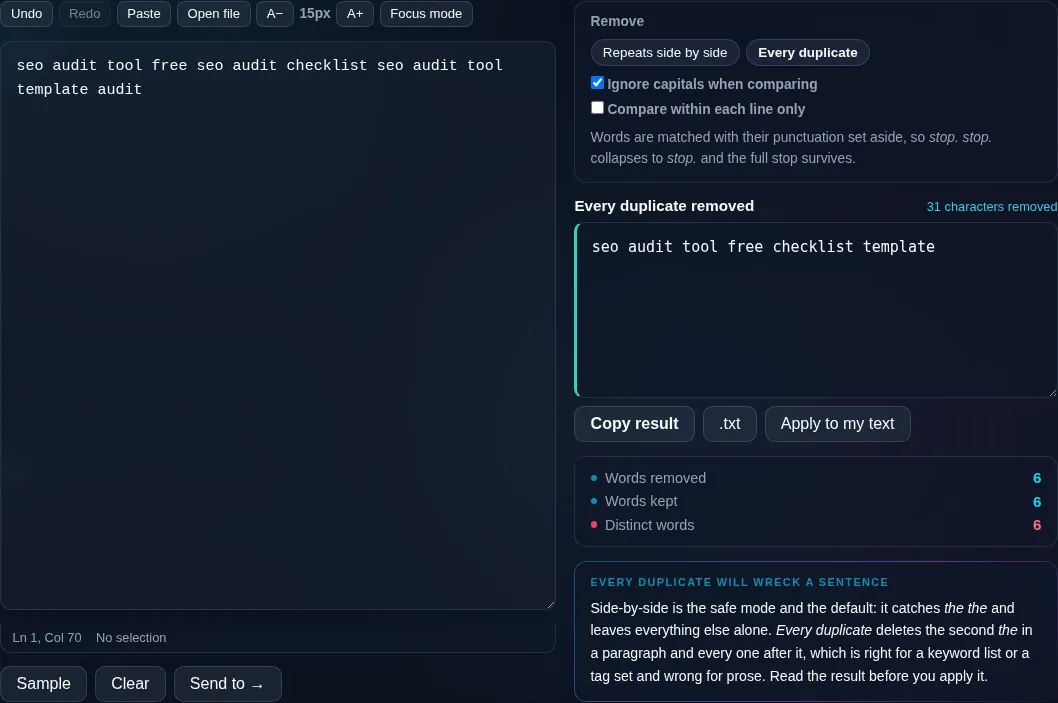
The two modes do very different jobs. 'Remove consecutive repeats' deletes only a word that immediately follows an identical word — the classic 'the the' or 'is is' typo — and is safe to run on normal prose because it doesn't touch words that are meant to recur. 'Remove all duplicates' keeps only the first occurrence of each word anywhere in the text, which would mangle a sentence but is exactly right for deduplicating a list of keywords, tags, or single-word entries. A case-insensitive option treats 'The' and 'the' as the same, and the tool is punctuation-aware so 'word,' and 'word' are compared as the same word. Word order is preserved. Everything runs locally in your browser, so nothing is uploaded. For deduplicating whole lines instead of words, use Remove Duplicate Lines.

Frequently Asked Questions

How do I fix accidental double words like 'the the'?

Use the consecutive-repeats mode. It removes a word only when it immediately repeats the word before it, so 'I saw the the cat' becomes 'I saw the cat'. Because it only targets back-to-back repeats, it's safe to run on full sentences and paragraphs.

What's the difference between the two modes?

Consecutive mode removes only immediate repeats (safe for prose). All-duplicates mode keeps only the first occurrence of each word anywhere, removing every later repeat — which is right for keyword or tag lists but would break normal sentences, since many words are meant to appear more than once.

Will it ruin my sentences?

Not if you use consecutive mode, which only removes back-to-back duplicate words and leaves legitimate repetition alone. The all-duplicates mode will change sentence meaning, so use that one only for word lists, not for prose you want to keep readable.

Is it case-sensitive?

You choose. With the case-insensitive option on, 'The' and 'the' are treated as the same word; with it off, only exact matches are considered duplicates. Case-insensitive is usually best for catching typos and tidying lists where capitalization varies.

Does punctuation affect duplicate detection?

The tool is punctuation-aware, so 'cat,' and 'cat' are recognized as the same word when comparing, and the original punctuation is preserved in the output. This means trailing commas or periods don't stop it from spotting a genuine duplicate.

How is this different from removing duplicate lines?

This works on individual words within your text. Remove Duplicate Lines works on whole lines, which suits lists with one item per line. Use this tool to fix repeated words or dedupe a space-separated word list; use the lines tool for list and data deduplication.

Is my text private — is anything uploaded?

No. Everything runs in your browser, so whatever you type or paste is processed on your own device and never uploaded to a server. Nothing is stored once you close the tab. That keeps your text — notes, code, documents, lists — completely private.

Is it free, and do I need to sign up?

Yes, it's completely free with no account, no trial, and no limit on how many times you use it. Because it runs entirely in your browser, there are no server costs, no usage caps, and no watermark or branding added to your text.

Does it work on a phone?

Yes. It runs in your phone's browser with nothing to install, so you can use it on Android or iOS. The layout adapts to small screens, so you can paste text, get the result, and copy it on the go just as easily as on a computer.

Does it work offline?

Once the page has loaded, it runs entirely on your device, so it keeps working without a connection — which is also why nothing is uploaded. You only need to be online to open the page the first time; after that the tool works locally.

Can I copy or download the result?

Yes. You can copy the result to your clipboard with one click, and longer output can be downloaded as a text file. Everything is processed locally, so copying and downloading are instant with no upload step and no waiting.

Is there a limit on how much text I can process?

There's no artificial cap, because the work happens on your device rather than a server. The practical limit is your device's memory, so very large inputs are smoother on a computer than an older phone. For most everyday text, processing is effectively instant.

Still have questions?

If you can't find the answer you're looking for, feel free to contact our support team.

Contact Us