Extract & Compare Text

Compare two texts line by line or two lists as sets, and pull emails, URLs and numbers out of any text.

100% Browser-Based Local Processing

Compare two things

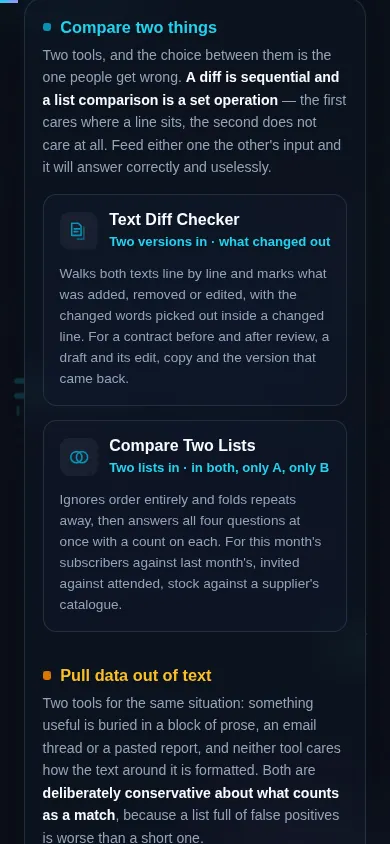
Two tools, and the choice between them is the one people get wrong. A diff is sequential and a list comparison is a set operation — the first cares where a line sits, the second does not care at all. Feed either one the other's input and it will answer correctly and uselessly.

Pull data out of text

Two tools for the same situation: something useful is buried in a block of prose, an email thread or a pasted report, and neither tool cares how the text around it is formatted. Both are deliberately conservative about what counts as a match, because a list full of false positives is worse than a short one.

Every one of these four reads your text rather than rewriting it — the only group in this category that does. Your original is never touched, which is why none of them has an undo. Nothing you paste leaves your browser.

Privacy Focused

🔒 Local Processing. Your text never leaves your device.

Instant Results

🌐 Fully Client-Side. Runs instantly in your browser.

No Signup

⚡ No accounts. No API keys. Just open and use.

Browser Based

🚀 No installs, no sign-ups, no character limits.

Comparing two texts, or comparing two lists?

These four tools read text rather than rewrite it. Two compare: a diff checker for two versions of the same text, where order and position matter, and a list comparison for two sets of items, where they do not. Two extract: emails and URLs, and numbers.

Every other group of text tools on this site hands your text back to you changed — tidied, recased, restyled, rewritten in another notation. Not one of these four does. They answer questions *about* text and leave the original exactly where it was. That is why none of them has an undo button: there is nothing to undo.

They divide into two pairs, and the split between the first pair is the one worth getting right before you click.

A diff is sequential. It walks two texts line by line, in order, and tells you what was inserted, deleted or edited between one version and the next. Position is the whole point: the same sentence moved from the top of a document to the bottom is a change, and a diff will say so. Reach for it when you have two versions of *the same thing* — a contract before and after review, a draft and its edit, a page of copy and the version that came back.

A list comparison is a set operation. It ignores order completely, folds duplicates away, and answers three questions: what appears in both lists, what is only in the first, and what is only in the second. The same item at the top of one list and the bottom of the other is simply in both. Reach for it when you have two collections of *separate things* — this month's subscribers against last month's, invited against attended, the SKUs you stock against the ones the supplier lists.

Feed a diff two shuffled lists and it will report almost every line as changed, correctly and uselessly. Feed a list comparison two drafts of a paragraph and it will tell you which sentences the two have in common, which is rarely the question. Both tools are working; only one of them was asked the right question.

The other two pull structured data out of unstructured text. One finds email addresses, web links and optionally phone numbers; the other finds numbers, and will total and average them for you. Both are for the same situation — something useful is buried in a block of prose, an email thread, a pasted report — and neither cares how the surrounding text is formatted.

Everything runs in your own browser. Two of these tools take two inputs rather than one, and both of those keep your original and your comparison side by side on screen the whole time. Nothing is uploaded.

How to compare or extract

Step 1: Pick by the question you are asking, not by the words in the tool name

Two versions of one thing means a diff; two collections of separate things means the list comparison.

Step 2: Paste your text

The two comparison tools have two panes, A and B, stacked in the left column — A is the original or first list, B is the revised version or second list.

Step 3: The result appears as you type

On the diff, added, removed and changed lines are each marked with a word and a symbol, not colour alone. On the list comparison, each of the four answers gets its own pane and its own count.

Step 4: Set the options if you need them — ignore case, ignore whitespace, keep or drop blank lines, and on the extractors which kinds of data to pull and whether to remove duplicates

Set the options if you need them — ignore case, ignore whitespace, keep or drop blank lines, and on the extractors which kinds of data to pull and whether to remove duplicates.

Step 5: Copy any result pane on its own, or use Send to to carry it straight into another text tool without it touching the clipboard or the address bar

Copy any result pane on its own, or use Send to to carry it straight into another text tool without it touching the clipboard or the address bar.

Extract & Compare Text in action

The Extract & Compare cluster grid, four tools split into the two that compare text and the two that pull data out of it, dark mode
The four-tool cluster grid
The Extract & Compare cluster on a phone, the four tool cards stacked in a single column
Mobile (grid stacked to one column)

What these tools count as the same thing

Every comparison rests on a definition of "identical", and each of these four lets you move it. That is the single setting most likely to change your answer, and it is worth a moment before you conclude the tool is wrong.

By default, comparison is exact. Apple and apple are different. item and item are different. The diff treats a line with trailing whitespace as changed, because in a file it is. Turn on ignore case and the first pair matches; turn on trim or ignore whitespace and the second does. What comes back is always the text you actually typed — the folding is used to decide what matches, never to rewrite your data. A tool that handed you back a lowercased list because you asked it to compare case-insensitively would be answering a question you did not ask.

Line endings are never a difference. A file saved on Windows and the same file saved on a Mac differ in an invisible character on every single line, and a diff that reported that would report nothing else. Both are normalised before anything is compared.

Duplicates inside one list are folded, and the tool tells you how many. Paste four hundred rows into the list comparison and get three hundred and eighty back, and you are owed the reason rather than left to work it out — the count of folded lines is printed alongside the results.

Extraction is pattern matching, and pattern matching has edges. The tools are deliberately conservative about it. An address written as *name at example dot com* is not found, because a rule loose enough to catch it also catches ordinary sentences. A bare four-digit year is not reported as a phone number, and a number glued to letters inside an identifier is not reported as a number unless you ask for it. Where the tools draw those lines is stated on each page rather than left for you to discover from a wrong answer.

Nothing you paste leaves your browser. That matters more here than in most of this category, because these are the tools people reach for with contracts, customer lists and contact details in hand. The comparison happens in the tab, the extraction happens in the tab, and there is no request that carries any of it anywhere — including the Send to button, which moves work between tools through session storage rather than the address bar.

Frequently Asked Questions

Should I use the diff checker or the list comparison?

It depends on whether order matters. A diff walks two texts line by line and reports what was inserted, deleted or edited, so moving a paragraph counts as a change — use it for two versions of the same thing, like a document before and after editing. A list comparison ignores order entirely and answers what is in both lists, what is only in the first, and what is only in the second. Use it for two collections of separate items.

Can these tools change my text?

No, and that makes this group unusual on this site. Every other cluster of text tools rewrites what you paste and hands it back. These four only read: the diff reports differences, the list comparison derives new lists from two you supply, and the extractors pull out copies of what they find. Your original stays exactly as you typed it in the pane you typed it into, which is why none of these tools needs an undo.

Does anything I paste get uploaded?

No. Every comparison and every extraction runs in your own browser, and there is no request that carries your text anywhere. That matters more here than in most of this category, because these are the tools people reach for holding contracts, customer lists and contact details. It includes the Send to button, which moves work between tools through session storage rather than the address bar, so nothing you typed can land in a URL, a browser history entry or an analytics record.

Why does the diff say a line changed when it looks identical?

Almost always trailing whitespace, or a space where a tab used to be — invisible on screen and a genuine difference in the file. Turn on ignore whitespace and the line will match. Line endings are the one invisible difference that is never reported: a file saved on Windows differs from the same file saved on a Mac on every single line, so both are normalised before anything is compared, and a diff between them comes back clean.

What happens to duplicate items in a list comparison?

They are folded down to one, and you are told how many were folded. Set operations have no concept of an item appearing twice, so a list of four hundred rows containing twenty repeats behaves as three hundred and eighty distinct items. Rather than let that quietly change your counts, the tool prints the number of duplicate lines it collapsed alongside the results. To remove duplicates from a single list instead, use Remove Duplicate Lines.

Why was an email written as "name at example dot com" not found?

Because a pattern loose enough to catch that also matches ordinary English sentences, and a list of false positives is worse than a short list. The extractor looks for real addresses in their real form. The same conservatism applies elsewhere: a bare year is not treated as a phone number, and digits glued inside an identifier are not treated as a number unless you turn that option on. Each page states where its line is drawn.

Does turning on "ignore case" change my text?

No. Case folding, trimming and whitespace normalisation are used only to decide what counts as a match; every result you get back carries the text exactly as you typed it. If two lines match only because case was ignored, the one that appears in the results is the original, in its original case. A tool that handed back a lowercased list because you asked it to compare case-insensitively would be answering a question nobody asked.

How large an input can these tools handle?

Large ones. The diff trims the matching start and end of the two texts before doing any real work, so a long document with a handful of edits is a small problem no matter how long it is. Beyond a size where line-by-line matching would stop being quick, the diff switches to reporting whole changed blocks and says on screen that it has done so, rather than quietly giving you a worse answer.

How is this different from the Dev Tools code diff checker?

This one is built for prose: contracts, drafts, copy and documentation, with word-level highlighting inside a changed line so you can see which phrase moved. The Developer Tools code diff checker is built for source code, where indentation is meaningful, syntax highlighting helps and whole-line comparison is usually what you want. Both compare two texts; they differ in what they assume about the text and in what they show you.

Can I chain these tools together?

Yes. Every tool in the category has a Send to button that carries the current result straight into another text tool, so you can extract the emails from a thread, then sort or dedupe the list, without copying anything by hand. Each result pane on the comparison tools can be sent on its own, so you can take just the items that appeared in both lists onward. The handoff travels in session storage rather than a query string.

Still have questions?

If you can't find the answer you're looking for, feel free to contact our support team.

Contact Us