Word Counter

Count words, characters, sentences, and paragraphs as you type, with reading time and limit presets.

100% Browser-Based Local Processing
15px

Ln 1, Col 1 No selection Variety —

0

Words

0 unique

0% Not started

Progress towards your word goal.

Characters
0
Characters, no spaces
0
Sentences
0
Paragraphs
0
Reading time
0m 00s
Speaking time
0m 00s

A word is any run of non-space characters containing at least one letter or digit, so don't is one word and is none. That is the same rule Google Docs uses and one more than Microsoft Word, which counts some punctuation runs.

Privacy Focused

🔒 Local Processing. Your text never leaves your device.

Instant Results

🌐 Fully Client-Side. Runs instantly in your browser.

No Signup

⚡ No accounts. No API keys. Just open and use.

Browser Based

🚀 No installs, no sign-ups, no character limits.

What is a Word Counter?

Word Counter counts the words, characters, sentences, and paragraphs in your text as you type, and estimates reading time. Paste or write text and the stats update live. It runs entirely in your browser, so your writing stays private, and you can check it against limits like tweet or meta-description length.

Whether you're hitting an essay's word count, staying under a tweet limit, or writing a meta description, you need to know how long your text is — instantly, as you write. A word counter shows it live.

This one counts words, characters, sentences, and paragraphs and estimates reading time, all in your browser. Nothing is uploaded, so even private drafts are safe. Paste or type, and watch the numbers update.
How to count words

Step 1: Paste or type your text into the box

Paste or type your text into the box.

Step 2: Read the live counts — words, characters, sentences, paragraphs, and reading time

Read the live counts — words, characters, sentences, paragraphs, and reading time.

Step 3: Use the limit presets (tweet, meta description, SMS) to check you're within range, then copy your text

Use the limit presets (tweet, meta description, SMS) to check you're within range, then copy your text.

Word Counter in action

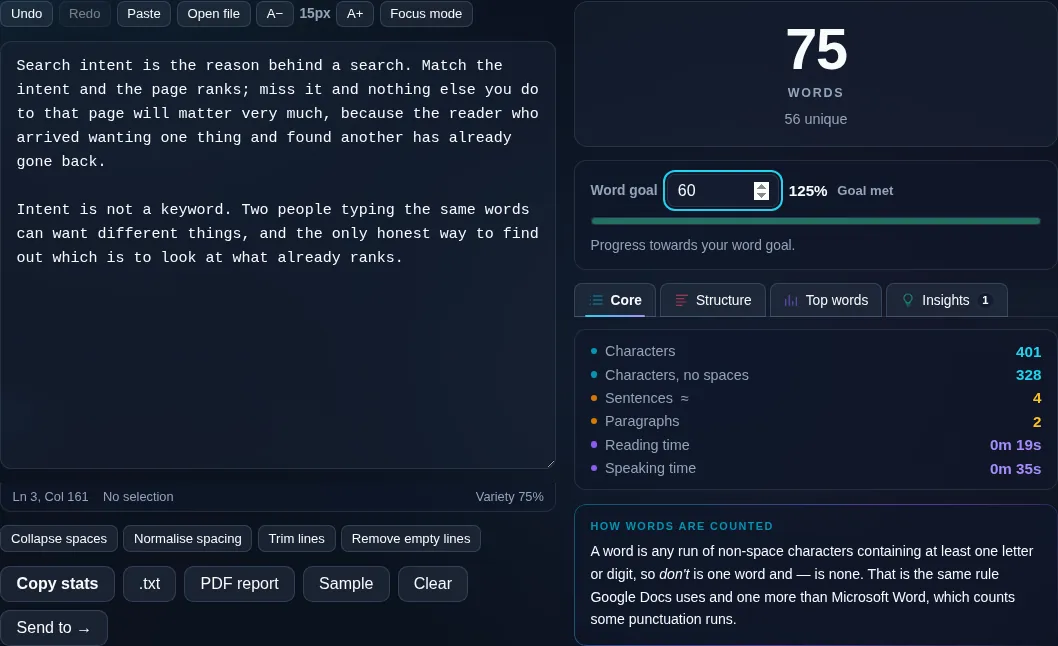
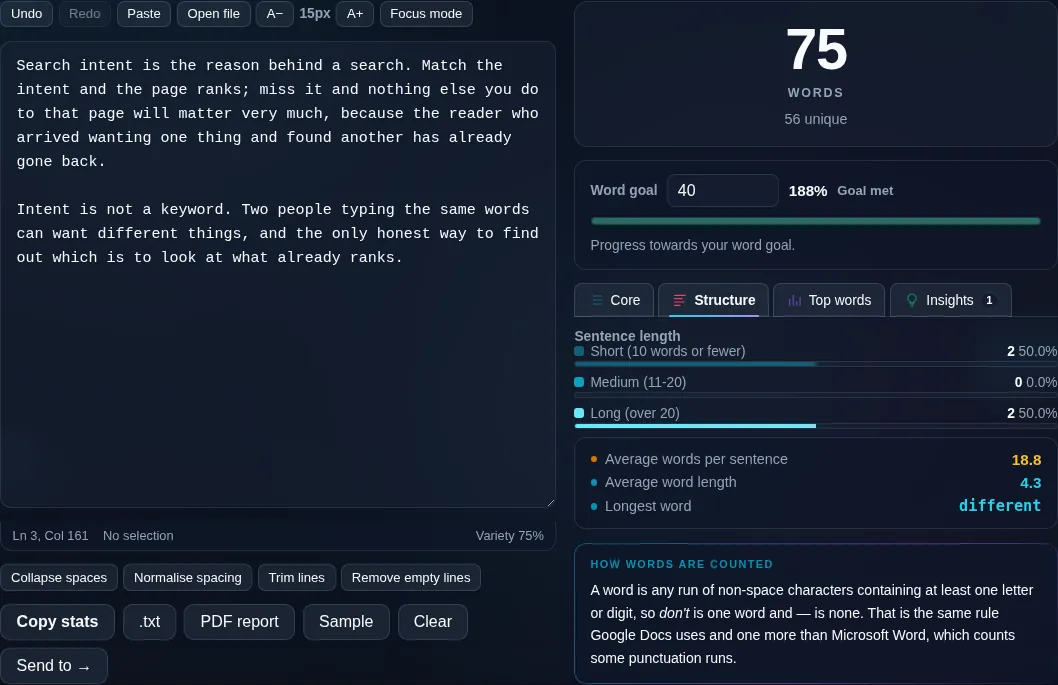
Word Counter showing live word and character counts in the browser.
Live counts
Text statistics including words, characters, and reading time.
Limit presets
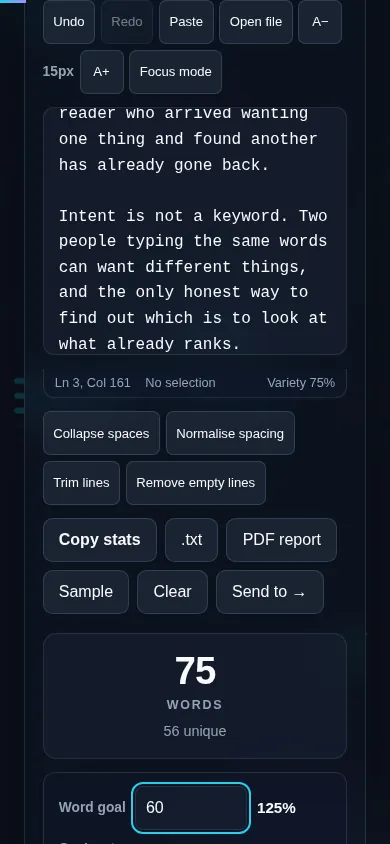
Counting words on a phone, no app installed.
Mobile (stacked)

What it counts, and how

Words are counted by splitting on whitespace, so 'don't' and 'state-of-the-art' count as one word each. Characters are shown both with and without spaces, since different limits measure differently — a meta description counts every character, while some word counts ignore spaces. Sentences are detected by ending punctuation and paragraphs by blank lines, both of which are estimates that work well for normal prose. Reading time is calculated from a typical reading speed (around 200–250 words per minute), so it's a useful guide rather than an exact figure, and word boundaries in non-Latin scripts may be counted differently. Everything updates live and runs locally in your browser, so nothing is uploaded. For just characters, see the Character Counter; for the most-used words, the Word Frequency Counter.

Frequently Asked Questions

How does the word counter work?

Paste or type into the box and it counts the words instantly, updating live as you edit. It splits your text on spaces and line breaks to count words, and also shows characters, sentences, paragraphs, and an estimated reading time — all without any button to press.

Does it count characters with and without spaces?

Yes. It shows both totals, because different limits measure differently. A tweet or meta-description limit counts every character including spaces, while some assignments count characters excluding spaces. Having both means you can check against whatever limit applies.

How is reading time estimated?

Reading time is based on a typical adult reading speed of roughly 200–250 words per minute. The tool divides your word count by that rate, so it's a reliable guide for 'how long is this to read' rather than an exact measurement, which would vary by reader and content.

How does it count sentences and paragraphs?

Sentences are counted by looking for ending punctuation — periods, question marks, and exclamation points — and paragraphs by blank lines between blocks of text. This matches how normal prose is structured, though unusual formatting or lots of abbreviations can affect the sentence count slightly.

Can I check against a character limit?

Yes. Built-in presets cover common limits like a tweet, an SMS message, and an SEO meta description, and the counter shows how many characters you have left. It's handy for writing within a strict limit without counting by hand.

Does it work for languages other than English?

It counts any text you paste, but word boundaries are detected using spaces, so languages that don't separate words with spaces (such as Chinese or Japanese) are counted differently. Character counts remain accurate for any language; word counts are most precise for space-separated languages.

Is my text private — is anything uploaded?

No. Everything runs in your browser, so whatever you type or paste is processed on your own device and never uploaded to a server. Nothing is stored once you close the tab. That keeps your text — notes, code, documents, lists — completely private.

Is it free, and do I need to sign up?

Yes, it's completely free with no account, no trial, and no limit on how many times you use it. Because it runs entirely in your browser, there are no server costs, no usage caps, and no watermark or branding added to your text.

Does it work on a phone?

Yes. It runs in your phone's browser with nothing to install, so you can use it on Android or iOS. The layout adapts to small screens, so you can paste text, get the result, and copy it on the go just as easily as on a computer.

Does it work offline?

Once the page has loaded, it runs entirely on your device, so it keeps working without a connection — which is also why nothing is uploaded. You only need to be online to open the page the first time; after that the tool works locally.

Can I copy or download the result?

Yes. You can copy the result to your clipboard with one click, and longer output can be downloaded as a text file. Everything is processed locally, so copying and downloading are instant with no upload step and no waiting.

Is there a limit on how much text I can process?

There's no artificial cap, because the work happens on your device rather than a server. The practical limit is your device's memory, so very large inputs are smoother on a computer than an older phone. For most everyday text, processing is effectively instant.

Still have questions?

If you can't find the answer you're looking for, feel free to contact our support team.

Contact Us