Reading Time Calculator

Estimate how long text takes to read (and to speak aloud) from its word count, with adjustable reading speed.

100% Browser-Based Local Processing
15px

Ln 1, Col 1 No selection

0m 00s

Reading time

238
Words
0
Characters
0
Sentences
0
Paragraphs
0
Unique words
0
Reading ease

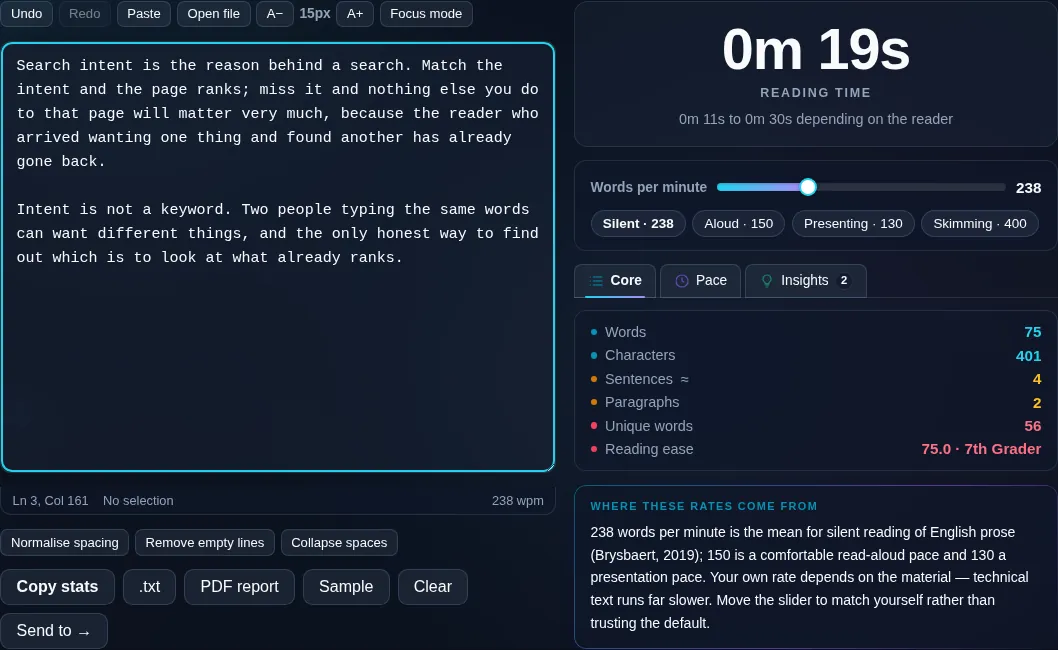
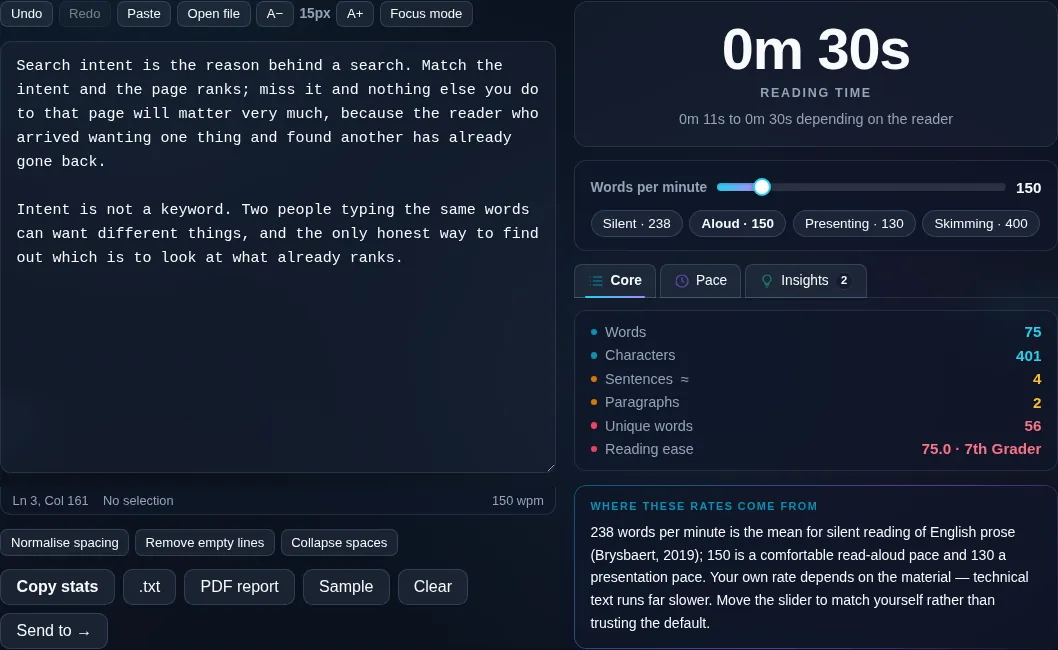
238 words per minute is the mean for silent reading of English prose (Brysbaert, 2019); 150 is a comfortable read-aloud pace and 130 a presentation pace. Your own rate depends on the material — technical text runs far slower. Move the slider to match yourself rather than trusting the default.

Privacy Focused

🔒 Local Processing. Your text never leaves your device.

Instant Results

🌐 Fully Client-Side. Runs instantly in your browser.

No Signup

⚡ No accounts. No API keys. Just open and use.

Browser Based

🚀 No installs, no sign-ups, no character limits.

What is a Reading Time Calculator?

Reading Time Calculator estimates how long your text takes to read, and optionally to speak aloud, based on its word count and a reading speed you can adjust. Paste your text and it shows an 'X min read' estimate. It runs entirely in your browser, so your text stays private.

Bloggers add an 'X min read' label so readers know what they're in for; speakers and presenters need to know if a script fits a time slot. Both come down to word count and pace.

This calculator estimates reading time (and speaking time) from your text, with an adjustable words-per-minute speed, all in your browser. Nothing is uploaded. Paste your text and get the estimate.
How to calculate reading time

Step 1: Paste or type your text into the box

Paste or type your text into the box.

Step 2: Adjust the reading speed (WPM) if needed, or pick slow/average/fast

Adjust the reading speed (WPM) if needed, or pick slow/average/fast.

Step 3: Read the estimated reading and speaking time, and copy the 'X min read' badge text

Read the estimated reading and speaking time, and copy the 'X min read' badge text.

Reading Time Calculator in action

Reading Time Calculator estimating read time in the browser.
Reading time
Reading and speaking time with adjustable words per minute.
WPM presets
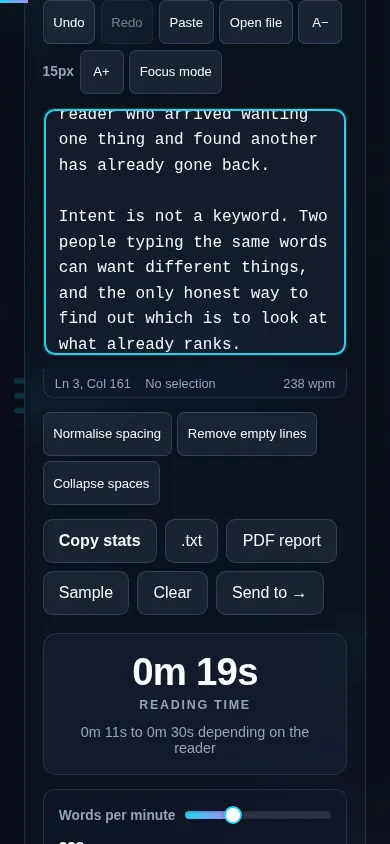
Estimating reading time on a phone, no app installed.
Mobile (stacked)

How reading time is estimated

Reading time is the word count divided by a reading speed in words per minute. Average adult silent reading is roughly 200–250 WPM, so the calculator defaults to about 225 and lets you adjust it — lower for technical or dense material, higher for light text — with slow/average/fast presets. It also estimates speaking time at a slower rate (around 150 WPM), which is useful for scripts, speeches, and presentations. These are estimates: real time depends on the reader, the difficulty of the content, images, and language, and word boundaries in non-Latin scripts are counted differently. For very short text it rounds to seconds. Everything runs locally in your browser, so nothing is uploaded, and you can copy ready-made 'X min read' badge text for your blog. For full text stats, see the Word Counter.

Frequently Asked Questions

How is reading time calculated?

It divides the word count by a reading speed in words per minute. The tool defaults to around 225 WPM, the average for adult silent reading, and shows the result as an 'X min read' estimate. You can change the speed to match your audience and content.

Can I change the reading speed?

Yes. You can set the words-per-minute directly or choose slow, average, or fast presets. Use a lower speed for dense or technical material that people read carefully, and a higher one for light, skimmable content — the estimate updates accordingly.

Does it estimate speaking time too?

Yes. Alongside reading time it shows speaking time at a slower rate of about 150 words per minute, which suits speeches, presentations, and voiceover scripts. It's a quick way to check whether a script will fit a time slot before you rehearse.

How accurate is the estimate?

It's a reliable guide, not an exact figure. Actual reading time varies with the reader's speed, the difficulty of the text, images, and formatting, so treat the number as a close approximation. Adjusting the WPM to match your specific audience makes it more accurate.

Can I get the 'X min read' label for my blog?

Yes. The tool produces ready-to-copy badge text like '5 min read' that you can paste into a blog post or CMS. Because it's all client-side, you can paste a draft, get the label, and copy it without your content being uploaded anywhere.

Does it work for non-English text?

It calculates from word count, so it works for any space-separated language, though the ideal WPM differs by language. For scripts that don't separate words with spaces (like Chinese or Japanese), the word-based estimate is less precise — adjusting the speed helps compensate.

Is my text private — is anything uploaded?

No. Everything runs in your browser, so whatever you type or paste is processed on your own device and never uploaded to a server. Nothing is stored once you close the tab. That keeps your text — notes, code, documents, lists — completely private.

Is it free, and do I need to sign up?

Yes, it's completely free with no account, no trial, and no limit on how many times you use it. Because it runs entirely in your browser, there are no server costs, no usage caps, and no watermark or branding added to your text.

Does it work on a phone?

Yes. It runs in your phone's browser with nothing to install, so you can use it on Android or iOS. The layout adapts to small screens, so you can paste text, get the result, and copy it on the go just as easily as on a computer.

Does it work offline?

Once the page has loaded, it runs entirely on your device, so it keeps working without a connection — which is also why nothing is uploaded. You only need to be online to open the page the first time; after that the tool works locally.

Can I copy or download the result?

Yes. You can copy the result to your clipboard with one click, and longer output can be downloaded as a text file. Everything is processed locally, so copying and downloading are instant with no upload step and no waiting.

Is there a limit on how much text I can process?

There's no artificial cap, because the work happens on your device rather than a server. The practical limit is your device's memory, so very large inputs are smoother on a computer than an older phone. For most everyday text, processing is effectively instant.

Still have questions?

If you can't find the answer you're looking for, feel free to contact our support team.

Contact Us