Readability Score Checker

Check your text's readability with Flesch Reading Ease and Flesch–Kincaid grade level, and see hard sentences highlighted.

100% Browser-Based Local Processing
15px

Ln 1, Col 1 No selection

US grade level

Type or paste some text.

Mark in the text

Flesch Reading Ease 0–100, higher is easier
Flesch–Kincaid Grade
Gunning Fog Index
SMOG Index
Coleman–Liau Index
Automated Readability Index
Consensus grade

Five of the six report a US school grade, so they are directly comparable; Flesch Reading Ease is the odd one out and runs the other way. When they disagree it is usually because one weighs syllables and another weighs letters.

These are estimates, and they are tuned for English. Every score here is arithmetic over sentence length and syllable or letter counts — nothing understands your text. Syllables come from a spelling heuristic that mishandles names, acronyms and loanwords; sentences are split on punctuation, so an abbreviation inflates the sentence count and flatters the score; and passive voice is matched by a regular expression, not a parser. Use them to compare two drafts of the same piece, not to certify one.

Privacy Focused

🔒 Local Processing. Your text never leaves your device.

Instant Results

🌐 Fully Client-Side. Runs instantly in your browser.

No Signup

⚡ No accounts. No API keys. Just open and use.

Browser Based

🚀 No installs, no sign-ups, no character limits.

What is a Readability Score Checker?

Readability Score Checker rates how easy your text is to read using Flesch Reading Ease and the Flesch–Kincaid grade level, with a plain-language interpretation and hard sentences highlighted. Paste your text and get the scores instantly. It runs entirely in your browser, so your writing stays private.

Clear writing reaches more people. Readability formulas estimate how hard your text is to read — by sentence length and word complexity — and give you a score and a grade level to aim for.

This checker scores your text with the well-known Flesch formulas and points out the sentences dragging your score down, all in your browser. Nothing is uploaded. Paste your text and see how readable it is.
How to check readability

Step 1: Paste or type your text into the box

Paste or type your text into the box.

Step 2: Read the Flesch Reading Ease score, grade level, and plain-language interpretation

Read the Flesch Reading Ease score, grade level, and plain-language interpretation.

Step 3: Review the highlighted hard sentences, simplify them, and recheck

Review the highlighted hard sentences, simplify them, and recheck.

Readability Score Checker in action

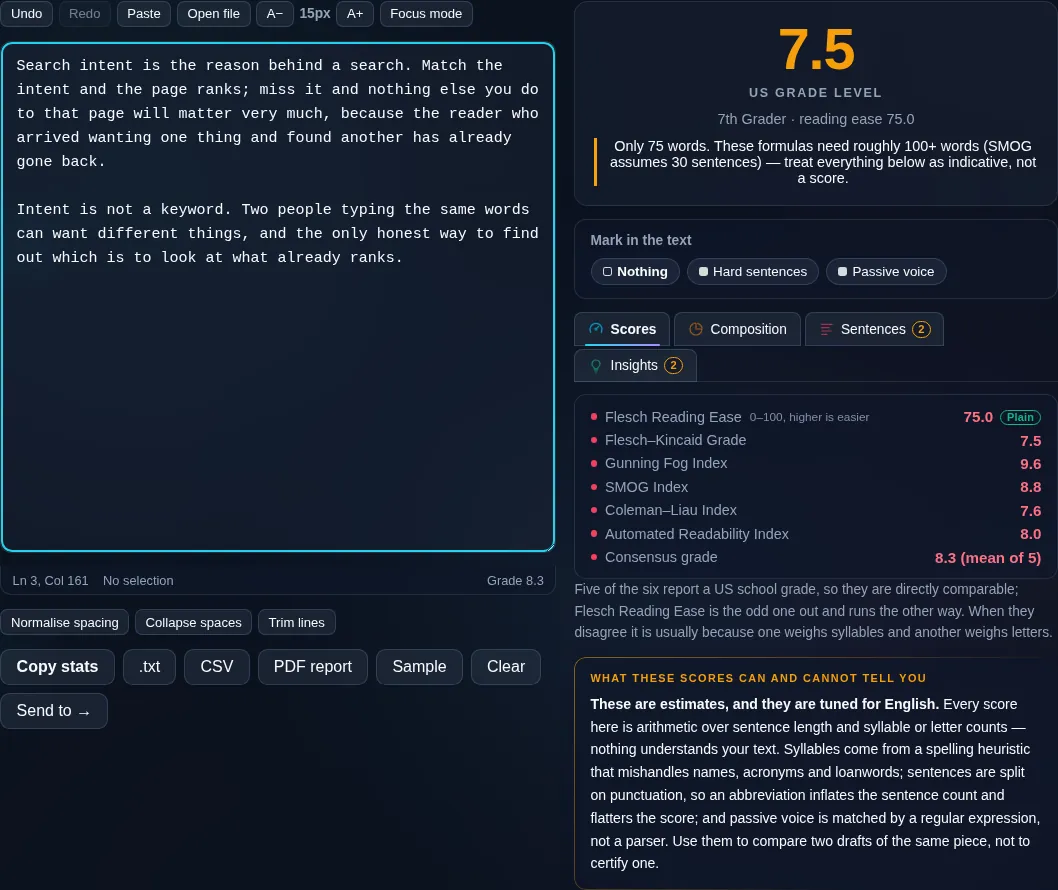
Readability Score Checker showing Flesch scores in the browser.
Readability scores
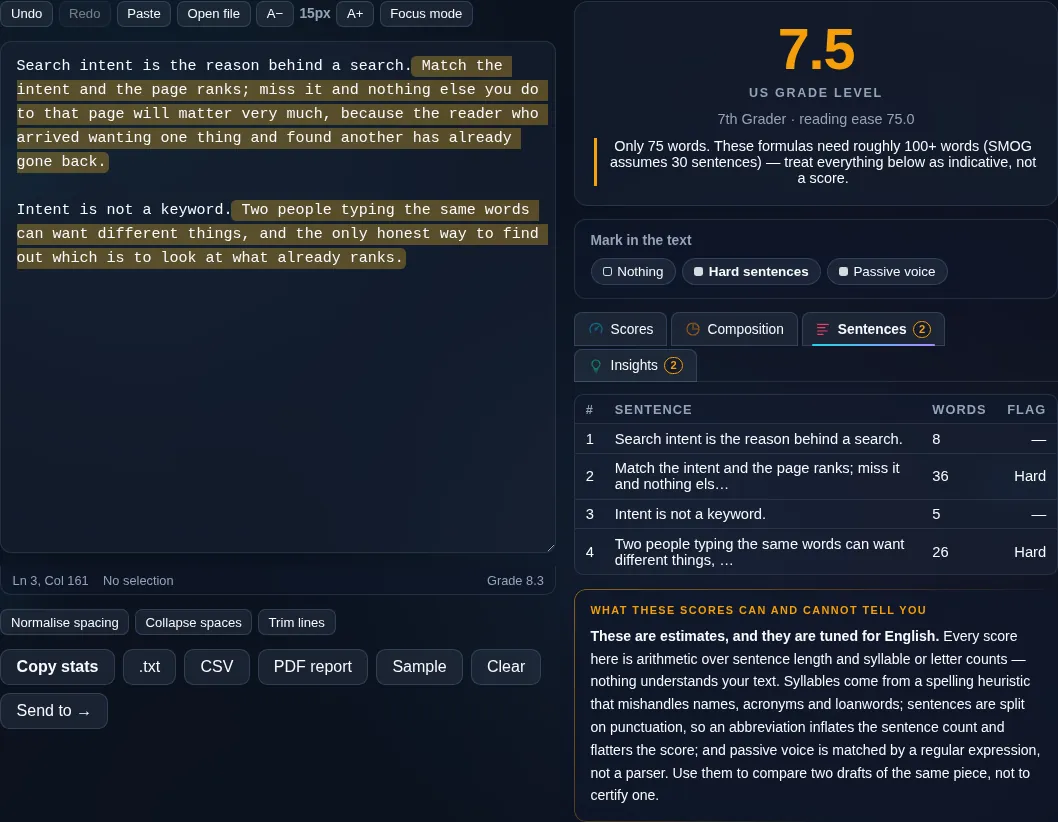
Readability score with grade level and highlighted hard sentences.
Hard sentences
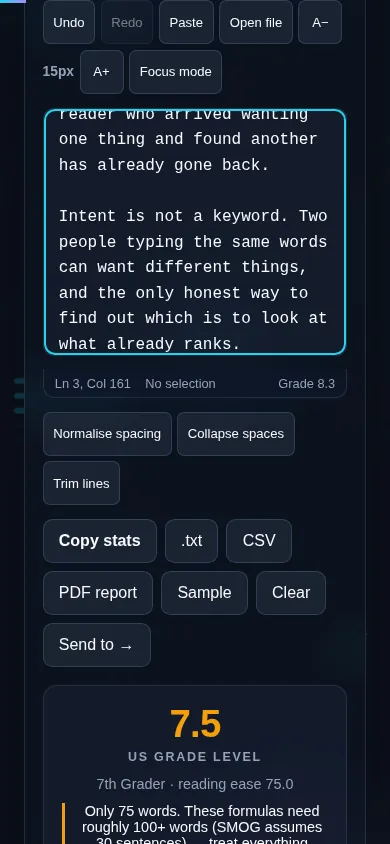
Checking readability on a phone, no app installed.
Mobile (stacked)

Understanding readability scores

Readability formulas estimate difficulty from two things: how long your sentences are and how complex your words are (usually measured in syllables). Flesch Reading Ease gives a 0–100 score where higher is easier — roughly 60–70 is plain English suitable for a general audience, while below 30 is hard, academic prose. Flesch–Kincaid converts the same inputs into a US school grade level, so '8' means an eighth-grader could follow it. The tool can also show Gunning Fog, SMOG, and Coleman–Liau for cross-checking, plus average sentence length and syllables per word, and it highlights the longest, most complex sentences so you know what to fix. Important caveats: syllable counting is heuristic and tuned for English, very short texts give unreliable scores, and a good score doesn't guarantee good writing — it only measures mechanical difficulty. Everything runs locally in your browser. For raw counts, see the Word Counter.

Frequently Asked Questions

What is the Flesch Reading Ease score?

It's a 0–100 readability score where higher means easier to read. Around 60–70 is plain English for a general audience; 30 or below is dense, academic text. It's calculated from your average sentence length and average syllables per word, so shorter sentences and simpler words raise the score.

What does the Flesch–Kincaid grade level mean?

It expresses readability as a US school grade — a level of 8 means the text is suitable for an eighth-grade reading level (around age 13–14). It uses the same sentence-length and word-complexity inputs as Reading Ease, just mapped to a grade so it's easy to set a target audience.

Which reading level should I aim for?

For a general web audience, aim for roughly grade 7–9 (Flesch Reading Ease about 60–70), which most adults read comfortably. Technical or specialist content can be higher, while content for a broad public audience should be lower. The right target depends on who you're writing for.

How can I improve my readability score?

Shorten long sentences, break them into two, prefer common short words over long ones, and cut unnecessary jargon. The tool highlights your hardest sentences so you can target them directly — fixing a few of the worst offenders usually lifts the whole score noticeably.

How accurate are the scores?

They're useful estimates, not exact measures. Syllable counting is done heuristically and the formulas are tuned for English, so results for other languages aren't reliable, and very short passages can score erratically. Treat the scores as guidance for editing rather than a definitive grade.

Does a good score mean good writing?

Not on its own. Readability formulas only measure mechanical difficulty — sentence and word length — not clarity of ideas, accuracy, structure, or style. A piece can score well and still be poorly argued. Use the score as one helpful signal alongside your own editing judgment.

Is my text private — is anything uploaded?

No. Everything runs in your browser, so whatever you type or paste is processed on your own device and never uploaded to a server. Nothing is stored once you close the tab. That keeps your text — notes, code, documents, lists — completely private.

Is it free, and do I need to sign up?

Yes, it's completely free with no account, no trial, and no limit on how many times you use it. Because it runs entirely in your browser, there are no server costs, no usage caps, and no watermark or branding added to your text.

Does it work on a phone?

Yes. It runs in your phone's browser with nothing to install, so you can use it on Android or iOS. The layout adapts to small screens, so you can paste text, get the result, and copy it on the go just as easily as on a computer.

Does it work offline?

Once the page has loaded, it runs entirely on your device, so it keeps working without a connection — which is also why nothing is uploaded. You only need to be online to open the page the first time; after that the tool works locally.

Can I copy or download the result?

Yes. You can copy the result to your clipboard with one click, and longer output can be downloaded as a text file. Everything is processed locally, so copying and downloading are instant with no upload step and no waiting.

Is there a limit on how much text I can process?

There's no artificial cap, because the work happens on your device rather than a server. The practical limit is your device's memory, so very large inputs are smoother on a computer than an older phone. For most everyday text, processing is effectively instant.

Still have questions?

If you can't find the answer you're looking for, feel free to contact our support team.

Contact Us