Remove Punctuation

Remove punctuation from your text, with options to keep marks like apostrophes or hyphens.

100% Browser-Based Local Processing
15px

Ln 1, Col 1 No selection

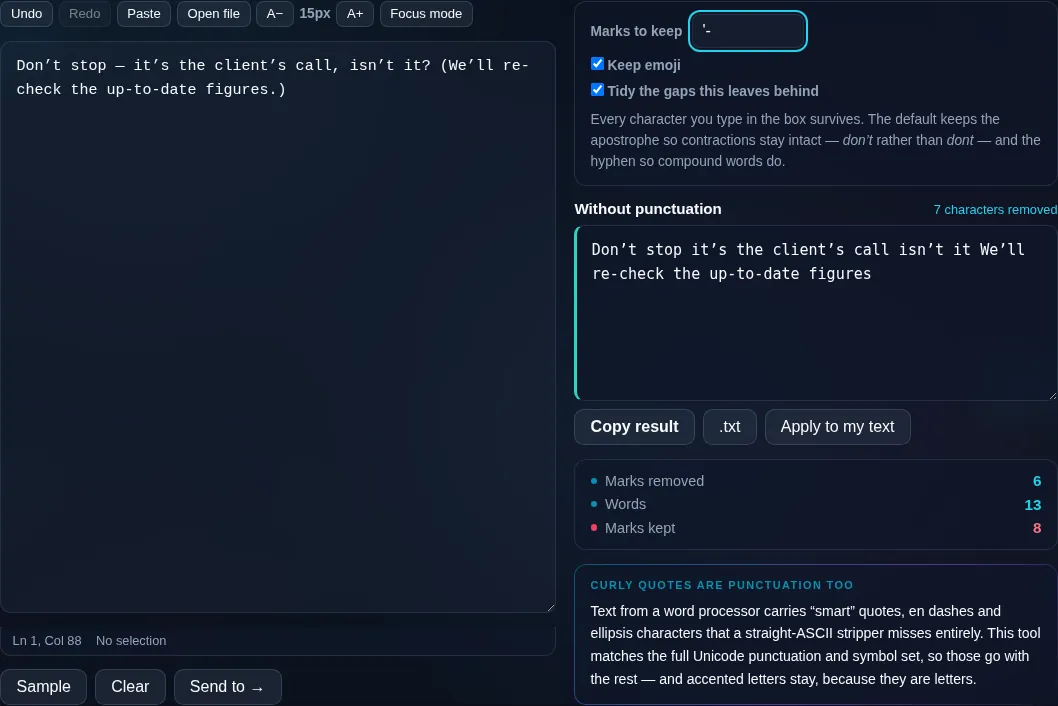
Every character you type in the box survives. The default keeps the apostrophe so contractions stay intact — don’t rather than dont — and the hyphen so compound words do.

Without punctuation Nothing to clean yet
Marks removed
0
Words
0
Marks kept
0

Text from a word processor carries “smart” quotes, en dashes and ellipsis characters that a straight-ASCII stripper misses entirely. This tool matches the full Unicode punctuation and symbol set, so those go with the rest — and accented letters stay, because they are letters.

Privacy Focused

🔒 Local Processing. Your text never leaves your device.

Instant Results

🌐 Fully Client-Side. Runs instantly in your browser.

No Signup

⚡ No accounts. No API keys. Just open and use.

Browser Based

🚀 No installs, no sign-ups, no character limits.

What is a Remove Punctuation?

Remove Punctuation strips punctuation marks from your text — periods, commas, quotes, brackets, and more — with checkboxes to keep any marks you want, like apostrophes in contractions. Paste your text and clean it in one click. It runs entirely in your browser, so your text stays private.

Removing punctuation is a common cleanup step — preparing text for analysis, simplifying a string, stripping marks before processing, or just tidying messy input. Doing it by hand means hunting down every symbol.

This tool removes punctuation in one click, and lets you keep specific marks so you don't break contractions or hyphenated words, entirely in your browser. Nothing is uploaded. Paste, clean, and copy.
How to remove punctuation

Step 1: Paste or type your text into the box

Paste or type your text into the box.

Step 2: Optionally tick marks to keep (such as apostrophes or hyphens)

Optionally tick marks to keep (such as apostrophes or hyphens).

Step 3: Remove punctuation, then copy or download the cleaned text

Remove punctuation, then copy or download the cleaned text.

Remove Punctuation in action

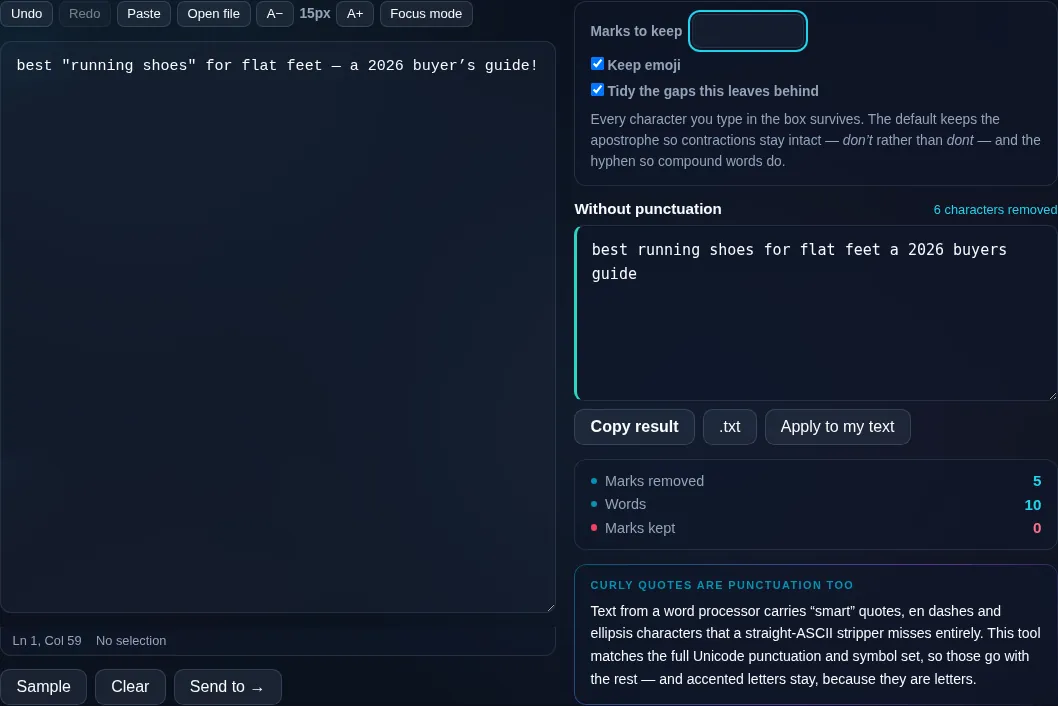
Remove Punctuation stripping marks in the browser.
Punctuation removed
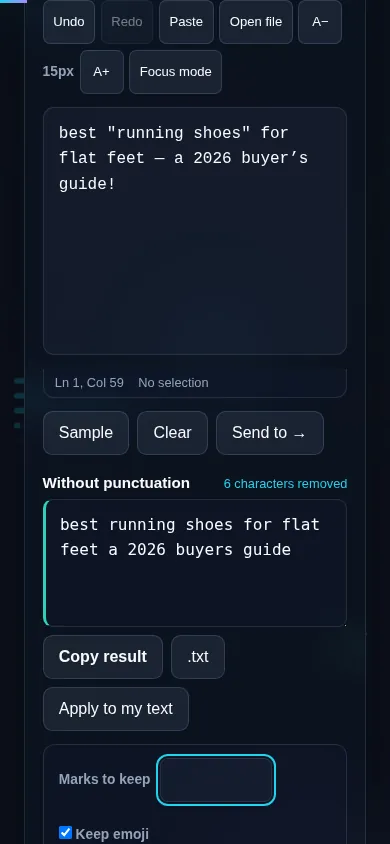
Text with punctuation removed but apostrophes kept.
Keep-marks options
Removing punctuation on a phone, no app installed.
Mobile (stacked)

Controlling what gets removed

By default the tool removes all punctuation — periods, commas, semicolons, colons, quotes, brackets, slashes, and other marks — leaving letters, numbers, and spaces. But blanket removal can break text: stripping apostrophes turns 'don't' into 'dont', and removing hyphens merges 'state-of-the-art'. So checkboxes let you keep specific marks, with the apostrophe and hyphen being the most common to preserve. You can also choose whether to strip or keep emoji and other symbols, and collapse any double spaces left behind where punctuation was removed. It handles Unicode punctuation (smart quotes, em dashes) as well as plain ASCII marks. Everything runs locally in your browser, so nothing is uploaded. To also strip accents from letters, use Remove Accents; to remove numbers, the Extract Numbers tool can isolate them instead.

Frequently Asked Questions

How do I remove all punctuation from text?

Paste your text and click Remove Punctuation — every punctuation mark is stripped out, leaving letters, numbers, and spaces. You can then copy or download the result. If you want to keep certain marks, tick them first so they survive the cleanup.

Can I keep apostrophes so contractions aren't broken?

Yes. Tick the apostrophe option and words like 'don't' and 'it's' stay intact instead of becoming 'dont' and 'its'. Keeping apostrophes (and often hyphens) is usually what you want when cleaning prose rather than reducing text to bare words.

Does it remove special characters and symbols too?

You can choose. Beyond standard punctuation, there are options to also strip symbols and emoji, or to leave them in place. This lets you decide whether you want truly bare text or just the removal of sentence punctuation while keeping symbols.

Will it keep my letters and numbers?

Yes. Removing punctuation only takes out the marks — letters and numbers are always preserved, along with spaces. If you specifically want to remove numbers as well, that's a separate task; this tool focuses on punctuation and optional symbols.

Does it handle smart quotes and em dashes?

Yes. As well as plain ASCII punctuation, it recognizes Unicode punctuation such as curly 'smart' quotes, em and en dashes, and ellipsis characters, so text pasted from word processors and the web is cleaned properly rather than leaving stray fancy marks behind.

What is removing punctuation useful for?

Common uses include preparing text for word-frequency or language analysis, simplifying strings, cleaning data before import, and stripping formatting from pasted text. Keeping a couple of marks (apostrophes, hyphens) makes the output readable, while removing everything gives you bare tokens.

Is my text private — is anything uploaded?

No. Everything runs in your browser, so whatever you type or paste is processed on your own device and never uploaded to a server. Nothing is stored once you close the tab. That keeps your text — notes, code, documents, lists — completely private.

Is it free, and do I need to sign up?

Yes, it's completely free with no account, no trial, and no limit on how many times you use it. Because it runs entirely in your browser, there are no server costs, no usage caps, and no watermark or branding added to your text.

Does it work on a phone?

Yes. It runs in your phone's browser with nothing to install, so you can use it on Android or iOS. The layout adapts to small screens, so you can paste text, get the result, and copy it on the go just as easily as on a computer.

Does it work offline?

Once the page has loaded, it runs entirely on your device, so it keeps working without a connection — which is also why nothing is uploaded. You only need to be online to open the page the first time; after that the tool works locally.

Can I copy or download the result?

Yes. You can copy the result to your clipboard with one click, and longer output can be downloaded as a text file. Everything is processed locally, so copying and downloading are instant with no upload step and no waiting.

Is there a limit on how much text I can process?

There's no artificial cap, because the work happens on your device rather than a server. The practical limit is your device's memory, so very large inputs are smoother on a computer than an older phone. For most everyday text, processing is effectively instant.

Still have questions?

If you can't find the answer you're looking for, feel free to contact our support team.

Contact Us