Remove Extra Spaces

Collapse double or multiple spaces into one and trim stray whitespace from your text.

100% Browser-Based Local Processing
15px

Ln 1, Col 1 No selection

Runs of two or more spaces become one, and every line loses the spaces at its ends. Indentation is deliberate in code and accidental in pasted prose, so it gets its own switch. To join the lines themselves, use Remove Line Breaks.

Cleaned text Nothing to clean yet
Spaces removed
0
Lines
0
Longest line
0

Text copied from a web page often carries U+00A0, which looks identical to a space and is not one. This tool collapses it along with the rest, so a stubborn gap that survived every other cleaner disappears here.

Privacy Focused

🔒 Local Processing. Your text never leaves your device.

Instant Results

🌐 Fully Client-Side. Runs instantly in your browser.

No Signup

⚡ No accounts. No API keys. Just open and use.

Browser Based

🚀 No installs, no sign-ups, no character limits.

What is a Remove Extra Spaces?

Remove Extra Spaces collapses runs of multiple spaces into a single space and trims stray whitespace from your text. Paste text with double spaces, awkward gaps, or trailing spaces and get a clean version in one click. It runs entirely in your browser, so your text stays private, and you can copy or download it.

Copied text is often littered with double spaces, gaps after periods, and trailing whitespace — the kind of mess that looks sloppy and breaks alignment. Fixing it by hand is tedious.

This tool collapses extra spaces and tidies whitespace in one click, entirely in your browser. Nothing is uploaded. Paste, clean, and copy.
How to remove extra spaces

Step 1: Paste or type your text into the box

Paste or type your text into the box.

Step 2: Click Remove Extra Spaces; turn on options like trimming lines or removing tabs if needed

Click Remove Extra Spaces; turn on options like trimming lines or removing tabs if needed.

Step 3: Copy the cleaned text or download it as a .txt file

Copy the cleaned text or download it as a .txt file.

Remove Extra Spaces in action

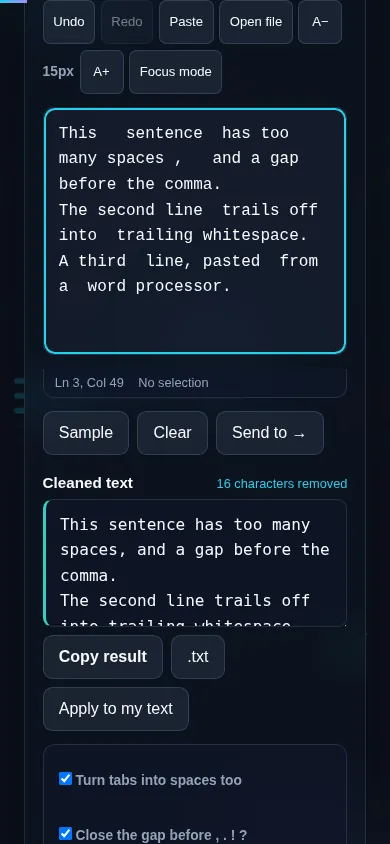
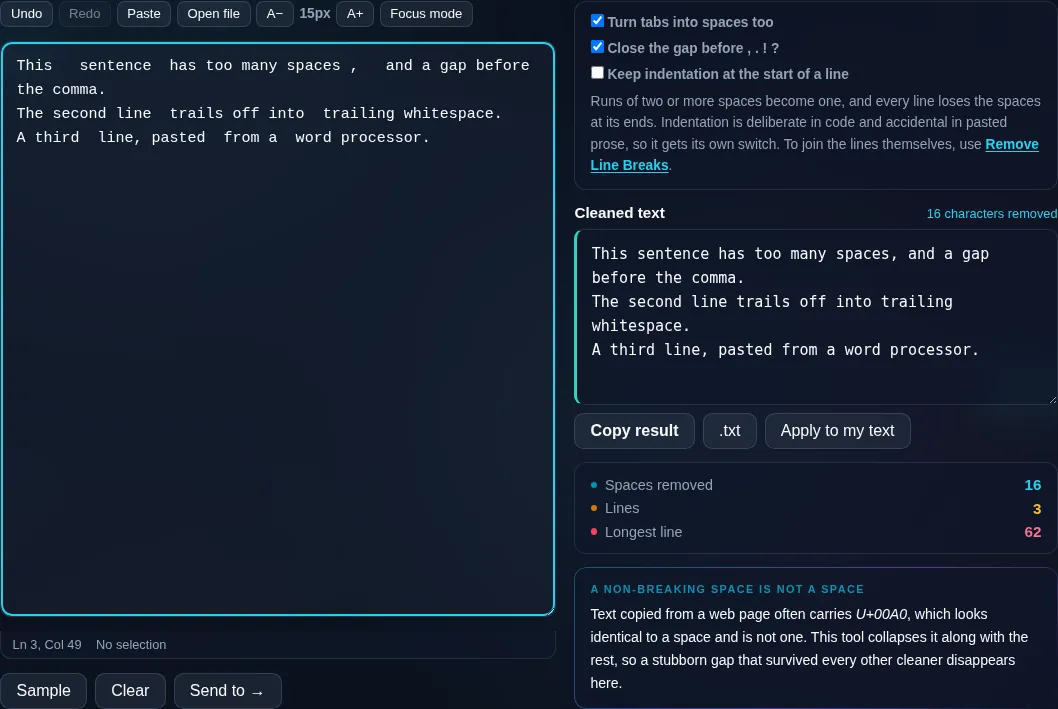
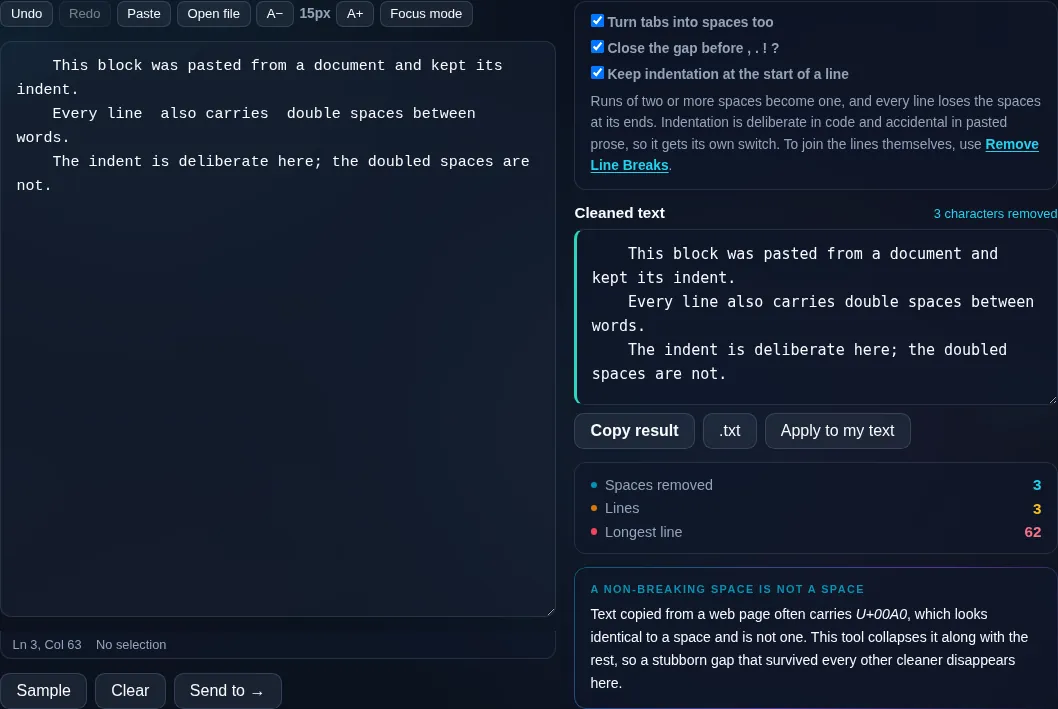
Remove Extra Spaces collapsing double spaces in the browser.
Cleaned text
Text with extra spaces collapsed and whitespace trimmed.
Options
Removing extra spaces on a phone, no app installed.
Mobile (stacked)

What gets cleaned up

The core action collapses any run of two or more spaces down to a single space, which fixes the double-spacing left by old typing habits or messy copy-paste. Options let you also trim leading and trailing spaces from each line, remove spaces sitting before punctuation (' word ,' → 'word,'), and convert tabs to spaces. If your text relies on intentional indentation — like code or a formatted list — you can choose to preserve leading whitespace so the cleanup only affects the gaps inside lines. Line breaks are kept; this tool is about horizontal spacing, not newlines. Everything runs locally in your browser, so even long documents clean instantly and nothing is uploaded. To remove the line breaks themselves, use Remove Line Breaks; to drop blank lines, Remove Empty Lines.

Frequently Asked Questions

How do I get rid of double spaces?

Paste your text and click Remove Extra Spaces — every run of two or more spaces is collapsed into one. It fixes the double spaces left after periods or by messy copy-paste in a single step, and you can then copy or download the cleaned text.

Does it trim spaces at the start and end of lines?

Yes, optionally. There's a setting to trim leading and trailing whitespace from each line, which removes the invisible spaces that often hide at the ends of pasted lines. You can leave it off if you want to keep intentional indentation.

Can it remove spaces before punctuation?

Yes. An option tidies spacing around punctuation, so 'hello , world' becomes 'hello, world'. This catches the stray spaces before commas, periods, and question marks that creep in from translation tools or sloppy formatting.

Will it remove tabs as well?

If you want. A toggle converts tabs into spaces (or removes them) as part of the cleanup, which helps when text mixes tabs and spaces inconsistently. Leave it off to keep tabs intact, for example in code or tabular data.

Does it keep my line breaks?

Yes. This tool only fixes horizontal spacing — multiple spaces and stray whitespace — and leaves your line breaks alone. If you also want to remove line breaks or blank lines, use the dedicated Remove Line Breaks and Remove Empty Lines tools.

Can it preserve indentation in code?

Yes. Turn on the preserve-indentation option and leading whitespace at the start of each line is kept, so code or indented lists stay aligned while extra spaces inside the lines are still collapsed. That makes it safe to run on formatted text.

Is my text private — is anything uploaded?

No. Everything runs in your browser, so whatever you type or paste is processed on your own device and never uploaded to a server. Nothing is stored once you close the tab. That keeps your text — notes, code, documents, lists — completely private.

Is it free, and do I need to sign up?

Yes, it's completely free with no account, no trial, and no limit on how many times you use it. Because it runs entirely in your browser, there are no server costs, no usage caps, and no watermark or branding added to your text.

Does it work on a phone?

Yes. It runs in your phone's browser with nothing to install, so you can use it on Android or iOS. The layout adapts to small screens, so you can paste text, get the result, and copy it on the go just as easily as on a computer.

Does it work offline?

Once the page has loaded, it runs entirely on your device, so it keeps working without a connection — which is also why nothing is uploaded. You only need to be online to open the page the first time; after that the tool works locally.

Can I copy or download the result?

Yes. You can copy the result to your clipboard with one click, and longer output can be downloaded as a text file. Everything is processed locally, so copying and downloading are instant with no upload step and no waiting.

Is there a limit on how much text I can process?

There's no artificial cap, because the work happens on your device rather than a server. The practical limit is your device's memory, so very large inputs are smoother on a computer than an older phone. For most everyday text, processing is effectively instant.

Still have questions?

If you can't find the answer you're looking for, feel free to contact our support team.

Contact Us