401(k) Calculator

Project your 401(k) at retirement with employer match and compound growth.

100% Browser-Based Local Processing
%
%
%
%
%

Contributions are checked against the 2026 elective-deferral limit of 24,500 (31,500 from 50) as a dated reference — limits change every year and this one is not enforced silently. A fixed return every year is a simplification; real markets are not smooth, and the order of good and bad years matters near retirement. Nominal figures, no tax modelled. Not financial advice.

Balance at retirement

686,000.00

You put in184,000.00
Employer put in69,000.00
Growth433,000.00
Without the match520,000.00
Formula and working

The formula

Each year: balance = (balance + your contribution + employer match) × (1 + return)

Your numbers

Waiting for your numbers.

An estimate, not financial advice. Figures are indicative, and the assumptions behind them are stated on the tool itself. Tax rules, rates and fees vary by country and change over time — check against your provider or a qualified adviser before acting on a number.

Privacy Focused

🔒 Local Processing. Your salary and balances never leave your device.

Instant Results

🌐 Fully Client-Side. Runs instantly in your browser.

No Signup

⚡ No accounts. No API keys. Just open and use.

Browser Based

🚀 No installs, no sign-ups, no bank account linking.

What is a 401(k) Calculator?

A 401(k) Calculator projects your retirement balance from your contributions, your employer's match, and compound growth. The match is essentially free money: match = min(your rate, the cap) × salary × the match rate. This is a US-focused estimate — not financial or tax advice — and it runs entirely in your browser.

A 401(k) is a US employer-sponsored retirement account you fund from your paycheck, often with an employer match on top. This calculator projects what your balance could grow to by retirement, and — its most useful feature — shows how much of that comes from your contributions, the employer match, and investment growth, separately.

Enter your current balance, salary, your contribution (as a percent of salary or a dollar amount), the employer match (for example, 50% of your contributions up to 6% of salary), an expected return, and years to retirement. Optionally add annual salary growth and a contribution step-up. The tool compounds the balance year by year, so those changes are handled exactly.

How to use the 401(k) calculator

Step 1: Enter your current balance and salary. Your starting 401(k) and annual pay

Enter your current balance and salary. Your starting 401(k) and annual pay.

Step 2: Enter your contribution. As a percent of salary or a dollar amount

Check it against the dated contribution-limit reference.

Step 3: Enter the employer match. For example, 50% up to 6% of salary — the tool applies the cap

Enter the employer match. For example, 50% up to 6% of salary — the tool applies the cap.

Step 4: Enter an expected return and years to retirement. A realistic return assumption and your horizon

Enter an expected return and years to retirement. A realistic return assumption and your horizon.

Step 5: Read the projection. See the balance at retirement, split into your contributions, the employer match, and growth — plus a with-vs-without-match comparison

Copy if needed.

401(k) Calculator in action

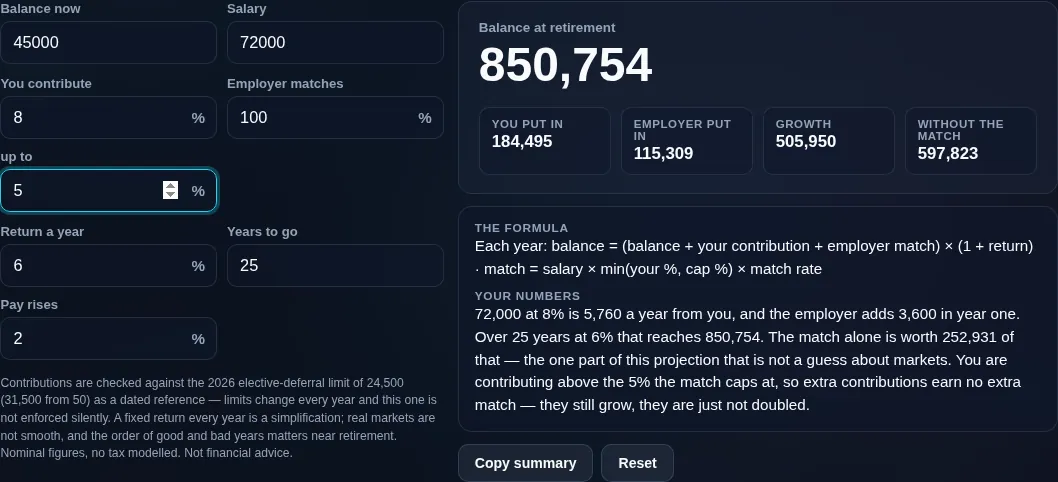
401k calculator projecting a balance from a percentage of a growing salary, with what you put in shown apart from what the employer added
Projection with contributions/match/growth split
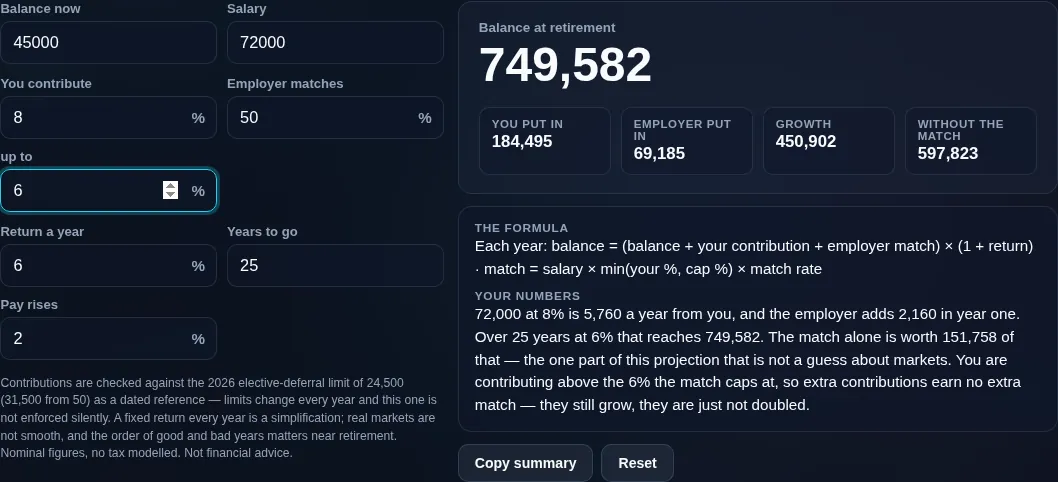
401k calculator showing the same projection without the employer match, which is the one term in it that is a contract rather than an assumption
With vs without employer match
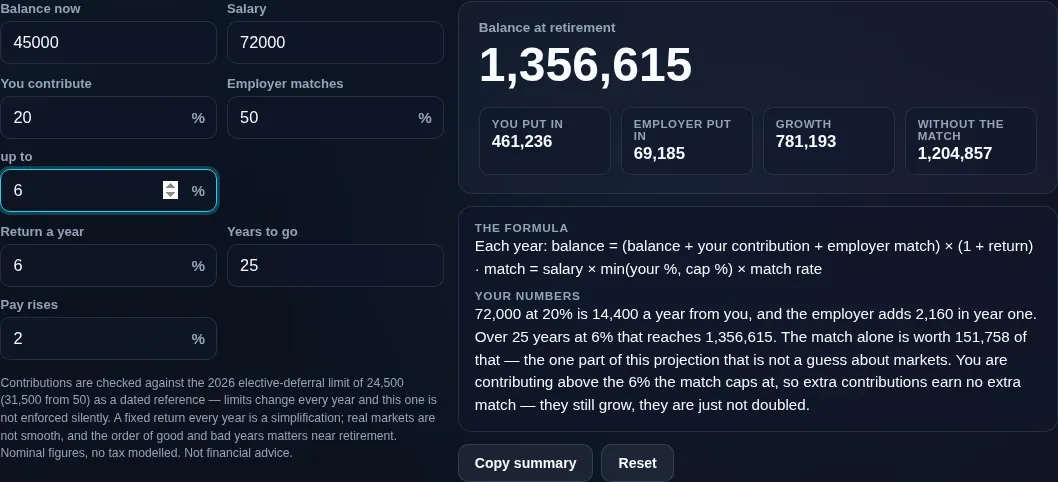
401k calculator with a contribution well above the match cap, earning exactly the same employer match as contributing at the cap
Contributing above the match cap, which earns exactly the same match
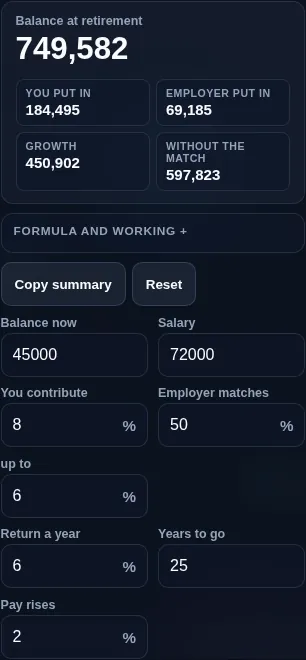
401k calculator running in a phone browser with the match fields paired
Mobile browser

When a 401(k) calculator helps

The single most important takeaway most people miss: the employer match is free money. If your employer matches up to 6% of salary and you contribute less than that, you're leaving guaranteed extra pay on the table. The calculator's with-versus-without-match view makes that value obvious — it's usually the highest-return part of the whole plan.

Now the honest framing. This is US-specific: 401(k) rules, the annual IRS contribution limit, catch-up amounts, and vesting all belong to the US system and change every year, so the tool treats the contribution limit as a dated reference you can adjust, not a hard rule it silently enforces. The projected balance is nominal (inflation not removed) and, for a traditional 401(k), pre-tax — meaning withdrawals in retirement are taxed, so your spendable amount is lower. A Roth 401(k) is funded with after-tax money and qualified withdrawals are tax-free. Returns are an assumption, not a guarantee, and this is not financial or tax advice.

Your salary and balance are sensitive, so everything runs in your browser — nothing is uploaded, and it works offline.

  • Capturing the full match. Check the contribution rate that earns your entire employer match.
  • Retirement planning. Project your balance and see the contribution/match/growth split.
  • Comparing contribution rates. See the long-run effect of contributing 6% vs 10%.
  • Modelling raises. Add salary growth and a step-up to see the compounding effect.
  • Understanding tax treatment. Grasp why a traditional balance is pre-tax.

Realistic example. Salary $70,000, you contribute 6% ($4,200/yr), employer matches 50% up to 6% (so $2,100/yr free), starting balance $20,000, assumed 7% return, 25 years. The projection compounds all of it; the match alone adds a large share, which the with-vs-without view highlights.

Advanced tip. Always contribute at least enough to get the full match — it's an immediate, guaranteed return no market can promise. Beyond that, weigh a traditional vs Roth 401(k) on your tax situation.

Common mistake to avoid. Don't read the traditional-401(k) balance as spendable cash — withdrawals are taxed, so the after-tax amount is lower.

Related. For a general nest-egg view, see the Retirement Calculator; for tax-free growth, the Roth IRA Calculator.

What this estimate is — and isn't

  • Not financial or tax advice. It's an educational projection, not a recommendation.
  • US-specific and dated. 401(k) limits, catch-up amounts, and rules are US and change yearly; the contribution limit here is an adjustable reference, not current-year law.
  • Traditional is pre-tax. The projected balance for a traditional 401(k) will be taxed on withdrawal; a Roth 401(k) is after-tax with tax-free qualified withdrawals.
  • Return is an assumption; value is nominal. Markets vary, and inflation isn't removed — real spending power is lower.
  • Match assumes vesting. Employer match may vest over time; if you leave early you might forfeit unvested amounts.
  • Your data stays private. All maths runs on your device; nothing is uploaded.
Frequently Asked Questions

What does this 401(k) calculator do?

It projects your US 401(k) balance at retirement from your current balance, salary, contribution rate, employer match, an assumed return, and years to retirement. Its key feature is splitting the result into your contributions, the employer match, and investment growth, so you can see how much each part adds. It's a US-focused educational estimate, not financial or tax advice.

---

How does an employer match work, and is it free money?

Yes, a match is effectively free money. Your employer adds to your 401(k) based on what you contribute — for example, 50% of your contributions up to 6% of salary. If you contribute 6%, they add 3% of salary on top. Contribute less than the cap and you forfeit part of that free money. The formula is match = min(your rate, the cap) × salary × the match rate.

---

How much should I contribute to my 401(k)?

At a minimum, contribute enough to capture your full employer match — that's an immediate, guaranteed return you shouldn't leave behind. Beyond that, how much more depends on your goals, budget, and other savings. Many people aim for 10–15% of salary including the match, but there's no universal number, and this tool is a planning aid, not advice.

---

What is the 401(k) contribution limit?

The IRS sets an annual limit on employee 401(k) contributions, with an extra catch-up amount for older savers, and it changes most years. Because of that, this tool treats the limit as a dated, adjustable reference rather than baking in a value that would go stale. Check the current figure on the IRS website and enter it if you want the cap enforced in your projection.

---

Is a 401(k) pre-tax, and will I be taxed later?

A traditional 401(k) is funded with pre-tax money, so contributions lower your taxable income now, but withdrawals in retirement are taxed as income — meaning the projected balance isn't all spendable. A Roth 401(k) is funded with after-tax money, and qualified withdrawals are tax-free. This calculator projects the pre-tax balance for a traditional plan; factor in future tax when planning.

---

What's the difference between a traditional and Roth 401(k)?

Traditional: contributions are pre-tax (a tax break now), and both contributions and growth are taxed when you withdraw in retirement. Roth: contributions are after-tax (no break now), but qualified withdrawals — including growth — are tax-free. Which is better depends on whether you expect a higher or lower tax rate in retirement. For tax-free growth, see the Roth IRA Calculator.

---

What return rate should I assume?

Use a realistic long-run figure for your investment mix, and test a range rather than one hopeful number. A diversified stock-heavy portfolio has historically returned more than bonds but with much more volatility, and nothing is guaranteed. Running an optimistic and a cautious scenario shows the spread of outcomes, which is more useful than a single point estimate.

---

How much will my 401(k) grow by retirement?

That depends on your contributions, the match, your assumed return, and how many years you have — small changes compound into large differences over decades. The calculator projects the balance and shows how much comes from contributions, match, and growth. Enter your figures to see your own number, and remember it's a nominal estimate that assumes a constant return.

---

What is vesting, and what happens to the match if I leave?

Vesting is how much of the employer match you actually own over time. Some plans vest immediately; others require a few years of service before the match is fully yours. If you leave before you're fully vested, you may forfeit the unvested portion of the match (your own contributions are always yours). The projection assumes you're vested, so adjust if your plan has a schedule.

---

Is this US-only, and does it use current tax law?

Yes, the 401(k) is a US retirement account, so this tool is US-focused. It does not encode current-year tax law or IRS limits automatically — those change yearly, so contribution limits are shown as an adjustable, dated reference. Treat the projection as a general estimate and confirm current rules with the IRS or a professional.

---

Is this financial or tax advice?

No. This calculator is an educational estimate to help you plan and to show the value of the employer match. It isn't financial, tax, or investment advice, and it doesn't account for your full situation. For decisions about contributions, tax, or retirement, consult a qualified financial or tax professional.

---

Is my data uploaded, and does it work offline?

No upload, and yes it works offline. Every calculation runs entirely in your browser, so your salary and balance — which are sensitive — are never sent to a server, there's no account, and no tracking. Once the page has loaded it keeps working with no connection, which is exactly what you want for private retirement figures.

Still have questions?

If you can't find the answer you're looking for, feel free to contact our support team.

Contact Us