Take-Home Pay Calculator

Estimate net pay from gross using your own tax rate and deductions — works in any country.

100% Browser-Based Local Processing
Taken off before tax
Tax and everything after it

Enter the figures from your own payslip or tax authority — this tool holds no country's tax tables, so it cannot go stale and it works anywhere, but it also cannot know your brackets, allowances or credits for you. An effective rate is total tax ÷ gross pay; it is lower than the top rate you hear quoted, and using the top rate here will understate your pay. Amounts you enter are read as being for the same period as the gross pay above. An estimate, not tax advice.

Take-home pay a year

37,544.00

Tax and contributions 11,856.00
Deductions 2,600.00
You keep 72.20%
Take-home a month 3,128.67
Formula and working

The formula

Net = gross − pre-tax deductions − tax − post-tax deductions

Your numbers

Waiting for your numbers.

An estimate, not financial advice. Figures are indicative, and the assumptions behind them are stated on the tool itself. Tax rules, rates and fees vary by country and change over time — check against your provider or a qualified adviser before acting on a number.

Privacy Focused

🔒 Local Processing. Your salary and balances never leave your device.

Instant Results

🌐 Fully Client-Side. Runs instantly in your browser.

No Signup

⚡ No accounts. No API keys. Just open and use.

Browser Based

🚀 No installs, no sign-ups, no bank account linking.

What is a Take-Home Pay Calculator?

A Take-Home Pay Calculator estimates your net pay from gross: Net = Gross − pre-tax deductions − income tax − post-tax deductions. Because tax rules differ by country and year, this tool is input-driven — you enter your own tax rate and deductions, so it works anywhere. It's an estimate, not tax advice.

Your take-home (net) pay is what's left after tax and deductions come out of your gross salary. This calculator estimates it from a simple, transparent chain: Net = Gross − pre-tax deductions − income tax − post-tax deductions. Enter your gross pay and pick a pay period, add your deductions, and it shows what you actually keep, broken down by year, month, week, or hour.

Here's the deliberate design choice that makes it different: it's input-driven and works in any country. Instead of hard-coding one nation's tax brackets — which would only help people there, and would go out of date every year — the tool asks you to enter your effective tax rate (or a fixed tax amount) from your payslip, your tax authority, or an accountant. That keeps it accurate to *your* situation, usable worldwide, and honest about what it is.

How to use the take-home pay calculator

Step 1: Enter your gross pay and pick a period. Annual, monthly, weekly, or hourly (with hours per week)

Enter your gross pay and pick a period. Annual, monthly, weekly, or hourly (with hours per week).

Step 2: Enter your income tax. Use your effective rate (from your payslip or tax authority) or a fixed tax amount — the tool doesn't assume any country's brackets

Enter your income tax. Use your effective rate (from your payslip or tax authority) or a fixed tax amount — the tool doesn't assume any country's brackets.

Step 3: Add pre-tax deductions. Retirement contributions, health premiums, and similar amounts taken before tax

Add pre-tax deductions. Retirement contributions, health premiums, and similar amounts taken before tax.

Step 4: Add post-tax deductions. Anything withheld after tax

Add post-tax deductions. Anything withheld after tax.

Step 5: Read your net pay and breakdown. See take-home per period, the effective take-home percentage, and an itemized breakdown

Copy the figures if needed.

Take-Home Pay Calculator in action

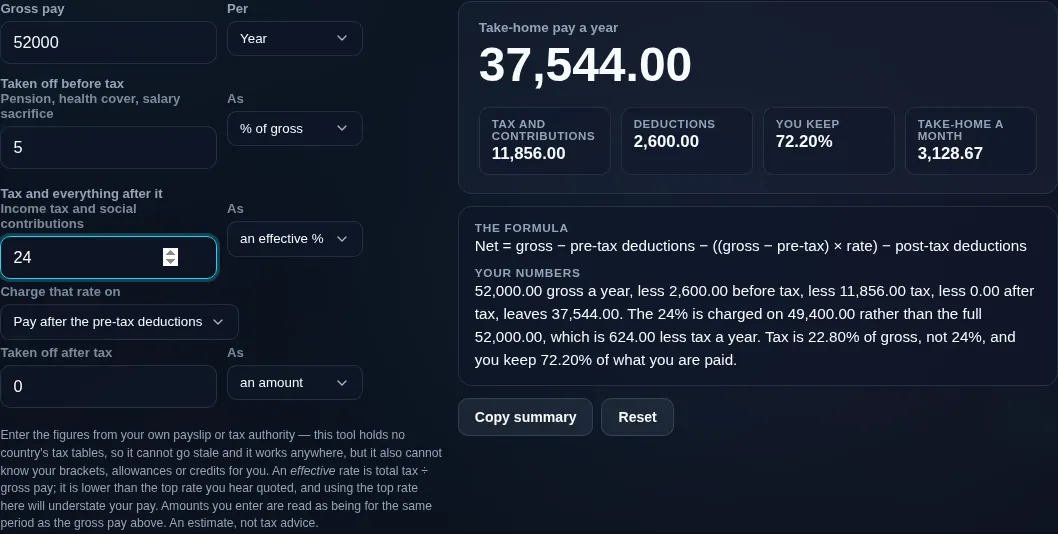
Take-home pay calculator turning 52,000 of gross pay into 37,544 of net after a 5% pension and a 24% effective tax rate
Gross → net with breakdown
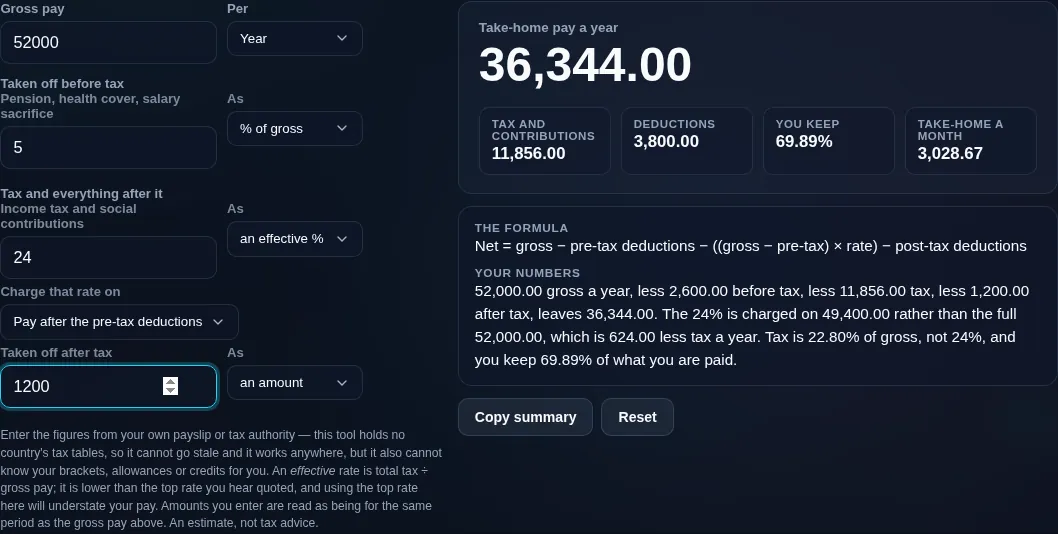
Take-home pay calculator with the tax charged on pay after the pre-tax deductions rather than on the full gross, and the working naming what that choice is worth
Pre-tax vs post-tax deductions
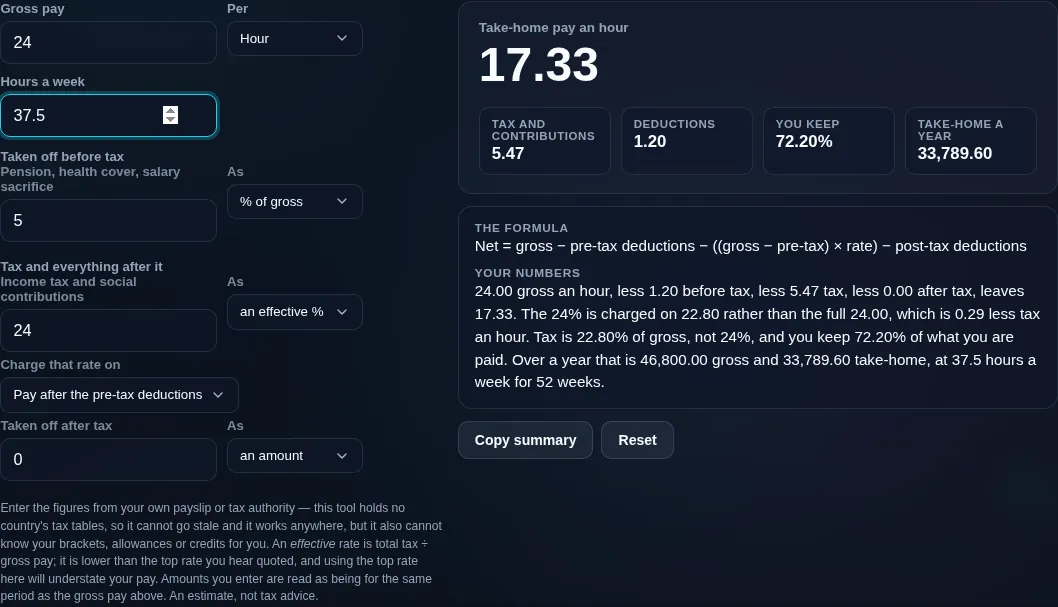
Take-home pay calculator with pay entered by the hour, annualised at the hours worked a week
Pay entered by the hour, annualised at the hours worked a week
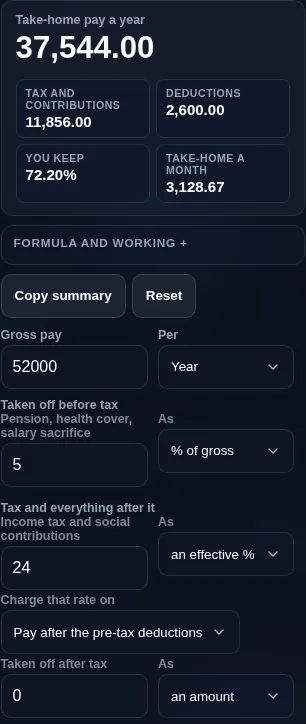
Take-home pay calculator running in a phone browser with the deduction rows stacked
Mobile browser

When a take-home pay calculator helps

Because of that, please read the scope clearly: this is an estimate, not tax advice, and not a filing-grade payroll engine. Real payroll applies progressive brackets, thresholds, allowances, credits, and local rules that this tool intentionally doesn't model. It's ideal for a quick, private sense of your net pay, for budgeting, or for comparing job offers — but for exact figures, use your official tax authority's calculator or a professional.

It also distinguishes pre-tax deductions (like retirement contributions, which can lower your taxable pay) from post-tax deductions (taken after tax), and lets you apply your rate to gross or to post-pre-tax income, so you can model your payslip more faithfully.

Salary is sensitive, so everything runs in your browser — nothing you enter is uploaded, and it works offline. To turn your net pay into a spending plan, use the Budget Calculator.

  • Comparing job offers. See net, not just headline gross, across offers.
  • Budgeting. Start a budget from what you actually take home.
  • Pay-period conversions. Turn an annual salary into monthly, weekly, or hourly net.
  • Modelling a change. Check the take-home effect of a raise or a bigger pension contribution.
  • Understanding your payslip. See how gross becomes net, step by step.

Realistic example. Gross $60,000/year, an effective tax rate of 22%, a $3,000 pre-tax retirement contribution, and $600 post-tax: taxable-ish base $57,000, tax about $12,540, net ≈ $43,860/year (about $3,655/month). The tool shows each line and lets you apply the rate to gross or to post-pre-tax income.

Advanced tip. Pre-tax deductions can reduce both your take-home *and* the tax you pay, so raising a pension contribution costs less net pay than the contribution amount. Model it by applying your rate to post-pre-tax income.

Common mistake to avoid. Don't treat the result as your exact legal net pay. Real payroll uses progressive brackets and local rules; this is a planning estimate.

Related. For pure salary-to-hourly conversion, see the Salary to Hourly Calculator.

What this estimate is — and isn't

  • Not tax advice, and not filing-grade. It's an educational estimate to help you plan, not a substitute for an official calculator or a professional.
  • Input-driven by design. It doesn't know or apply any country's tax brackets — you enter your own rate or amount, which is why it works anywhere.
  • Real payroll is more complex. Progressive brackets, thresholds, allowances, credits, and local rules aren't modelled here.
  • Pre-tax vs post-tax matters. How and where deductions apply changes the result; the tool lets you choose.
  • Your salary stays private. All maths runs on your device; nothing is uploaded.
Frequently Asked Questions

How is take-home pay calculated?

Take-home (net) pay is your gross pay minus deductions: Net = Gross − pre-tax deductions − income tax − post-tax deductions. Pre-tax items (like retirement contributions) come out first and can lower taxable pay; income tax is applied; then post-tax deductions are subtracted. This calculator runs that chain using the tax rate and deductions you enter, and shows each step.

---

What's the difference between gross and net pay?

Gross pay is your total earnings before anything is taken out — the headline salary figure. Net pay (take-home) is what actually reaches your bank account after income tax and other deductions. The gap between them is why your take-home is lower than your advertised salary. This tool estimates net from gross so you can see what you really keep.

---

Does this apply my country's tax brackets automatically?

No — and that's deliberate. Tax brackets, thresholds, and rules differ by country, region, and year, and change often, so instead of hard-coding one nation's law, this tool asks you to enter your own effective tax rate or amount. That keeps it accurate to your situation, usable anywhere in the world, and honest. For exact statutory figures, use your tax authority's official calculator.

---

What tax rate should I enter?

Enter your effective tax rate — the overall percentage of your pay that goes to income tax — rather than your top marginal bracket. You can find it on a recent payslip (tax paid ÷ gross), from your tax authority, or from an accountant. If you only know a fixed tax amount, enter that instead. Using the effective rate gives a more realistic estimate than the headline bracket.

---

What are pre-tax vs post-tax deductions?

Pre-tax deductions come out of your pay *before* income tax is calculated — common examples are retirement contributions and some health premiums — so they can reduce your taxable pay. Post-tax deductions are taken *after* tax, so they lower your take-home without affecting the tax. The tool separates the two because they change your net pay differently.

---

Why is my take-home pay less than my salary?

Because your salary is the gross figure, and several things come out before you're paid: income tax, retirement or pension contributions, health or insurance premiums, and other withholdings. Together these can reduce take-home by a large fraction, especially at higher incomes. This calculator shows the breakdown so you can see exactly where your salary goes.

---

How do I convert annual to monthly, weekly, or hourly net?

Divide the annual net figure by the number of periods: monthly = ÷12, weekly = ÷52, and hourly = ÷ (hours per week × 52). The tool does this automatically once you pick a pay period, showing your take-home across all of them. Just note that real paychecks can vary slightly period to period due to rounding and timing.

---

How do pre-tax deductions like a 401(k) affect take-home and tax?

A pre-tax contribution lowers both your take-home pay *and* your taxable income, so it costs you less net pay than the contribution amount. For example, a $100 pre-tax contribution at a 22% effective rate reduces take-home by only about $78, because you'd have paid $22 of that in tax anyway. Model this by applying your tax rate to income after pre-tax deductions.

---

Is this accurate enough for budgeting or a loan application?

For budgeting and rough comparisons, yes — it gives a solid estimate of what you take home. For anything official, like a loan or mortgage application, use your actual payslips or your tax authority's figures, because lenders need exact, verified numbers. This tool is a planning aid, not a filing-grade or verifiable document.

---

Is this tax advice?

No. This calculator is an educational estimate to help you understand and plan around your pay. It isn't tax, legal, or financial advice, and it doesn't apply any specific country's tax law. For decisions that matter — filings, entitlements, or disputes — consult your tax authority or a qualified professional.

---

Does it handle self-employment or bonuses?

You can estimate them by entering the relevant gross and your own effective rate, but self-employment has extra considerations (like self-employment tax and allowable expenses) that a simple gross-to-net chain doesn't capture — for that, see the Self-Employment Tax Calculator. Bonuses are often taxed differently from regular pay, so treat any bonus estimate as rough.

---

Is my salary data uploaded, and does it work offline?

No upload, and yes it works offline. Every calculation runs entirely in your browser, so your salary and deductions — which are sensitive — are never sent to a server, there's no account, and no tracking. Once the page has loaded it keeps working with no connection, which is exactly what you want for private pay figures.

Still have questions?

If you can't find the answer you're looking for, feel free to contact our support team.

Contact Us