Mortgage Affordability Calculator

Estimate how much house you can afford from your income, debts, and down payment using an adjustable DTI.

100% Browser-Based Local Processing
%
yr
%
%

Affordability is not approval, and neither is what you should borrow. DTI limits are lender guidelines that vary by lender, loan type and country, which is why both are fields here rather than constants — 28/36 is a common conventional pair, and 43% or higher is not unusual. A lender also weighs credit history, employment, reserves and the property itself, none of which are here. Borrowing the maximum leaves nothing for the things a house asks for after you buy it. An estimate; a pre-approval is the real number.

Home price you could afford

348,549

Housing payment cap2,230.00
Which limit bindsAll debt
Left for principal and interest1,730.00
Mortgage that supports288,549
Formula and working

The formula

Cap = min(income × front%, income × back% − debts) − tax and insurance · Loan = cap × ((1 + i)^n − 1) ÷ (i(1 + i)^n)

Your numbers

Waiting for your numbers.

An estimate, not financial advice. Figures are indicative, and the assumptions behind them are stated on the tool itself. Tax rules, rates and fees vary by country and change over time — check against your provider or a qualified adviser before acting on a number.

Privacy Focused

🔒 Local Processing. Your salary and balances never leave your device.

Instant Results

🌐 Fully Client-Side. Runs instantly in your browser.

No Signup

⚡ No accounts. No API keys. Just open and use.

Browser Based

🚀 No installs, no sign-ups, no bank account linking.

What is a Mortgage Affordability Calculator?

A Mortgage Affordability Calculator estimates the home price you could afford. Lenders cap your debt as a share of income (debt-to-income, or DTI): max total monthly debt = gross monthly income × DTI. Subtract existing debts to get your housing budget, then back-solve the loan. It's an estimate, not a pre-approval.

"How much house can I afford?" comes down to how much a lender will let you borrow against your income, and how much you're comfortable committing. This calculator estimates your maximum home price and mortgage from your income, existing debts, down payment, rate, and term — and it shows the logic, so the number isn't a mystery.

The engine is the debt-to-income ratio (DTI). Lenders cap your total monthly debt at a percentage of your gross monthly income. The classic guideline is the 28/36 rule: no more than 28% of gross income on housing (the "front-end" ratio) and 36% on total debt (the "back-end" ratio). So your maximum housing payment is roughly your income × the DTI limit, minus your existing debt payments (car, student loans, credit cards). From that payment budget, the tool back-solves the largest loan the payment supports, then adds your down payment to get the maximum home price. You can adjust the DTI limits to match your lender or country, which is why the tool works anywhere.
How to estimate what you can afford

Step 1: Enter your income. Gross annual or monthly

Enter your income. Gross annual or monthly.

Step 2: Enter your monthly debts. Car, student loan, credit card minimums, and other recurring debt

Enter your monthly debts. Car, student loan, credit card minimums, and other recurring debt.

Step 3: Enter your down payment. The cash you'll put toward the purchase

Enter your down payment. The cash you'll put toward the purchase.

Step 4: Enter the rate, term, and DTI limit. Adjust the DTI (front/back-end) to your lender or country; optionally add estimated tax/insurance/HOA

Enter the rate, term, and DTI limit. Adjust the DTI (front/back-end) to your lender or country; optionally add estimated tax/insurance/HOA.

Step 5: Read your maximums. See the max monthly housing payment, the max loan, and the max home price, with the logic shown

Copy if needed.

Mortgage Affordability Calculator in action

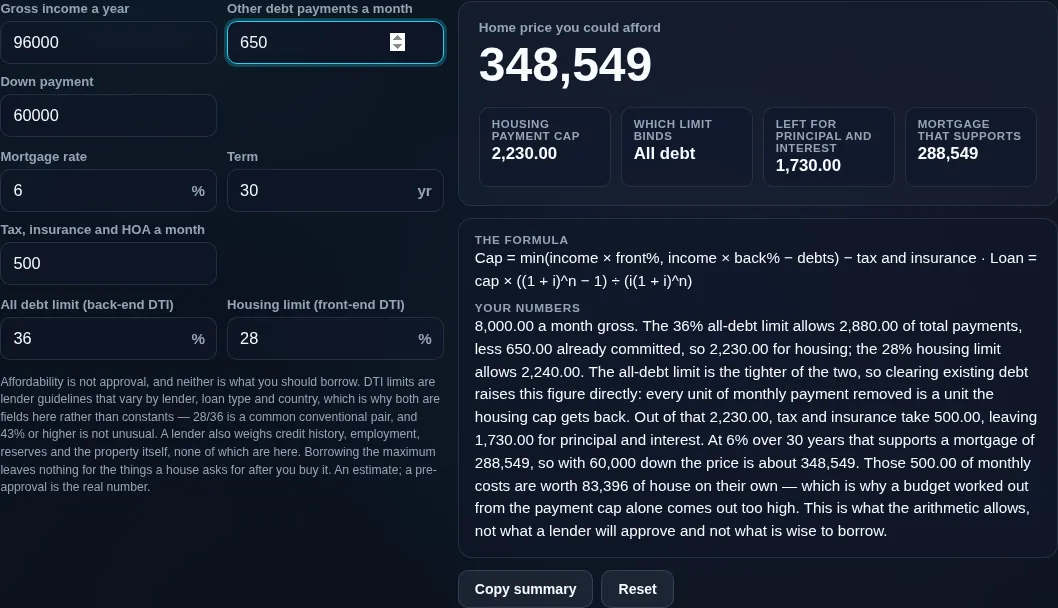
Mortgage affordability calculator turning 96,000 of gross income, 650 of other debt and 60,000 down into a 288,549 mortgage and a 348,549 home price
Inputs + max price / loan / payment result
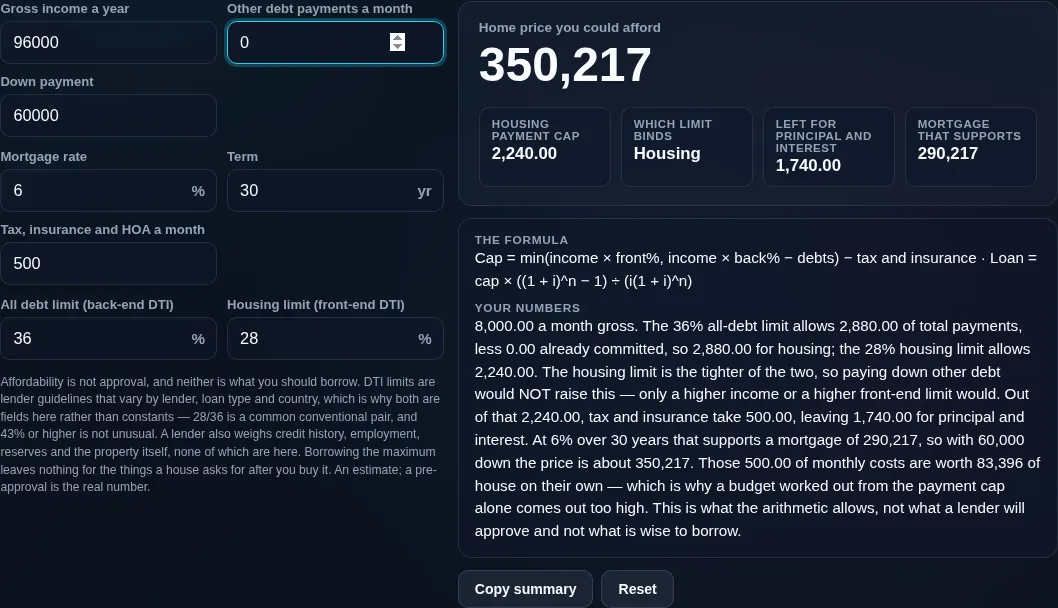
The same figures with the other debt cleared, where the 28% housing limit takes over from the 36% all-debt limit and the price moves only to 350,217
Adjustable DTI (28/36) control
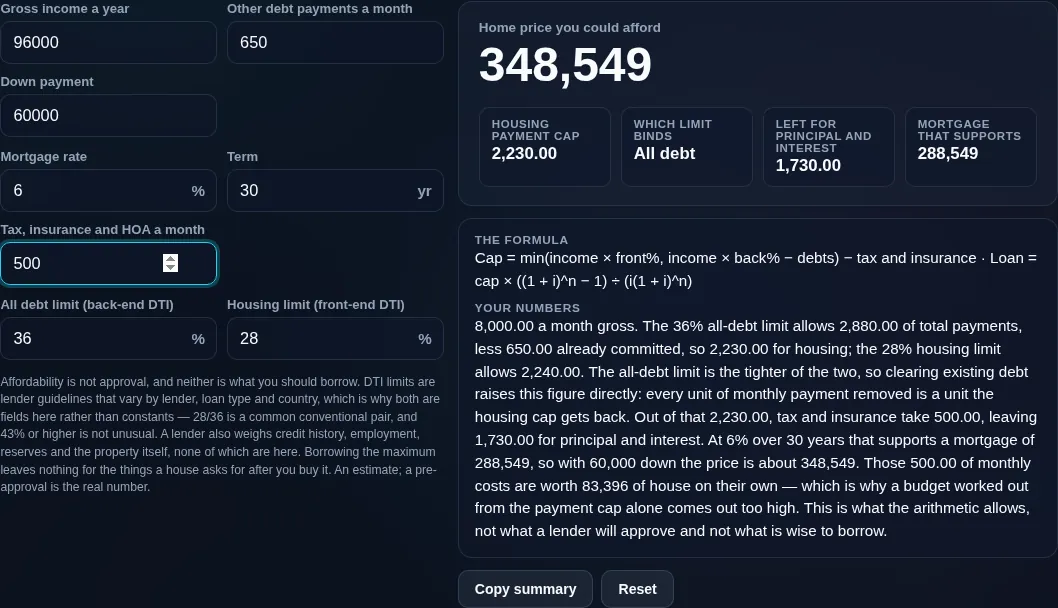
The payment cap broken down — 2,230.00 a month of housing, of which 500.00 goes to tax, insurance and HOA, leaving 1,730.00 for principal and interest
Payment cap breakdown (P&I vs tax/insurance/PMI)
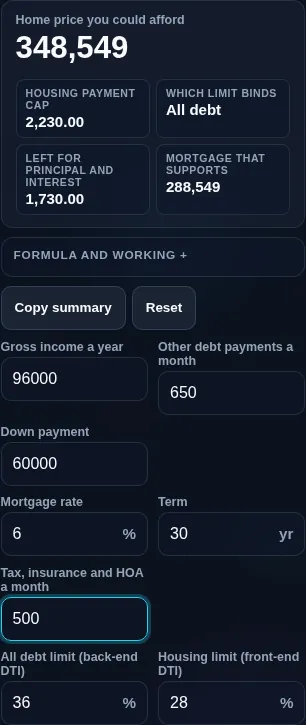
Mortgage affordability calculator running in a phone browser, with the income inputs and the price result stacked
Mobile browser

When an affordability calculator helps

Now the honesty that lead-gen tools skip. First, affordability is not approval. Lenders also weigh your credit score, employment history, cash reserves, and the property itself — this estimate can't guarantee a loan. Second, being able to borrow the maximum doesn't mean you should. A payment at the top of your DTI leaves little room for emergencies, and many people deliberately buy below their max. Third, your housing payment must cover more than principal and interest — property tax, insurance, PMI, and HOA all come out of the same cap, so the loan a given payment supports is smaller once those are included. The tool separates these.

It's an educational estimate, not financial advice — for a real figure, get a lender pre-approval. Everything runs in your browser; your income and debts are never uploaded.

  • House hunting. Set a realistic price range before you browse.
  • Saving for a deposit. See how a bigger down payment lifts your price ceiling.
  • Managing debts. Check how paying off a car or card raises what you can borrow.
  • Comparing scenarios. Test different rates, terms, and DTI limits.
  • Sanity-checking a lender's figure. Understand where their number comes from.

Realistic example. Gross income $6,000/month, a 36% back-end DTI, and $500 of existing debts: max total debt = $2,160; minus $500 = $1,660 for housing. If about $360 covers tax/insurance, roughly $1,300 is left for principal & interest, which — at 6.5% over 30 years — back-solves to a loan of about $205,000. Add a $40,000 down payment and the max home price is ≈ $245,000.

Advanced tip. Run a conservative version too: a lower DTI (say 28%) and a slightly higher rate give a "comfortable" figure with breathing room, which is often wiser than the maximum.

Common mistake to avoid. Don't treat this as approval or as a target to hit. It's a ceiling, not a recommendation.

Related. For the payment on a specific price, see the Mortgage Calculator; for the full payoff table, the Loan Calculator.

What this estimate is — and isn't

  • Not a pre-approval or a guarantee. Lenders also assess credit, employment, reserves, and the property; this can't promise a loan.
  • Don't borrow the maximum. The top of your DTI leaves little cushion; buying below your ceiling is often the safer choice.
  • The payment cap covers more than P&I. Property tax, insurance, PMI, and HOA reduce the loan a given payment supports — the tool separates them.
  • DTI rules vary. Limits differ by lender, loan type, and country; the DTI here is adjustable, not fixed US rules.
  • Not financial advice. It's educational. Your income and debt figures stay on your device and are never uploaded.

Frequently Asked Questions

How is mortgage affordability calculated?

It's based on your debt-to-income ratio (DTI). Your maximum total monthly debt is your gross monthly income × a DTI limit; subtract your existing debts to get the amount available for housing. From that housing budget, the tool back-solves the largest loan the payment supports, then adds your down payment for the maximum home price. It's an estimate, not a pre-approval.

---

What is the 28/36 rule (and DTI)?

The 28/36 rule is a common lender guideline: spend no more than 28% of gross monthly income on housing (the front-end ratio) and no more than 36% on total debt including the mortgage (the back-end ratio). DTI is simply your monthly debt payments divided by your gross monthly income. Lenders use it to gauge how much more debt you can handle; this tool lets you adjust the limits.

---

How much house can I afford on my income?

It depends on your income, debts, down payment, the rate, and the DTI limit. As a rough guide, at a 36% back-end DTI a $6,000/month income supports about $2,160 of total debt; after existing debts and housing costs like tax and insurance, the remaining principal-and-interest budget back-solves to a loan amount. Enter your figures for your own estimate — and remember it's a ceiling, not a target.

---

Does affordability mean I'll be approved?

No. This estimate shows roughly how much a lender might allow based on income and DTI, but approval also depends on your credit score, employment history, cash reserves, the property's appraisal, and the lender's own rules. Two people with the same income can get different decisions. For a real figure you can rely on, get a lender pre-approval.

---

Should I borrow the maximum I can afford?

Usually not. The maximum sits at the top of your DTI, leaving little room for emergencies, rate rises, maintenance, or lifestyle. Many buyers deliberately choose a home below their ceiling so the payment is comfortable and they can keep saving. Treat the maximum as a limit to stay under, not a target to reach — and run a conservative scenario too.

---

Does the payment cap include property tax, insurance, and PMI?

It should, because they come out of the same monthly budget. Your housing payment isn't just principal and interest — it also covers property tax, home insurance, private mortgage insurance (PMI) if your deposit is small, and any HOA fees. Those extras reduce how much loan a given payment supports, so the tool lets you include them for a more realistic maximum.

---

How does my down payment affect what I can afford?

Your down payment adds directly to the home price on top of the loan you can support, so a bigger deposit raises your ceiling dollar for dollar. It can also lower your rate and remove PMI (typically at 20% down), which frees up more of your payment for principal and interest — indirectly increasing the loan too. The tool adds your down payment to the max loan for the max price.

---

What DTI do lenders usually accept?

It varies by lender, loan type, and country. The traditional guideline is 36% back-end (43% is a common upper limit for many conventional loans, and some programs go higher with strong credit or reserves). Because there's no single number, this calculator uses an adjustable DTI so you can match your lender's criteria or your own comfort level.

---

How do existing debts reduce what I can borrow?

Every existing monthly debt — a car payment, student loan, or minimum credit-card payment — counts against your back-end DTI, leaving less room for a mortgage payment. For example, at a 36% DTI on $6,000 income, $2,160 is available for all debt; a $500 car payment leaves $1,660 for housing. Paying off debts before applying can noticeably increase how much you can borrow.

---

Is this US-only, or does it work in any country?

It works anywhere, because the DTI limits are inputs you set rather than fixed US rules. Affordability guidelines and the mortgage products behind them differ by country, so enter the DTI, rate, and term that apply to you. The underlying maths — income × DTI, minus debts, back-solved into a loan — is universal.

---

Is this financial advice or a pre-approval?

Neither. It's an educational estimate to help you set a realistic price range and understand how affordability works. It isn't financial advice, and it can't approve a loan or bind any lender. For a figure you can act on, speak to a mortgage lender or broker and get a formal pre-approval.

---

Is my income data uploaded, and does it work offline?

No upload, and yes it works offline. Every calculation runs entirely in your browser, so your income and debt figures — which are sensitive — are never sent to a server, there's no account, and no lead-gen or tracking. Once the page has loaded it keeps working with no connection, unlike lender affordability tools that collect your details.

Still have questions?

If you can't find the answer you're looking for, feel free to contact our support team.

Contact Us