Budget Calculator (50/30/20)

Split your monthly take-home pay into needs, wants, and savings with the 50/30/20 rule — adjustable, with plan-vs-actual.

100% Browser-Based Local Processing

After tax, not gross — budgeting a salary you never receive is the commonest way this framework goes wrong.

The split
%
%
%

50/30/20 is a starting framework, not a law — a high-rent city can make 50% for needs impossible, and someone clearing debt may want far more than 20%. The categories blur too: a gym can be either. Adjust the split to what you are actually deciding between. Not financial advice.

Needs, wants and savings

1,600.00

Needs · 50% 1,600.00
Wants · 30% 960.00
Savings and debt · 20% 640.00
Savings over a year 7,680.00
Formula and working

The formula

Each category = take-home pay × its share of 100%

Your numbers

3,200.00 split 50/30/20 gives 1,600.00 for needs, 960.00 for wants and 640.00 for savings and extra debt payments — 7,680.00 a year.

An estimate, not financial advice. Figures are indicative, and the assumptions behind them are stated on the tool itself. Tax rules, rates and fees vary by country and change over time — check against your provider or a qualified adviser before acting on a number.

Privacy Focused

🔒 Local Processing. Your salary and balances never leave your device.

Instant Results

🌐 Fully Client-Side. Runs instantly in your browser.

No Signup

⚡ No accounts. No API keys. Just open and use.

Browser Based

🚀 No installs, no sign-ups, no bank account linking.

What is a Budget Calculator (50/30/20)?

A 50/30/20 Budget Calculator splits your monthly take-home pay into three buckets: 50% for needs, 30% for wants, and 20% for savings and debt repayment. Enter your after-tax income and it shows each target amount. The percentages are a flexible guideline you can adjust to your situation.

The 50/30/20 rule is one of the easiest ways to budget: divide your monthly after-tax income into needs (50%), wants (30%), and savings or debt repayment (20%). This calculator does the split instantly — enter your take-home pay and it shows exactly how much each bucket should hold, and it lets you compare those targets against what you actually spend.

Needs are the essentials you can't easily skip: rent or mortgage, utilities, groceries, transport, insurance, and minimum debt payments. Wants are the nice-to-haves: dining out, subscriptions, hobbies, travel, upgrades. Savings covers building an emergency fund, investing, and any *extra* debt payoff beyond the minimums (paying down high-interest debt fast is often the best "saving" you can do).

How to use the 50/30/20 budget calculator

Step 1: Enter your monthly take-home pay. Use your after-tax (net) income, not gross

Enter your monthly take-home pay. Use your after-tax (net) income, not gross.

Step 2: Keep or adjust the split. The default is 50/30/20; change it if your situation calls for a different mix (the three must total 100%)

Keep or adjust the split. The default is 50/30/20; change it if your situation calls for a different mix (the three must total 100%).

Step 3: Read your targets. See the money for needs, wants, and savings each month

Read your targets. See the money for needs, wants, and savings each month.

Step 4: Optional: enter your actual spending. Compare what you spend against each target to spot where to adjust

Optional: enter your actual spending. Compare what you spend against each target to spot where to adjust.

Step 5: Copy or save. Grab the figures, or let the tool remember them on your device

Copy or save. Grab the figures, or let the tool remember them on your device.

Budget Calculator (50/30/20) in action

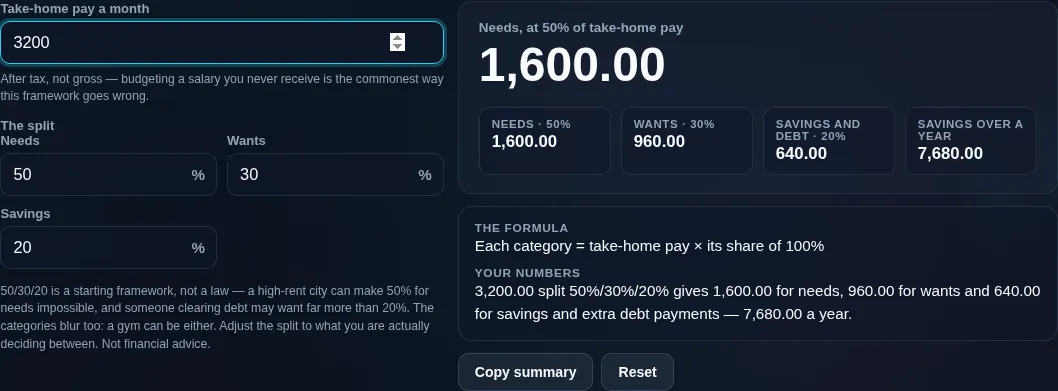
Budget calculator splitting 3,200.00 of take-home pay 50/30/20 — 1,600.00 for needs, 960.00 for wants and 640.00 for savings and debt, 7,680.00 a year
Income split into needs/wants/savings
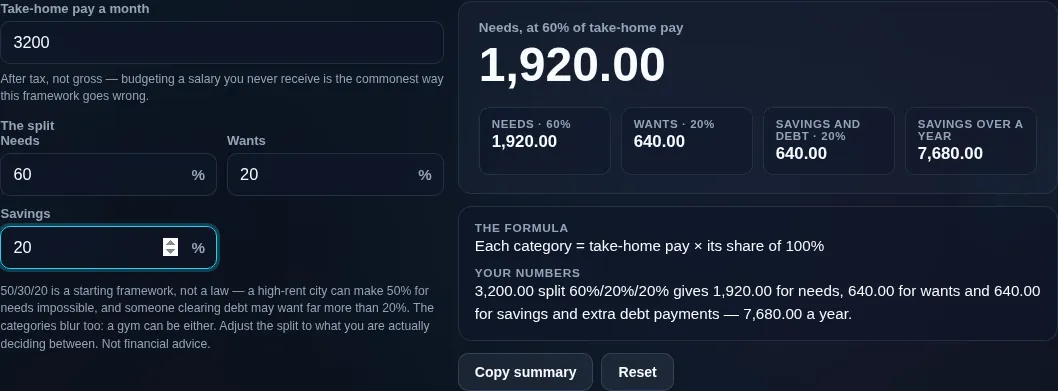
The same pay on a 60/20/20 split instead, moving 1,920.00 to needs and 640.00 to wants — the shares are fields, not a fixed rule
Adjustable split control
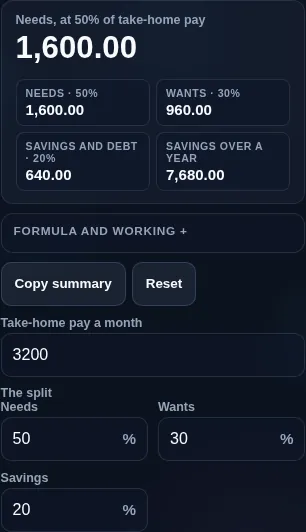
Budget calculator running in a phone browser, with the pay input and the three category cards stacked
Mobile browser

When a budget calculator helps

Two honesty points make this more useful than a rigid formula. First, use your net (after-tax) income, not your gross salary — budgeting from gross overstates what you actually have and is a very common mistake. If you're not sure of your take-home figure, work it out with the Take-Home Pay Calculator. Second, 50/30/20 is a guideline, not a law. In a high-cost city, needs can easily exceed 50%; aggressive savers push well past 20%; people repaying heavy debt may temporarily shrink wants. That's why the tool lets you adjust the percentages (to 70/20/10, 60/30/10, or anything that sums to 100%) to fit your real life.

It's a planning framework to bring clarity, not financial advice — and categories can blur (a gym membership might be a need or a want for you). Everything runs in your browser: your income and spending are never uploaded, unlike budgeting apps that ask to connect your bank. For where the savings should go first, see the Emergency Fund Calculator.

  • Starting a budget. Get instant target amounts from your take-home pay.
  • Checking your spending. Compare your actual needs/wants/savings against the targets.
  • After a pay change. Re-split a new salary in seconds.
  • Setting a savings rate. See what 20% (or more) actually means in money.
  • Simplifying finances. Skip spreadsheets and bank-linked apps for a quick, private plan.

Realistic example. Take-home pay of $4,000/month with the standard split: $2,000 for needs, $1,200 for wants, and $800 for savings and extra debt repayment. If your rent, groceries, and bills already come to $2,400, your needs are 60% — a signal to trim wants, boost income, or accept a different split.

Advanced tip. If you carry high-interest debt, treat aggressive payoff as part of the 20% (or more) — clearing 20% interest is a guaranteed "return" no investment matches.

Common mistake to avoid. Don't budget from your gross salary. Tax and deductions come out first, so always start from take-home pay.

Related. Work out net pay with the Take-Home Pay Calculator; size your safety net with the Emergency Fund Calculator.

What this budget is — and isn't

  • A guideline, not a rule. 50/30/20 is a helpful starting point, not a mandate; adjust it to your income, cost of living, debt, and goals.
  • Use net income. Budget from take-home pay, not gross — otherwise you'll plan around money you don't have.
  • Categories can blur. Whether something is a need or a want is personal; the split is a framework, not a rulebook.
  • Not financial advice. It's an educational planning aid.
  • Your data stays private. All maths runs on your device — no bank connection, no account, nothing uploaded.
Frequently Asked Questions

What is the 50/30/20 rule, and how does this calculator work?

The 50/30/20 rule splits your monthly after-tax income into three parts: 50% for needs, 30% for wants, and 20% for savings and debt repayment. This calculator takes your take-home pay and shows the target amount for each bucket, and it lets you adjust the percentages and compare the plan against your actual spending.

---

Should I budget on gross or net income?

Net — your after-tax, take-home pay. Gross salary includes tax and deductions that never reach your account, so budgeting from it plans around money you don't actually have. The 50/30/20 rule is specifically designed for net income. If you're unsure of your take-home figure, work it out first with the Take-Home Pay Calculator.

---

What counts as a "need" vs a "want"?

Needs are essentials you can't easily go without: housing, utilities, groceries, transport, insurance, and minimum debt payments. Wants are discretionary: dining out, subscriptions, hobbies, travel, and upgrades. The line is personal — a car is a need for a commuter but a want for someone with transit — so use your own judgment. The point is to see the balance, not to police every category.

---

How much should I save each month?

The rule suggests 20% of take-home pay for savings and extra debt repayment, but the right figure depends on your goals and situation. If you have high-interest debt, prioritize clearing it; if you're saving for a house or retiring early, aim higher than 20%. Even a small, consistent amount beats none — the habit matters as much as the percentage.

---

Is 50/30/20 realistic for everyone?

No — it's a useful starting framework, not a universal reality. In high-cost areas, essential needs alone can exceed 50% of income, leaving less for wants and savings. People on lower incomes may find needs dominate, while high earners can save far more than 20%. Treat the split as a target to adjust toward, not a rigid rule you've failed if you miss.

---

What if my needs are more than 50%?

That's common, especially with expensive housing. If needs run to 60% or more, you can't hit the standard split, so options are to trim wants, increase income, reduce fixed costs (a cheaper place, refinancing, cutting a car), or temporarily lower the savings target. The calculator lets you set a realistic split for your situation while you work on the bigger levers.

---

Can I change the percentages, like 70/20/10?

Yes. The tool defaults to 50/30/20 but lets you set any split that totals 100%. Popular alternatives include 70/20/10 (70% living costs, 20% savings, 10% debt or giving) and 60/30/10. Aggressive savers might use 50/20/30 (more savings). Adjust the mix to match your income, cost of living, and goals — the framework is meant to be flexible.

---

Where should the 20% savings go?

Usually in this order: first build a small starter emergency fund, then clear high-interest debt (a guaranteed return), then grow a full emergency fund of a few months' expenses, then invest for longer-term goals. The right priority depends on your situation. Size your safety net with the Emergency Fund Calculator and plan payoff with a debt calculator.

---

How do I use this if I'm paid irregularly?

Budget from a conservative estimate of your average monthly take-home — ideally your lower typical months, not your best ones. In good months, direct the surplus to savings or debt; in lean months, lean on the buffer that builds up. Freelancers and commission earners especially benefit from a larger emergency fund to smooth the gaps between the targets.

---

How is this different from a budgeting app?

This is a quick, private calculator, not a tracking app. It gives you clear target amounts and a plan-vs-actual snapshot without connecting to your bank, creating an account, or storing your transactions on a server. Budgeting apps do more ongoing tracking but require access to your financial data; this tool trades that depth for speed and privacy.

---

Is this financial advice?

No. This calculator is an educational planning aid to help you organize your income into a simple, adjustable budget. It isn't financial advice and doesn't account for your full circumstances. For personalized guidance on saving, debt, or investing, consider a qualified financial professional.

---

Is my income data uploaded, and does it work offline?

No upload, and yes it works offline. Every calculation runs entirely in your browser, so your income and spending figures are never sent to a server, there's no account, and no bank connection or tracking. Once the page has loaded it keeps working with no connection — a private alternative to budgeting apps that want access to your finances.

Still have questions?

If you can't find the answer you're looking for, feel free to contact our support team.

Contact Us