Loan Calculator

Calculate your loan's monthly payment (EMI), total interest, and total cost, with an amortization schedule.

100% Browser-Based Local Processing
% a year

A repayment loan at a fixed rate, with interest charged monthly on the balance still owed. Fees, insurance and any change of rate are not included. Figures are an estimate, not an offer of credit.

Payment each month

400.76

Total interest 4,045.54
Total paid 24,045.54
Paid off in 5 yr
Interest saved Add an extra payment
Formula and working

The formula

payment = P × r × (1 + r)ⁿ ÷ ((1 + r)ⁿ − 1)

Your numbers

P = 20,000, monthly rate r = 7.5 ÷ 12 ÷ 100 = 0.00625, n = 60 payments → 400.76 a month.

Year-by-year schedule
YearInterestPrincipalBalance

Privacy Focused

🔒 Local Processing. Your numbers never leave your device.

Instant Results

🌐 Fully Client-Side. Runs instantly in your browser.

No Signup

⚡ No accounts. No API keys. Just open and use.

Browser Based

🚀 No installs, no sign-ups, no server round-trip.

What is a Loan Calculator?

A Loan Calculator works out the monthly payment on a loan from the amount borrowed, the interest rate, and the term. It also shows the total interest you'll pay and the total cost, plus a month-by-month amortization schedule. Enter your figures and it calculates instantly in your browser, keeping your numbers private.

Before taking a loan, you want to know the real cost: the monthly payment you'll commit to, and how much interest you'll pay over the whole term. Those depend on the amount, the rate, and the length in a way that's hard to estimate in your head.

This calculator gives the monthly payment, total interest, and a full repayment schedule, and shows the formula. It runs entirely in your browser, so your financial figures never leave your device.
How to calculate a loan payment

Step 1: Enter the loan amount, the annual interest rate, and the term

Enter the loan amount, the annual interest rate, and the term.

Step 2: Read the monthly payment, total interest, and total amount paid

Read the monthly payment, total interest, and total amount paid.

Step 3: Open the amortization schedule to see how each payment splits between principal and interest

Open the amortization schedule to see how each payment splits between principal and interest.

Loan Calculator in action

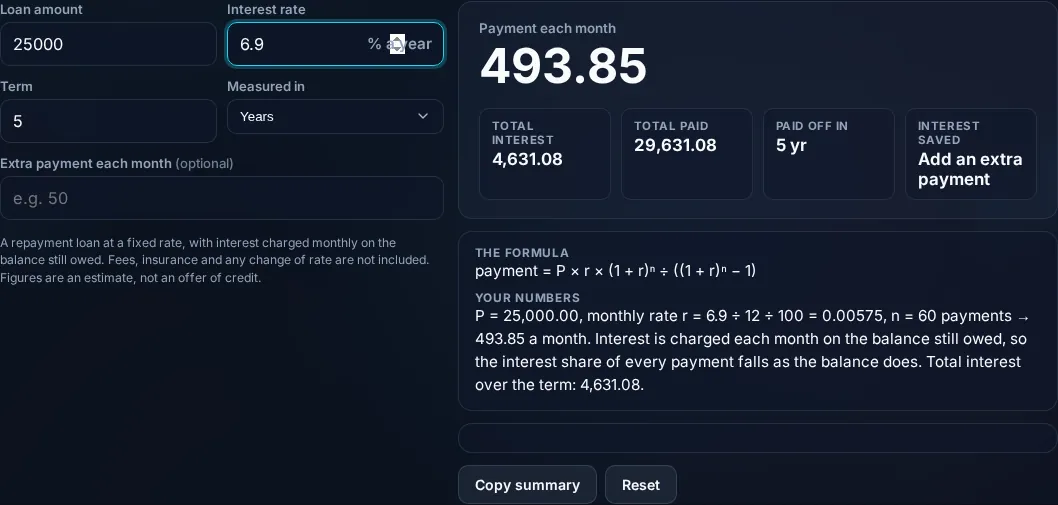
Loan Calculator showing the monthly payment and total interest in the browser.
Payment + totals
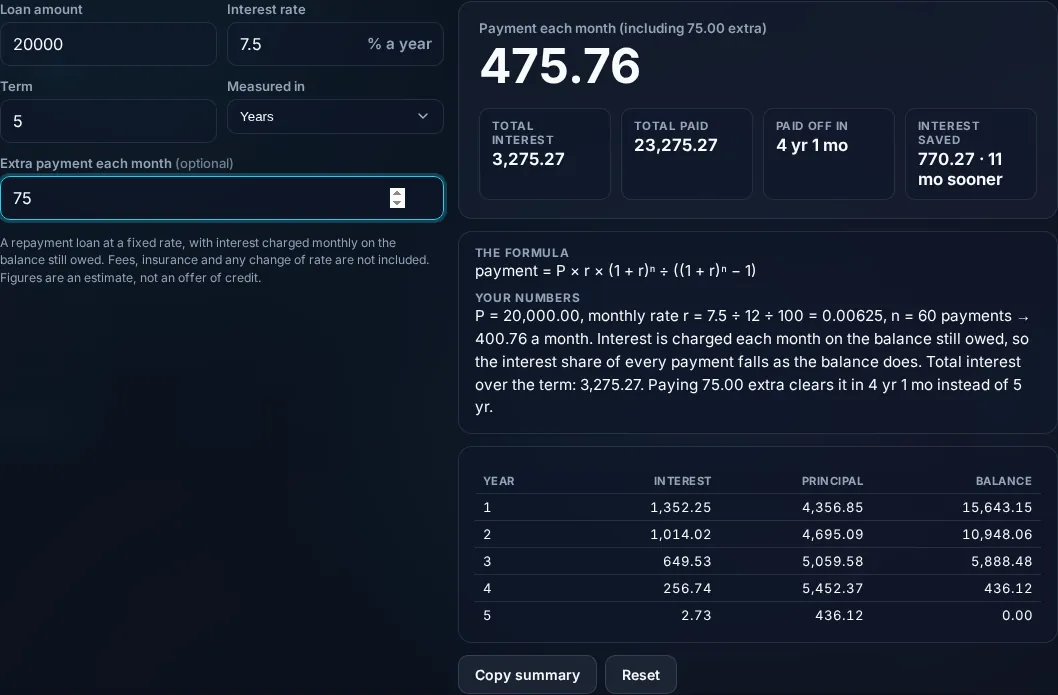
Loan amortization schedule of principal and interest.
Amortization schedule
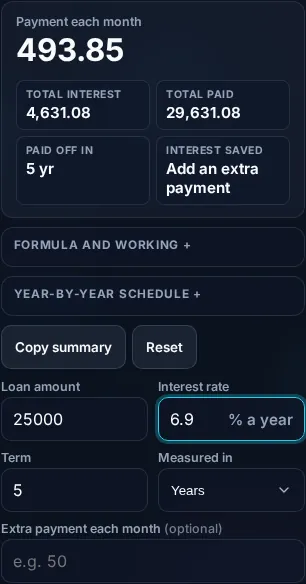
Calculating a loan payment on a phone, no app installed.
Mobile (stacked)

How loan payments work — and what the estimate omits

Most loans are amortized, meaning you pay a fixed amount each period that gradually shifts from mostly interest to mostly principal. The monthly payment uses the standard formula M = P × [r(1+r)ⁿ] ÷ [(1+r)ⁿ − 1], where P is the principal, r is the monthly interest rate (annual rate ÷ 12 ÷ 100), and n is the number of payments (years × 12). Early payments are mostly interest because interest is charged on the larger remaining balance; the amortization schedule shows this split month by month, which is why the total interest can be a large share of the loan. The calculator also handles a 0% rate (the payment is simply principal ÷ months) and can model extra payments, which cut the term and total interest. One honest point: this is the core loan math, but real-world loans add origination fees, insurance, and sometimes variable rates that the simple formula doesn't include — so treat the result as a close estimate, not a quote, and it isn't financial advice. Everything computes locally in your browser. For home loans use the Mortgage Calculator; for vehicles, the Car Loan Calculator; for growth, the Compound Interest Calculator.

Frequently Asked Questions

How is a loan's monthly payment calculated?

With the amortized-loan formula: M = P × [r(1+r)ⁿ] ÷ [(1+r)ⁿ − 1], where P is the loan amount, r is the monthly rate (annual rate ÷ 12 ÷ 100), and n is the total number of monthly payments. The calculator applies this and shows the formula, so you get the payment plus how it was derived.

What is an amortization schedule?

It's a table showing each payment over the loan's life and how it splits between interest and principal, along with the remaining balance. Early payments are mostly interest; later ones mostly principal. The schedule reveals exactly how the debt is paid down and how much total interest you'll pay.

Why is so much of my early payment interest?

Because interest is charged on the outstanding balance, which is largest at the start. With a fixed monthly payment, most of the early portion covers that interest and only a little reduces the principal. As the balance falls, the interest portion shrinks and more goes to principal — visible in the amortization schedule.

Does paying extra reduce the total interest?

Yes, significantly. Extra payments go straight to the principal, shrinking the balance that interest is charged on, which shortens the term and cuts total interest. The calculator can model an extra monthly or one-off payment so you can see how much time and money it saves.

What does this calculator not include?

It computes the core loan repayment, but real loans often add origination or processing fees, mandatory insurance, taxes, and sometimes variable interest rates — none of which the simple formula captures. So treat the result as a close estimate of the principal-and-interest payment, not a final quote, and confirm the full cost (APR) with the lender.

Is this loan calculator financial advice?

No. It's a math tool that estimates payments and interest from the figures you enter. It doesn't account for your full financial situation, the lender's exact terms, or whether a loan is right for you. Use it to compare scenarios, but consult a qualified financial professional for advice on borrowing decisions.

Is it free, and do I need to sign up?

Yes, it's completely free with no account, no trial, and no limit on how many times you use it. It runs entirely in your browser, so there's no sign-in wall — just open the page and calculate.

Is my data private?

Yes. Everything is calculated in your browser — the numbers you enter are never sent to a server, and nothing is stored once you close the tab. That keeps any personal figures (salary, loan, health) on your own device.

Does it work on mobile?

Yes. It runs in your phone's browser with nothing to install, so you can calculate on Android or iOS. The layout adapts to small screens, so entering numbers and reading the result is easy on the go.

Does it work offline?

Once the page has loaded, the calculation runs entirely on your device, so it keeps working without a connection. You only need to be online to open the page the first time — which is also why nothing you enter is uploaded.

Can I copy or share the result?

Yes. You can copy the result to your clipboard with one click, and many results can be shared. Because everything is calculated locally, copying is instant with no upload step.

How accurate is it, and is this professional advice?

The math is accurate for the inputs you give, and the formula is shown so you can verify it. But results are estimates for general use, not professional advice — finance calculators use simplified assumptions and ignore fees and rate changes, and health calculators are general estimates, not medical advice. For important decisions, consult a qualified professional.

Still have questions?

If you can't find the answer you're looking for, feel free to contact our support team.

Contact Us