Grade Calculator

Calculate your weighted course grade, or the score you need on the final to hit a target grade.

100% Browser-Based Local Processing
What do you need?

Weights are how much each category counts toward the final grade. They do not have to add to 100 — if they don't, each is taken as a share of the total you entered, which is what happens when you are part-way through a course.

Grade so far

86.7%

Letter B
Weight counted 70.0%
Points banked 60.7 of 100
Formula and working

The formula

grade = Σ(score × weight) ÷ Σ weight

Your numbers

Waiting for your grades.

Privacy Focused

🔒 Local Processing. Your numbers never leave your device.

Instant Results

🌐 Fully Client-Side. Runs instantly in your browser.

No Signup

⚡ No accounts. No API keys. Just open and use.

Browser Based

🚀 No installs, no sign-ups, no server round-trip.

What is a Grade Calculator?

A Grade Calculator works out your course grade from weighted components — assignments, tests, and exams each counting a percentage — and can tell you the score you need on the final to reach a target grade. It computes the weighted average and shows whether your goal is achievable, all in your browser.

Course grades are usually weighted: homework might be 20%, midterms 30%, the final 50%. Working out your standing — or what you need on the final to hit an A — means juggling those weights correctly.

This calculator does both: your current weighted grade, and the 'what do I need on the final' calculation. It runs entirely in your browser, so your scores stay private.
How to calculate your grade

Step 1: Add each graded component with its score and its weight (percentage of the grade)

Add each graded component with its score and its weight (percentage of the grade).

Step 2: Read your weighted overall grade

Read your weighted overall grade.

Step 3: Switch to 'needed on final' and enter your target to see the score required on the final exam

Switch to 'needed on final' and enter your target to see the score required on the final exam.

Grade Calculator in action

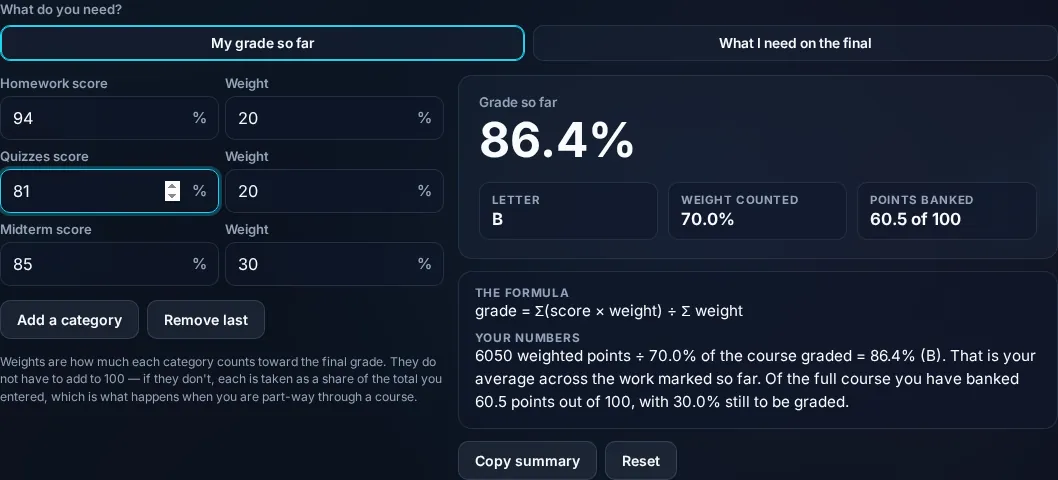
Grade Calculator showing a weighted course grade in the browser.
Weighted grade
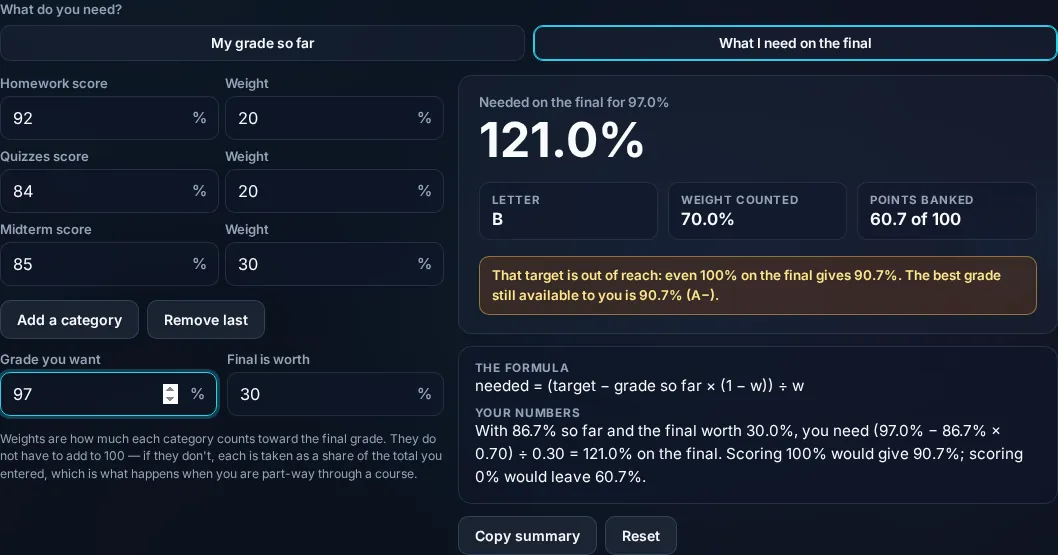
Score needed on the final to reach a target grade.
Needed on final
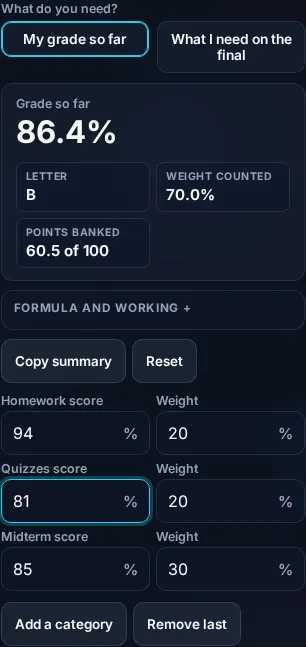
Calculating a grade on a phone, no app installed.
Mobile (stacked)

Weighted grades and the final-exam question

A weighted grade multiplies each component's score by its weight and sums them: grade = Σ(score × weight) ÷ Σ(weight). If homework (20%) is 90, midterms (30%) average 80, and the final (50%) is 85, the grade is (90×0.2 + 80×0.3 + 85×0.5) ÷ 1 = 84.5%. The weights should reflect your syllabus and typically total 100%. The reverse — 'what do I need on the final?' — is the calculation students search for most: given your current grade in everything except the final, the final's weight, and your target overall grade, the required final score is (target − current_contribution) ÷ final_weight, where current_contribution is your grade so far times the non-final weight. The calculator works this out and, importantly, flags when the required score is impossible (above 100%) or trivially low (you've already secured the target) — useful reality checks before an exam. It can also map the percentage to a letter grade on a scale you set. Honest note: it assumes the weights and scores you enter are accurate and that your instructor rounds and scales as you expect; it's a planning tool, not the official gradebook. Everything computes locally in your browser. For GPA across multiple courses, see the GPA Calculator.

Frequently Asked Questions

How do I calculate a weighted grade?

Multiply each component's score by its weight (as a fraction), add them up, and divide by the total weight: grade = Σ(score × weight) ÷ Σ(weight). For homework 90 at 20%, midterm 80 at 30%, final 85 at 50%, that's 84.5%. Enter your components and weights and the calculator does it.

How do I find what I need on the final exam?

Use your current grade in everything else, the final's weight, and your target. The required final score = (target − current_contribution) ÷ final_weight, where current_contribution is your current grade times the non-final weight. The calculator's 'needed on final' mode computes this from your inputs.

What if the score I need on the final is over 100%?

Then your target isn't reachable through the final alone — even a perfect final won't get you there. The calculator flags this clearly so you can set a realistic goal or look at other options (extra credit, talking to your instructor). Conversely, it shows if you've already locked in the target.

Do the weights need to add up to 100%?

Ideally yes — graded components usually total 100% of the course grade. The calculator divides by the sum of the weights you enter, so it still works if they don't total exactly 100, but for an accurate result enter the weights from your syllabus so they reflect how the course is actually graded.

What's the difference between this and a GPA calculator?

This calculates your grade within a single course from weighted assignments and exams. A GPA calculator combines your final grades across multiple courses, weighted by credit hours, into an overall grade point average. Use the grade calculator during a course and the GPA calculator for your transcript.

Is this my official grade?

No. It's an accurate estimate from the scores and weights you enter, but your instructor's gradebook is official — they may round differently, drop a lowest score, curve, or apply rules you haven't accounted for. Use it to track your standing and plan for the final, and confirm with your instructor.

Is it free, and do I need to sign up?

Yes, it's completely free with no account, no trial, and no limit on how many times you use it. It runs entirely in your browser, so there's no sign-in wall — just open the page and calculate.

Is my data private?

Yes. Everything is calculated in your browser — the numbers you enter are never sent to a server, and nothing is stored once you close the tab. That keeps any personal figures (salary, loan, health) on your own device.

Does it work on mobile?

Yes. It runs in your phone's browser with nothing to install, so you can calculate on Android or iOS. The layout adapts to small screens, so entering numbers and reading the result is easy on the go.

Does it work offline?

Once the page has loaded, the calculation runs entirely on your device, so it keeps working without a connection. You only need to be online to open the page the first time — which is also why nothing you enter is uploaded.

Can I copy or share the result?

Yes. You can copy the result to your clipboard with one click, and many results can be shared. Because everything is calculated locally, copying is instant with no upload step.

How accurate is it, and is this professional advice?

The math is accurate for the inputs you give, and the formula is shown so you can verify it. But results are estimates for general use, not professional advice — finance calculators use simplified assumptions and ignore fees and rate changes, and health calculators are general estimates, not medical advice. For important decisions, consult a qualified professional.

Still have questions?

If you can't find the answer you're looking for, feel free to contact our support team.

Contact Us