GPA Calculator

Calculate your GPA from course grades and credit hours, with weighted and cumulative options and configurable scales.

100% Browser-Based Local Processing

Credit-weighted, the way almost every institution calculates it — a 4-credit course moves your GPA twice as much as a 2-credit one. Pass/fail courses and transfer credits usually sit outside the GPA; check your school's own rules.

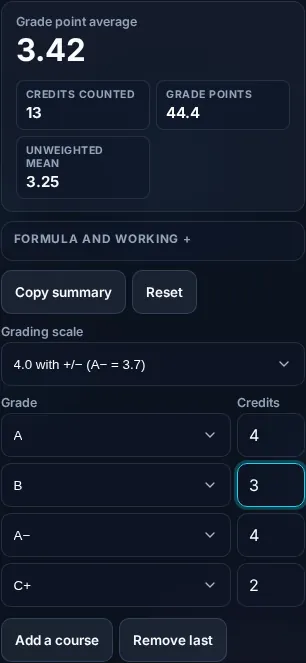
Grade point average

3.42

Credits counted 13
Grade points 44.4
Unweighted mean 3.25
Formula and working

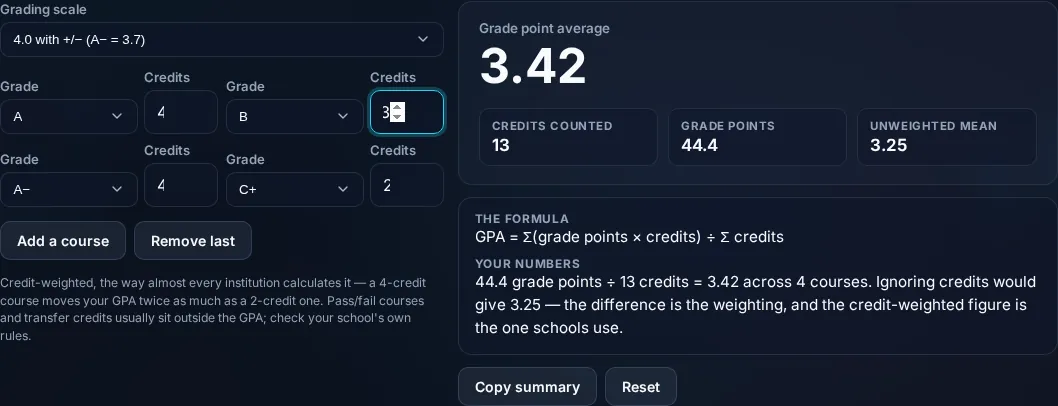
The formula

GPA = Σ(grade points × credits) ÷ Σ credits

Your numbers

Waiting for your courses.

Privacy Focused

🔒 Local Processing. Your numbers never leave your device.

Instant Results

🌐 Fully Client-Side. Runs instantly in your browser.

No Signup

⚡ No accounts. No API keys. Just open and use.

Browser Based

🚀 No installs, no sign-ups, no server round-trip.

What is a GPA Calculator?

A GPA Calculator works out your Grade Point Average from your course grades and credit hours. Each grade maps to grade points (A = 4.0, B = 3.0, and so on), and the GPA is the sum of grade points × credits divided by total credits. Enter your courses and it computes your weighted GPA, with a cumulative option, in your browser.

Your GPA isn't just the average of your grades — it's weighted by credit hours, so a high grade in a 4-credit course counts more than the same grade in a 1-credit one. Calculating it by hand across a transcript is tedious.

This calculator does the weighting for you, supports different grading scales, and can fold in your prior GPA for a cumulative figure. It runs entirely in your browser, so your grades stay private.
How to calculate your GPA

Step 1: Add a row for each course with its grade and credit hours

Add a row for each course with its grade and credit hours.

Step 2: Choose the grading scale your school uses (e.g

4.0, with or without +/−).

Step 3: Read your weighted GPA; add prior credits and GPA for a cumulative figure

Read your weighted GPA; add prior credits and GPA for a cumulative figure.

GPA Calculator in action

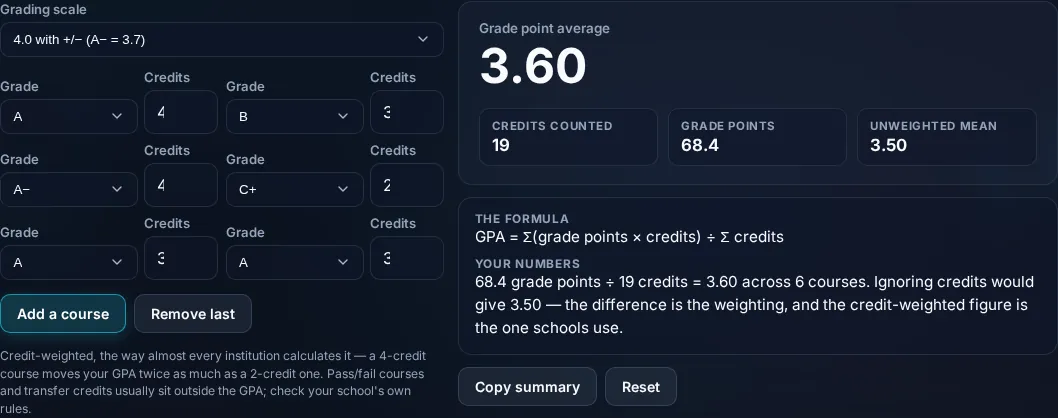
GPA Calculator computing grade point average in the browser.
GPA result
Weighted GPA from courses, grades, and credits.
Cumulative
Calculating GPA on a phone, no app installed.
Mobile (stacked)

Why GPA is credit-weighted

GPA is a weighted average, not a simple one. Each letter grade converts to grade points on your school's scale — commonly A = 4.0, B = 3.0, C = 2.0, D = 1.0, F = 0 on a 4.0 scale, often with pluses and minuses (A− = 3.7, B+ = 3.3, etc.). The calculation multiplies each course's grade points by its credit hours (its 'quality points'), sums those across all courses, and divides by the total credit hours: GPA = Σ(grade points × credits) ÷ Σ(credits). That weighting is the whole point — a 4-credit course influences your GPA four times as much as a 1-credit course, so an A in a heavy course lifts your GPA more than an A in a light one. The calculator lets you pick the scale (since schools differ — some use 4.0, others 4.3, 5.0 for honors, or percentage-to-point mappings), exclude pass/fail courses that don't carry grade points, and add your previous total credits and GPA to compute a cumulative GPA across semesters. One honest note: grade-point values and scales vary by institution, so set them to match your school's policy, and treat the result as your own calculation, not an official transcript figure. Everything computes locally in your browser. For a single class, see the Grade Calculator.

Frequently Asked Questions

How is GPA calculated?

Convert each grade to grade points (A = 4.0, B = 3.0, etc.), multiply by the course's credit hours, sum these across all courses, and divide by total credits: GPA = Σ(grade points × credits) ÷ Σ(credits). The calculator does this weighting automatically from the grades and credits you enter.

Why are credit hours used in the GPA?

Because GPA is weighted by how much each course counts. A 4-credit course affects your GPA four times as much as a 1-credit course, so grades in bigger courses matter more. Without credit weighting you'd get a simple average, which would misrepresent a transcript where courses carry different weights.

What's the difference between weighted and cumulative GPA?

'Weighted by credits' is how any GPA is calculated (bigger courses count more). 'Cumulative' GPA combines all your semesters into one overall figure, while a semester GPA covers just that term. This calculator gives the semester GPA and, if you add your prior total credits and GPA, the cumulative GPA too.

Do grading scales differ between schools?

Yes. Many use a 4.0 scale, but the exact grade-point values vary — some use plus/minus grades (A− = 3.7), some cap at 4.0 and others at 4.3 or use 5.0 for honors/AP courses, and some map percentages to points differently. Set the calculator to your school's scale so the result matches your official GPA.

How do pass/fail courses affect GPA?

Usually they don't — pass/fail (or credit/no-credit) courses typically earn credit but carry no grade points, so they're excluded from the GPA calculation. The calculator lets you mark or omit such courses so they count toward credits where appropriate but don't skew your grade point average.

Is this my official GPA?

It's an accurate calculation based on the grades, credits, and scale you enter, but it's not an official record — your institution's registrar computes the official GPA using its exact policies (rounding, repeated-course rules, scale specifics). Use this to estimate, plan, and check, and rely on your transcript for the official figure.

Is it free, and do I need to sign up?

Yes, it's completely free with no account, no trial, and no limit on how many times you use it. It runs entirely in your browser, so there's no sign-in wall — just open the page and calculate.

Is my data private?

Yes. Everything is calculated in your browser — the numbers you enter are never sent to a server, and nothing is stored once you close the tab. That keeps any personal figures (salary, loan, health) on your own device.

Does it work on mobile?

Yes. It runs in your phone's browser with nothing to install, so you can calculate on Android or iOS. The layout adapts to small screens, so entering numbers and reading the result is easy on the go.

Does it work offline?

Once the page has loaded, the calculation runs entirely on your device, so it keeps working without a connection. You only need to be online to open the page the first time — which is also why nothing you enter is uploaded.

Can I copy or share the result?

Yes. You can copy the result to your clipboard with one click, and many results can be shared. Because everything is calculated locally, copying is instant with no upload step.

How accurate is it, and is this professional advice?

The math is accurate for the inputs you give, and the formula is shown so you can verify it. But results are estimates for general use, not professional advice — finance calculators use simplified assumptions and ignore fees and rate changes, and health calculators are general estimates, not medical advice. For important decisions, consult a qualified professional.

Still have questions?

If you can't find the answer you're looking for, feel free to contact our support team.

Contact Us