Percentage Calculator

Calculate percentages free — find X% of a number, what percent one number is of another, and percentage increase or decrease.

100% Browser-Based Local Processing
What do you want to work out?
%

Nothing is sent anywhere — every figure is worked out in your browser.

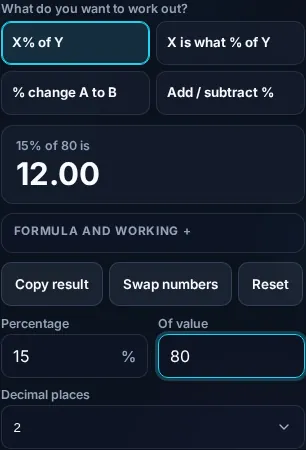
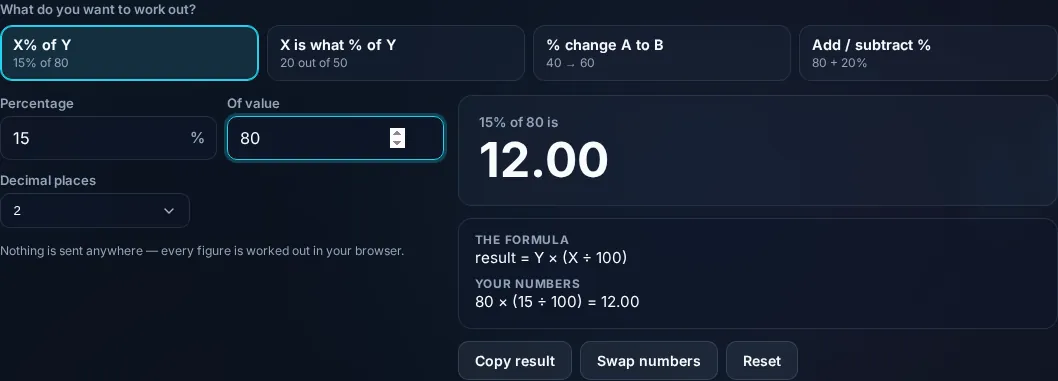
15% of 80 is

12

Formula and working

The formula

result = Y × (X ÷ 100)

Your numbers

80 × (15 ÷ 100) = 12

Privacy Focused

🔒 Local Processing. Your numbers never leave your device.

Instant Results

🌐 Fully Client-Side. Runs instantly in your browser.

No Signup

⚡ No accounts. No API keys. Just open and use.

Browser Based

🚀 No installs, no sign-ups, no server round-trip.

What is a Percentage Calculator?

A Percentage Calculator works out percentage problems instantly. Enter your numbers and it finds what X% of a value is, what percentage one number is of another, or the percentage increase or decrease between two values — showing the formula so you can see exactly how the answer was reached. It runs in your browser.

Percentages come up everywhere — discounts, tips, grades, growth, tax — but the three common questions ('what is 15% of 80?', '20 is what percent of 50?', 'what's the % change from 40 to 60?') each need a slightly different formula.

This calculator covers them all in one place and shows the working, so you get the answer and understand it. It runs entirely in your browser, so your numbers stay private.
How to calculate a percentage

Step 1: Pick the type of percentage question you have

Pick the type of percentage question you have.

Step 2: Enter the two numbers

Enter the two numbers.

Step 3: Read the result with the formula shown, and copy it if you need to

Read the result with the formula shown, and copy it if you need to.

Percentage Calculator in action

Percentage Calculator showing a result with the formula in the browser.
Result + formula
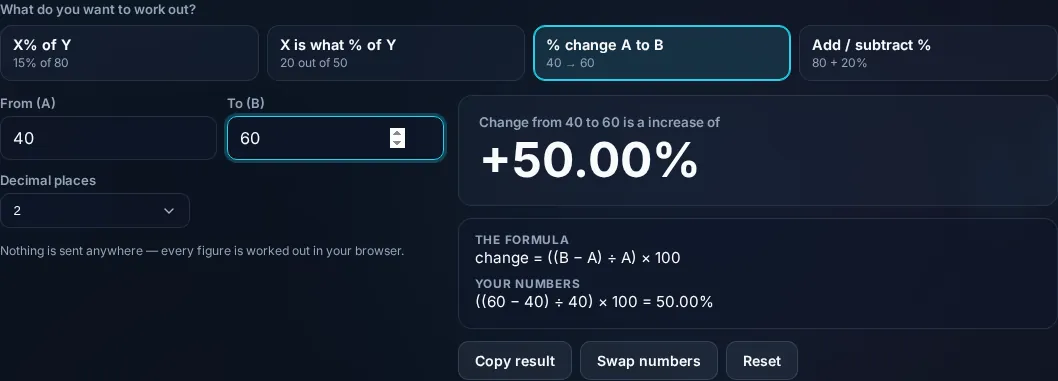
Percentage calculator modes for the common questions.
Modes
Calculating a percentage on a phone, no app installed.
Mobile (stacked)

The percentage formulas, explained

There are three everyday percentage calculations, and the tool shows the formula for each. 'What is X% of Y?' multiplies: result = Y × (X ÷ 100) — so 15% of 80 is 80 × 0.15 = 12. 'X is what percent of Y?' divides: percent = (X ÷ Y) × 100 — so 20 out of 50 is (20 ÷ 50) × 100 = 40%. 'Percentage change from A to B' uses: change = ((B − A) ÷ A) × 100, which is positive for an increase and negative for a decrease — from 40 to 60 that's ((60 − 40) ÷ 40) × 100 = 50%. The tool also handles adding or subtracting a percentage (e.g., add 20% tax). It guards against dividing by zero (when the base is 0) and lets you control rounding for display, though it computes at full precision. Showing the formula isn't just transparency — it's how you can reuse the method by hand later. Everything runs locally in your browser. For change between two values specifically, see the Percentage Change Calculator; for shopping, the Discount and Tip calculators.

Frequently Asked Questions

How do I calculate what X% of a number is?

Multiply the number by the percentage divided by 100: result = number × (percent ÷ 100). For example, 15% of 80 is 80 × 0.15 = 12. Select that mode, enter 15 and 80, and the calculator shows 12 along with the formula so you can follow the steps.

How do I find what percentage one number is of another?

Divide the part by the whole and multiply by 100: percent = (part ÷ whole) × 100. For example, 20 out of 50 is (20 ÷ 50) × 100 = 40%. The calculator does this when you choose the 'X is what % of Y' mode and enter the two numbers.

How do I calculate percentage increase or decrease?

Use ((new − old) ÷ old) × 100. A positive result is an increase, a negative one a decrease. From 40 to 60 that's ((60 − 40) ÷ 40) × 100 = 50% increase. Select the change mode and enter the old and new values; the calculator shows the signed percentage.

How do I add or subtract a percentage from a number?

To add X%, multiply by (1 + X/100); to subtract, multiply by (1 − X/100). Adding 20% to 50 gives 50 × 1.2 = 60; taking 20% off 50 gives 50 × 0.8 = 40. The calculator has a mode for this, useful for tax, markups, and discounts.

Why does it show the formula?

So you can verify the answer and learn the method, rather than trusting a black box. Seeing 'result = 80 × (15 ÷ 100) = 12' makes the calculation transparent and lets you reproduce it by hand or in a spreadsheet later. It's also clearer for checking your own homework or work.

What happens if I divide by zero?

If the base number (the 'whole' or 'old' value) is zero, the percentage is undefined — you can't express a part of nothing or a change from zero as a percentage. The calculator detects this and shows a clear message instead of an error or a misleading number.

Is it free, and do I need to sign up?

Yes, it's completely free with no account, no trial, and no limit on how many times you use it. It runs entirely in your browser, so there's no sign-in wall — just open the page and calculate.

Is my data private?

Yes. Everything is calculated in your browser — the numbers you enter are never sent to a server, and nothing is stored once you close the tab. That keeps any personal figures (salary, loan, health) on your own device.

Does it work on mobile?

Yes. It runs in your phone's browser with nothing to install, so you can calculate on Android or iOS. The layout adapts to small screens, so entering numbers and reading the result is easy on the go.

Does it work offline?

Once the page has loaded, the calculation runs entirely on your device, so it keeps working without a connection. You only need to be online to open the page the first time — which is also why nothing you enter is uploaded.

Can I copy or share the result?

Yes. You can copy the result to your clipboard with one click, and many results can be shared. Because everything is calculated locally, copying is instant with no upload step.

How accurate is it, and is this professional advice?

The math is accurate for the inputs you give, and the formula is shown so you can verify it. But results are estimates for general use, not professional advice — finance calculators use simplified assumptions and ignore fees and rate changes, and health calculators are general estimates, not medical advice. For important decisions, consult a qualified professional.

Still have questions?

If you can't find the answer you're looking for, feel free to contact our support team.

Contact Us