Average Calculator

Calculate the mean, median, mode, range, and sum of a set of numbers in one place.

100% Browser-Based Local Processing

Anything that isn't a number is ignored. Everything is worked out in your browser.

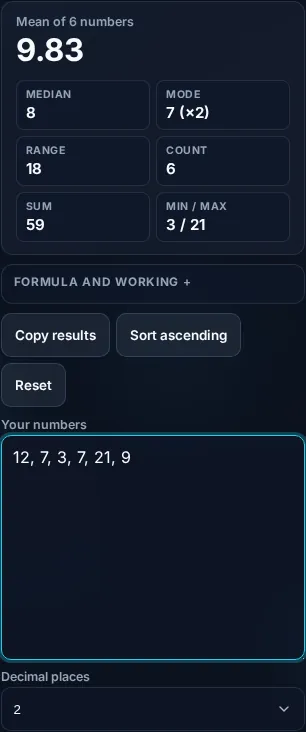
Mean of 6 numbers

9.83

Median 8
Mode 7
Range 18
Count 6
Sum 59
Min / Max 3 / 21
Formula and working

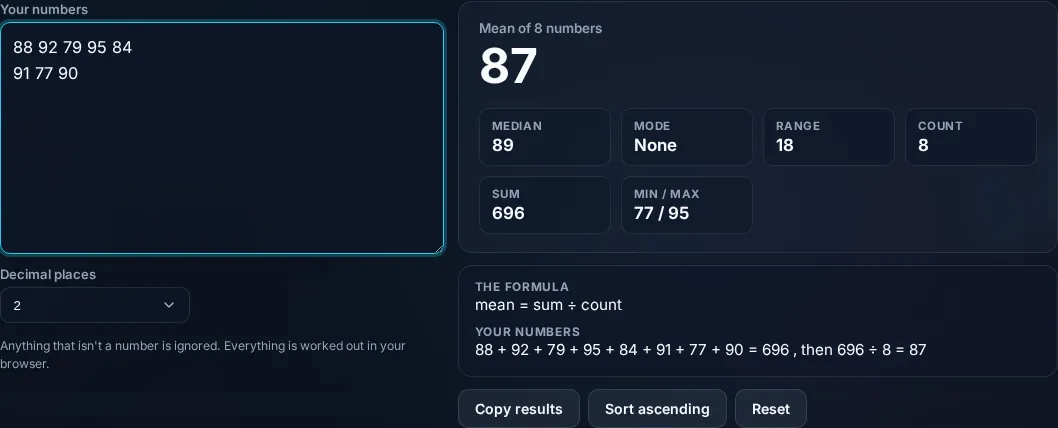
The formula

mean = sum ÷ count

Your numbers

59 ÷ 6 = 9.83

Privacy Focused

🔒 Local Processing. Your numbers never leave your device.

Instant Results

🌐 Fully Client-Side. Runs instantly in your browser.

No Signup

⚡ No accounts. No API keys. Just open and use.

Browser Based

🚀 No installs, no sign-ups, no server round-trip.

What is a Average Calculator?

An Average Calculator finds the mean, median, and mode of a set of numbers, plus the range, sum, and count. The mean is the sum divided by how many numbers there are; the median is the middle value; the mode is the most frequent. Enter your numbers and it computes them all instantly in your browser, with the working shown.

'Average' usually means the mean, but the median and mode are averages too — and which one to use depends on your data. Having all of them at once, plus the range and sum, saves switching tools.

This calculator takes a list of numbers in any common format and returns the full set of summary statistics with the working. It runs entirely in your browser, so your data stays private.

How to calculate an average

Step 1: Enter or paste your numbers, separated by commas, spaces, or new lines

Enter or paste your numbers, separated by commas, spaces, or new lines.

Step 2: Read the mean, median, mode, range, sum, and count

Read the mean, median, mode, range, sum, and count.

Step 3: Use the one that fits your data — see the working to verify

Use the one that fits your data — see the working to verify.

Average Calculator in action

Average Calculator showing mean, median, and mode in the browser.
Stats result
Summary statistics from a list of numbers.
Working
Calculating an average on a phone, no app installed.
Mobile (stacked)

Mean, median, mode — and which to use

The three 'averages' answer slightly different questions. The mean (arithmetic average) is the sum of the values divided by the count — the everyday average, best for fairly even data. The median is the middle value when the numbers are sorted (or the average of the two middle ones for an even count); it's more robust than the mean when data is skewed or has outliers, which is why incomes and house prices are usually reported as medians — a few very large values drag the mean up but barely move the median. The mode is the value that appears most often; a dataset can have no mode, one mode, or several (multimodal), and it's the only average that works for non-numeric categories. The calculator also gives the range (max − min, showing spread), the sum, the count, and the minimum and maximum. It accepts numbers separated by commas, spaces, or line breaks and ignores non-numeric entries. Choosing the right measure matters: for a quick balanced average use the mean, for skewed data prefer the median, and for the most common value use the mode. Everything is standard statistics, shown so you can check it, and it all computes locally in your browser. For percentages, see the Percentage Calculator.

Frequently Asked Questions

How do I calculate the mean?

Add up all the numbers and divide by how many there are: mean = sum ÷ count. For 4, 8, and 9, that's (4 + 8 + 9) ÷ 3 = 7. This is the everyday 'average'. Enter your numbers and the calculator shows the mean along with the sum and count it used.

What's the difference between mean, median, and mode?

The mean is the sum divided by the count (the usual average); the median is the middle value when sorted; the mode is the most frequent value. They can differ a lot — the calculator shows all three so you can pick the one that best represents your data.

When should I use the median instead of the mean?

Use the median when your data is skewed or has outliers — a few very large or small values pull the mean but barely affect the median. That's why incomes, house prices, and salaries are usually reported as medians: they better reflect the 'typical' value when extremes are present.

What is the mode, and can there be more than one?

The mode is the value that appears most often. A dataset can have no mode (all values unique), one mode, or several (bimodal/multimodal) if multiple values tie for most frequent. It's the only average that works for categories, not just numbers. The calculator reports all modes when there's a tie.

What is the range?

The range is the difference between the largest and smallest values (max − min). It measures how spread out the data is: a small range means the numbers are close together, a large range means they're widely spread. The calculator shows it alongside the averages to give a sense of variability.

How should I enter the numbers?

Type or paste them separated by commas, spaces, or new lines — the calculator parses all of these. Non-numeric text is ignored, so you can paste from a spreadsheet or list. It then computes the mean, median, mode, range, sum, and count from whatever valid numbers it finds.

Is it free, and do I need to sign up?

Yes, it's completely free with no account, no trial, and no limit on how many times you use it. It runs entirely in your browser, so there's no sign-in wall — just open the page and calculate.

Is my data private?

Yes. Everything is calculated in your browser — the numbers you enter are never sent to a server, and nothing is stored once you close the tab. That keeps any personal figures (salary, loan, health) on your own device.

Does it work on mobile?

Yes. It runs in your phone's browser with nothing to install, so you can calculate on Android or iOS. The layout adapts to small screens, so entering numbers and reading the result is easy on the go.

Does it work offline?

Once the page has loaded, the calculation runs entirely on your device, so it keeps working without a connection. You only need to be online to open the page the first time — which is also why nothing you enter is uploaded.

Can I copy or share the result?

Yes. You can copy the result to your clipboard with one click, and many results can be shared. Because everything is calculated locally, copying is instant with no upload step.

How accurate is it, and is this professional advice?

The math is accurate for the inputs you give, and the formula is shown so you can verify it. But results are estimates for general use, not professional advice — finance calculators use simplified assumptions and ignore fees and rate changes, and health calculators are general estimates, not medical advice. For important decisions, consult a qualified professional.

Still have questions?

If you can't find the answer you're looking for, feel free to contact our support team.

Contact Us