Percentage Change Calculator

Calculate the percentage increase or decrease between two values, with the formula shown.

100% Browser-Based Local Processing
Which comparison?

Change measures against the old value and has a direction. Difference measures against the average of the two and is always positive — use it when neither number is "first".

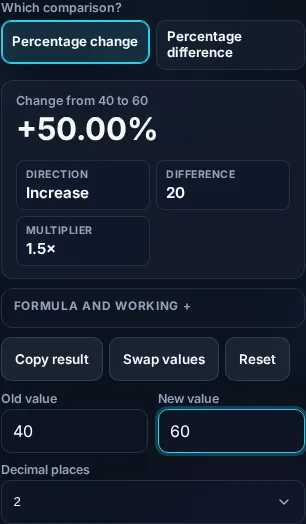
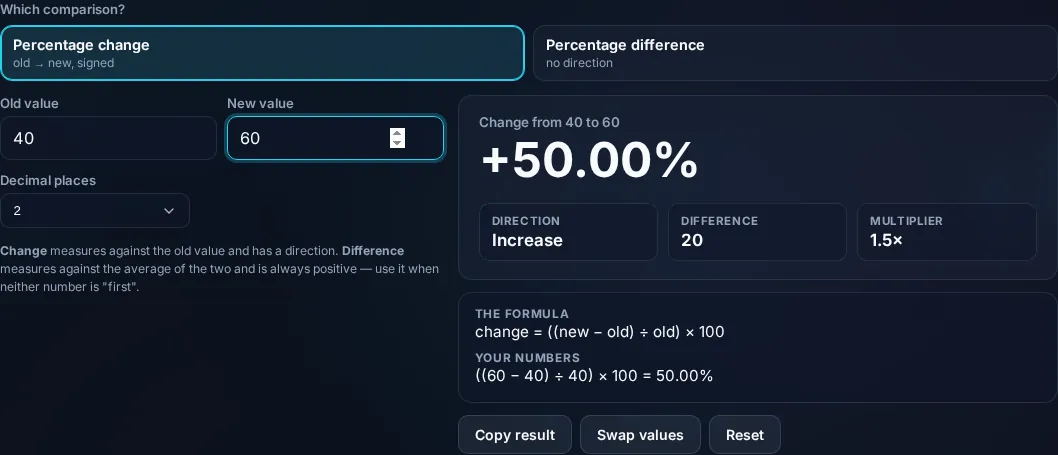
Change from 40 to 60

+50.00%

Direction Increase
Difference 20
Multiplier 1.5×
Formula and working

The formula

change = ((new − old) ÷ old) × 100

Your numbers

((60 − 40) ÷ 40) × 100 = 50.00%

Privacy Focused

🔒 Local Processing. Your numbers never leave your device.

Instant Results

🌐 Fully Client-Side. Runs instantly in your browser.

No Signup

⚡ No accounts. No API keys. Just open and use.

Browser Based

🚀 No installs, no sign-ups, no server round-trip.

What is a Percentage Change Calculator?

A Percentage Change Calculator finds the percentage increase or decrease between two values. It uses ((new − old) ÷ old) × 100 — a positive result is an increase, a negative one a decrease. Enter the original and new numbers and it shows the percentage change and the difference, with the formula, in your browser.

Whether a price rose, a metric grew, or a value dropped, the question is the same: by what percent did it change? It's a specific calculation that catches people out, especially the direction and the base.

This calculator gives the signed percentage change and the raw difference between two values, and shows the working. It runs entirely in your browser, so your numbers stay private.
How to calculate percentage change

Step 1: Enter the original (old) value

Enter the original (old) value.

Step 2: Enter the new value

Enter the new value.

Step 3: Read the percentage change — positive for an increase, negative for a decrease — and the difference

Read the percentage change — positive for an increase, negative for a decrease — and the difference.

Percentage Change Calculator in action

Percentage Change Calculator showing increase or decrease in the browser.
Change result
Percentage change between two values with the formula.
Increase/decrease
Calculating percentage change on a phone, no app installed.
Mobile (stacked)

Percentage change vs percentage difference

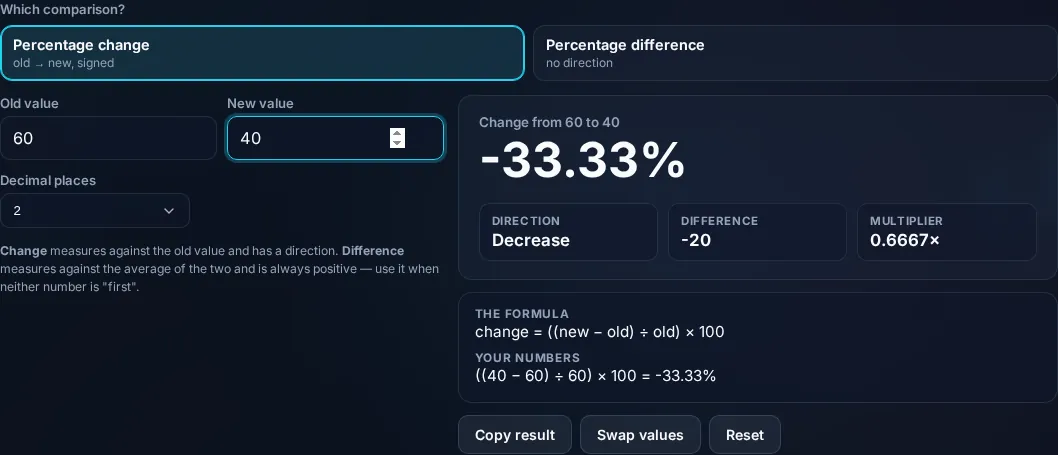
Percentage change measures how much a value rose or fell relative to its starting point: ((new − old) ÷ old) × 100. From 40 to 60 is ((60 − 40) ÷ 40) × 100 = +50% (an increase); from 60 to 40 is ((40 − 60) ÷ 60) × 100 = −33.3% (a decrease). Notice the base matters — the same absolute change of 20 is a different percentage depending on which value you start from, which is why a 50% rise followed by a 50% fall doesn't return you to the start. The sign tells you the direction, so the calculator labels it as an increase or decrease. It's worth distinguishing this from percentage difference, which compares two values without a 'before and after' direction, using the average of the two as the base: |a − b| ÷ ((a + b) ÷ 2) × 100 — useful when neither value is the reference point. The calculator can show both. One edge case it handles: if the old value is zero, percentage change is undefined (you can't express a change from nothing as a percentage), and it flags this rather than dividing by zero. Everything is exact arithmetic shown step by step, computed locally in your browser. For other percentage tasks, see the Percentage Calculator.

Frequently Asked Questions

How do I calculate percentage change?

Subtract the old value from the new, divide by the old value, and multiply by 100: ((new − old) ÷ old) × 100. From 40 to 60 that's ((60 − 40) ÷ 40) × 100 = 50% increase. The calculator does this and labels the result as an increase or decrease, with the formula shown.

How do I calculate a percentage decrease?

Same formula — a decrease just gives a negative result. From 80 to 60: ((60 − 80) ÷ 80) × 100 = −25%, a 25% decrease. The calculator shows the negative sign and labels it a decrease, so you can read the direction at a glance.

Why does the starting value matter?

Because percentage change is relative to the original value, the same absolute change is a different percentage depending on the base. Going from 40 to 60 is a 50% increase, but 60 to 40 is only a 33.3% decrease — the bases (40 vs 60) differ. That's also why a 50% gain then a 50% loss doesn't return you to the start.

What's the difference between percentage change and percentage difference?

Percentage change has a direction (old → new) and uses the old value as the base. Percentage difference compares two values symmetrically, with no 'before/after', using their average as the base. Use change when one value is the reference point; use difference when comparing two equal-status values. The calculator offers both.

What happens if the old value is zero?

Percentage change is undefined when the starting value is zero — you can't express a change from nothing as a percentage (it would mean dividing by zero). The calculator detects this and shows a clear message instead of an error or an infinite result. The new value's absolute size is shown instead.

Can it handle negative numbers?

Yes. The calculator works with negative old or new values, applying the same formula. Just be aware that percentage change involving negative bases can be counterintuitive (the sign of the base affects the direction), so the calculator shows the working so you can interpret the result correctly.

Is it free, and do I need to sign up?

Yes, it's completely free with no account, no trial, and no limit on how many times you use it. It runs entirely in your browser, so there's no sign-in wall — just open the page and calculate.

Is my data private?

Yes. Everything is calculated in your browser — the numbers you enter are never sent to a server, and nothing is stored once you close the tab. That keeps any personal figures (salary, loan, health) on your own device.

Does it work on mobile?

Yes. It runs in your phone's browser with nothing to install, so you can calculate on Android or iOS. The layout adapts to small screens, so entering numbers and reading the result is easy on the go.

Does it work offline?

Once the page has loaded, the calculation runs entirely on your device, so it keeps working without a connection. You only need to be online to open the page the first time — which is also why nothing you enter is uploaded.

Can I copy or share the result?

Yes. You can copy the result to your clipboard with one click, and many results can be shared. Because everything is calculated locally, copying is instant with no upload step.

How accurate is it, and is this professional advice?

The math is accurate for the inputs you give, and the formula is shown so you can verify it. But results are estimates for general use, not professional advice — finance calculators use simplified assumptions and ignore fees and rate changes, and health calculators are general estimates, not medical advice. For important decisions, consult a qualified professional.

Still have questions?

If you can't find the answer you're looking for, feel free to contact our support team.

Contact Us