Zalgo / Glitch Text Generator

Generate zalgo / glitch text with adjustable intensity — the corrupted, creepy look — to copy and paste.

100% Browser-Based Local Processing
15px

Ln 1, Col 1 No selection

3 1 3

The pattern is held while you type — Deal again re-rolls it.

Glitched Nothing to style yet
Marks added
0
Characters
0
Code points
0

Cleaned mode removes combining marks, and it cannot tell a glitch mark from an accent that was typed as a separate character. Ordinary text is unaffected — every operating system produces a precomposed é — but text that was deliberately decomposed will come back as plain letters. That trade is what makes the glitch removable at all — as does putting all three sliders at zero, which returns your text untouched.

Privacy Focused

🔒 Local Processing. Your text never leaves your device.

Instant Results

🌐 Fully Client-Side. Runs instantly in your browser.

No Signup

⚡ No accounts. No API keys. Just open and use.

Browser Based

🚀 No installs, no sign-ups, no character limits.

What is a Zalgo / Glitch Text Generator?

Zalgo Text Generator creates the corrupted, 'glitchy' look — letters dripping with chaotic marks above and below — by stacking Unicode combining characters on your text. Adjust the intensity, then copy and paste it. It runs entirely in your browser, so your text stays private, and a clean-up option removes the effect.

Zalgo text is the creepy, corrupted-looking style where letters spill over with chaotic marks, popular for horror themes, memes, and edgy usernames. It's made by piling Unicode combining marks onto each character.

This tool generates it with adjustable intensity and can also strip it back out. It runs entirely in your browser, so nothing is uploaded. Type, glitch, and copy.
How to make zalgo text

Step 1: Type or paste your text into the box

Type or paste your text into the box.

Step 2: Adjust the intensity sliders for marks above, in the middle, and below

Adjust the intensity sliders for marks above, in the middle, and below.

Step 3: Click to copy the glitch text, or use the clean option to remove zalgo from pasted text

Click to copy the glitch text, or use the clean option to remove zalgo from pasted text.

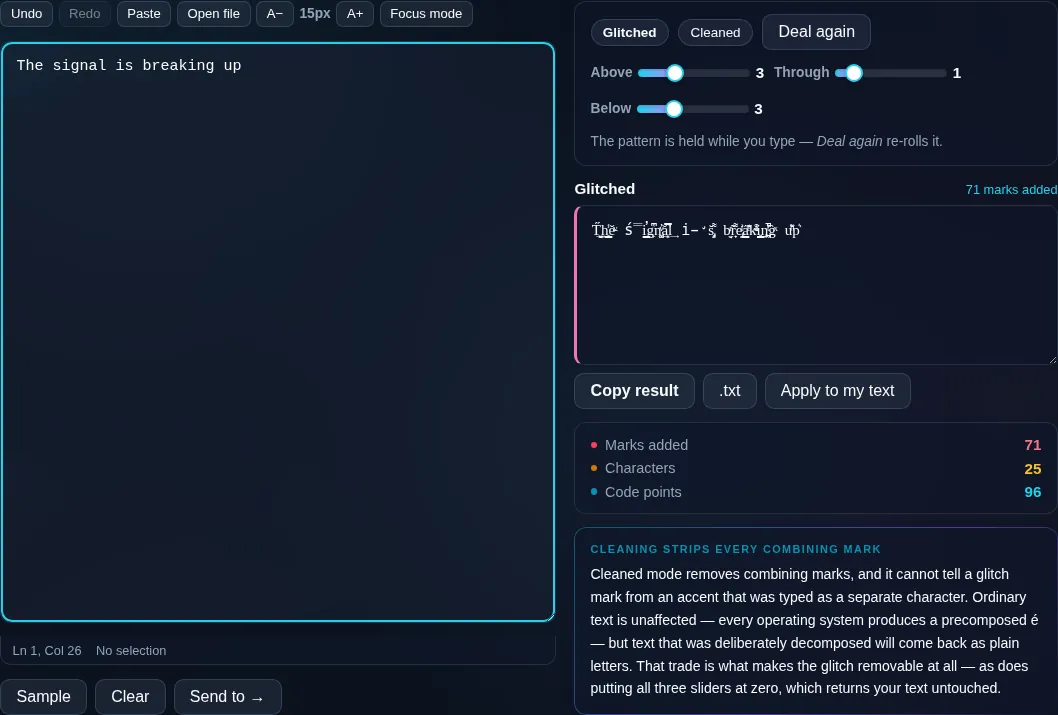
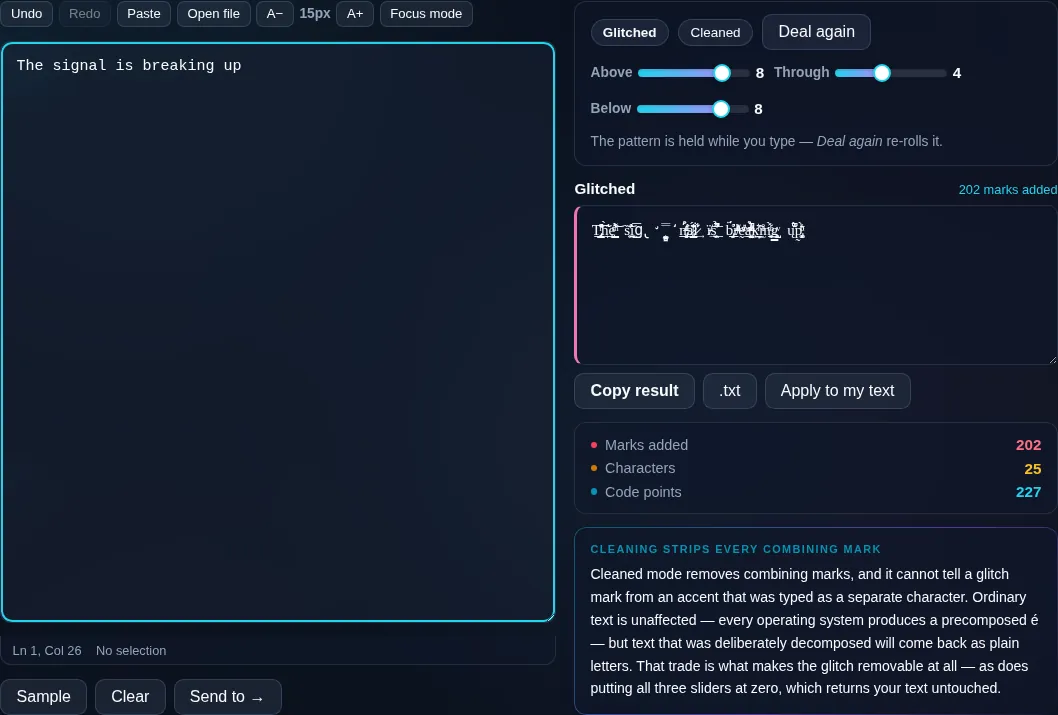
Zalgo / Glitch Text Generator in action

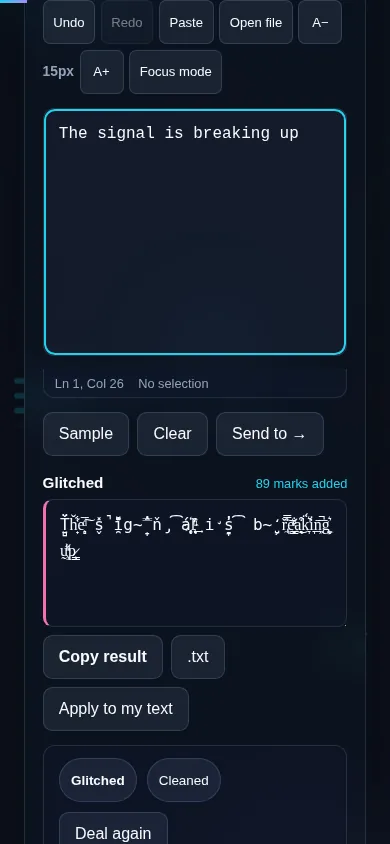
Zalgo Text Generator making glitch text in the browser.
Glitch result
Text shown with adjustable zalgo glitch intensity.
Intensity sliders
Making zalgo text on a phone, no app installed.
Mobile (stacked)

How zalgo works (and where it breaks)

Zalgo exploits Unicode combining marks — the diacritics normally used to add a single accent to a letter. By stacking many of them above, through, and below each character, the text appears to overflow and corrupt. The generator lets you control how many marks go in each direction, from a light glitch to a full chaotic mess, choosing the marks randomly for an organic look. Two practical notes: very high intensity can spill over surrounding lines and layout, so it's deliberately capped, and many platforms detect and strip excessive combining marks (or render them poorly), so heavy zalgo may not survive a paste everywhere. It's also inaccessible to screen readers. A built-in clean option removes combining marks to recover the plain text. Everything runs locally in your browser, so your text isn't uploaded. For other looks, see the Fancy Text Generator.

Frequently Asked Questions

What is zalgo text?

Zalgo text is text that looks corrupted or 'glitched', with letters covered in chaotic marks spilling above and below. It's created by stacking many Unicode combining diacritical marks on each character. It's popular for horror aesthetics, memes, and edgy usernames.

How do I control how intense the glitch is?

Use the intensity sliders — separate controls for marks above, through, and below the letters. Turn them down for a subtle glitch or up for a heavily corrupted look. The generator caps the maximum so the text doesn't completely overflow the page.

Will zalgo text work on every platform?

Not always. Many platforms detect and strip excessive combining marks, or render them poorly, so heavy zalgo may show up reduced or as plain text when pasted. Lighter intensity survives more reliably; it's worth testing where you plan to use it.

Can I remove zalgo from text?

Yes. A clean option strips the combining marks back out, recovering the plain underlying text. That's useful if someone sends you zalgo text you want to read normally, or if you want to undo the effect on your own text.

Why does strong zalgo overflow onto other lines?

Because the marks are stacked vertically above and below each letter, and a tall stack extends beyond the normal line height into the lines around it. That overflow is part of the effect, but it's why the tool limits the maximum intensity to keep things usable.

Is zalgo text accessible?

No — it's purely a visual effect and screen readers can't make sense of the piled-up combining marks, often reading gibberish or skipping it. Use zalgo only for decoration and fun, never for information that needs to be readable by everyone.

Is my text private — is anything uploaded?

No. Everything runs in your browser, so whatever you type or paste is processed on your own device and never uploaded to a server. Nothing is stored once you close the tab. That keeps your text — notes, code, documents, lists — completely private.

Is it free, and do I need to sign up?

Yes, it's completely free with no account, no trial, and no limit on how many times you use it. Because it runs entirely in your browser, there are no server costs, no usage caps, and no watermark or branding added to your text.

Does it work on a phone?

Yes. It runs in your phone's browser with nothing to install, so you can use it on Android or iOS. The layout adapts to small screens, so you can paste text, get the result, and copy it on the go just as easily as on a computer.

Does it work offline?

Once the page has loaded, it runs entirely on your device, so it keeps working without a connection — which is also why nothing is uploaded. You only need to be online to open the page the first time; after that the tool works locally.

Can I copy or download the result?

Yes. You can copy the result to your clipboard with one click, and longer output can be downloaded as a text file. Everything is processed locally, so copying and downloading are instant with no upload step and no waiting.

Is there a limit on how much text I can process?

There's no artificial cap, because the work happens on your device rather than a server. The practical limit is your device's memory, so very large inputs are smoother on a computer than an older phone. For most everyday text, processing is effectively instant.

Still have questions?

If you can't find the answer you're looking for, feel free to contact our support team.

Contact Us