Title Case Converter

Convert headings to proper Title Case with AP, Chicago, APA, or MLA style rules — small words handled correctly.

100% Browser-Based Local Processing
15px

Ln 1, Col 1 No selection

Style guide

AP and APA lowercase a small word only when it is three letters or fewer, so with keeps its capital. Chicago and MLA lowercase articles, conjunctions and prepositions whatever their length. All four always capitalise the first and last word, and the first word after a colon.

AP Title Case Nothing to convert
Characters
0
Words
0
Lines
0

A word already in full capitals is treated as an acronym and kept, so the NASA report becomes The NASA Report and never The Nasa Report. Both halves of a hyphenated word are capitalised. Style guides disagree on the harder calls — long prepositions and phrasal verbs especially — so read the result before you publish it.

Privacy Focused

🔒 Local Processing. Your text never leaves your device.

Instant Results

🌐 Fully Client-Side. Runs instantly in your browser.

No Signup

⚡ No accounts. No API keys. Just open and use.

Browser Based

🚀 No installs, no sign-ups, no character limits.

What is a Title Case Converter?

Title Case Converter capitalizes your headings the right way. Paste a title, choose a style — AP, Chicago, APA, or MLA — and it capitalizes the important words while leaving small words like 'a', 'of', and 'the' lowercase, with the first and last word always capitalized. It runs entirely in your browser.

Capitalizing a title correctly is fiddly: the major words get capitals, but short words like 'and', 'to', and 'the' usually stay lowercase — unless they start or end the title. Different style guides disagree on the details, too.

This converter applies the rules for you. Pick a style, paste your title, and get correct capitalization in one click — all in your browser, with nothing uploaded.
How to convert a title to Title Case

Step 1: Paste or type your title into the box

Paste or type your title into the box.

Step 2: Choose a style (AP, Chicago, APA, MLA, or capitalize all words)

Choose a style (AP, Chicago, APA, MLA, or capitalize all words).

Step 3: Convert, then copy the result or download it

Convert, then copy the result or download it.

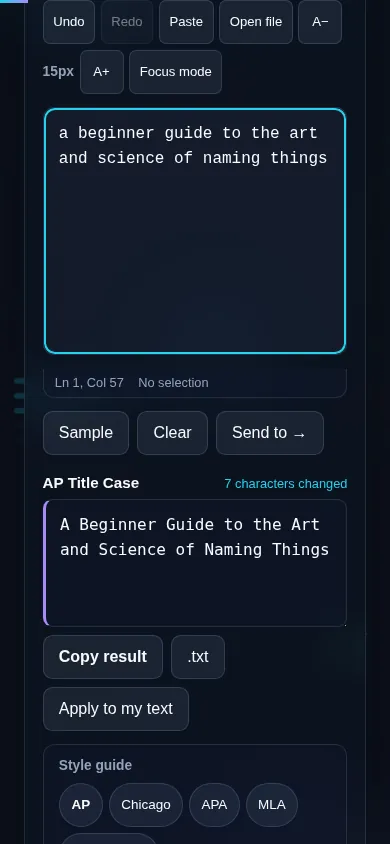
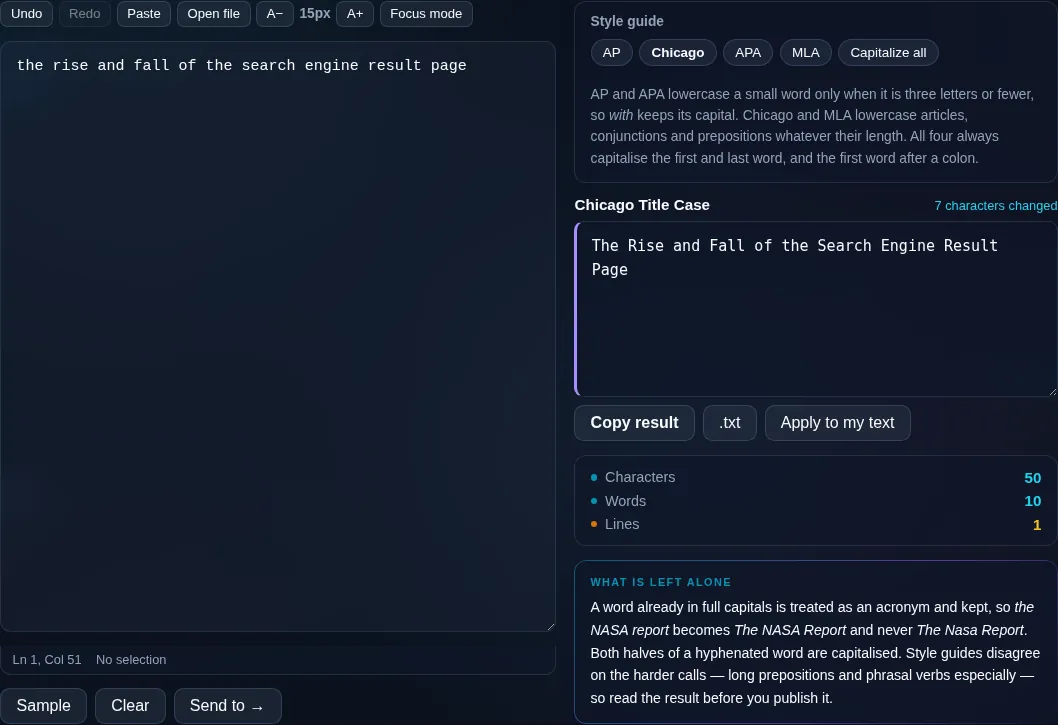
Title Case Converter in action

Title Case Converter capitalizing a heading in the browser.
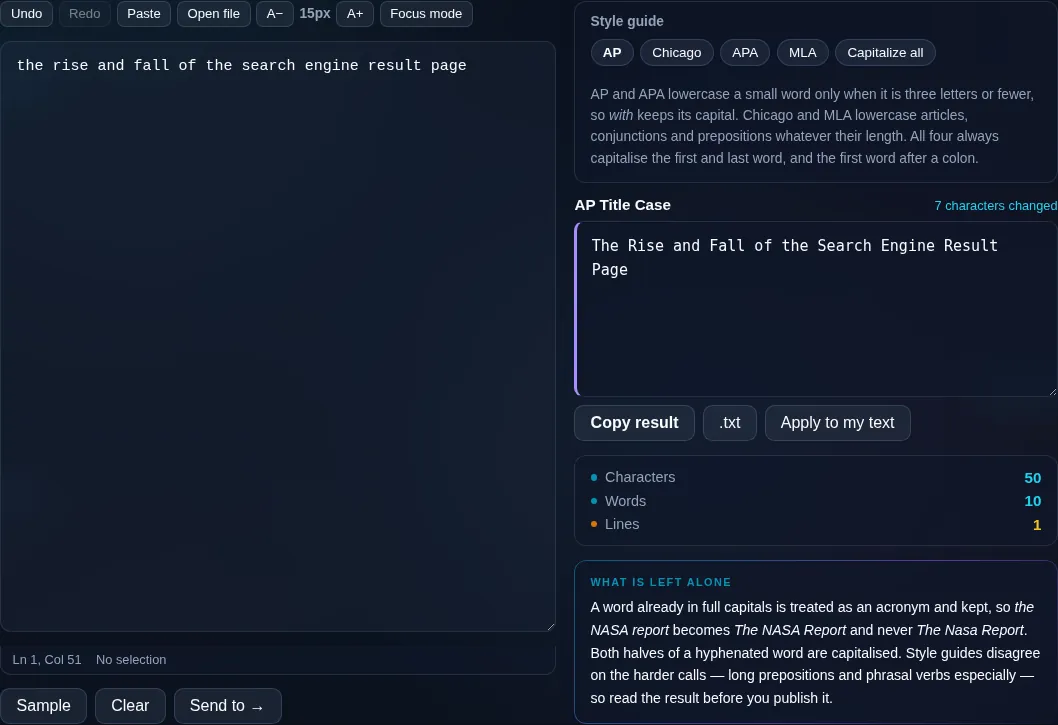
Style preset + result
A title capitalized with AP style, small words lowercase.
Small-words example
Converting a title to title case on a phone, no app installed.
Mobile (stacked)

How title case rules work

In title case, the principal words — nouns, verbs, adjectives, adverbs — are capitalized, while short function words such as articles ('a', 'an', 'the'), short conjunctions ('and', 'but', 'or'), and short prepositions ('of', 'to', 'in') stay lowercase. The first and last word of the title are always capitalized regardless. Style guides differ on the threshold for 'short' (AP capitalizes prepositions of four-plus letters, for example), which is why this tool offers AP, Chicago, APA, and MLA presets. It handles hyphenated words and subtitles after a colon, but because guides disagree on edge cases, a quick manual check is wise before publishing. If you simply want every word capitalized, use Capitalize Each Word instead.

Frequently Asked Questions

What is Title Case?

Title Case capitalizes the main words of a title — nouns, verbs, adjectives — while keeping short words like 'a', 'of', and 'the' lowercase, with the first and last word always capitalized. It's the standard style for headlines, book titles, and headings, and it reads more professionally than capitalizing every word.

Which style guides does it support?

It offers presets for AP, Chicago, APA, and MLA, plus a 'capitalize every word' option. The styles mainly differ on which short words stay lowercase and the length threshold for prepositions, so picking the one your publication uses gives the most accurate result.

Why are some small words left lowercase?

Because that's the convention: short articles, conjunctions, and prepositions aren't capitalized in the middle of a title. So 'the lord of the rings' becomes 'The Lord of the Rings' — 'of' and the middle 'the' stay lowercase, while the first 'The' is capitalized because it begins the title.

Does it capitalize the first and last word?

Yes. Regardless of what the word is, the first and last words of a title are always capitalized — a rule all the major style guides share. So even a title that ends in 'of' or 'the' will have that final word capitalized.

How is this different from Capitalize Each Word?

Title Case follows style rules and leaves small words lowercase, which is correct for headlines. Capitalize Each Word capitalizes every word with no exceptions. Use this Title Case tool for proper titles and headings; use Capitalize Each Word when you genuinely want all words capitalized.

Will it get every title perfectly right?

It applies the standard rules and handles most titles well, including hyphenated words and subtitles. But style guides disagree on tricky cases and the tool can't always tell a proper noun from an ordinary word, so a quick read-through before publishing is worth it.

Is my text private — is anything uploaded?

No. Everything runs in your browser, so whatever you type or paste is processed on your own device and never uploaded to a server. Nothing is stored once you close the tab. That keeps your text — notes, code, documents, lists — completely private.

Is it free, and do I need to sign up?

Yes, it's completely free with no account, no trial, and no limit on how many times you use it. Because it runs entirely in your browser, there are no server costs, no usage caps, and no watermark or branding added to your text.

Does it work on a phone?

Yes. It runs in your phone's browser with nothing to install, so you can use it on Android or iOS. The layout adapts to small screens, so you can paste text, get the result, and copy it on the go just as easily as on a computer.

Does it work offline?

Once the page has loaded, it runs entirely on your device, so it keeps working without a connection — which is also why nothing is uploaded. You only need to be online to open the page the first time; after that the tool works locally.

Can I copy or download the result?

Yes. You can copy the result to your clipboard with one click, and longer output can be downloaded as a text file. Everything is processed locally, so copying and downloading are instant with no upload step and no waiting.

Is there a limit on how much text I can process?

There's no artificial cap, because the work happens on your device rather than a server. The practical limit is your device's memory, so very large inputs are smoother on a computer than an older phone. For most everyday text, processing is effectively instant.

Still have questions?

If you can't find the answer you're looking for, feel free to contact our support team.

Contact Us